Managing social media without a plan usually leads to rushed posts, missed opportunities, and inconsistent results. A social media content calendar solves that problem by giving you a clear publishing plan before you hit ‘Post.’
In this guide, you’ll learn how to build a social media content calendar that keeps your content organized, helps your team collaborate better, and makes publishing across multiple platforms much easier. You’ll also see how SocialBu’s content calendar makes the entire process easy.
Note: Throughout this guide, you’ll find practical examples and actionable tips you can apply.
Quick Framework
Idea → Draft → Review → Scheduled → Published → Performance Review → Improve next month
What is a Social Media Content Calendar?
A social media content calendar is a document or software that helps you plan, organize, and schedule your social media posts across different platforms. It ensures consistent publishing, better collaboration, and a more strategic approach to content marketing.
Why Is a Social Media Content Calendar Important?
Creating great content isn’t usually the hardest part. Staying consistent is.
Many businesses start with enthusiasm. They post regularly for a few weeks, then client work, meetings, or daily responsibilities take over. Social media becomes an afterthought.
The research backs this up. According to the Content Marketing Institute, 58% of B2B marketers say their content strategy is only ‘moderately effective’, mostly because they lack clear goals and a repeatable content process. A calendar fixes both.
Instead of reacting to every post, you’re working from a plan that aligns with your marketing goals.
 Next to Read: A Step-by-Step Social Media Management Checklist in 2026
What is Included in a Social Media Calendar?
A social media content calendar should do more than tell you what to post tomorrow. The best calendars answer three questions before a single post goes live:
- What are we posting?
- Why are we posting it?
- When and where will it be published?
If your calendar can’t answer those questions, it’s probably missing key information. SocialBu’s Content Calendar is built around exactly these three questions, so nothing goes live without a clear purpose.
Social Media Content Calendar Must-Haves
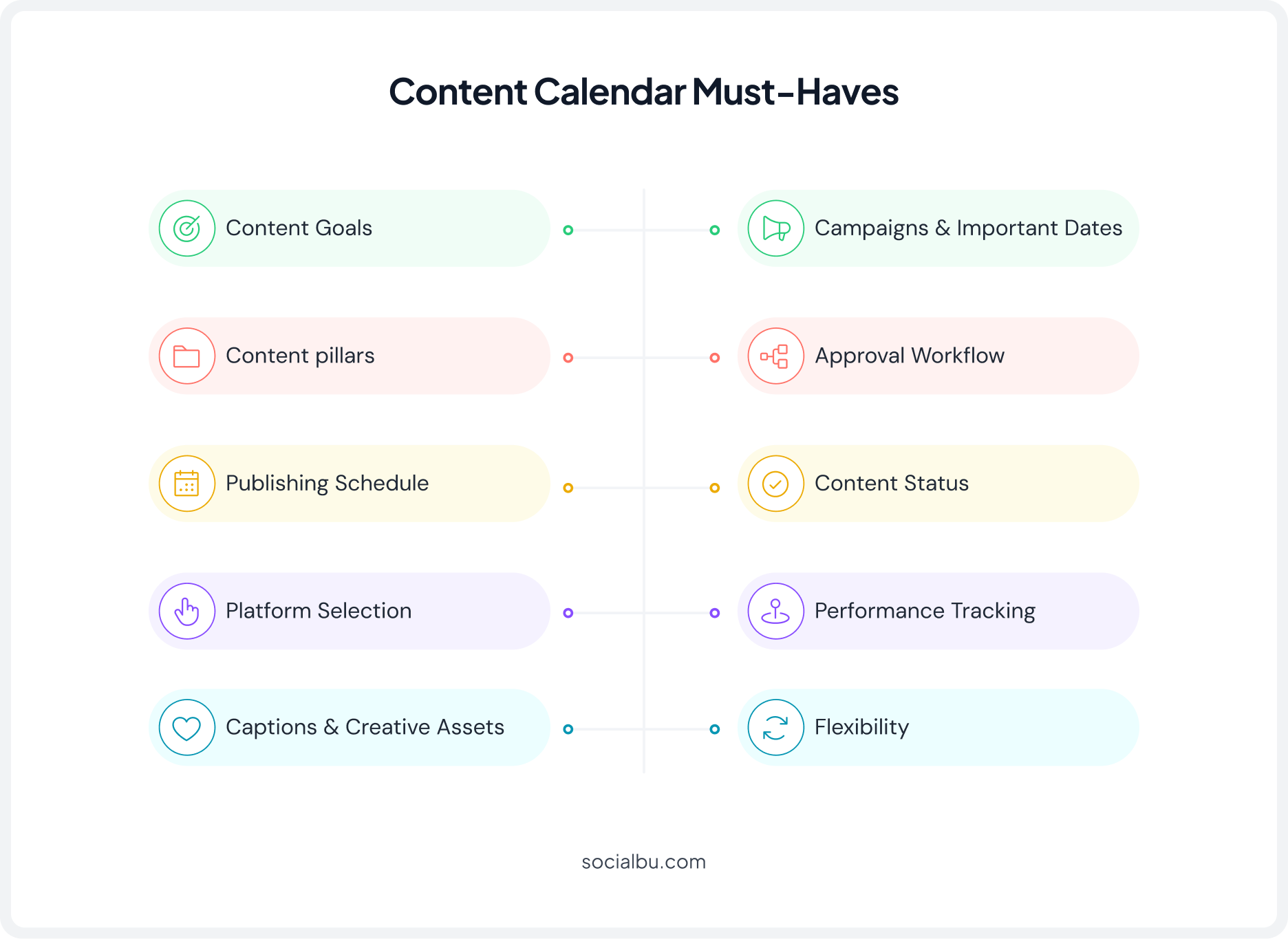
A social media content calendar is only as good as what you put in it. Here are the essentials every effective one should include:
1. Content Goals
Every post should have a purpose. Your social media content calendar should make it clear why each piece of content exists. According to the Content Marketing Institute, 42% of B2B marketers say their content strategy underperforms because of a lack of clear goals.
2. Content Pillars
They keep your messaging focused and make planning easier. Strong social media content pillars also help you maintain a balanced content mix throughout your calendar.
3. Publishing Schedule
Decide your posting frequency based on your audience and resources. A well-built social media posting schedule paired with the best time to post on social media makes this decision a lot easier.
4. Platform Selection
Not every post belongs on every platform. Your multi-platform content calendar should clearly show where each post will be published. Ideally, follow proven cross-platform social media publishing practices instead of copy-pasting the same post everywhere.
5. Captions and Creative Assets
A publish date isn’t enough. Keep captions, images, videos, hashtags, links, and creative files attached to every post.
6. Campaigns and Important Dates
Plan product launches, holidays, seasonal promotions, and events in advance. A social media campaign planner helps you spread campaigns across weeks.
7. Approval Workflow
A clear approval workflow helps the content calendar for teams stay organized and reduces publishing mistakes. This is exactly the kind of process outlined in a proper social media publishing checklist for agencies.
8. Content Status
Labels like idea, draft, review, scheduled, and published help everyone know exactly where each post stands. This becomes especially useful for a digital marketing agency managing multiple clients and campaigns. Social media management tools for agencies handle this much better.
9. Flexibility
Leave room for trends, breaking news, or spontaneous ideas. Even the simplest social media calendar should be flexible enough to adapt.
10. Performance Tracking
Your work doesn’t end after you hit publish. Reviewing your results regularly and learning to track social media publishing performance the right way helps you improve your social media content calendar month after month.
“SocialBu’s Content Calendar usage data shows that publishing activity stayed consistently high with over 606,000 posts published. Monitoring this kind of performance helps teams identify trends, spot workflow bottlenecks, and continuously improve their content strategy.”
What Happens Without a Content Calendar?
Many businesses don’t realize they need one until problems start appearing. Common signs include:
- Posting inconsistently across platforms.
- Repeating the same content ideas.
- Missing important holidays or campaigns.
- Publishing too much promotional content.
- Forgetting to review posts before publishing.
- Team members creating duplicate work.
- Scrambling for content every day.
These issues become even more noticeable as your business grows or you start managing multiple social media accounts.
Why Businesses Can No Longer Rely on Last-Minute Posting?
Most brands aren’t competing against local businesses anymore. They’re competing with creators, influencers, global companies, AI-generated content, and brands that publish every single day.
That means consistency matters more than ever.
Planning your content ahead of time also gives you space to:
- Review captions before publishing, check for grammar and brand consistency, coordinate campaigns across multiple platforms, prepare visuals ahead of deadlines, leave room for timely or trending content, and analyze what’s working and adjust future posts.
Planning doesn’t remove creativity. It creates room for better creativity.
Worth Reading: Does Scheduling Social Media Posts Hurt Reach? (The Real Answer)Social Media Content Calendar vs. Posting Schedule
Many people use these terms interchangeably. They’re closely related, but they’re not the same thing.
Social Media Content Calendar
- Focuses on planning your overall content strategy
- Includes campaigns, captions, content ideas, media, approvals, and goals
- Helps organize future content
- Used by marketing teams throughout the planning process
Posting Schedule
- Focuses on when posts go live
- Includes publishing dates and times
- Helps automate publishing
- Used mainly during publishing
Think of it this way.
A social media content calendar answers: ‘What are we posting, why are we posting it, and when?’
A posting schedule answers: ‘Exactly when should each post be published?’
The two work best together.
Also Read: Social Media Scheduler: Top 9 Tools to Try in 2026Social Media Content Calendar Template
Now that you know what belongs in a calendar, let’s build one.
How to Create a Social Media Content Calendar with SocialBu
Building a social media content calendar shouldn’t mean multitasking.
With SocialBu, planning, creating, scheduling, and approving content all happen in one place. You can build a complete content calendar planner in just a few steps.
Here’s how.
Step 1
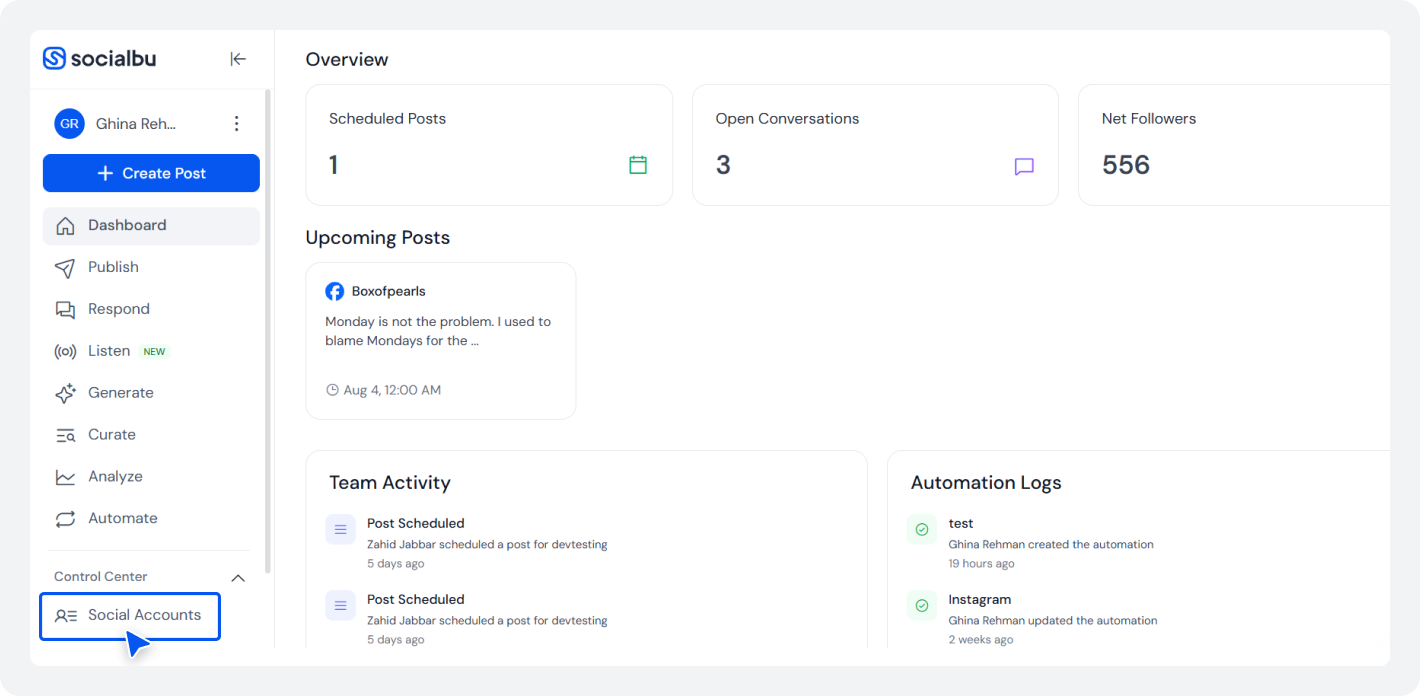
If you haven’t already, create your SocialBu account and log in. Once you’re inside the dashboard, connect all the social media platforms you manage. Click ‘Social Accounts’ to add accounts.
Step 2
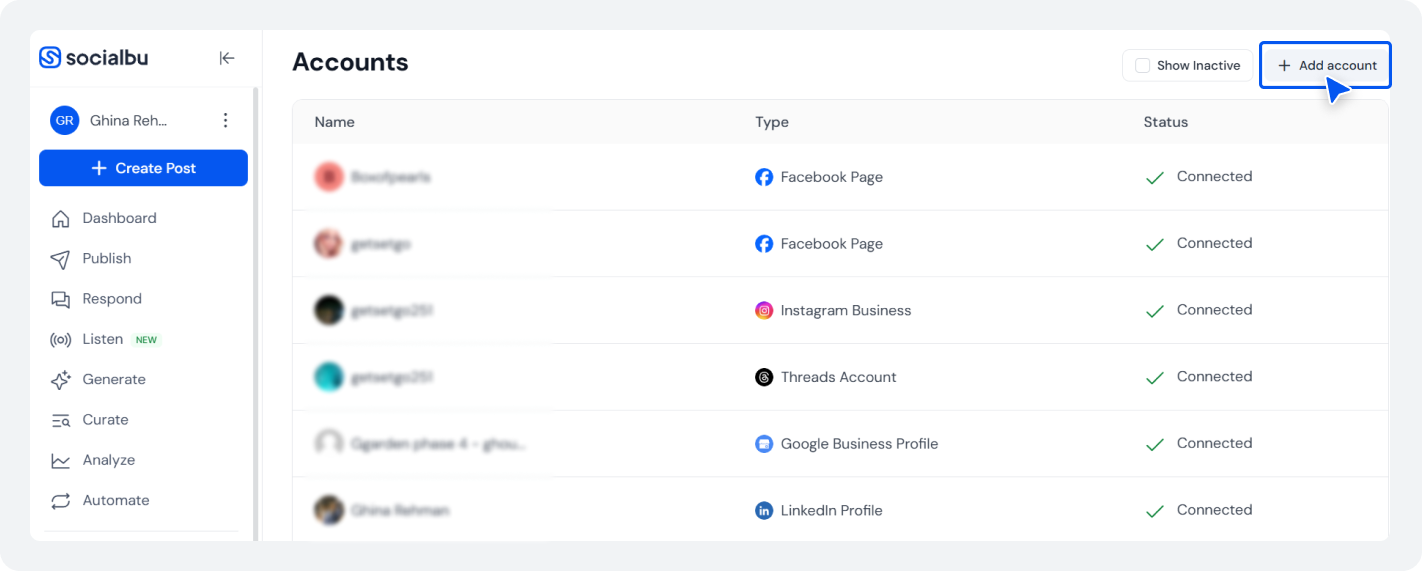
Select ‘Add Account’. You can connect multiple platforms, including Facebook, Instagram, LinkedIn, X (Twitter), Threads, Pinterest, Bluesky, Mastodon, TikTok, and Google Business Profile.
Connecting everything first allows you to manage a true multi-platform content calendar.
Step 3
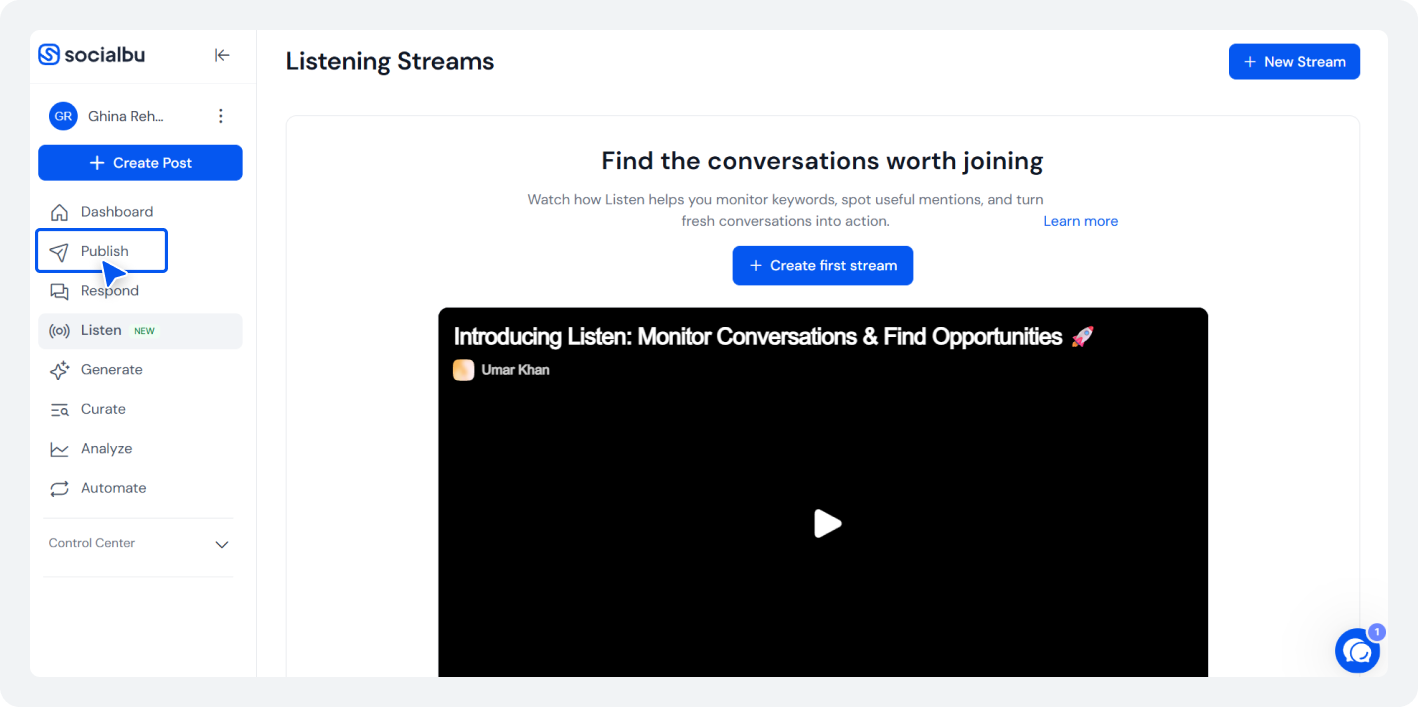
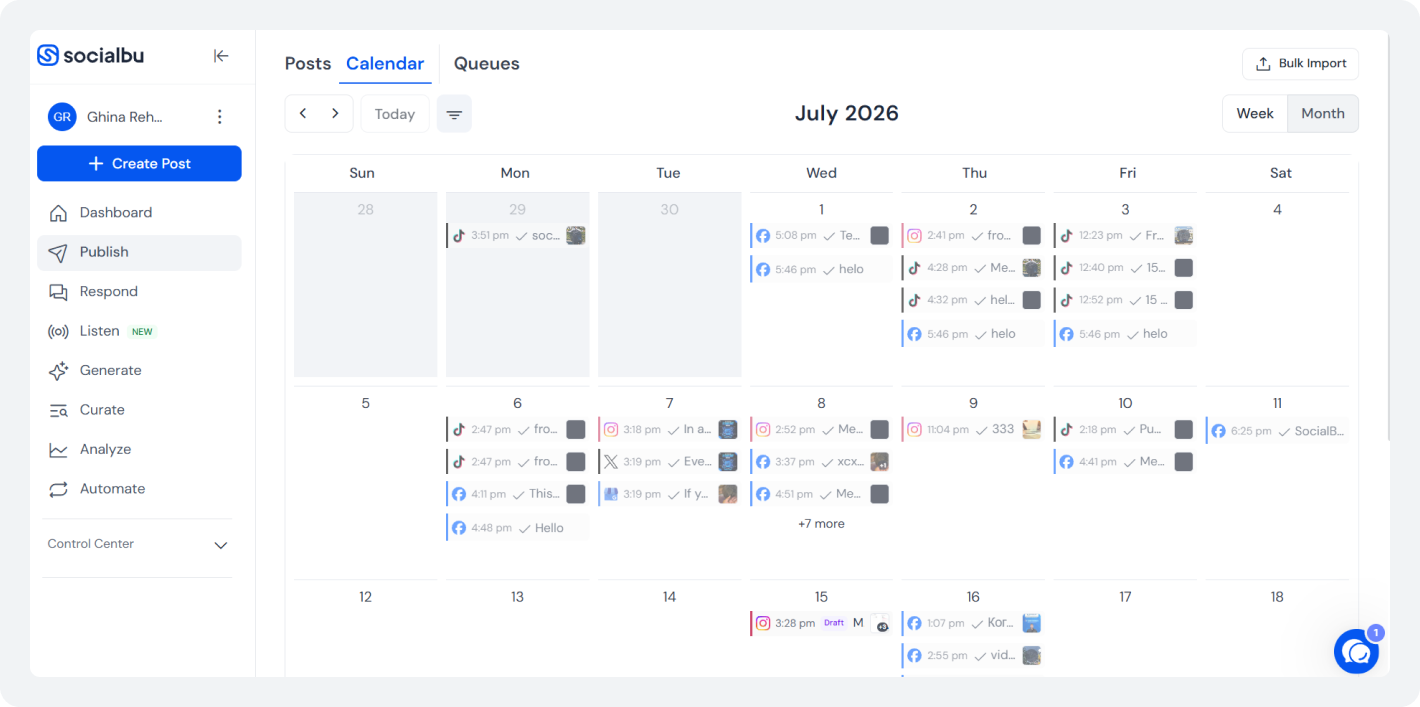
After connecting your accounts, click on the ‘Publish’ option to open the ‘Calendar’. This becomes Socialbu’s content calendar, your central hub where you’ll see every scheduled, drafted, and published post in one place.
Step 4
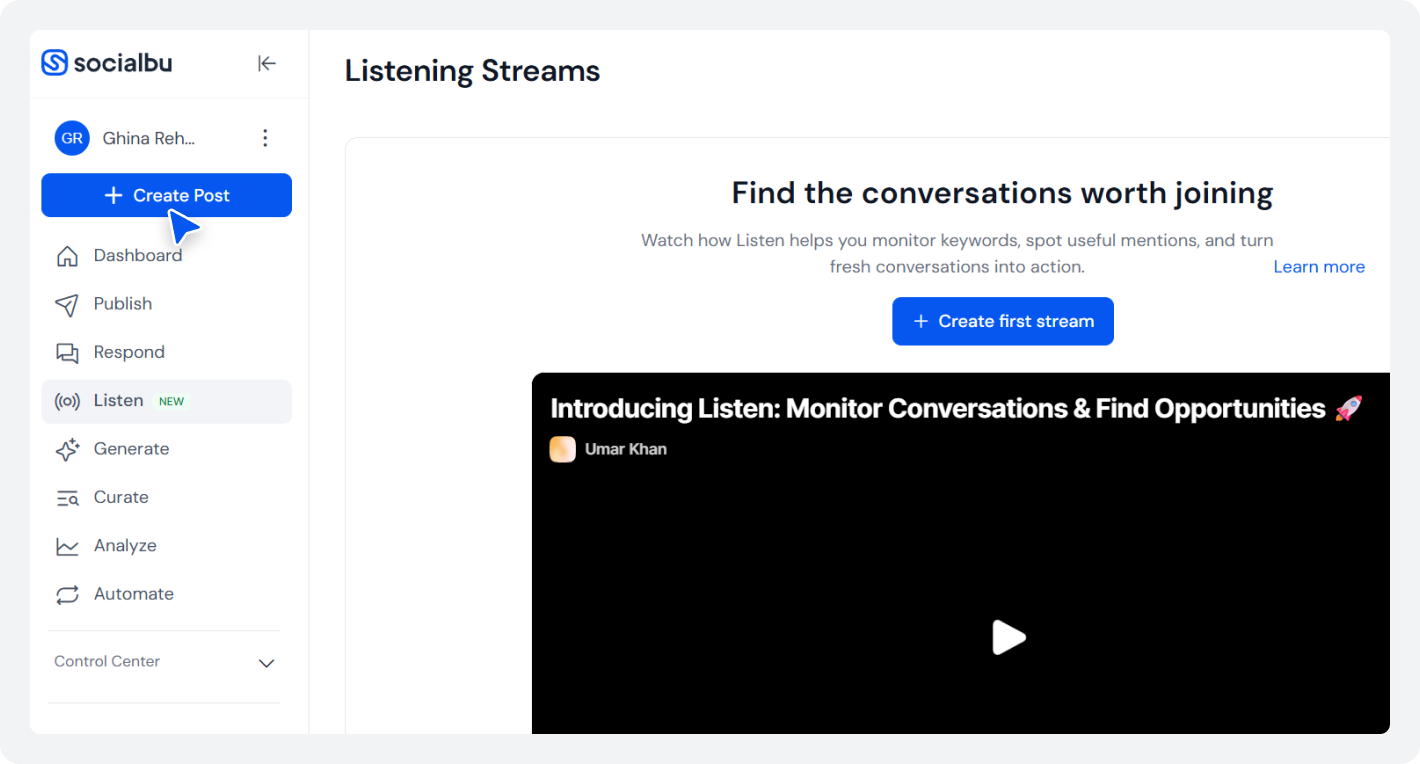
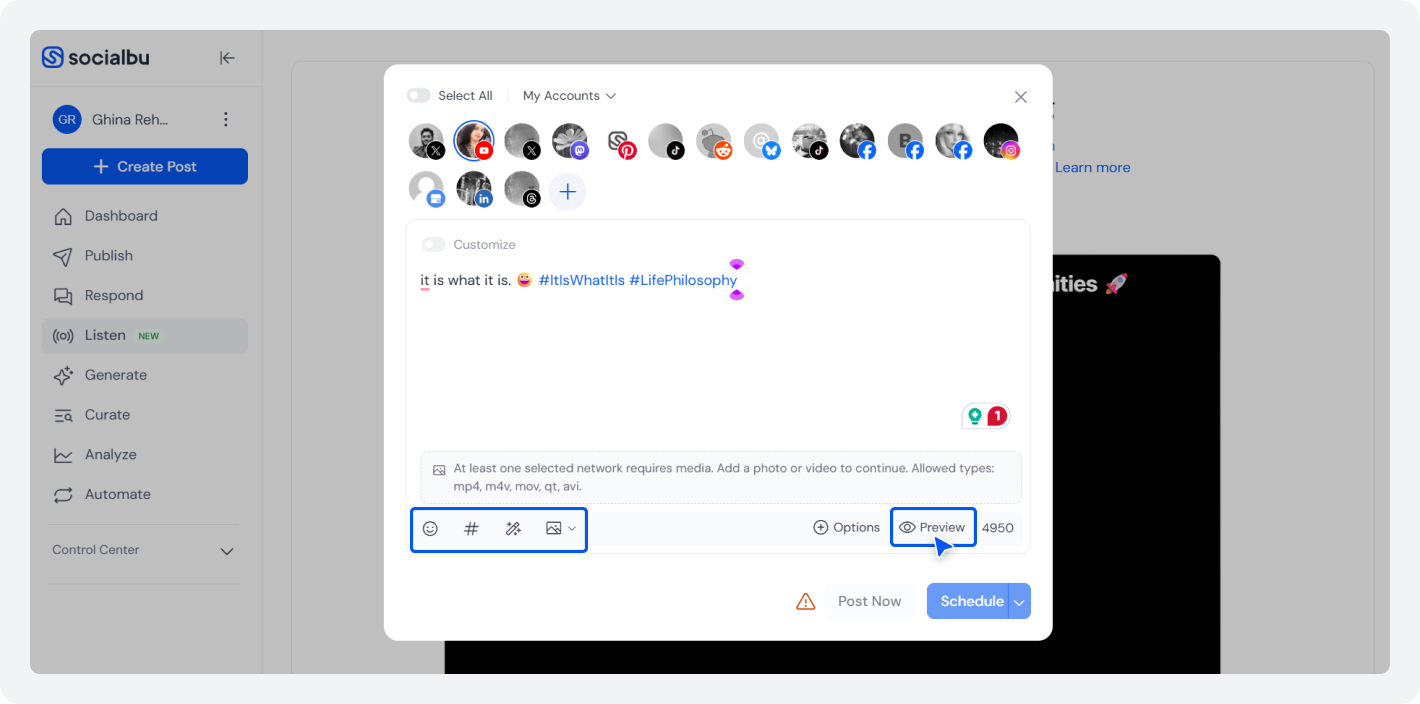
Now it’s time to start filling your social media content calendar. Click ‘Create post’ and choose the social accounts where you want the content to appear.
Step 5
Write your caption, upload images or videos, attach links, and preview how the post will look before publishing. Since all creative assets stay attached to the post, your team doesn’t have to search through folders or chat messages later.
This makes SocialBu’s content calendar much more than a simple social media scheduler; it becomes your complete content planning workspace.
Step 6
One of the biggest advantages of using a dedicated social media calendar tool is seeing the bigger picture.
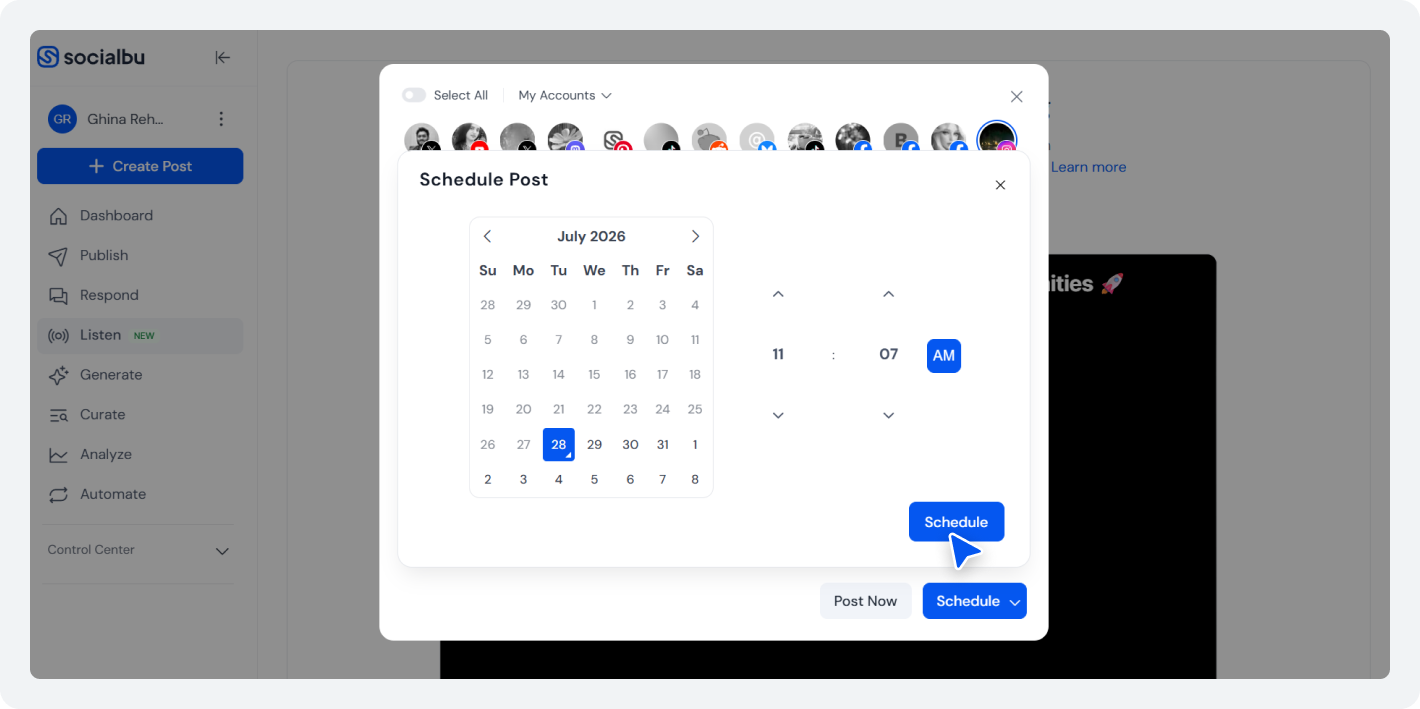
Instead of planning one post at a time, schedule multiple client posts for an entire week or month’s worth of content together. Once your posts are ready, choose when each one should go live. Click on the ‘Schedule’ button and set your preferred date and time.
Planning your posting frequency in advance helps maintain consistency without needing to remember every publishing time.
Step 7
Once you are done scheduling your post, you can check everything in the content calendar.
After that, review your scheduled posts regularly to understand what resonates with your audience’s interests.
Use these insights to improve your content planner, post at the right frequency, create a better content mix, and plan stronger campaigns. Over time, your social media content calendar becomes more effective because it’s based on real results, not guesswork.
Why Teams Switch to SocialBu’s Content Calendar?
Planning a week’s worth of content in a spreadsheet isn’t too difficult.
Planning content for multiple social media accounts, coordinating UGC campaigns, collecting approvals, managing creative assets, and publishing consistently every week? That’s where things start getting messy.
Files get scattered, captions live in different documents, feedback gets buried in chat messages, and someone eventually asks, ‘Which version are we posting?’
That’s why many teams eventually move from a simple social media content calendar template to a dedicated social media calendar tool. Instead of juggling multiple apps, everything lives in one place. You can see the difference in how teams use SocialBu’s content calendar.
Those numbers tell an interesting story. Consistent publishing isn’t about remembering what to post every day. It’s about having a system that keeps your content planner, campaigns, approvals, and publishing schedule organized from start to finish.
That’s exactly what SocialBu’s content calendar is designed to help with.
Your Next Month of Content Starts Here
You’ve got the strategy. Now put it into action. Use SocialBu to plan, create, schedule, and manage your social media content from one place.
How to Make Your Content Calendar Actually Work?
A good calendar helps you plan. A great one helps you stay consistent. Here are a few simple habits that make your social media content calendar much more effective.
1. Plan Around Content Pillars
Don’t plan every post from scratch. Start with a few content pillars that reflect your brand, then build your calendar around them.
2. Batch Your Content
Instead of creating content every single day, set aside time once a week or month to plan and schedule several posts together. It’s one of the easiest ways to save time and stick to a consistent posting frequency.
3. Leave Room for Trends
Not everything can be planned weeks in advance. Leave a few empty spots in your calendar so you can jump on recent social media trends.
4. Keep Everything Together
Nothing slows a team down like hunting for captions, images, or links at the last minute. Keep everything attached to each post so your content planner stays organized.
5. Check What’s Working
Your calendar shouldn’t stay the same forever. Look at which posts get the most engagement, clicks, or reach, then use those insights to improve your content mix and plan better content next month.
Interesting Read: Reach And Impressions: Which One Matters More? Quick Comparison6. Treat Your Calendar as a Living Document
Your plans will change, and that’s okay. Move posts around, update campaigns, and make room for new ideas as they come up. A good social media content calendar is flexible enough to grow with your business.
To give you a better idea of what an organized social media content calendar looks like. Here are a few practical examples you can learn from.
Social Media Content Calendar Examples
Every business plans content differently. A creator doesn’t need the same social media content calendar as a marketing agency, and an ecommerce brand won’t post like a SaaS company.
Here are a few social media calendar examples to help you visualize how different businesses organize their content.
Example 1: Small Business
A local coffee shop wants to stay active without posting every day.
Day
- Monday
- Wednesday
- Friday
- Sunday
Content
- New menu item
- Customer photo
- Weekend promotion
- Behind-the-scenes Reel
This simple weekly social media planner keeps content balanced while leaving room for seasonal promotions or local events.
Example 2: SaaS Company
Software brands usually combine educational content with product updates.
Day
- Monday
- Tuesday
- Wednesday
- Thursday
- Friday
Content Pillar
- Product tip
- Customer success story
- Industry insight
- Feature update
- Team culture
This type of social media posting plan helps maintain a healthy content mix without sounding overly promotional.
The Best Calendar Is the One You’ll Actually Use
There’s no perfect social media content calendar example that works for everyone.
Some businesses prefer a spreadsheet. Others use a simple content planner template. As content grows across platforms and team members, many switch to a dedicated social media calendar tool.
Interesting Reading: Social Media Holiday Calendar for 2026Common Social Media Content Calendar Mistakes
Even the best social media content calendar won’t deliver results if it’s not managed properly. Here are some of the most common ones to avoid.
- Planning only promotional content
- Ignoring content pillars
- Posting the same content everywhere
- Planning too far ahead
- Skipping the review process
- Never looking at performance
Interesting Read: Automate Your Client’s Entire Social Media Workflow (2026 Guide for Agencies)Final Thoughts
A great social media content calendar isn’t about filling empty dates. It’s about building a system that helps you publish consistently, stay organized, and create content with purpose.
You don’t need the perfect calendar on day one. You just need one that your team will actually use.
Start with clear goals, build around strong content pillars, review your results regularly, and improve your process over time.
As your strategy grows, the right tools make all the difference. SocialBu brings planning, scheduling, collaboration, automation, and analytics together. This makes it easier to spend less time managing your workflow and more time creating content your audience actually wants to see.
FAQs
Q: What is a social media content calendar?
A: A social media content calendar is a planning system that helps you organize, schedule, and manage content across different social media platforms. It typically includes publishing dates, content ideas, captions, media assets, campaigns, and approval workflows.
Q: How do you structure a social media content calendar?
A: Start by defining your marketing goals and content pillars. Then organize your calendar with publishing dates, target platforms, captions, media files, campaigns, and approval stages. Review performance regularly and adjust future content based on your analytics.
Q: How do I create a social media content calendar for free?
A: You can create a basic social media content calendar template using Excel or Google Sheets. Include columns for publishing dates, platforms, captions, media, and campaign goals.
Q: What should a content calendar template include?
A: A good template should include publishing dates, content topics, platforms, captions, creative assets, content pillars, campaign information, approval status, and performance notes. These details help keep your planning process organized and consistent.
Q: How far in advance should you plan a social media content calendar?
A: Most businesses benefit from planning two to four weeks ahead. This provides enough structure to stay consistent while leaving room for trends, industry news, and timely content.
Q: What’s the difference between a content calendar and a posting schedule?
A: A social media content calendar focuses on planning your overall content strategy, while a posting schedule focuses on when content is published. The calendar answers what and why to post, while the schedule answers when to publish.
Q: What’s the best tool for managing a social media content calendar for multiple clients?
A: The best tool depends on your workflow, but agencies generally benefit from platforms that combine planning, scheduling, collaboration, approvals, and analytics. SocialBu brings these capabilities together in one dashboard, making it easier to manage multiple brands from a single workspace.
Q: How do you build a content calendar in Excel or Google Sheets versus a dedicated tool?
A: Excel and Google Sheets are good starting points for simple planning. However, they require additional tools for scheduling, collaboration, approvals, and analytics.