Let’s be straight about something. Most brands don’t have a social media problem. They have a consistency and systems problem. Someone has an idea, a post goes up, then three weeks of silence. Sound familiar?
A content calendar tells you what to post. A social media management checklist tells you how to run the whole operation, from strategy and content planning to approval workflows, community management, and monthly reporting. These are very different things.
The brands winning in 2026 aren’t the most creative ones. They’re the most organized. Here’s what the landscape looks like right now.
The attention is there. The question is whether your content is structured well enough to capture any of it. This social media marketing checklist 2026 gives you a complete system, nine steps that cover every phase of the operation. Run them in order the first time. After that, each section has its own recurring cadence.
Quick framework: Define goals → Audit what exists → Plan content → Create & approve → Schedule → Engage daily → Track analytics → Optimize monthly → Use automation to scale. The rest of this guide unpacks each of those steps in enough detail that you can actually do them.
Step 01: Social Media Strategy Checklist
Build Your Strategy Foundation
Every social media strategy checklist starts here, and for good reason: if you skip this step, every other checklist in this guide becomes guesswork. Before you create a single post, you need to know what you’re trying to accomplish, who you’re talking to, and how you’ll measure whether it’s working.
This isn’t about writing a 40-page strategy doc. It’s about answering a handful of specific questions and writing those answers down so the whole team is working from the same page.
Set Goals That Connect to Real Business Outcomes
The biggest mistake in social media goal-setting is going too vague. “Grow our audience” is not a goal. Use the SMART framework – Specific, Measurable, Achievable, Relevant, Time-bound; and connect every goal to something your business actually cares about.
1. Brand awareness? Make it measurable.
Instead of “increase awareness,” write: “Reach 50,000 new accounts per month on Instagram by Q3.” Now you have a number to work toward and a metric to track (reach and impressions).
2. Lead generation? Set a traffic light.
“Drive 500 link clicks per week from LinkedIn to our product page.” This ties directly to CTR, and you can calculate what engagement rate you need to hit that number.
3. Community building? Measure engagement rate.
“Achieve a 5% average engagement rate across all platforms by the end of Q2.” Engagement rate = (likes + comments + shares) /reach * 100.
4. Sales and conversions? Track the full funnel.
“Generate 20 demo sign-ups per month from social traffic.” This requires UTM tracking on every link so you can see which platform and which post actually converted.
Know Exactly Who You’re Talking To
Your content can’t speak to everyone and actually resonate with anyone. Before you build a content plan, document your audience in three layers:
Demographics: Age range, location, job title, or life stage. Psychographics: what they care about, what problems keep them up at night, what they aspire to. Platform behavior: what type of content they consume, what time of day they’re active, whether they engage or just scroll.
Choose Platforms Based on Audience Data, Not Comfort
Being on every platform doesn’t mean more reach. It usually means less effort and worse results everywhere. Pick two or three platforms where your specific audience actually spends time.
✅ Strategy Foundation Checklist
Step 02: Social Media Audit Checklist
Audit What You Already Have Before Building Anything New
A social media audit checklist is the honest reckoning most brands skip. Before you plan new content or set new goals, you need a clear picture of what’s actually working, what’s broken, and what you’re paying for that you’re not using.
Most teams do a surface-level audit; they check if the profile photo is current and call it done. A real audit covers four areas: profile completeness, content performance history, audience data, and your competitive landscape.
Profile and Brand Consistency Review
Go through every platform where you have a presence, including platforms you haven’t posted on in months. For each one, check that your profile photo, cover image, bio, and website link are all up to date and consistent. This sounds basic, but it’s shockingly common to find outdated logos, dead links, or bios that reference a product you retired two years ago.
Dormant profiles actively hurt you. An inactive LinkedIn page with no recent posts signals to prospects that your company isn’t engaged. Either commit to a platform or redirect visitors to your active channels. There’s no neutral; there’s only active or harmful.
Content Performance Review (Last 90 Days)
Pull your top 10 and bottom 10 posts from the last 90 days across each platform. Don’t just look at likes. Look at reach, saves, shares, and comments separately. Then ask three questions:
- What format did the top performers use: video, carousel, static image, text post?
- What topics did they cover?
- What did the hook or first line look like?
The answers tell you where to invest your effort going forward.
Competitor Audit
Pick your top 3 competitors and manually review their content from the last 30 days. Note how often they post, which formats they use most, and which posts are generating the most engagement. You’re not looking to copy them; you’re looking for gaps. Topics they’re not covering that your audience cares about are opportunities for you.
✅ Social Media Audit Checklist
👉 Free Social Media Management Checklist for 2026
Download our free Social Media Management Checklist for 2026 and get a step-by-step framework for planning, publishing, engaging, and tracking performance across all your social channels.
No spam. Unsubscribe anytime.
Step 03: Social Media Content Plan Checklist
Plan Your Content Before You Create It
Without a content planning system, you’re starting from scratch every week. That’s exhausting, and it leads to inconsistent posting, off-brand content, and a feed that doesn’t build any content authority. A proper social media content plan is built on three things: content pillars, a content calendar, and a repurposing workflow.
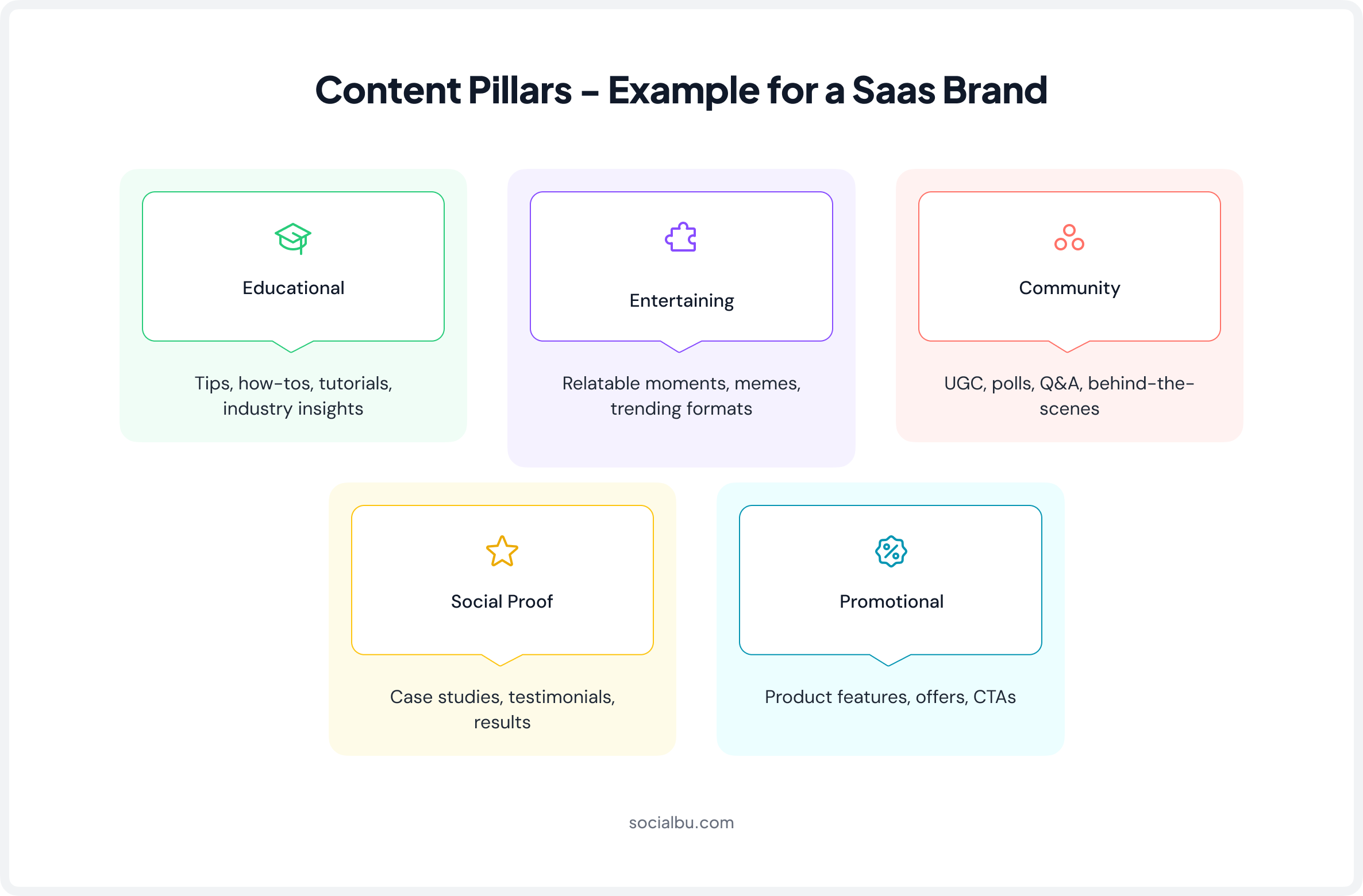
Define 3-5 Content Pillars
Content pillars are the core topic categories your brand consistently publishes on. Think of them as the columns holding up your content strategy. Without them, your feed is a random mix that builds no trust or audience expectations. With them, followers start to know what they’ll get from you, and that consistency is what builds loyalty.
For a Saas brand, for example, the pillars might look like this:
Apply the 70/20/10 Content Mix
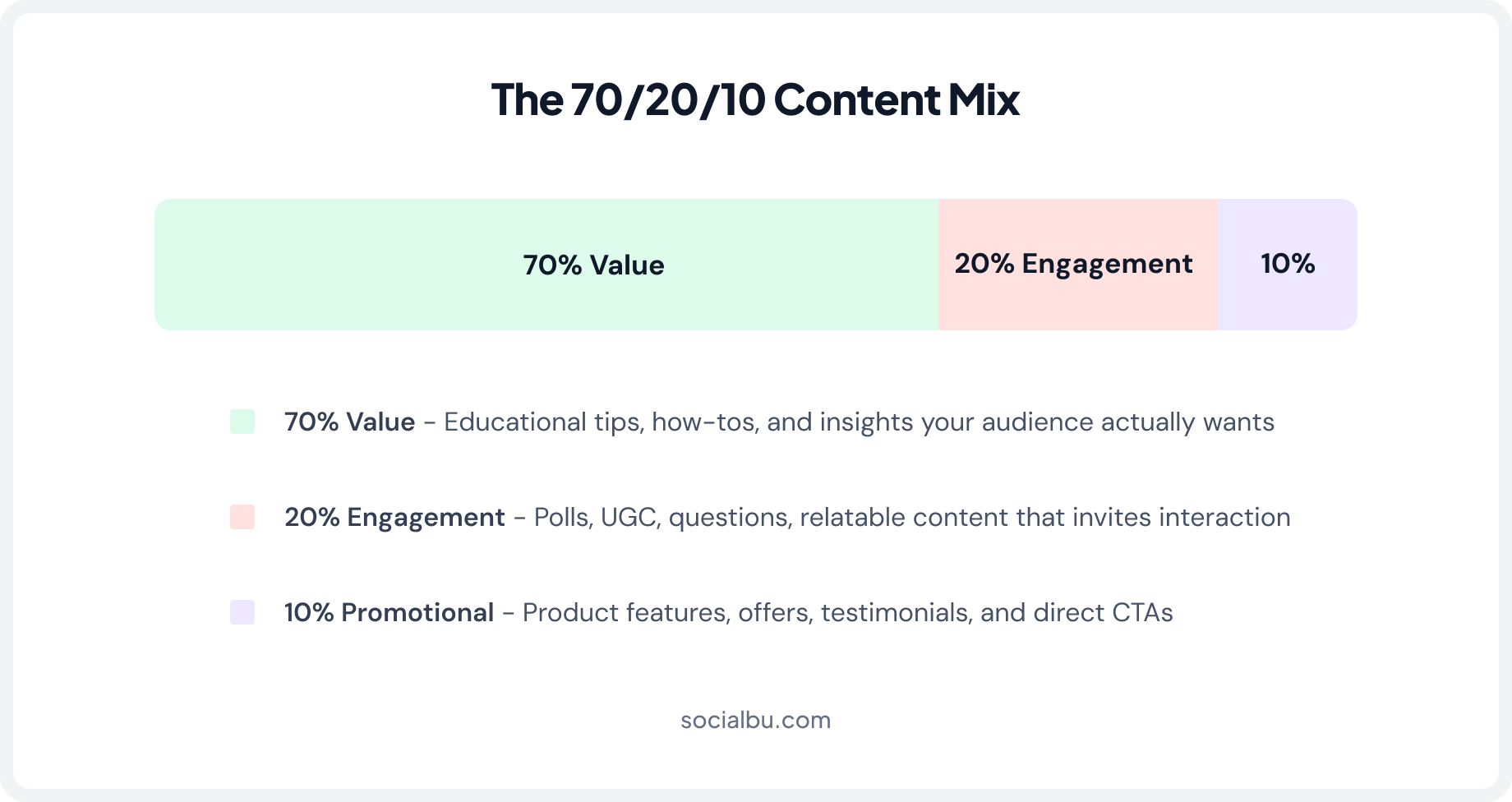
This is one of the most durable frameworks in content planning, and it still holds up in 2026. The reason it works is simple: if your feed is all promotions, people unfollow. If it’s all entertainment, you never convert. The mix keeps both audiences engaged.
Build a Content Repurposing Strategy
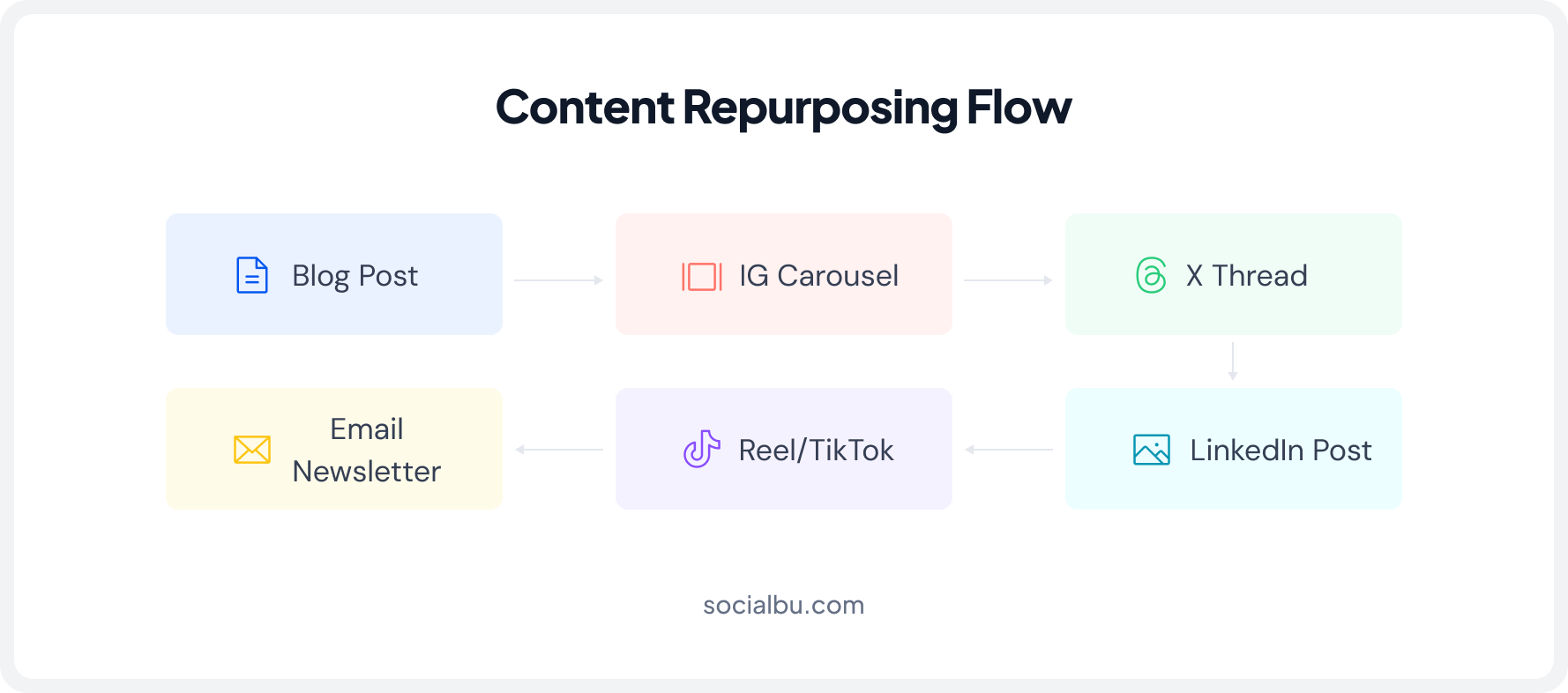
The smartest brands in 2026 aren’t creating more content; they’re getting more out of what they already create via content repurposing. One well-researched blog post can become a LinkedIn article, an Instagram carousel, an X thread, a TikTok talking-head video, and an email newsletter section. That’s five to eight pieces of content from a single core idea.
The key is that you’re not copy-pasting. You’re reformatting for context. A Twitter thread is written differently from an Instagram carousel, even if both come from the same blog post. Build this workflow explicitly into your content process; it doesn’t happen automatically.
✅ Content Planning Checklist
When did you last audit your social profiles?
SocialBu pulls your post performance, follower growth, and engagement data in one place so your audit takes hours, not days.
Step 04: Pre-Production Content Checklist
Create Content That Doesn’t Get Ignored
Most brands focus entirely on what to post and rarely on how to make that post actually work. A pre-production content checklist is the quality gate that catches mistakes that would have quietly killed your engagement: the wrong dimensions, a weak hook, a call to action buried at the bottom, or visuals that look nothing like your brand.
Write Captions That Stop the Scroll
On most platforms, only the first one or two lines of your caption are visible before the reader hits “read more.” That means your hook, the very first sentence, is the only thing standing between your content being read or ignored. Here’s a framework that actually works:
1. The Hook (Line 1)
Lead with a bold calm, a surprising statistic, a provocative question, or an admission. “We spent $10,000 on ads last month, and this organic post outperformed all of it.” stops more people than “Here are some marketing tips.” Make it impossible to scroll past.
2. The Body (Lines 2-8)
Deliver on the hook. Keep sentences short. One idea per line. White space is your friend on social media; it makes captions look approachable rather than overwhelming. Get to the point without padding.
3. The CTA (Final Line)
Tell people exactly what to do next. “Save this for later,” “Drop your biggest takeaway in the comments,” “Click the link in bio to get the full guide.” Be specific. Vague CTAs (“let us know your thoughts!”) get ignored.
 Here are some high-converting captions for your small business on Instagram: 200+ Instagram Captions for Small Business Owners That Convert
Visual Specs: Get These Right Every Time
Posting the wrong dimensions isn’t just sloppy; it signals to the algorithm that your content isn’t optimized, and it makes your brand look amateur. Here are the 2026 social media posts sizes you need to know:
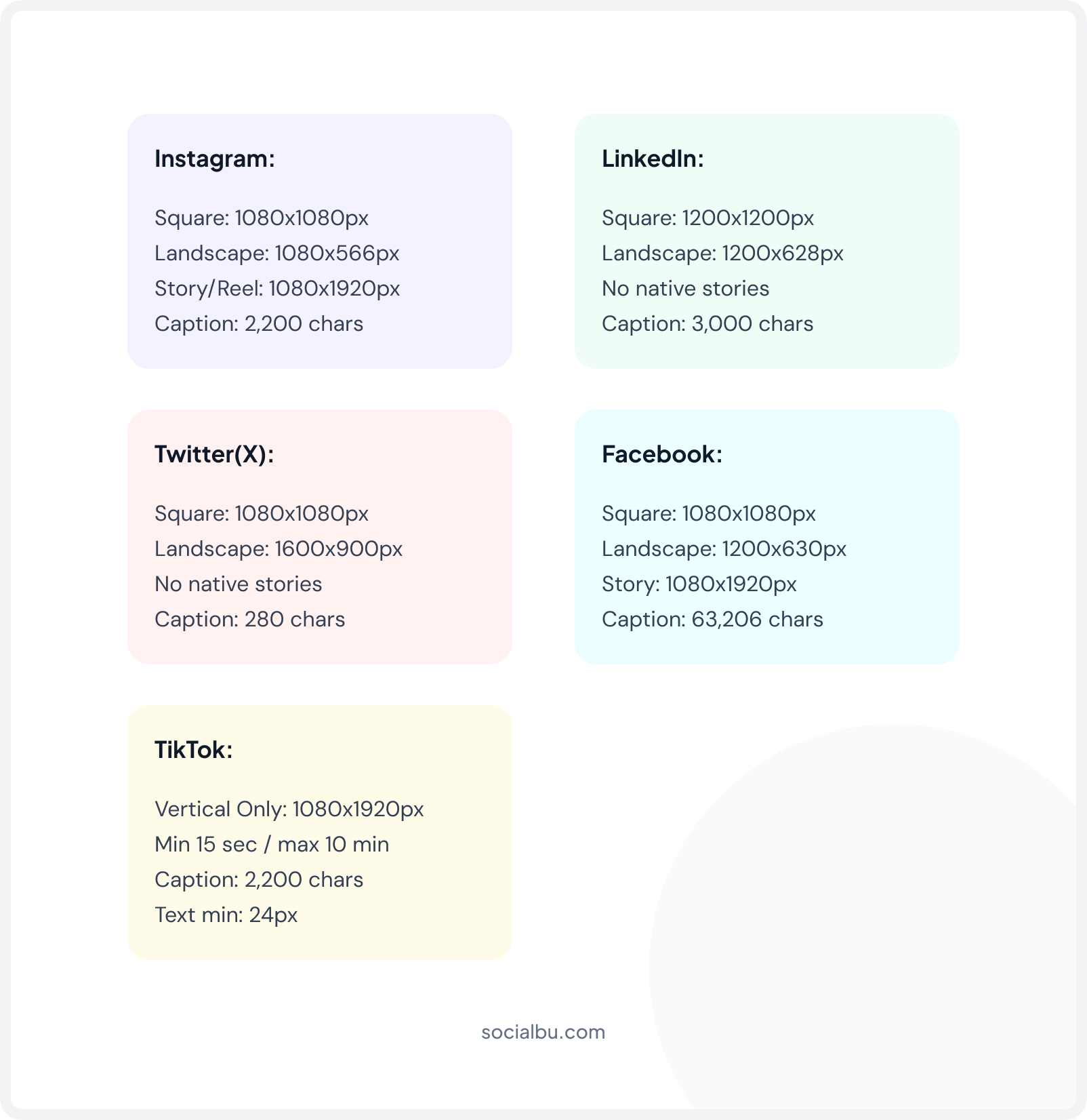
✅ Pre-Production Content Checklist
Step 05: Social Media Scheduling Checklist
Schedule Smarter, Not Just More Often
Posting when inspiration strikes is not a social media strategy; it’s an activity with no system behind it. A social media scheduling checklist ensures your content goes out consistently at the right times, without requiring someone to be online manually for every post. That’s what a social media posting checklist is really for: removing the dependency on memory and motivation.
How Often Should You Post in 2026?
There’s no universal answer, but there is a principle: consistency beats frequency. Our research suggests that post consistency at a lower frequency outperforms brands that burst-post and then go quiet. Start with a schedule you can actually sustain. Build up from there.
Twitter/X | TikTok | |||
Wed & Thurs | Tues to Thurs | Mon to Fri | Thurs to Sun | Tues & Thurs |
6 AM - 8 AM 11 AM - 1 PM 7 PM - 9 PM | 7 AM - 9 AM 12 PM 5 PM - 6 PM | 8 AM - 10 AM 12 PM - 1 PM 6 PM - 9 PM | 7 AM - 9 AM 1 PM - 3 PM 6 PM - 9 PM | 6 AM - 10 AM 7 PM - 11 PM |
✅ Scheduling & Publishing Checklist
You’ve got the checklist. Now you need the tool to run it.
SocialBu handles scheduling, engagement, analytics, team approvals, and AI content. The entire nine-step system, one platform.
Step 06: Daily Engagement Checklist
Engagement & Community Management
Publishing content is half the job. The other half, the half most brands skip because it doesn’t feel like “real work”, is showing up for your audience after the post goes live. Community management is how you build genuine relationships, earn word-of-mouth, and signal to algorithms that your account deserves broader distribution.
A post with zero comments in the first hour gets buried. A post with ten engaged comments in the first thirty minutes gets pushed to more feeds. Your response time isn’t just a customer service metric; it’s a growth lever.
Response Time: How Fast is Fast Enough?
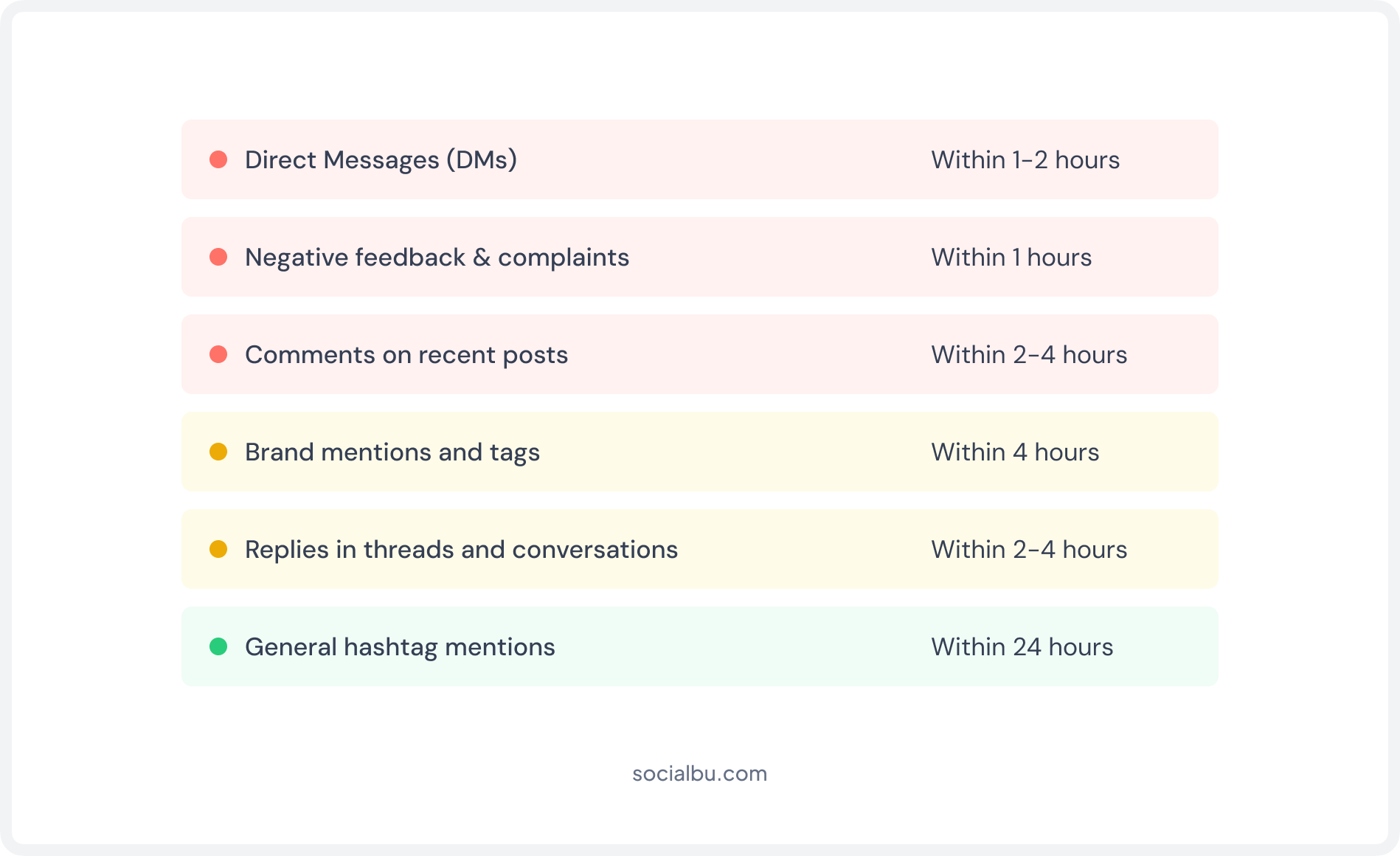
Research suggests that 38% of people expect a reply on social media within 30 minutes, while 68% expect one within 4 hours. Slow responses don’t just frustrate customers; they actively depress your engagement signals. Here’s how to prioritize your response queue:
How to Handle Negative Comments Without Making It Worse?
Negative comments are inevitable. And honestly, how you handle them publicly says more about your brand than the original complaint ever could.
The framework is simple: acknowledge the issue without being defensive, empathize with the person’s experience, and move towards resolution; ideally by taking the conversation to DMs or email for the follow-up. Don’t delete unless it’s spam or harassment. Deleting legitimate complaints looks worse than leaving them up.
✅ Daily Community Management Checklist
Step 07: Social Media Analytics Checklist
Track the Numbers That Actually Tell You Something
Your social media analytics checklist determines whether you’re making real progress or just staying busy. The problem is that most dashboards drown you in data that looks impressive but doesn’t actually help you make decisions. You don’t need to track everything; you need to track the right things at the right flow.
Reach vs. Impressions – Why Both Matter?
Reach is the number of unique accounts that saw your content. Impressions are the total number of times your content was displayed, including multiple views by the same person.
If your impressions are significantly deeper than your reach, it means the same people are seeing your content multiple times, which is actually a positive signal for algorithmic distribution. It means the platform thinks your content is worth showing repeatedly.
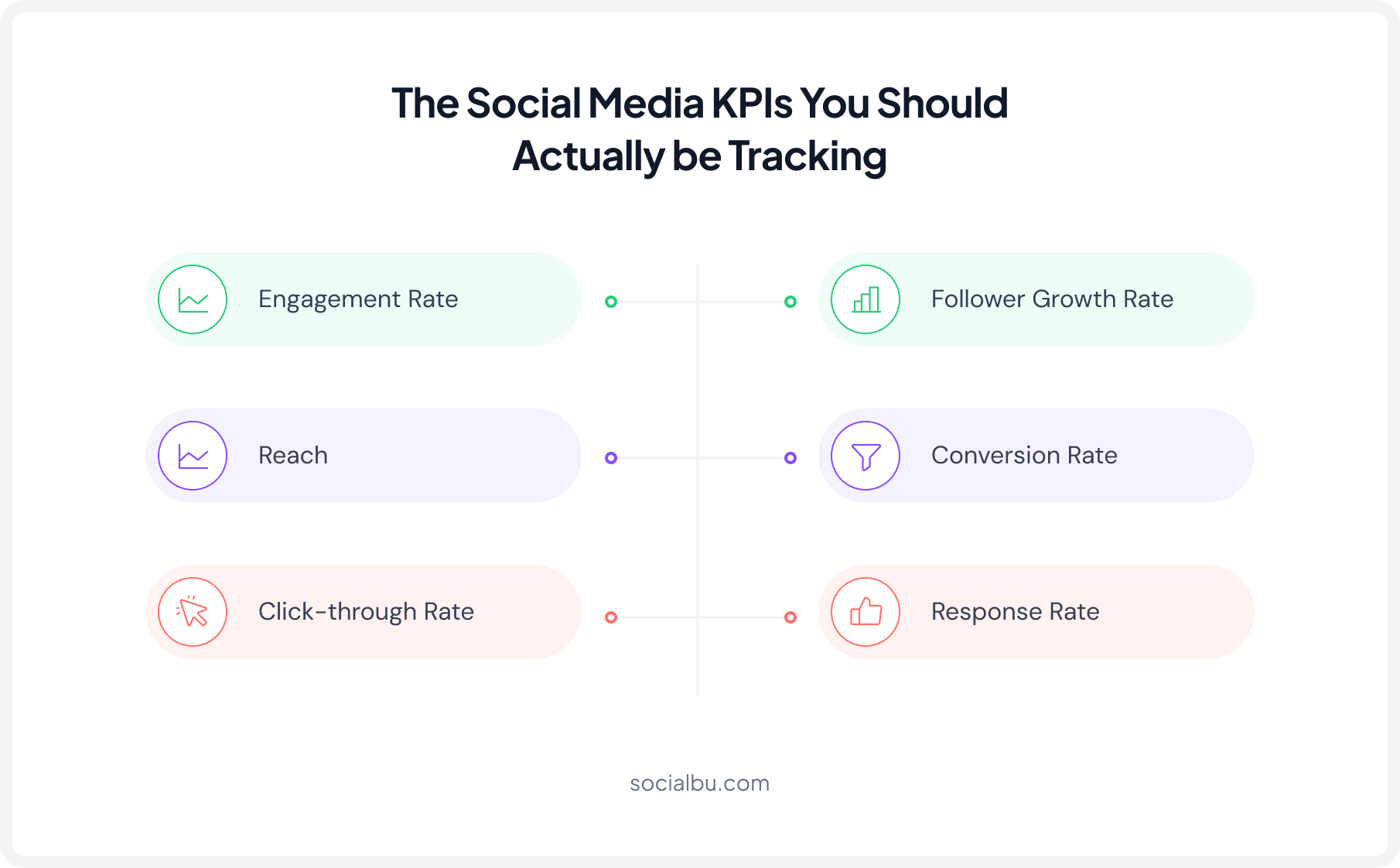
The key habit: After every week’s review, write down exactly three actionable changes in your social media management checklist that you’ll make to next week’s content based on what you learned. Not ten. Not one. Three. This forces specificity and prevents analysis paralysis.
✅ Analytics Checklist – Weekly & Monthly
Step 08: Team Workflows & SOPs
Build Team Workflows That Don’t Break When Someone’s Sick
If your entire social media operation lives in one person’s head, you don’t have a system; you have a single point of failure. Social media SOPs turn tribal knowledge into documented, repeatable workflows that anyone on the team can follow. This is how you manage social media accounts at scale without chaos.
Define Team Roles Clearly
Even on a small team, ambiguous ownership creates bottlenecks. Someone is waiting for someone else, and nobody’s sure who’s responsible for what. These are the core roles a social media team needs covered, even if one person wears multiple hats:
Content Creator
Writes captions, scripts, and copy. Develops ideas based on content pillars and the publishing calendar.
Designer
Creates visuals, carousels, and templates. Maintains brand consistency across all creative assets.
Social Media Manager
Oversees the content calendar, approves posts, manages community engagement, and tracks performance.
Analyst
Pulls reports, tracks KPIs, identifies trends, and feeds insights back into the content strategy.
Document Your Content Approval Workflow
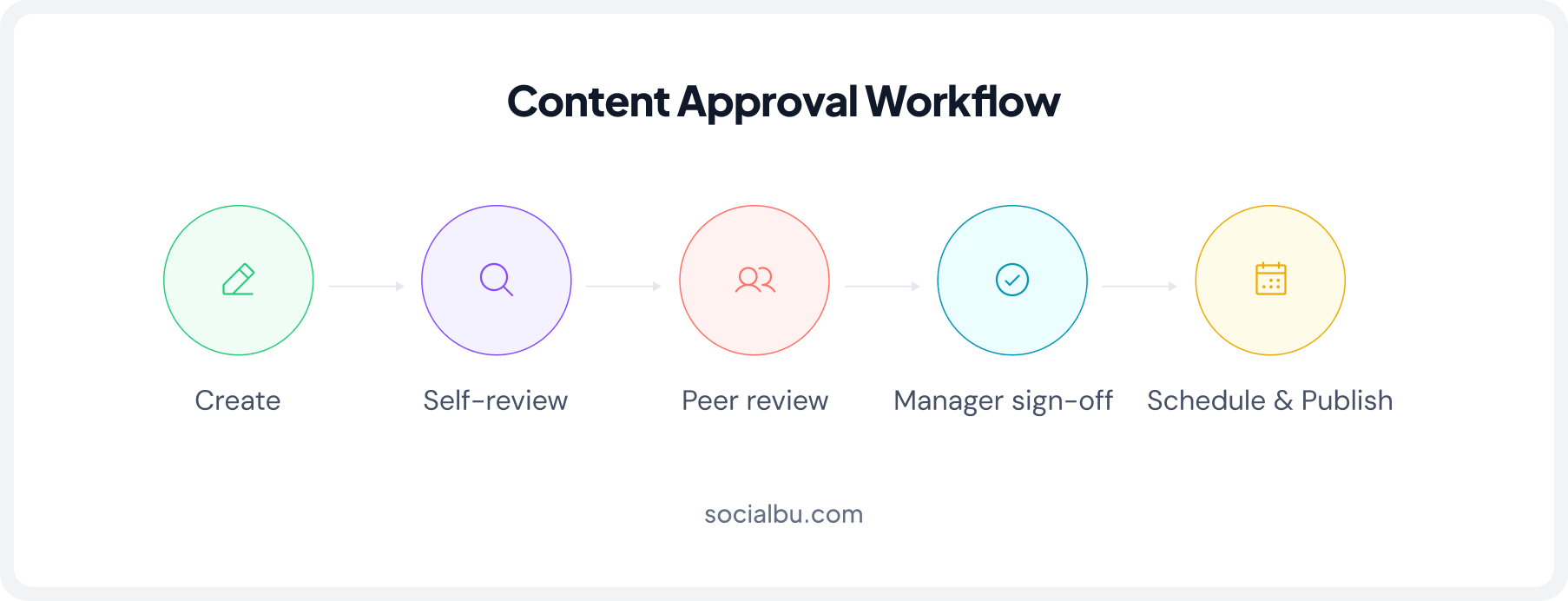
Every piece of content should pass through a defined approval chain before it goes live. The complexity of that chain depends on your team size, but even solo marketers benefit from a personal review step, a checklist you run on every post before scheduling it. For teams, a clear approval workflow prevents last-minute panic and off-brand content reaching your audience.
✅ Team Workflow & Onboarding Checklist
Step 09: AI & Automation Checklist
Using AI Social Media Tools in 2026 Without Losing Your Brand Voice
AI is no longer a novelty in social media marketing; it’s a core part of how fast-moving teams operate in 2026. But there’s a right way to use it and a way that quietly makes your content worse.
The wrong way is to treat AI as a replacement for your voice and judgment. The right way is to treat it as a very capable assistant who handles the first drafts and the repetitive work, so you can focus on the thinking, the strategy, and the human touch that actually builds an audience.
According to Salesforce’s State of Marketing report, 68% of marketers using AI for content creation say it significantly improves their productivity, but 79% still require human review before publishing. That ratio is exactly right. AI generates, humans decide.
What does AI actually do well in a social media workflow?
The tasks where AI genuinely saves time are high-volume, structured, and don’t require deep brand judgment. That means first drafts, not finished posts. It means idea generation, not campaign strategy. It means adapting existing content into new formats, not creating original insight from scratch.
Check out this quick guide if automation is something that interests you: Automate Your Client’s Entire Social Media Workflow (2026 Guide for Agencies)How SocialBu brings AI and Automation together in one place?
Most social media teams end up with a patchwork of tools: one for scheduling, one for analytics, a separate AI writing tool, and another for team approvals. It works, but it creates friction at every handoff. SocialBu is built to bring the whole workflow, including AI assistance, into a single platform so nothing falls through the gaps between tools.
The key thing SocialBu gets right is that the AI assist is baked into the workflow, not bolted on the side. You’re not copy-pasting between tools; the AI writes inside the scheduler, the approval sits inside the calendar, and the analytics feed directly back into your content planning. That’s what makes it practical rather than just a list of features.
Final Thoughts: The only thing left is to actually use it!
The hardest part of building a social media system isn’t knowing what to do; it’s getting started and staying consistent. This social media management checklist is designed to be implemented in stages, not all at once. Start with Steps 1 and 2: get your strategy down and do your audit. Everything else gets easier once you have that foundation.
In week two, tackle your content planning system (Step 3). By the end of your first month, you should have all nine documented, even if some are still a work in progress. That’s the goal: not perfection, but a running system you improve over time.
To add to that, use SocialBu to streamline your social media management workflow, and spend the time you save refining your content strategy.
FAQs
Q: How often should I update my social media management checklist?
Review and update your social media management checklist at least once every quarter. Update it sooner if platform features, business goals, or audience preferences change.
Q: Can a social media management checklist work for multiple platforms?
Yes. A well-structured checklist can be adapted for multiple platforms by including platform-specific tasks for content formats, posting schedules, engagement, and analytics.
Q: How do I prioritize tasks in my social media checklist?
Prioritize tasks based on business goals and impact. Focus first on content planning, publishing, community engagement, and performance tracking; then address optimization and experimentation.
Q: Should I be deleting negative comments on social media?
Not usually. Legitimate negative feedback should be addressed professionally and constructively. Delete comments only if they contain spam, hate speech, harassment, or violate your community guidelines.
Q: How does a social media management checklist help with crisis management?
A social media management checklist provides clear response procedures, approval workflows, monitoring tasks, and communication guidelines, helping teams respond quickly and consistently during a crisis.