

Creating fresh content every day, for every platform isn’t sustainable. That’s what makes social media content curation so valuable: instead of creating everything from scratch, you find, organize, and share the best content already out there, adding your own perspective so it still feels like you.
Done right, it fills your calendar, builds authority, and keeps your audience engaged without burning out your content team.
In this guide, we’ll break down exactly what content curation means, why it matters more in 2026 than ever, and how to build a repeatable workflow to curate, organize, and schedule curated content, all from one place.
Quick Answer
Social media content curation is the process of discovering, selecting, organizing, adding context to, and sharing high-quality content from trusted sources that provides value to your audience while supporting your marketing goals.

What Is Social Media Content Curation?
Social media content curation is the process of finding, evaluating, and sharing relevant content from other sources, rather than producing everything in-house.
It’s not just hitting “share.” Good curation means adding context, credit, and a point of view so the content still reflects your brand.
So what does “curated content” mean in practice?
Think of a curator at an art museum; they don’t paint the pieces on the wall, but they decide what’s worth showing, how it’s arranged, and what story it tells. A social media curator does the same thing with articles, videos, stats, and industry news.
How Content Curation is Different from Reposting?
Many brands treat content curation as if it’s just reposting, but they aren’t the same. Simply hitting the share button without adding anything new rarely helps your brand.
In fact, it often sends your audience back to the original creator, giving them little reason to follow you.
What Curation Adds That a Simple Repost Doesn’t
Content curation goes beyond sharing someone else’s post. It starts with actually reading or watching the content, verifying that the source is credible, and deciding whether it’s worth your audience’s attention.
Then comes the most important step: adding your own perspective, insight, or takeaway that explains why the content matters.
If you’re only trying to reshare something as-is, platform guide like how to repost a reel on Instagram will get the job done mechanically. But content curation goes several steps further than any of those reposting workflows.
Why Crediting Sources and Adding Context Matters
A thoughtful caption transforms a shared link into valuable content. But context alone isn’t enough; you should also credit the original creator and make sure the content aligns with your brand voice and audience.
Sharing reliable, relevant content consistently helps establish your brand as a trusted source rather than just another account that reposts.
Why Should Content Curation Be Part of Every Social Media Strategy?
Audiences are tired of brands posting the same promotional content on repeat. Content fatigue affects both the people creating content and the people scrolling past it.
Content curation solves several problems at once, like consistency, authority, relevance, time, and engagement, while supporting your original content rather than replacing it.
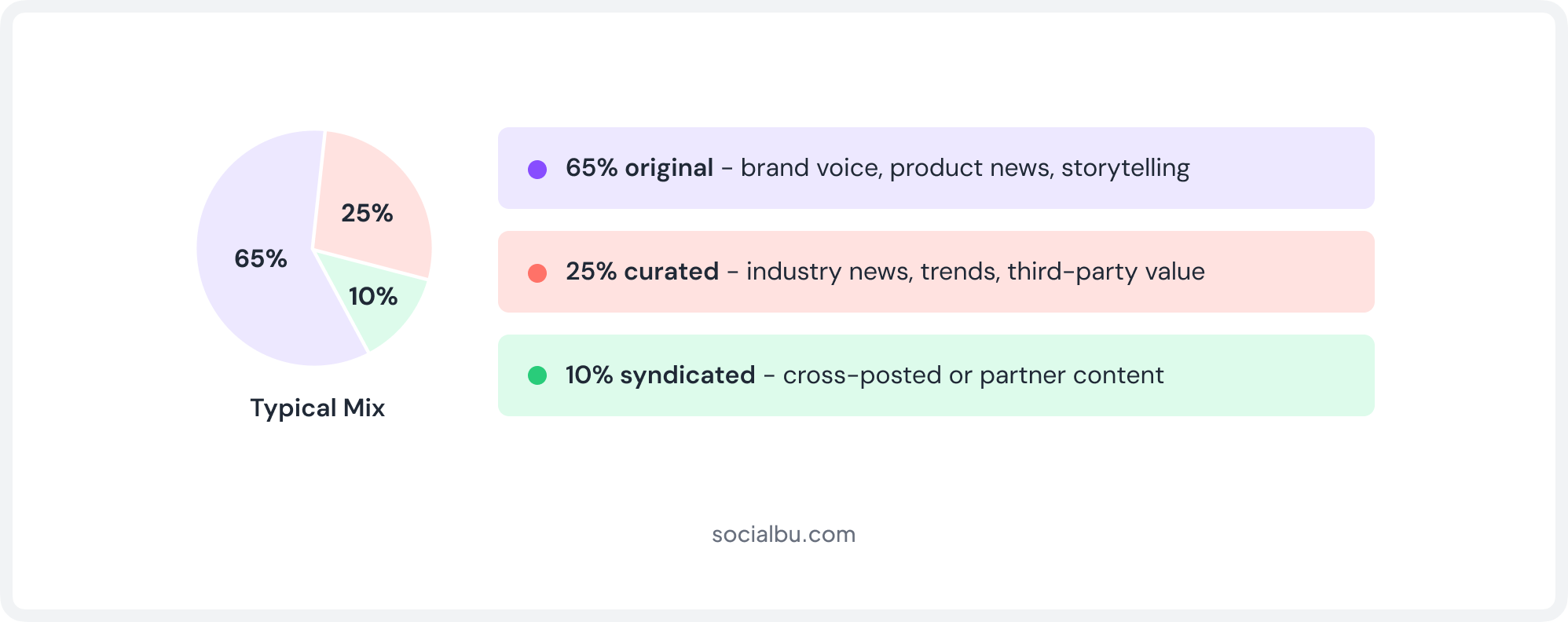
Why Does Content Curation Deliver Better Results?
Content curation isn’t just a way to post more often; it improves the quality and impact of your overall strategy.
- Build Authority: Sharing valuable industry content with your own insights positions your brand as a trusted source instead of a company that only talks about itself.
- Stay Relevant: Curated news and trends keep your audience informed, even when you aren’t publishing original research or breaking news.
- Save Time Without Sacrificing Quality: Curating a high-quality article or report takes minutes, while creating an original video or long-form post can take hours, or even days.
- Increase Engagement: A healthy mix of original and curated content introduces fresh perspectives, making your feed more interesting and encouraging meaningful interactions.
A structured social media management checklist can help you decide exactly where curated posts fit into your broader publishing cadence.
How Is Content Creation Different from Content Curation?
Understanding the difference between content creation and content curation is the first step towards building a balanced social media strategy.
While both play important roles, they serve different purposes and require varying levels of time, effort, and resources.
1. Content Creation: High Effort. High Ownership
Content creation is a heavier lift. It requires research, writing, design, and often video production, making it more time-consuming and resource-intensive.
In return, you get complete ownership over the content and full control of your brand voice, messaging, and storytelling.
That’s why original content is best suited for product launches, customer success stories, thought leadership, original research, and other posts that should sound unmistakably like your brand.
2. Content Curation: Less Work. Lasting Value.
Content curation follows a different workflow. Instead of creating from scratch, you’re discovering high-quality content, verifying its credibility, and adding your own perspective before sharing it.
Because the foundation already exists, the process takes minutes rather than days and relies more on good judgment than on a large budget.
The tradeoff is that you don’t own the original content, but you do create value by providing context, insights, and relevance for your audience.
Why You Need Both Original and Curated Content
Content creation and content curation aren’t competing strategies; rather, they complement each other.
Original content builds your brand identity and showcases your expertise, while curated content helps you stay consistent, relevant, and connected to industry conversations without exhausting your creative resources.
Pairing curation with repurposing social media posts stretches your original content even further, letting your best-performing posts work harder without demanding fresh production every time.
The most successful brands don’t choose one over the other. They combine both to maintain a steady social media posting schedule while continuously delivering value to their audience.
Feature | Content Creation | Content Curation |
Definition | Producing 100% original content | Finding and sharing relevant third-party content |
Time Investment | High; research, writing, design, editing | Low to medium; discovery, review, context |
Cost | Higher (writers, designers, video editors) | Lower (Tools + review time) |
Best for | Brand voice, product news, storytelling | Consistency, industry news, thought leadership |
Ownership | You own the content fully | You add value, but don't own the source |
Sustainable Frequency | 2-3x/week | Daily, easily |
How to Curate Content for Social Media
This is the part that actually matters: how do you curate content for social media in a way that’s efficient and doesn’t feel random?
Here’s the full content curation process, step by step.
|
STEP 01
Find sources
Discover trusted blogs, news sites, RSS feeds, and industry experts.
|
STEP 02
Filter for fit
Review relevance, freshness, and authority before saving content.
|
STEP 03
Add your take
Add your summary, opinion, or question to encourage discussion.
|
STEP 04
Organize it
Organize content into categories rather than random bookmarks.
|
Step 1: Find Trustworthy Content
Content discovery starts with knowing where to look. The best social media curators build a shortlist of go-to sources instead of googling from scratch every day. These include:
- Industry blogs
- News sites
- RSS feeds
- Reddit communities
- LinkedIn posts
- Research reports
- Industry experts
- Niche publications
The goal is to build a list of trusted sources you can return to again and again, rather than chasing whatever shows up in a random search.
Step 2: Choose Content Your Audience Actually Wants
Not everything worth reading is worth sharing. Before you curate something, run it through three filters:
- Relevance (does it matter to your specific audience?)
- Freshness (is it current or recycled?)
- Authority (does the source have real credibility?)
Step 3: Add Your Own Perspective
This is the step that separates curation from copy-pasting. Add a short summary in your own words, your honest opinion, a question to spark discussion, or a connection to your product or industry.
A one-line “here’s an article” caption gets scrolled past. A caption that says why it matters gets comments.
Step 4: Organize Curated Content Into Categories
Here’s where most people’s process falls apart. You find ten great articles this week and then what?
They end up as browser bookmarks you never revisit, a messy spreadsheet with dead links, or screenshots buried in your camera roll.
This is exactly why having a dedicated content curation workspace, instead of scattered folders, becomes non-negotiable once you’re posting regularly across multiple platforms.
Step 5: Schedule Curated Content Alongside Your Original Posts
Once the content is organized, it needs a home in your social media content calendar. Scheduling curated and original posts together, rather than managing them separately, keeps your feed balanced, instead of clumping five curated links in one day and going silent for a week.
Combining curated finds with a smart social media post recycling routine also helps you refill gaps in the calendar without scrambling for something new to say every single day.
This is exactly the gap a tool like SocialBu’s Curate feature is built to close.
Why Manual Content Curation Doesn’t Scale
Doing all of this manually works, for about two weeks. You’ll start with a few browser tabs, a folder of bookmarks, and maybe a spreadsheet for links and notes. Then reality sets in.
New content appears faster than you can organize it, bookmarks become scattered across different apps, and nothing connects to the tool where you actually schedule your social media posts.
Why Bookmarks and Spreadsheets Don’t Scale
This isn’t a productivity issue. It’s a tooling issue.
Bookmarks, spreadsheets, and note-taking apps were designed to store information, not to power a repeatable social media content workflow. Choosing the right social media management tools from the start prevents this problem before it starts.
As your content library grows, finding, organizing, and publishing valuable content becomes increasingly difficult.
Signs Your Manual Process Is Breaking Down
A manual curation workflow usually starts to show the same problems:
- You’re searching from scratch every day instead of reusing quality content you’ve already found.
- Bookmarks are scattered everywhere: your browser, Notion, Slack, and random documents, with no central searchable library.
- Too much time goes into repetitive tasks like copying links between tabs, documents, and scheduling tools.
- Great content gets forgotten because tabs close, links disappear, or ideas never make it onto the content calendar.
- There’s no approval workflow, making it easier for inaccurate or off-brand content to be shared.
- Consistency depends on memory rather than a reliable system, leading to last-minute content gaps.
Build a Repeatable Curation System, Not a Habit
The teams that succeed with content curation over the long term aren’t necessarily more disciplined; they simply have better systems.
By bringing content discovery, organization, approvals, and scheduling into a single workflow, they spend less time managing content and more time consistently sharing valuable insights.
Move Curation Out of Your Bookmarks Bar
SocialBu brings content discovery, organization, and scheduling together in one streamlined dashboard.
Curate, Organize, and Publish Content with SocialBu
This is where curation stops being a chore and becomes a system. SocialBu’s Curate feature was built specifically to solve the workflow gaps above. Such as discovery, organization, and scheduling, all in one dashboard, so nothing has to live in five different places before it reaches your calendar.
Below is the full, click-by-click process for using it.
How to Use SocialBu’s Curate Feature (Step-by-Step)
Here are the steps to follow to start using the Curate feature on SocialBu.
1. Create your account and connect your profiles
Start by creating a SocialBu account if you haven’t created one already. Select the “arrow” next to Control Center and choose “Social Accounts.”
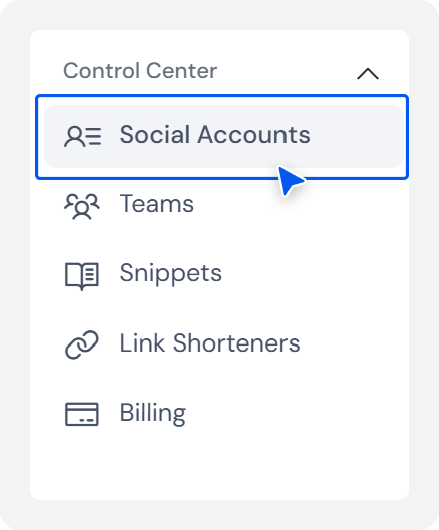
Click “+ Add account” at the top and add all the social accounts you want.
2. Open the Curate tab and add your sources
From the left-hand navigation, select Curate.
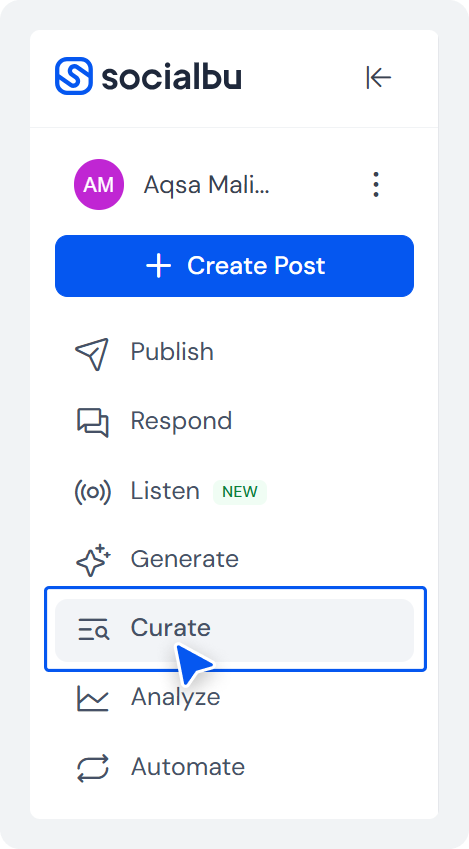
Click “Add Source.”
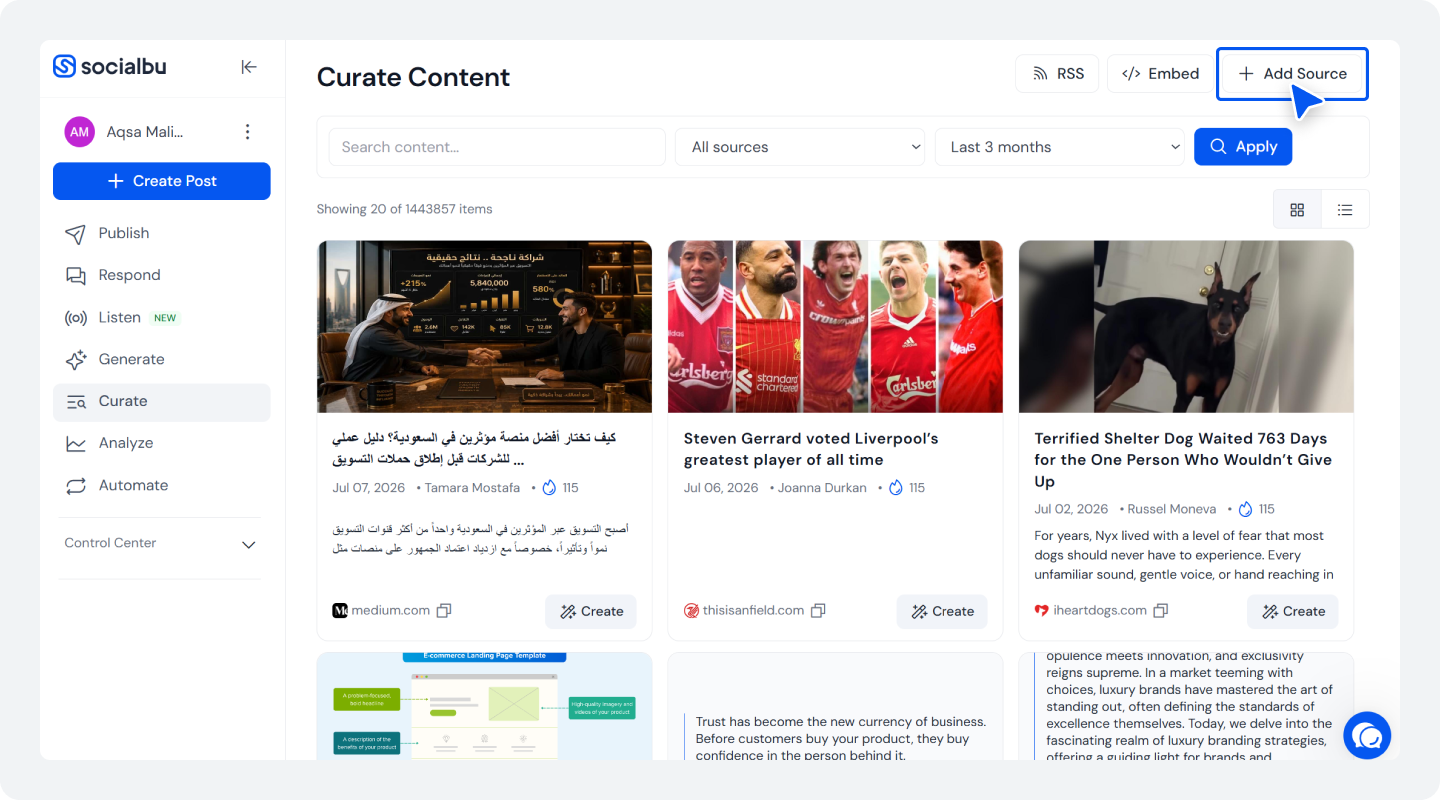 Paste in the RSS feed or website URL for a blog, publication, or industry site you trust, and save it.

Repeat for each source on your shortlist; you can add as many as you like, and new articles will automatically populate your workspace as they’re published.
3. Scan and save what’s worth sharing
Your feed shows incoming articles from every connected source in one scrollable stream. When something fits your audience, you can copy the post and save it somewhere.
4. Create Posts Using the Content
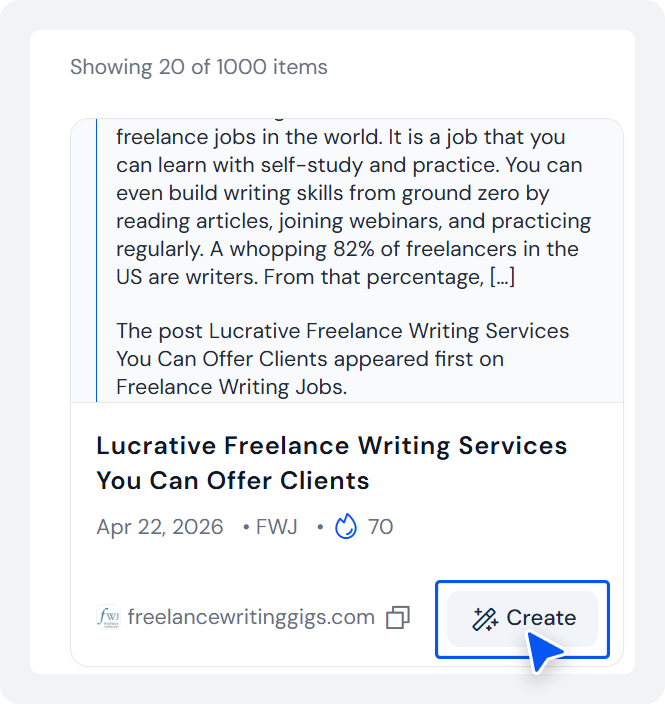
You can even create and publish a post using the content suggestion you like by clicking the “Create” option.
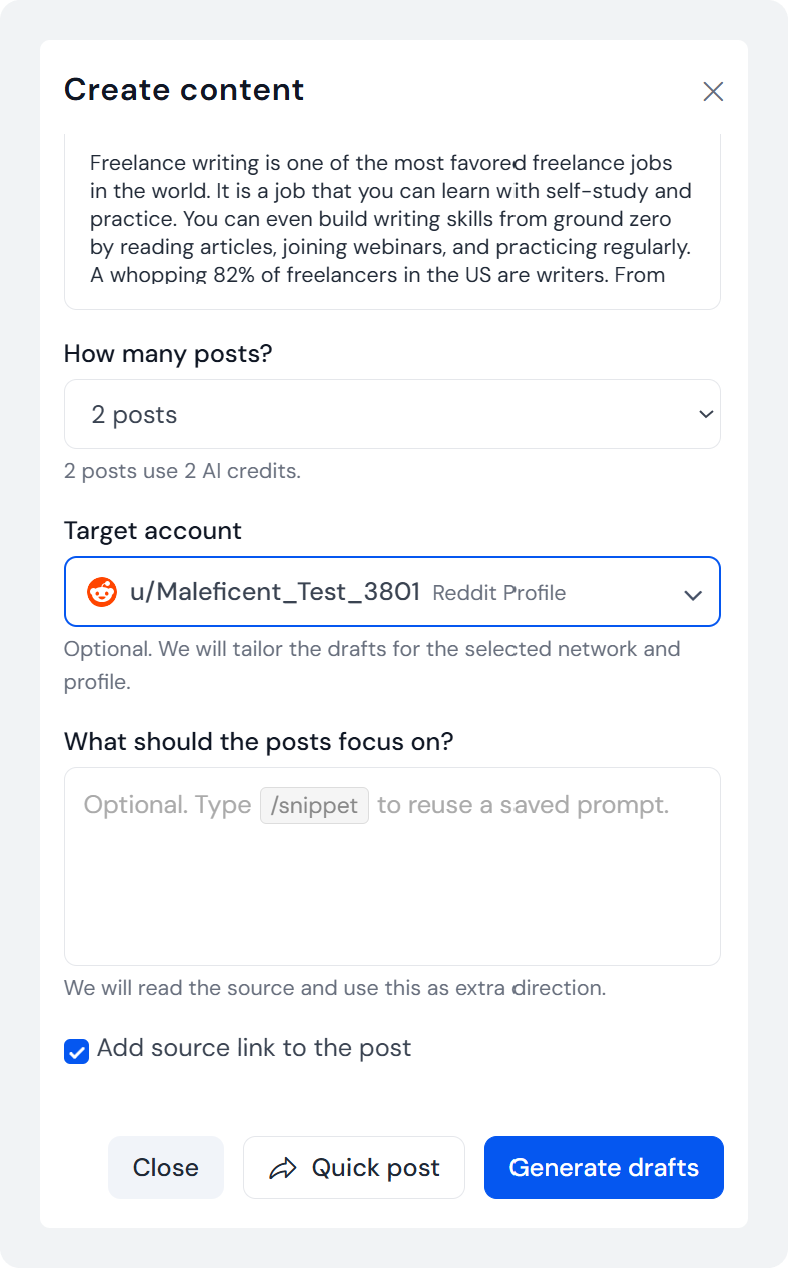
Select the number of posts, the target account, add any caption if you want. Either save it to draft or click “Quick post” to make your post go live immediately.
What SocialBu’s Curate Feature Replaces
No more browser bookmarks you’ll never open again. Won’t need to dohunting across a dozen tabs every morning. No more copy-pasting links between a curation app and a separate scheduler.
Discovery, saving, organizing, scheduling, reusing, and approving all live in the same workspace where you’ll eventually hit publish; across Facebook, Instagram, LinkedIn, X, Threads, Bluesky, Mastodon, and Pinterest.

Social Media Content Curation Best Practices for a Stronger Strategy
Once curation becomes part of your routine, a handful of habits determine whether it strengthens your feed or just adds noise. These social media content curation best practices are less about any single post and more about a standard you hold every post to.

1. Credit the Source, Every Time
Crediting the source is non-negotiable. It’s both an ethical baseline and a practical one, since it’s how the original creator and your audience know exactly where the value came from.
2. Add a Caption, a Take, a Question
Every share should carry commentary, because that’s the layer that actually makes the post yours; without it, you’re just a distribution channel for someone else’s work.
3. Protect Brand Voice Consistency
It’s just as important to maintain brand voice consistency across curated posts as across original ones. The source material changes, but the personality behind the account shouldn’t.
4. Mix Curated and Original Posts
Mixing curated and original posts, rather than clustering one type together, keeps the feed feeling intentional rather than lopsided.
5. Diversify and Verify Your Sources
Behind all of it should be a discipline of using recent information and diversifying your trusted sources so you’re not over-indexed on one publication’s point of view.
6. Measure What’s Actually Working
Track performance to identify which sources and formats drive engagement, and let that data quietly reshape your source list over time. Running a periodic social media audit makes this a lot easier to keep on top of.
What Are Some Social Media Content Creation Mistakes
Most curation mistakes come from treating the process as a shortcut rather than a discipline.
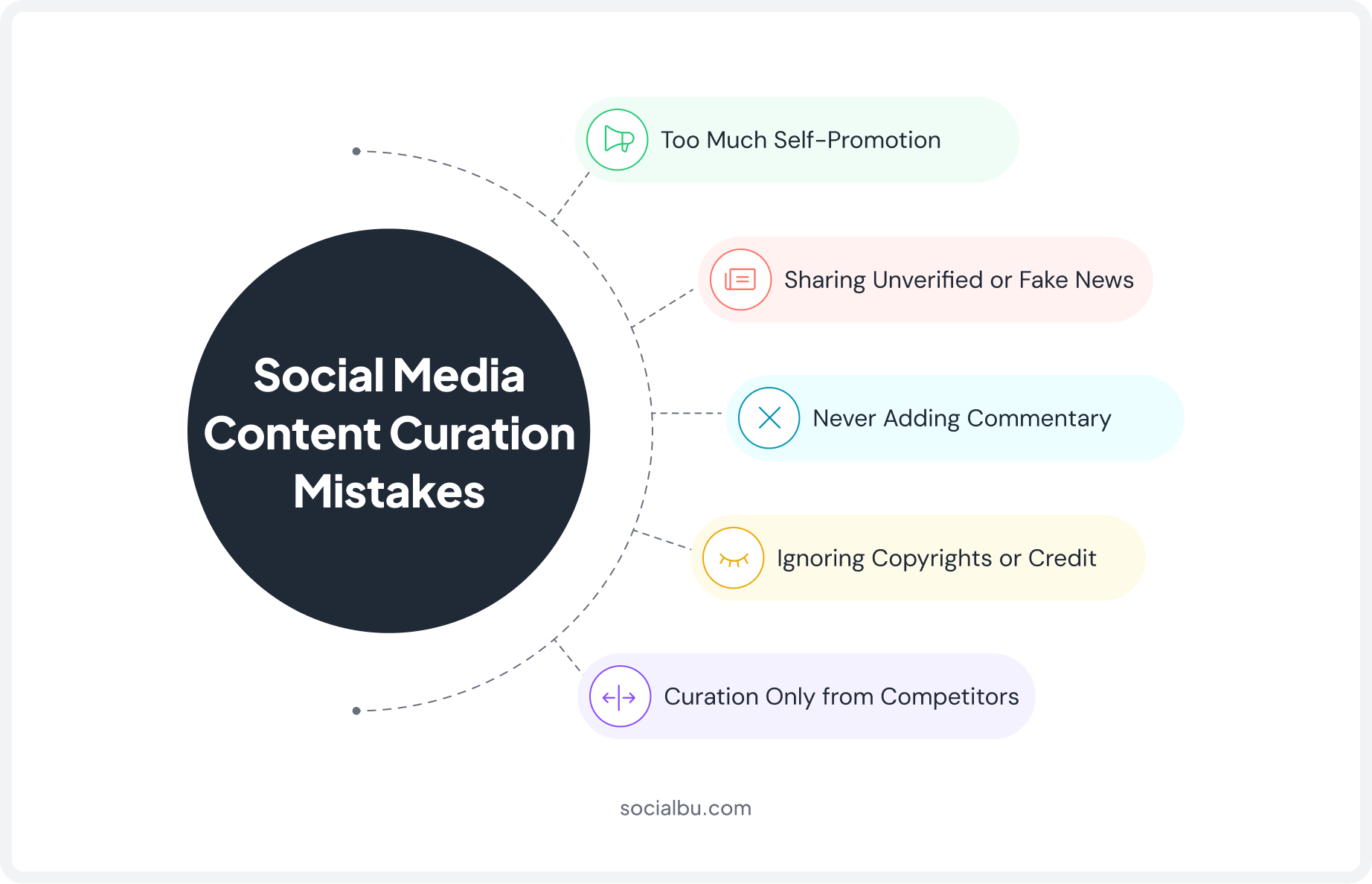
1. Too Much Self-Promotion
Turning curation into a flimsy excuse to talk about your own product again defeats the purpose of offering your audience a broader perspective.
2. Sharing Unverified or Fake News
This is one of the fastest ways to damage the credibility you’ve spent months building. A single bad share can undo a lot of trust.
3. Never Adding Commentary
Skipping commentary reduces curation to reposting, which gives your audience no reason to follow you over the original source.
4. Ignoring Copyrights or Credit
This isn’t just bad etiquette; depending on the content and platform, it can create real legal exposure.
5. Curation Only from Competitors
Rather than the wider industry, this can quietly turn your feed into free advertising for the accounts you’re supposed to be competing with.
Real Examples of Social Media Content Curation
Content curation examples look different depending on the industry, but the underlying principle stays the same: find something genuinely valuable, and add enough of your own perspective that it feels native to your account rather than borrowed.
1. SaaS
SaaS accounts tend to curate industry reports and third-party comparisons alongside their own feature updates. A report showing a shift in buyer behavior becomes context for why a new feature matters right now.
2. Healthcare
Healthcare accounts lean heavily on verified research and public health updates, almost always with added context explaining what a finding means for their specific audience.
3. Education
Education accounts curate study tips, research, and student success stories, often pairing third-party research with their own alumni’s real outcomes.
4. Agencies
Agencies use curated client wins and industry trends to demonstrate expertise to prospects who are still deciding whether to reach out. A documented social media publishing checklist for agencies ensures consistency across every client account.
5. Creators
Creators frequently curate by resharing community content or user-generated content, adding commentary that keeps their own voice front and center.
6. Small Business
Small businesses often curate local news, reviews, and community events to stay visible without a big production budget.
Final Thoughts
Social media content curation isn’t a shortcut; it’s a strategy. The brands that show up consistently in 2026 aren’t necessarily the ones creating the most original content; they’re the ones who’ve built a reputable system to find, organize, and share great content alongside their own.
Once that system is in place, curation stops feeling like a hassle and becomes the most fun part of your social media management journey, but only after you no longer have to juggle multiple tools.
That’s exactly the gap SocialBu’s Curate feature was built to close. So, give it a try if you haven’t already and set foot on your content curation journey before it’s too late.
Ready to Build Your Curation Workflow?
Manage your content discovery and scheduling in one place.
FAQs
Q: What is content curation in social media?
It’s the practice of finding, evaluating, and sharing relevant third-party content, such as articles, videos, stats, or industry news, instead of producing everything yourself. Then add your own context, opinion, and credit so it still reflects your brand.
Q: How do you use content curation on social media?
Build a shortlist of trusted sources, filter what you find for relevance and authority, add your own take before sharing, organize saved pieces into categories, and schedule them alongside your original post in one calendar.
Q: What are the best tools for social media content curation in 2026?
Look for social media content curation tools that combine RSS feed discovery, one-click saving, category organization, and a shared publishing calendar. SocialBu’s Curate feature covers all four in a single dashboard.
Q: What’s the difference between content curation and content creation?
Creation means producing 100% original content, at a higher cost, with full ownership, best for brand storytelling. Curation means finding and sharing third-party content with your own framing; lower cost, faster, and sustainable at a daily rhythm.
Q: What are the benefits of content curation for social media growth?
It builds authority through thought leadership, keeps your feed relevant without having to break every story yourself, saves significant time compared to original production, and improves engagement by mixing perspectives.
Q: How does content curation affect social media algorithms?
Consistent posting and genuine engagement, both of which curation supports, are rewarded by most social media algorithms, since platforms prioritize accounts that stay active and spark real interaction.