
You post a high-end post on social media once, then never think about it again. Even when that post performs well. Even when it’s still relevant months later.
The problem: your best content reaches only 30% of your audience. The other 70% never see it. New followers scroll past it. Timing misses people in different time zones, and it just disappears.
Social media post recycling fixes this. Instead of constantly creating new content, you republish what already works on a schedule. Same post, new audience, zero extra effort. Automate it, and you stop thinking about scheduling altogether.
This guide explains what post recycling is and how to build a system that keeps your evergreen content working 24/7 without manual effort.
Quick Answer:
Post-recycling is republishing your best-performing content on a fixed schedule to reach new audiences. You do not create new posts.
Instead of posting your content once and then forgetting about it, you recycle it and post it again weeks or months later.
Social media posting automation tools like SocialBu automate this process completely, letting your evergreen content work for you indefinitely.
What is Social Media Post Recycling?
Social media post recycling is republishing the same social media posts, or evergreen ones, at different times to reach more people. You write a post once. It performs well. Months later, you post it again with the same or a slightly different caption to reach a broader, newer audience.
Since evergreen content is valuable and stays relevant over time, search engines favor it.
- A how-to guide you posted in January.
- A product tip from March.
- A framework from last summer.
These posts don’t expire.
They’re just as relevant now as they were when you first posted them.
The problem is most people think of social media posts as one-time events. You publish, it appears in your feed and your audience’s, and then it’s time to move on. You write something new next week. Your old posts just sit there with little to no post engagement.
Post recycling changes that mindset. Instead of treating posts as one-and-done, you treat them as assets that can work multiple times.
Post it once. Reach 5,000 people.
Post it again in 6 weeks. Reach another 5,000 people (mostly different people who missed it the first time).
But here is the thing: social media post recycling is not social media content repurposing. Both are different.
How Does Post Recycling Differ From Content Repurposing?
Repurposing content means taking one piece of content and repurposing it into various formats. A blog post becomes an infographic. A video becomes a carousel. A podcast becomes a LinkedIn article.
Content recycling means republishing the same content in the same format. You’re not changing anything. You’re just posting it again at a different time to reach a new audience.
Both strategies work. But social media content recycling is simpler because it requires no extra work. Repurposing requires you to redesign, reformat, and rewrite.
What Types of Content Should You Recycle?
Not every post is worth recycling. The best posts to recycle are evergreen posts/content.
Evergreen content remains relevant and valuable to your audience over time.
Evergreen content includes:
- How-to guides
- Tutorials
- Tips and frameworks
- Educational content
- Templates
- Tools and resources
- Best practices
- Case studies
- Frequently asked questions (FAQs)
- Customer testimonials and reviews
- Foundational advice that doesn’t change with time.
Posts about specific events, short-lived trends, or dates are not evergreen content. A post about Black Friday deals works in November but not in January. A post about a trending topic works for a week, then becomes irrelevant.
To help you understand better, here are some examples of content worth recycling:
- “5 ways to write Instagram captions that get replies”: This works forever. Posting it every 8-10 weeks is smart.
- “The biggest mistake social media managers make”: Timeless. Recycle quarterly.
- “Template: 30-day social media content calendar”: A resource that doesn’t expire. Perfect for recycling and mentioning in your blogs and social media posts.
- “A customer success story or case study”: Still relevant months later. Recycle it.
- “Educational threads or carousels”: Teaching something that doesn’t change. Recycle it.
 Check out the ultimate Social Media Content Calendar guide and get a free social media content calendar template to organize your monthly content posting plan.
Examples of content that is NOT worth recycling:
- “Join us live tomorrow at 3 PM”: Time-sensitive. It’s useless after that day.
- “Check out this trending sound on Instagram”: Trends expire in days.
- “Our Black Friday Sale is live”: Seasonal. Wait until next year.
How Do You Identify Your Best Evergreen Content to Recycle?
Before you recycle social media posts and set up your queue system, identify which posts are actually worth recycling.
Here is how you can do that:
Step 1: Look at Your Top Performers
Pull your social media analytics from the last 3-6 months from the native platform or by using a third-party social media management tool such as SocialBu.
- Find your 10 to 15 highest-engagement posts.
- Look at engagement rate (likes, comments, shares).
- A post with 100 likes on a 10,000 follower account is different from a post with 100 likes on a 100,000 follower account.
Use SocialBu’s analytical features to see your top-performing posts, individual post insights, engagement metrics, and content growth trends. Filter the posts by engagement rate and sort highest to lowest. Those are your winners.
Step 2: Evaluate Timelessness
Not every high-performing post is evergreen content. A post about a seasonal sale performed well, but it won’t work next month.
Ask yourself, “Is this post still relevant right now? Will it be relevant in 6 months? Or in a year?”
If the answer is yes, it’s worth recycling. If it’s tied to a specific date, season, or trend, skip it.
Step 3: Update Before Recycling
Before you recycle content, spend some time updating it. If your post mentions statistics, check if they’re still current. If it links somewhere, verify the link is still live. If it references something dated, update it.
A post from 2025 that says, “in 2025, X happened,” should be updated to “in 2026, X is still happening” or updated with new data.
Now, let’s move to the main part: how you can auto-publish or recycle your best evergreen social media content.
How to Auto-Republish Evergreen Social Media Content with SocialBu: A Step-by-Step Process
Manual post recycling is possible, but it’s one more thing to remember and one more task to complete before the working day ends.
So when you can automate your social media posts, why not take advantage of AI-powered automation?
Auto-recycling your social media posts eliminates the usual workaround and helps you save hours even when you don’t remember.
You set auto-posting to social media once, and SocialBu’s post recycling feature in its Publish feature (aka the Queues) posts on a schedule automatically.
Let’s automate your social media posts now.
What is SocialBu’s Queues Feature?
SocialBu’s Queues are designed specifically for recycling. You create a queue, add your evergreen posts to it, set a schedule (like “every Monday at 9 AM” or “twice a week”), and SocialBu publishes them automatically. Posts cycle through the queue and repeat indefinitely.
It’s hands-off social media post recycling.
Here is how to do it step-by-step with SocialBu:
Step 1: Create a New Queue
Log in to your SocialBu account.
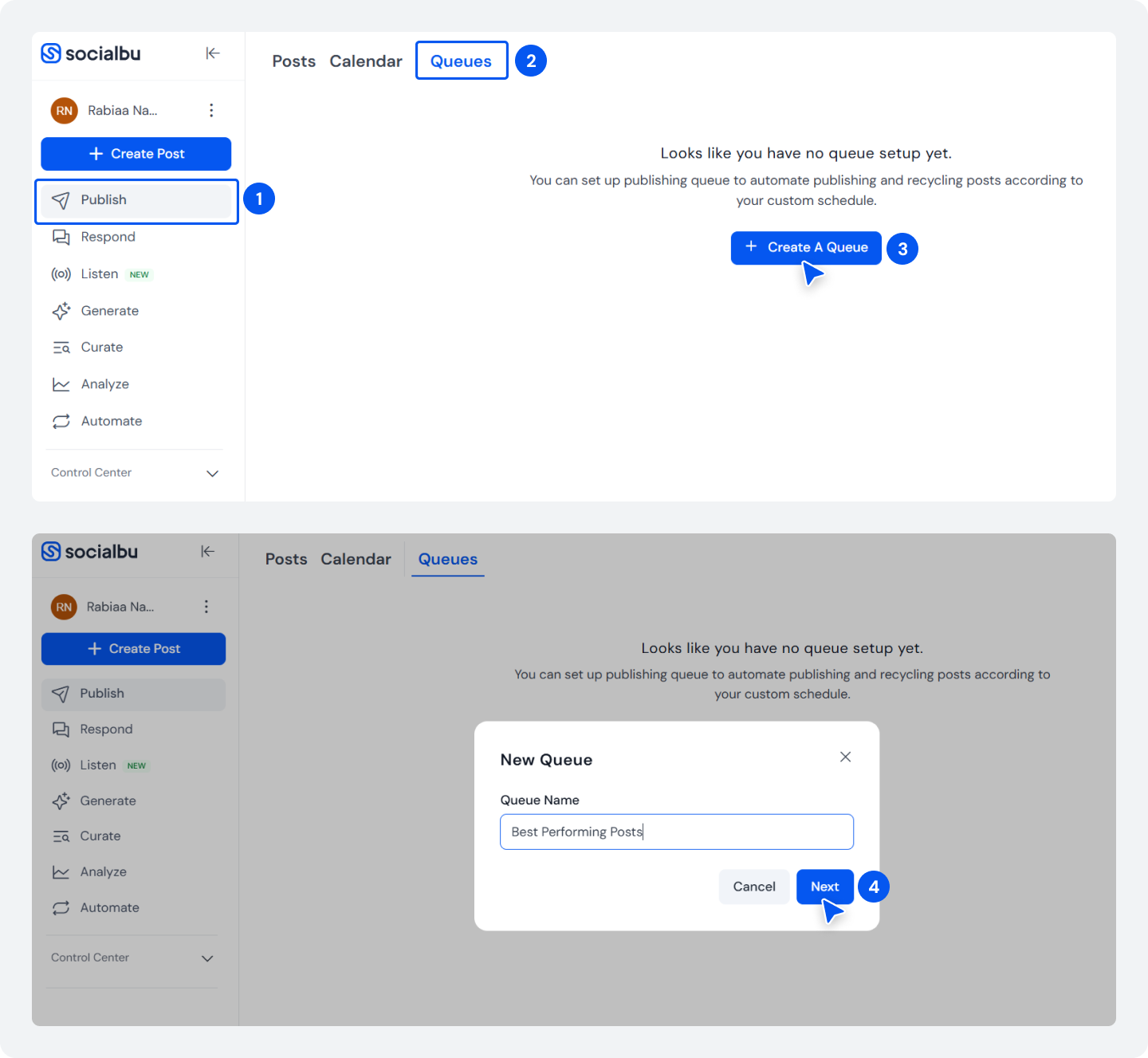
Now go to the ‘Publish‘ section in your SocialBu dashboard from the left-side panel. Then click on ‘Queues‘.
Click “Create a Queue.” Give it a name (e.g., “Evergreen Tips” or “Best Performing Posts”) and click ‘Next.’
Step 2: Set Your Publishing Schedule
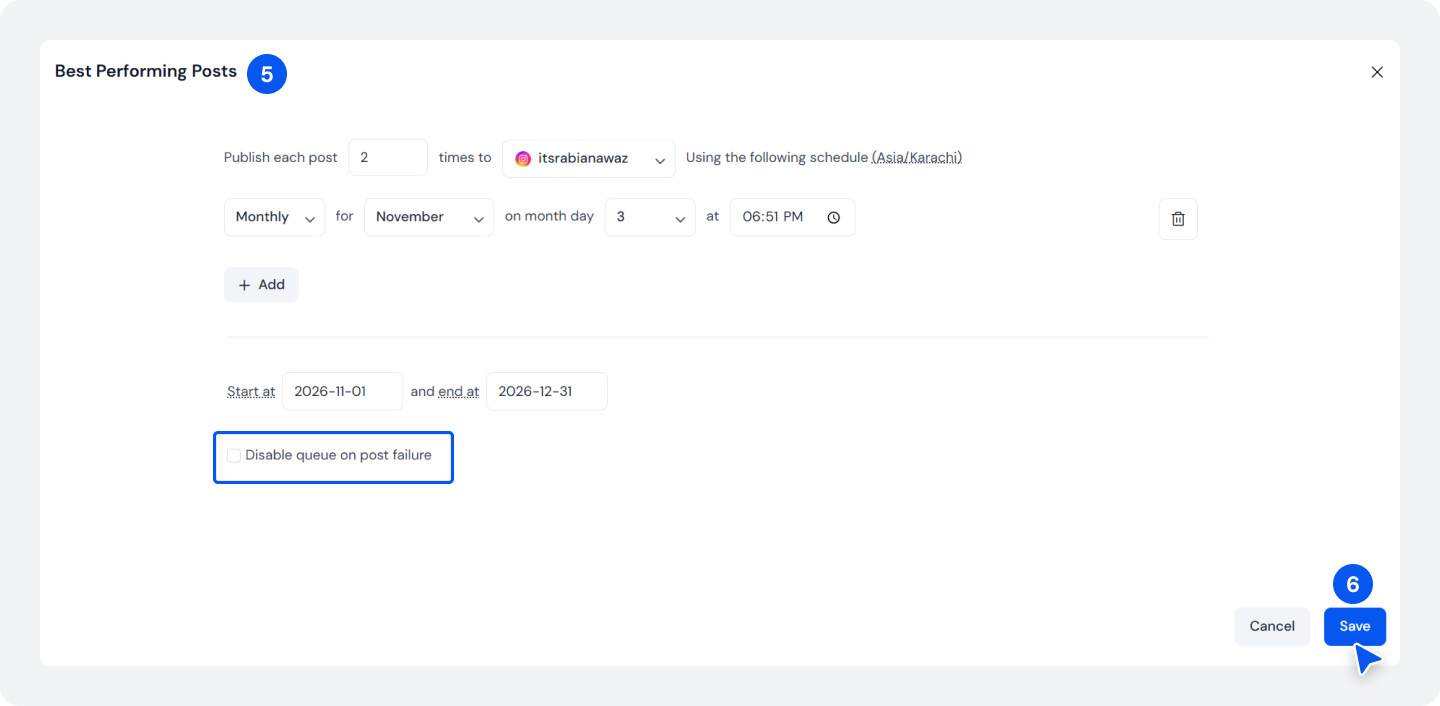
Now on this page, you set all your required settings to auto-publish your evergreen content.
Choose how many times a post must repeat and how often you want posts to recycle. You can post weekly, monthly, or on custom days/times. For example: “Every Monday at 9 AM and Thursday at 2 PM.”
Select the social media accounts this queue will post to. You can set it up for multiple platforms at once if you want the same post across channels.
You can also set a start date and end date if you’re running a specific campaign, or leave it open-ended to recycle indefinitely.
Click ‘Save’ to activate it.
Step 3: Add Your Evergreen Posts to the Queue
Your queue to recycle your social media posts is active now.
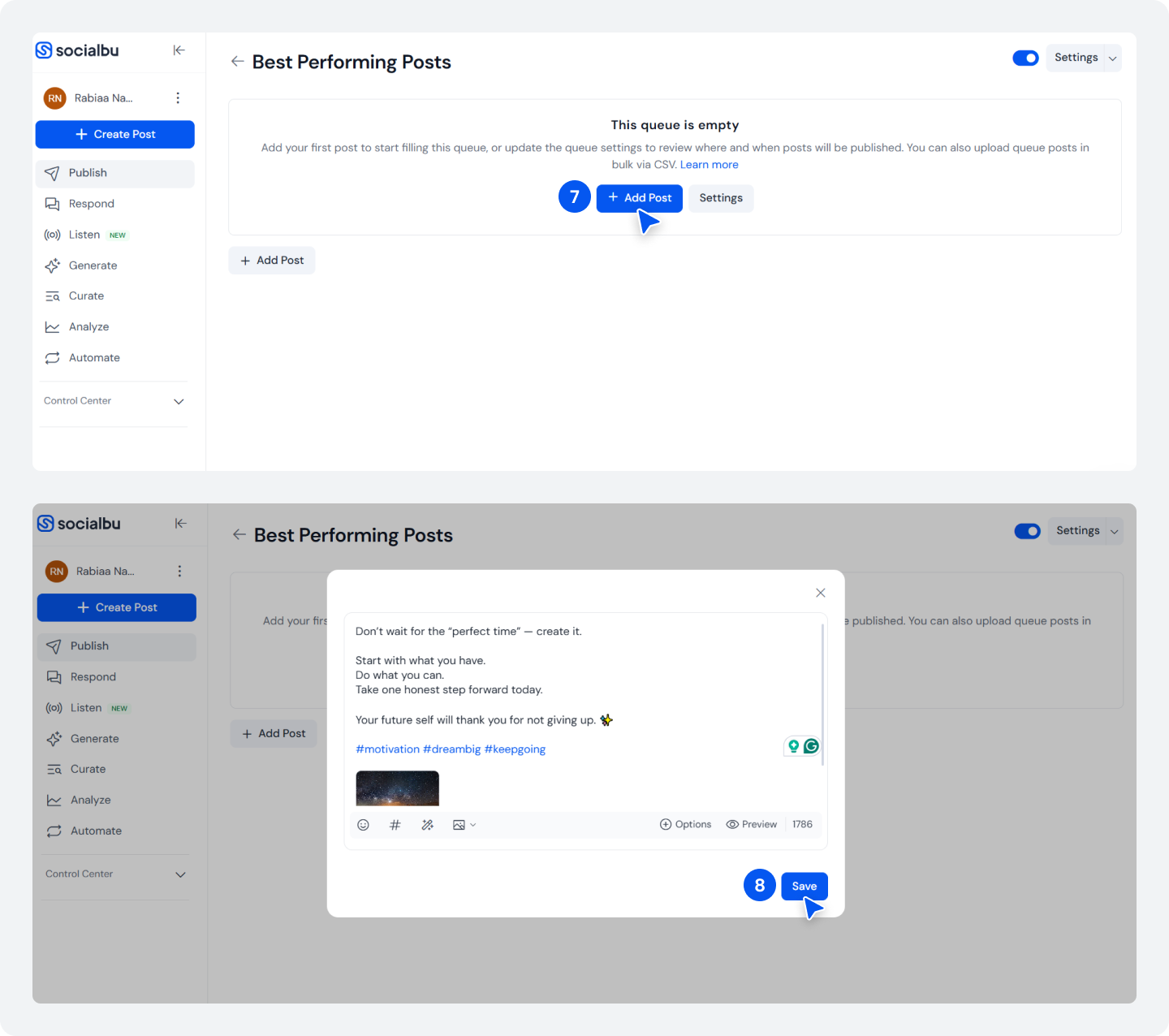
Now click on the ‘Add post’ to add the posts you identified earlier to recycle. You can create new posts directly in the queue or add existing posts you’ve already created. You can bulk upload via CSV too.
For each post, make sure it meets the platform’s requirements:
- Instagram feed posts need images
- LinkedIn posts with links need alt text
- TikTok videos need video files
SocialBu will tell you if something doesn’t meet the requirements before it’s added. Click on ‘Save‘ then.
Step 4: Configure Repeat Settings
You can also decide how many times each post should be recycled when you are setting up your queue. You can set it to repeat infinitely or cap it at a number (like 2, 3, 4, or 5).
If you want an extra layer of safety, enable “Disable on failure.” If a post fails to publish, SocialBu will pause the queue and notify you so you can fix it before more posts fail.
Step 5: Activate Your Queue
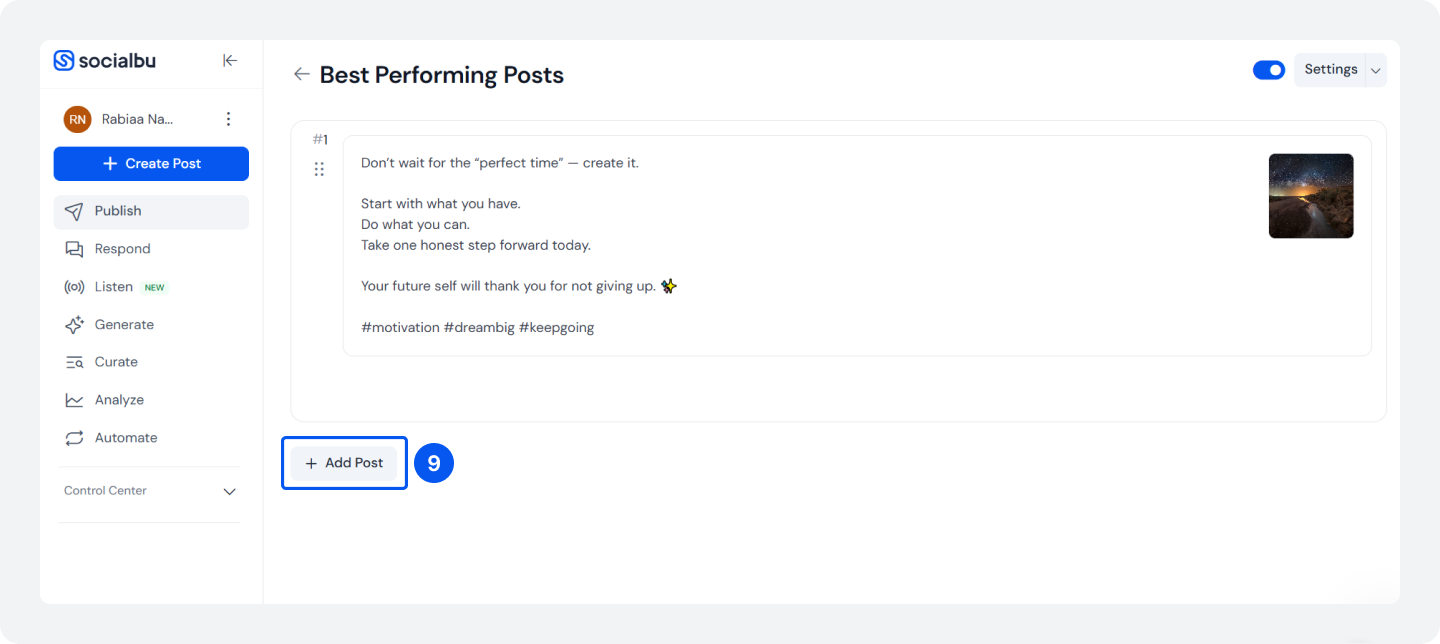
Click on ‘Add Posts’ to add as many posts as you want in the same queue with the set schedule.
Click on ‘Save,’ and your queue is now live
And it’s done.
SocialBu now posts automatically on your schedule. You don’t need to do anything else. Posts publish while you’re in meetings, while you’re focused on other work.
Check in occasionally to monitor performance and refresh content seasonally.
Ready To Auto-Publish Your Best Content?
Start a free SocialBu account and set up your first queue in under 5 minutes.
How Should You Build a Complete Social Media Content Recycling System?
Recycling content alone shouldn’t be the only way in your social media evergreen content strategy. It’s one part of a balanced system. Here’s how you can build it:
- Batch creates new content weekly: Set aside 2 to 3 hours each week to create fresh social media content. Write captions, design graphics, and film videos. This is your new content.
- Identify evergreen content as you go: Mark what’s evergreen. After a few weeks, you’ll have a backlog of posts ready to recycle.
- Add best performers to your queue: Once a post proves itself (good engagement after 1-2 weeks), add it to your recycling queue.
- Maintain a 70/30 split: About 70% of your posts should be new content or variations of existing content. About 30% should be recycled. This keeps your feed fresh while maximizing the value of your best content.
- Review quarterly: Every 3 months, check what’s being recycled. Remove anything that’s become irrelevant. Add new high-performers.
This social media auto-publish system ensures you’re posting consistently (because recycling fills gaps), generating fresh ideas regularly (because you’re always creating), and maximizing ROI from your best content.
Also Read: Manual vs Automated Posting to know which works best to keep your social media posting frequency consistent.How Do You Measure if Social Media Post Recycling Is Working?
Track these metrics to know whether your efforts going into social media post recycling are working or not:
- Engagement rate of recycled posts vs. new posts: Are recycled posts performing as well as new ones? If yes, recycling is working.
- Total monthly reach: Compare reach from 3 months ago to now. With recycling running, it should increase even if you’re creating the same amount of new content.
- Time spent on content creation: If you’re spending less time creating while reach stays the same or increases, your social media content recycling is delivering ROI.
- Follower growth: Consistent posting (including recycling) usually improves follower growth because algorithms reward consistency.
You don’t need complex social media analytics to track the progress. Just look at whether your numbers are trending up with less effort. If yes, post recycling is working.
Get Started With Social Media Post Recycling Today
Social media post recycling is one of the simplest, most effective strategies that most social media teams do not pay that much attention to. It requires zero effort, zero new ideas, and almost no additional resources beyond social media posting automation tools.
Here are your next steps for the coming week:
- Audit your top 15 posts from the last 3 months. Identify which are evergreen posts.
- Pick one social media platform to start with. Don’t do all platforms simultaneously.
- Plan your recycling schedule. (Weekly? Bi-weekly? Or every 6 weeks?)
- Add those posts to SocialBu’s Queues and set up a schedule.
That’s it. Once it’s running, you get consistent reach from content you’ve already created. Meanwhile, you focus on creating new content with the time you’ve saved.
SocialBu’s Queues feature automates this completely, so you don’t have to remember to recycle or manually schedule. Sign up for the 7-day free trial now.
Frequently Asked Questions
Q. How does automatic post republishing work?
A. The process of automatic post republishing uses social media scheduling tools to republish your best posts on a fixed schedule without manual intervention. You set a recycling schedule (e.g., “post every Monday at 9 AM”), add evergreen content to a queue, and the tool automatically publishes at the specified times, cycling through your posts indefinitely to keep your accounts active.
Q. What types of content should I recycle?
A. Recycle evergreen content such as how-to guides, tips, frameworks, templates, and educational posts that remain relevant weeks or months later. Avoid recycling time-sensitive posts like event announcements, trending topics, or seasonal promotions unless you’re reposting them at the right time of year.
Q. How is post recycling different from content repurposing?
A. In social media post recycling, we republish the same content in the same format at different times. In contrast, content repurposing transforms a single piece into multiple formats (e.g., a blog post into an infographic or a video). Recycling content requires no extra work and maximizes the ROI, whereas repurposing content requires redesign and reformatting.
Q. Will recycling posts hurt my social media performance?
A. No, recycling social media posts improves performance because different audiences see your content at different times. Most of your followers miss a post the first time it’s published, so recycling it reaches new people who didn’t see the original. As long as you space out recycled posts (6-8 weeks between republishes), your audience won’t notice repetition, and engagement stays strong.
Q. How often should you recycle social media posts?
A. The ideal frequency depends on your platform and audience size: recycle LinkedIn posts every 2 to 4 weeks, Instagram posts every 6 to 8 weeks, Facebook posts every 4 to 6 weeks, and TikTok posts more frequently, since its algorithm is feed-based. For smaller accounts (under 10,000 followers), recycling every 4 to 6 weeks works; for larger accounts, 8 to 12 weeks works best.
Q. Can I recycle posts on all social media platforms?
A. Yes, you can recycle social media posts on all major platforms: Instagram, Facebook, LinkedIn, TikTok, Twitter/X, Pinterest, and YouTube. Post formats and frequency vary by platform. Use a social media automation tool such as SocialBu, Buffer, or Hootsuite that supports multi-platform posting to automate content recycling publishing across channels.
Q. What tools are best for automating social media post recycling?
A. One prominent tool is SocialBu, as its Queues feature is specifically designed to automate and recycle your evergreen content. It allows you to set schedules, add evergreen posts, and republish on a fixed timeline without manual intervention. Other tools are Buffer, Later, and Hootsuite. The best tool for your business depends on your budget, the platforms you use, and the features you need.
Q. Should I update recycled posts before republishing?
A. Yes, spend some time updating statistics, links, and references to ensure accuracy and keep the content up to date before recycling posts. A recycled post with outdated data or broken links damages credibility. Freshen the content quickly, verify links work, and update year references; then republish with confidence.
Q. Does post recycling work for all industries?
A. Post-recycling works for almost all industries, such as SaaS, agencies, education, e-commerce, nonprofits, and B2B and B2C businesses; all benefit from recycling evergreen content. Industries with highly time-sensitive content (news, fashion, and cryptocurrency) need to be selective, only recycling evergreen how-tos and foundational advice rather than trend-based posts.