You can schedule Instagram Stories in 2026 using Meta Business Suite or a third-party tool. Scheduling Stories helps you save time, stay consistent, and post even when you’re busy.
The problem is that posting Stories manually every day is time-consuming and easy to forget. That’s where an Instagram scheduling tool comes in handy.
In this guide, you’ll learn how to schedule Instagram Stories on desktop and mobile, and discover how to schedule Stories with links, polls, and more.
Key Takeaways
- Schedule Instagram Stories using Meta Business Suite or third-party tools like SocialBu.
- Auto-publish Stories with supported tools and professional Instagram accounts.
- Save time by planning Stories in advance instead of posting manually.
- Schedule Stories from desktop or mobile.
- Support for links, polls, and stickers depends on Instagram’s API and the scheduling tool.
- SocialBu users publish 34K+ posts weekly, with 97.1% of created posts successfully published.

The Misunderstandings I See Constantly About Instagram Story Scheduling
Many people still hold misconceptions about scheduling Instagram Stories. Let’s clear them up.
Misunderstanding 1: Instagram does not allow Story scheduling
This is outdated information.
Instagram has added more scheduling options through Meta’s ecosystem. However, the available features depend on your account type and the tools you use.
Misunderstanding 2: Scheduling will automatically publish everything
Not always.
Some scheduling methods only create reminders or require final steps before publishing. If you want true auto-publish Instagram stories, you need a tool that supports direct publishing.
Misunderstanding 3: You cannot schedule Instagram stories with links
Many users think links, stickers, and interactive elements cannot be planned ahead. Some scheduling tools support Instagram Story features such as links. While others may have restrictions.
Misunderstanding 4: Scheduling reduces engagement
Scheduling does not automatically reduce engagement. In fact, planning ahead often improves consistency- the best time to post on Instagram for proof that timing (not automation) drives reach. SocialBu’s internal product data shows that users who begin creating a post almost always complete the publishing process.
According to the analysis of SocialBu’s usage data
“Over the last 30 days, 97.1% of users who created a post went on to publish it, indicating that once content is planned, it is very likely to be shared successfully.”
 You Can Also Read: Why and How to schedule Instagram posts?
Can You Schedule Instagram Stories?
Yes, you can schedule Instagram Stories. If you only publish occasionally, native tools may be enough.
Can You Schedule Instagram Stories for Free?
Yes, you can schedule Instagram Stories for free using some native options, but free tools often have limitations.
Many users search for ‘schedule Instagram Stories free’ because they want to automate content without paying for software.
However, free scheduling options may not provide features like:
- Advanced content planning, team collaboration, detailed analytics, approval workflows, multiple platform management, and flexible Instagram story planning.
If your goal is only occasional posting, free options can work.
How to Schedule Instagram Stories in 2026 using SocialBu?
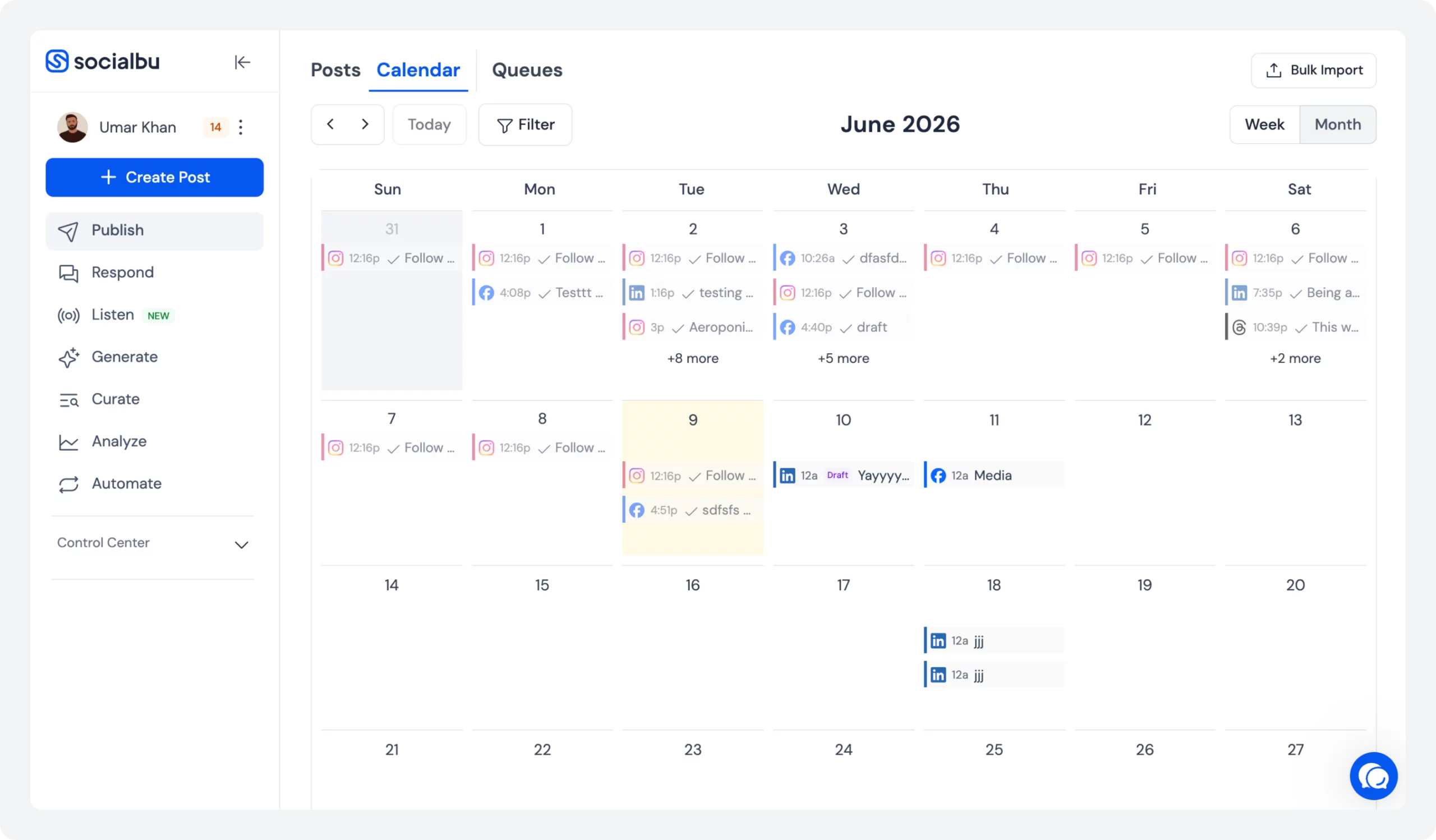
The easiest way to schedule Instagram Stories is to use a dedicated Instagram scheduling tool like SocialBu.
SocialBu is a social media management tool that lets you manage Instagram content alongside other platforms. Instead of switching between apps, you can create, schedule, and monitor your content from one dashboard.
Before you start, make sure your Instagram account is properly connected and that you have the required permissions to publish.
How to Schedule Instagram Stories on Desktop with SocialBu?
You can schedule Instagram Stories from your desktop by connecting your Instagram account with SocialBu and creating your Story content in advance.
Follow these steps:
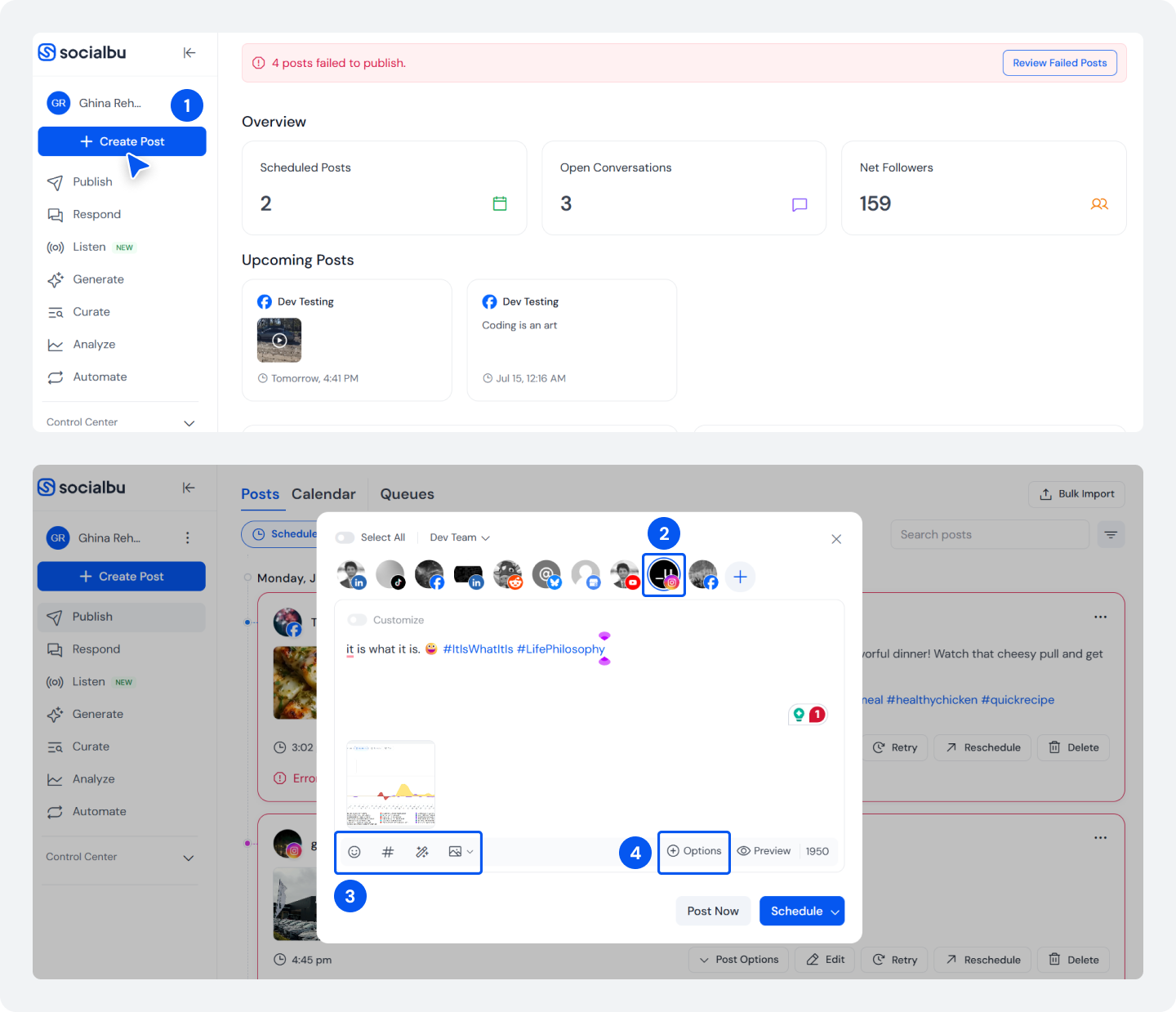
Step 1: Connect your Instagram account. Make sure your Instagram account is:
- A Business or Creator account
- Connected to the correct Facebook page
- Ready for third-party publishing permissions
Once connected, SocialBu can help you manage your Instagram posting schedule from your dashboard. After connecting your account, click on ‘Create Post’.
Step 2: Choose Instagram as your platform.
Step 3: Write a caption for your story, upload an image, and add stickers.
Instagram Stories work best when content is vertical. The recommended Story format is: 1080 × 1920 pixels with a 9:16 aspect ratio.
Step 4: Click on ‘Options’ to choose the format.
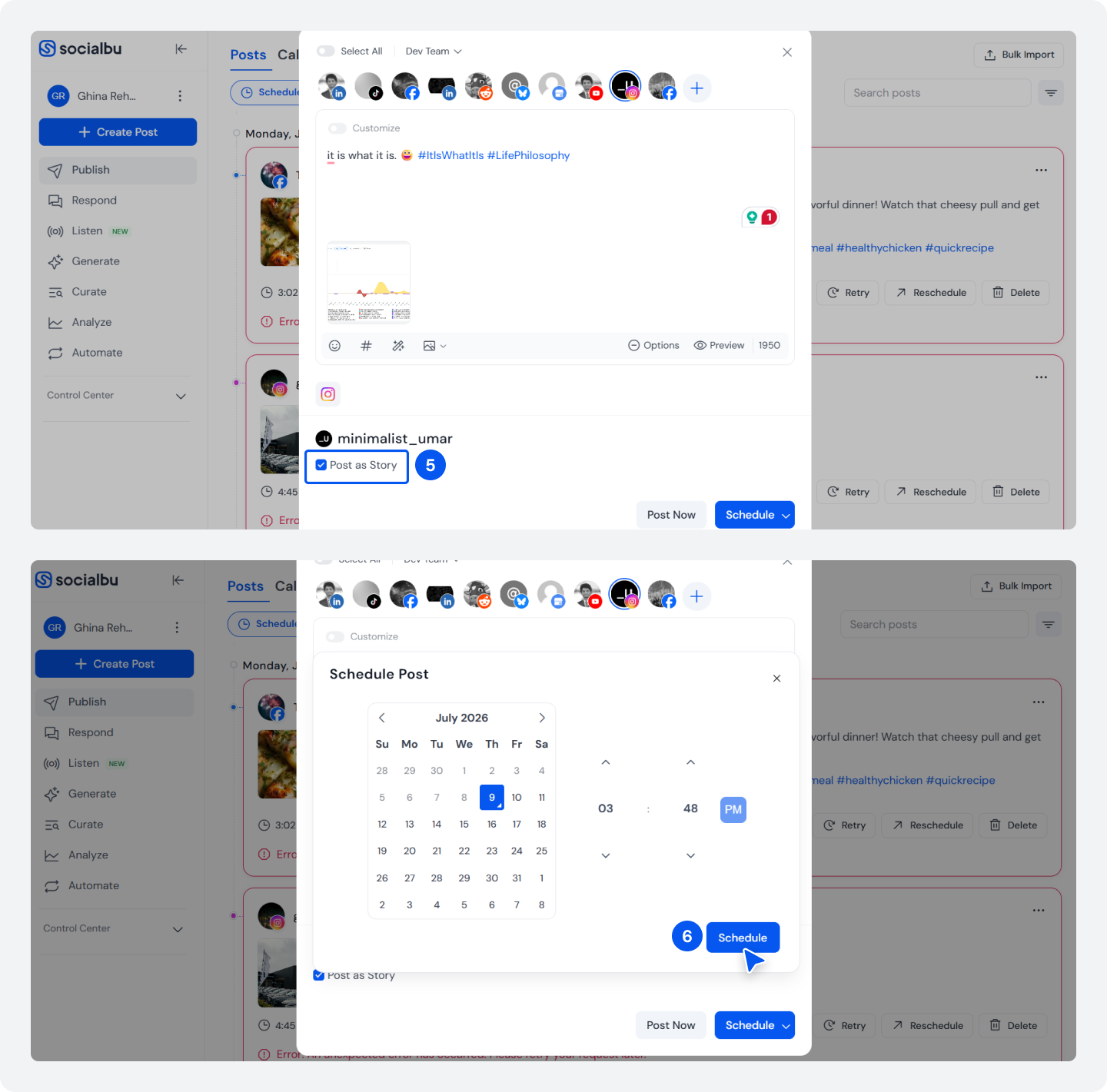
Step 5: Choose ‘Post as Story’ to schedule your Instagram story.
Step 6: To schedule your Instagram story, click on ‘Schedule’, select a date and time, then click ‘Schedule’.
How to Schedule Instagram Stories on the Socialbu iOS App?
The SocialBu mobile app makes it easier to manage Instagram Stories when you are away from your computer.
A mobile Instagram scheduler is useful for creators and marketers who work while traveling or managing content on the go. The process is simple:
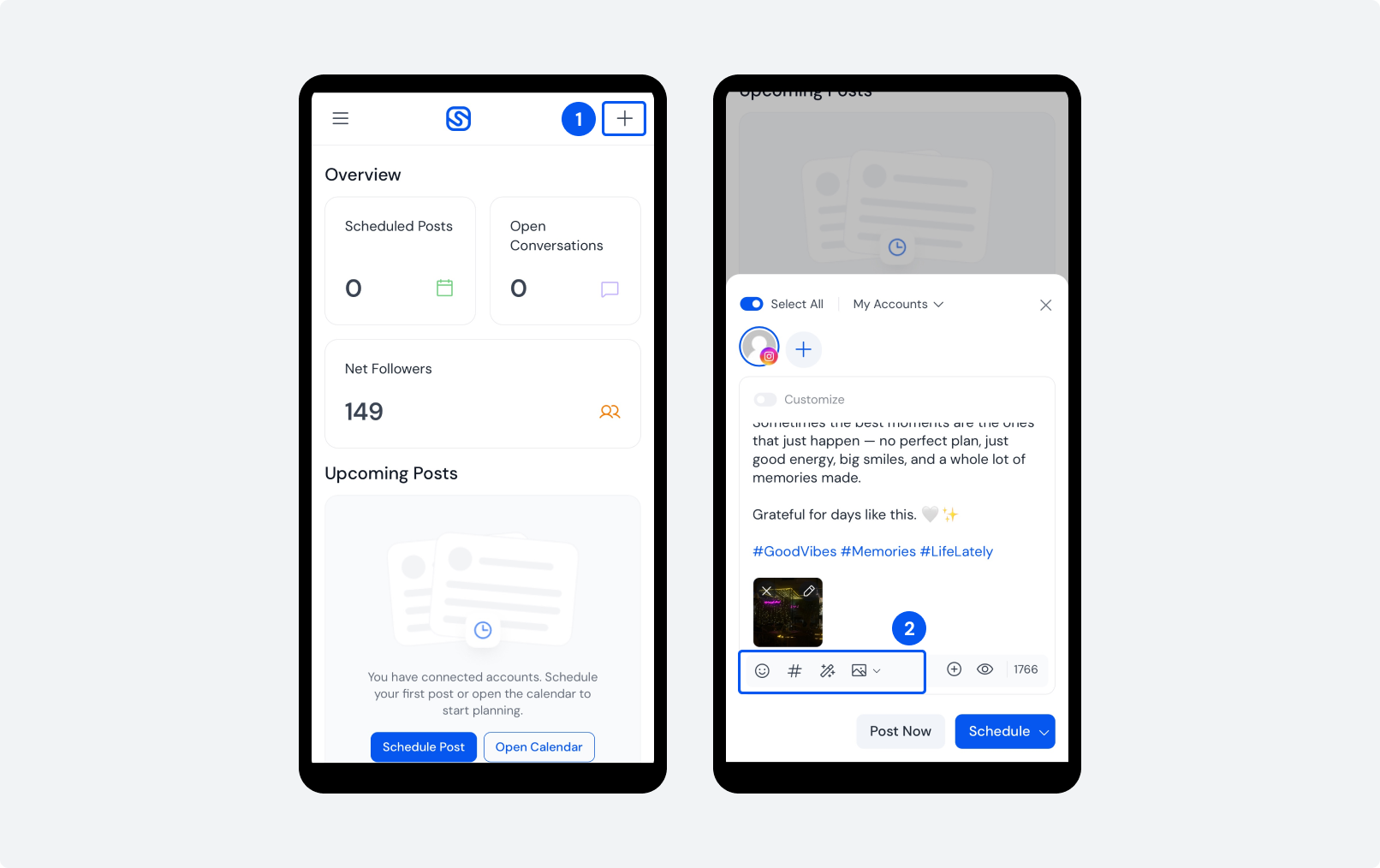
Step 1: Install the SocialBu app on your iOS device and log into your account. Make sure your Instagram account is already connected. From the mobile dashboard, tap the ‘+’ icon. Select Instagram and choose story content.
Step 2: Add a caption, emojis, and hashtags for your story content. Mobile scheduling is helpful for capturing content during events, meetings, or daily activities.
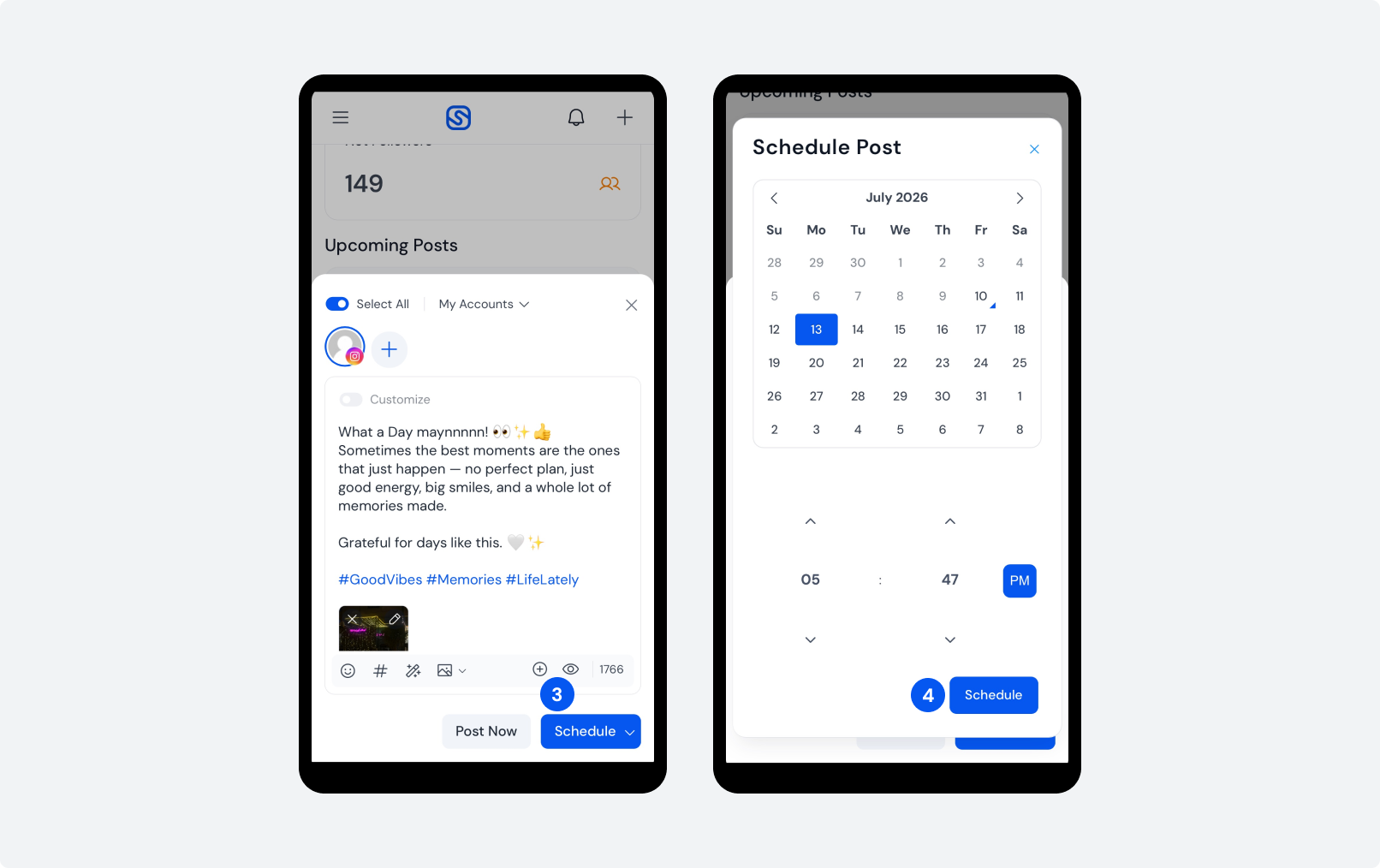
Step 3: After that, before posting, click on ‘Schedule’.
Step 4: Once your Story is ready:
- Select the date
- Select the time
- Save the schedule
You can then review upcoming content through your scheduling dashboard.
How to Schedule Instagram Stories Using Meta Business Suite (Native Method)
Meta Business Suite is one of the easiest ways to schedule Instagram Stories without using a third-party scheduling tool. It is a free platform from Meta that allows businesses and creators to manage Instagram and Facebook content from one dashboard.
Before scheduling, make sure your Instagram account is a professional account (Business or Creator) and connected to a Facebook Page. Follow these steps to schedule Instagram Stories using Meta Business Suite:
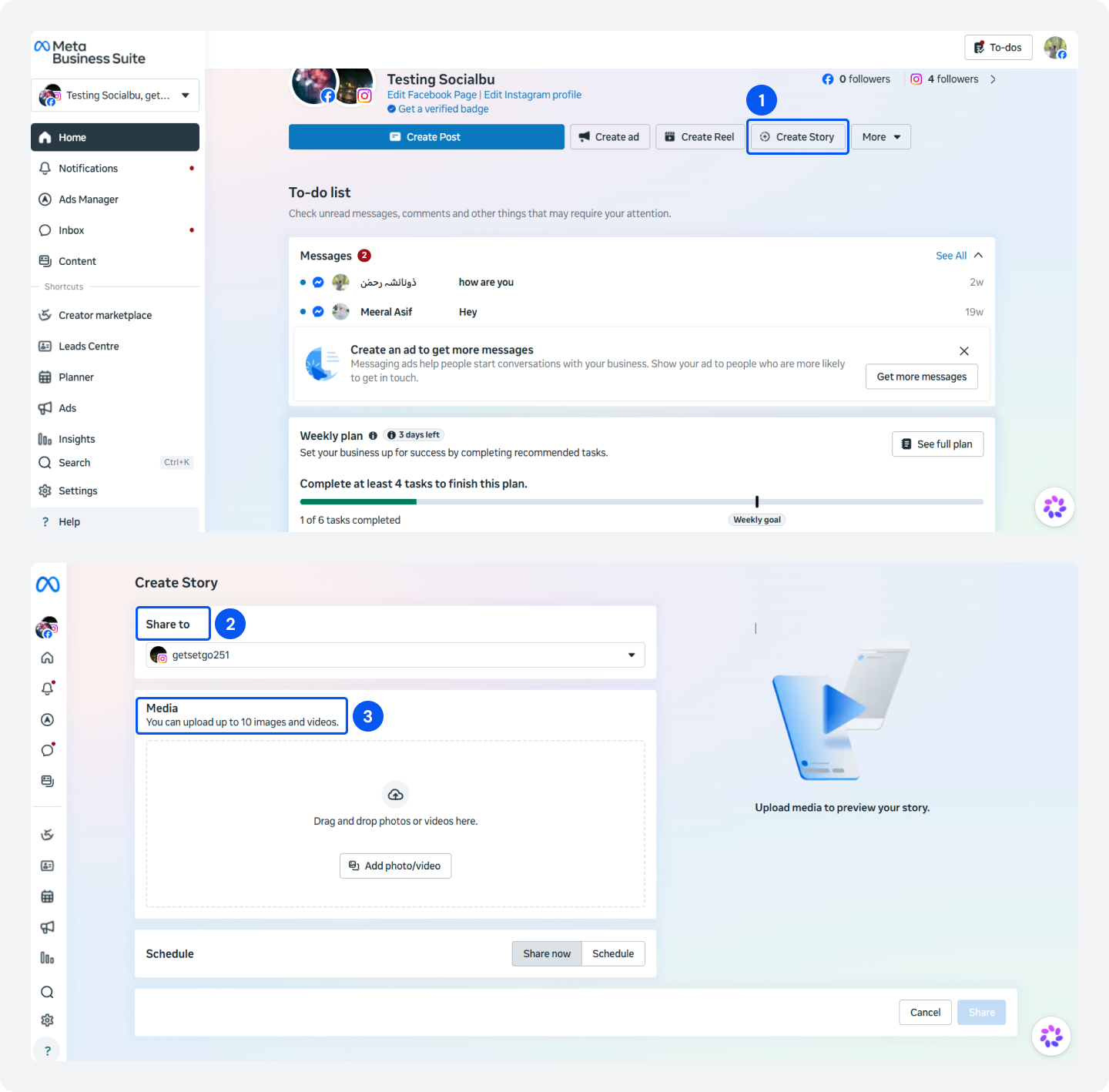
Step 1: Log in to Meta Business Suite on your desktop and click on ‘Create Story’. Mobile scheduling is helpful for capturing content during events, meetings, or daily activities.
Step 2: Then select the Instagram account from ‘Share to’.
Step 3: Click on Media and upload an image or video of your choice. The recommended format is 1080 × 1920 pixels with a 9:16 aspect ratio.
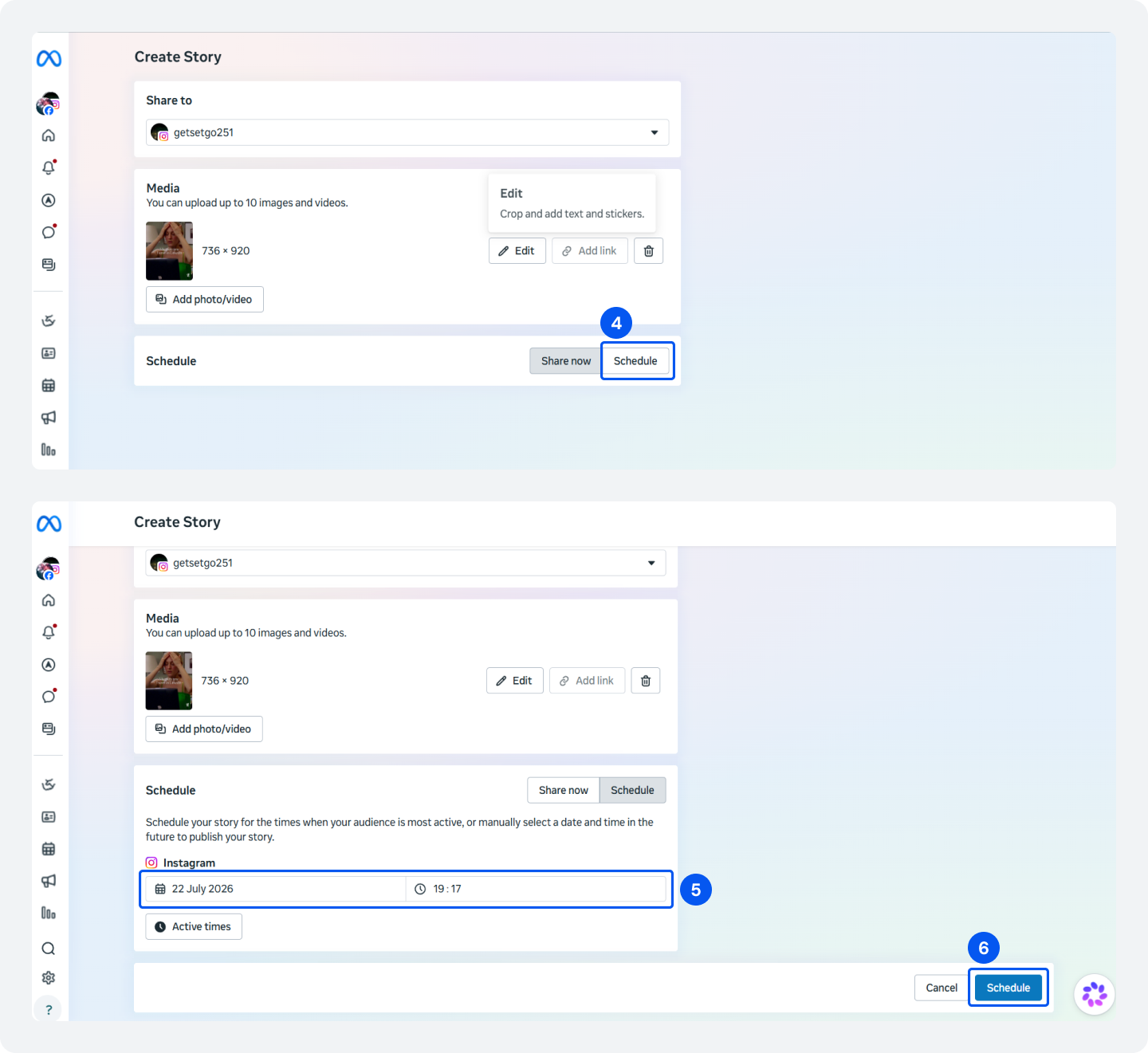
Step 4: After uploading your story, click on the ‘Schedule’ button.
Step 5: Select a date and Time to schedule your post. You can also check Active times to schedule your post when your audience is most active.
Step 6: Click on ‘Schedule’ and your story will appear in your planned social media content calendar, allowing you to organize upcoming posts and campaigns.
Schedule your Instagram Stories when your audience is most active instead of choosing a random time.
Why Use SocialBu Instead of Scheduling Instagram Stories Manually?
SocialBu helps turn Instagram posting from a daily task into a planned workflow. Manual posting has several challenges:
- You need to remember every posting time
- Content preparation becomes stressful
- Teams cannot easily collaborate
- Campaign planning becomes harder
A scheduling tool solves these problems by giving you a central place to manage your content.
SocialBu users publish 34,000+ posts every week, and immediate posts typically go live in under two minutes.
Scheduling ahead helps you save time and post consistently.
What Socialbu Does That the Native Tools Don’t?
- Better content planning. Organize future campaigns, weekly posting schedules, and different content types in one place.
- Multi-platform publishing. Schedule content for Instagram, Facebook, LinkedIn, X (Twitter), and other social networks from a single dashboard.
- Team collaboration. Create a smoother approval process for your team. Designers, marketers, and managers can review and approve content before it goes live.
- Posts, Stories, and Reels together. Scheduling Instagram posts, Stories, and Reels from one place helps you maintain a consistent publishing schedule across every content format.
- Content calendar for consistent publishing. View all your scheduled content in a calendar layout.
Can You Schedule Instagram Stories Automatically?
📊
Data from SocialBu Usage Analysis
Auto-publishing helps eliminate one of the biggest reasons for missed Instagram Stories – simply forgetting to post. Based on SocialBu’s platform data, 97.1% of users who create a post go on to publish it, showing that a reliable scheduling workflow makes it much easier to stay consistent.
Yes, Instagram Stories can be scheduled automatically when your scheduling tool supports direct publishing. However, automatic publishing depends on Instagram account type, API permissions, tool capabilities, and content format.
Auto-publishing also removes one of the biggest sources of missed content: forgetting to post at the right time.
In SocialBu, users who create content almost always publish, achieving a 97% create-to-publish completion rate and enabling a reliable scheduling workflow.
Can You Schedule Instagram Stories With Polls or Stickers?
Scheduling Instagram Stories with polls and stickers depends on the tool and Instagram’s publishing limitations. Interactive Story features are important because they increase engagement.
Brands commonly use: Poll stickers, question stickers, emoji sliders, and link stickers.
However, not every third-party scheduling tool can automatically publish every Instagram Story element.
Ready to Stop Posting Instagram Stories Manually?
SocialBu makes it simple. Plan, schedule, and auto-publish your Instagram Stories, Posts, and Reels from one dashboard.
Final Thoughts
Scheduling Instagram Stories in 2026 is no longer only about saving time. It is about creating a better content system.
Native tools work well for simple scheduling. But businesses that need planning, collaboration, and a complete Instagram content workflow can benefit from dedicated tools like SocialBu.
The future of Instagram marketing is not about posting more. It is about posting smarter.
FAQs
Q: Can you schedule Instagram Stories?
Yes, you can schedule Instagram Stories using tools like Meta Business Suite and third-party apps.
Instagram has added more scheduling options over time, but the available features depend on your account type and the tool you use.
Q: How do you schedule Instagram Stories?
You can schedule Stories by using a supported scheduling tool connected to your Instagram professional account.
The basic process is:
- Connect your Instagram account.
- Create your Story content.
- Upload your image or video.
- Choose your publishing time.
- Schedule the Story.
Tools like SocialBu help you organize scheduled Stories into your overall Instagram content calendar.
Q: Can you schedule Instagram Stories for free?
Yes, you can schedule Insta Stories for free using Meta Business Suite if your account supports the feature. However, free scheduling options usually have fewer features.
Paid Instagram scheduling tools often offer better planning, team management, analytics, support for multiple accounts, and cross-platform scheduling.
Q: Can you schedule Instagram Stories with links?
Yes, you can schedule Stories with links depending on your account, tool, and available publishing features.
Before choosing a scheduler, check whether it supports the Story features you need.
Q: Can you schedule Insta Stories with polls or stickers?
Sometimes, yes, but it depends on the scheduling tool and Instagram’s publishing limitations.
Interactive features like poll stickers, question stickers, emoji sliders, and link stickers may not be supported by every Instagram scheduling app.
Q: Can you schedule Instagram Stories natively (without a third-party app)?
Yes, but native scheduling options are limited compared with dedicated tools. Instagram itself does not offer a complete scheduling system inside the mobile app.
Most advanced scheduling happens through Meta Business Suite or approved third-party platforms.
Q: How do you schedule Instagram Stories on Hootsuite?
Hootsuite can help manage Instagram content scheduling, but available Story scheduling features depend on Instagram permissions and Hootsuite capabilities. The general process is:
- Connect Instagram.
- Create content.
- Select scheduling options.
- Choose a publishing time.
Many businesses use Hootsuite because it combines multiple social networks into one dashboard.
Q: How do you schedule Instagram Stories on desktop vs mobile?
Desktop scheduling is usually better for planning, while mobile scheduling is better for quick updates.
Desktop tools provide larger workspace, easier file management, and better campaign planning. Mobile scheduling apps are useful when you create content while traveling or working remotely.
Q: Can Instagram Stories be scheduled to auto-publish?
Yes, Instagram Stories can be scheduled to auto-publish when the scheduling tool supports direct publishing. However, some tools only send reminders instead of automatically publishing.
Q: What’s the best time to post Instagram Stories?
The best time to post Instagram Stories depends on your audience, not a universal schedule. Generally, strong posting times are when your followers are most active.
Q: Can you schedule Instagram Reels along with Stories?
Yes, many social media scheduling tools allow you to schedule Instagram Reels, posts, and Stories all at once. Managing all content formats in one Instagram posting schedule makes campaigns easier to organize.
Q: Is it possible to schedule Instagram Stories in advance?
Yes, scheduling Stories in advance is possible using supported tools. Planning ahead helps businesses prepare product launches, seasonal campaigns, promotions, and educational content.
An Instagram story planner makes it easier to maintain consistency.
Q: Why can’t I schedule a post or Story on Instagram?
Scheduling problems usually occur due to account restrictions, connection issues, or unsupported features.
Common reasons include:
- Using a personal account instead of a professional account
- Incorrect Facebook page connection
- Missing permissions
- Unsupported Story elements
- App or platform limitations
Checking your account setup usually solves most scheduling issues.