If you’re running a local business in 2026 and you’re still manually creating Google Business Profile posts one at a time, you’re losing ground to competitors who’ve already automated this process.
Scheduling GBP posts isn’t a nice-to-have anymore; it’s a core part of any serious local SEO strategy.
In this guide, we’ll walk you through both the free and native method and the more powerful SocialBu approach, so you can choose the right workflow for your business size and goals.
Quick Answer
You can schedule posts on Google Business Profile in 2026 either natively inside the GBP dashboard for free or use a dedicated tool like SocialBu to bulk schedule, automate, and manage Google Business Profile posts across multiple locations at scale. Here’s what it does:
- Boosts local search visibility and Google Maps ranking
- Keeps your profile active and relevant
- Saves hours of manual work every week
- Drives more clicks, calls, and direct requests

What Is Google Business Profile Post Scheduling?
Google Business Profile post scheduling refers to the practice of planning and publishing your GBP content in advance, rather than creating posts in real time.
Instead of logging into your profile every day to write a new update, you batch your content creation and set specific dates and times for each post to go live automatically.
Key Stats That Show Why GBP Matters in 2026:
- 64% of consumers use Google to find local business info before visiting.
- Customers are 2.7x more likely to trust a business with a complete, active GBP profile, and 70% more likely to visit it.
- 78% of local searches on mobile result in an in-store visit within 24 hours.
- 56% of businesses have not yet claimed their Google Business Profile listing.
In practical terms, when you schedule Google My Business posts, you can dedicate one focused session per week, or even per month, to writing and queuing your content, and then let automation handle all the publishing.
This eliminates the daily need of remembering to post and removes the inconsistency that comes with reactive, last-minute content creation.
The difference between manual and scheduled posting is significant:
Manual Posting | Scheduled Posting |
You log in daily, write fresh content, and publish in real time. This approach is time-consuming, prone to gaps, and difficult to maintain consistently, especially during busy sessions. | You write content in batches, set your preferred publish times, and let automation maintain a consistent posting rhythm. Your profile stays active even when your attention is elsewhere. |
The key benefit of scheduling GMB post workflows is consistency. Google rewards businesses that post regularly with higher visibility in local pack results and on Google Maps. When you rely on manual posting, life gets in the way, and your profile goes quiet. Scheduling eliminates that risk entirely.
Why Google Business Profile Post Scheduling Matters in 2026?
The local search landscape has evolved dramatically over the past few years. Google’s algorithm now actively factors in profile activity, content freshness, and engagement signals when ranking businesses in the local pack and on Google Maps.
Here’s why a consistent Google Business Profile post-scheduling strategy is no longer optional for businesses serious about local search:
1. Improves Local Search Visibility
Google’s local ranking algorithm considers three primary factors: relevance, distance, and prominence. Consistent local SEO posting directly impacts all three.
An active profile signals to Google that your business is open, engaged, and relevant, helping you appear more frequently in the local pack ranking results when customers search for businesses like yours.
Research suggests that GBP listings with regular posts generate about 12% more branded search impressions.
That’s a significant competitive advantage available to any business willing to invest in a scheduling strategy. For a deeper look at how social signals feed into this, see the impact of social media on local search rankings.
2. Increases Google Maps Visibility and Engagement
Your Google Maps visibility is directly tied to how active your profile is. Businesses with consistent posting habits generate more clicks, more requests for directions, and more phone calls.
Google tracks these engagement signals and uses them to further boost your ranking, creating a positive feedback loop that rewards active businesses.
Studies show a 42% increase in direction requests for businesses posting weekly versus monthly, and 28% more website clicks from GBP for businesses with a consistent posting schedule. This isn’t theoretical; it’s measurable, with a direct impact on your bottom line.
If you want to track exactly which posts are driving these clicks and calls, SocialBu’s analytics dashboard can show you engagement patterns down to the post level.
3. Maintains Profile Freshness
Most Google Business Profile posts expire after 7 days. If you’re not consistently replacing them with fresh content, your profile looks stale to both Google and potential customers.
Without a scheduling strategy in place, your profile can go dark for weeks at a time without you even realizing it. A scheduled posting workflow ensures your profile is always populated with current, relevant content.
4. Supports Conversion Intent
Google Business Profile updates function as mini landing pages embedded directly in Google Search and Maps results.
When a customer searches for your business type, your posts can appear alongside your profile with compelling offers, calls to action, and promotions, driving conversions before the customer ever visits your website. This makes GBP posting a direct revenue driver, not just an SEO tactic.
Every post is a conversion opportunity, and scheduling ensures you never miss one.
Start Scheduling Your GBP Posts Today!
SocialBu makes it easy to schedule, automate, and manage all your Google Business Profile posts in one place.
Types of Posts You Can Schedule on Google Business Profile
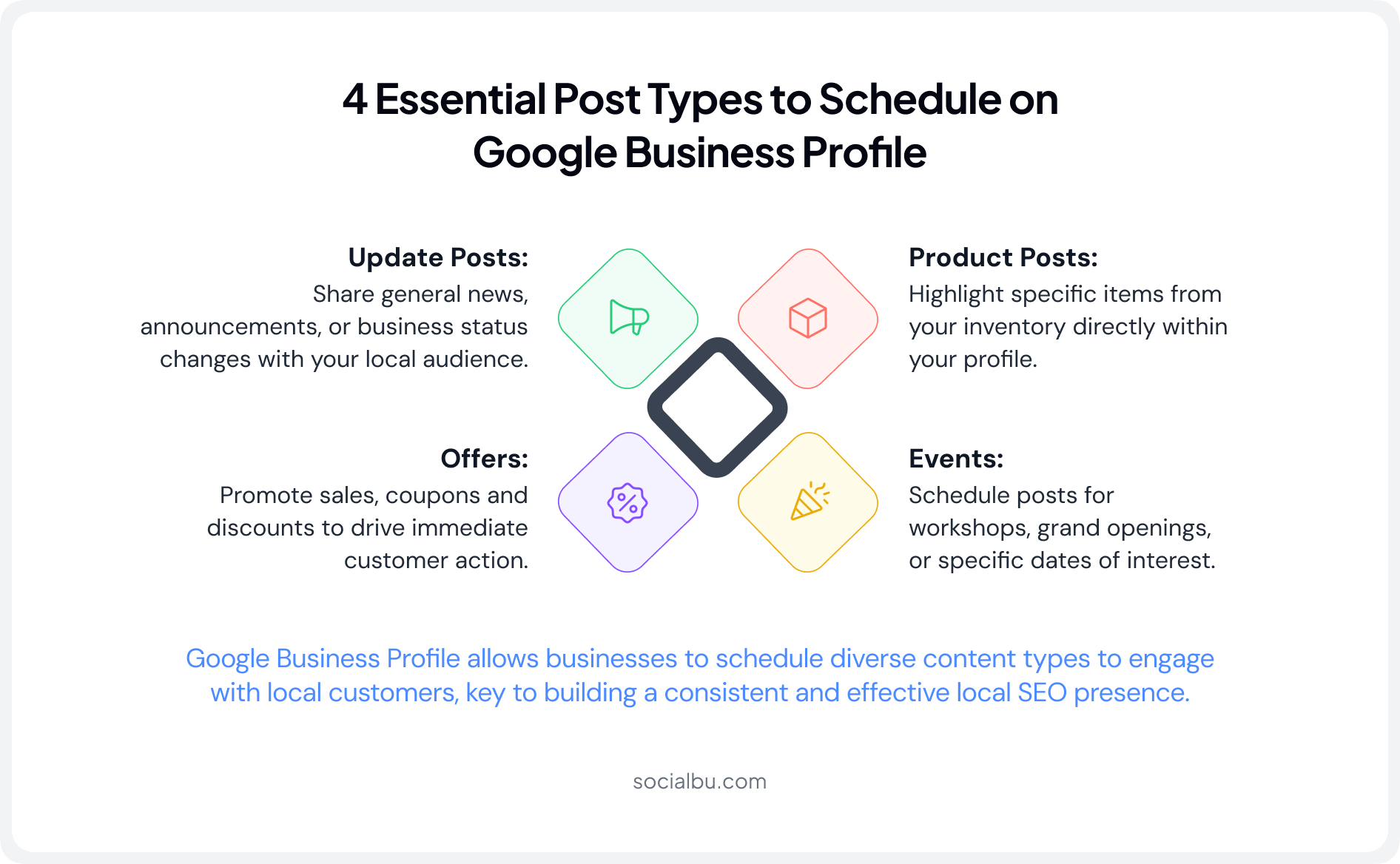
Before moving towards the scheduling process, it’s important to understand the four GBP post types available on Google Business Profile. Each serves a different strategic purpose in your content calendar.
1. Update Posts
Update posts are general announcements, news, or information about your business. They’re ideal for regular communication; sharing new hours, highlighting team members, posting behind-the-scenes content, or keeping customers informed about changes.
Update posts expire after 7 days, which is exactly why scheduling is so critical. You need fresh content queued up to replace them as they expire.
2. Offers
Offer posts are designed for discounts, deals, and promotional content with set start and end dates. They’re perfect for limited-time campaigns, seasonal promotions, and loyalty incentives.
Offer posts disappear after the offer end date you specify, making them ideal for time-sensitive marketing campaigns.
3. Events
Event posts provide time-based visibility for workshops, sales, grand openings, and other scheduled happenings. They remain live until the event ends, giving you extended visibility for time-bound activities.
These posts are highly effective for driving RSVPs and foot traffic to your business location. Tying event posts to seasonal or awareness dates? Check the social media holiday calendar for 2026 for ideas.
4. Product Posts
Product Posts give catalog-style visibility to specific products or services, complete with price, description, and a buy or learn more CTA. They’re particularly effective for e-commerce adjacent local businesses and retailers who want to showcase specific items directly in search results.
 Also Read: What Is Google My Business Image Size and Dimensions? Get every post type looking sharp with the right image specs before you schedule.
Can You Schedule Posts on Google Business Profile in 2026?
Yes, you can absolutely schedule posts on Google Business Profile in 2026. There are two main methods available.
- Native Scheduling: Basic scheduling is available directly inside the GBP dashboard, completely free. It’s sufficient for solo business owners posting occasionally at a single location.
- Third-Party Tools like SocialBu: Dedicated GBP post scheduler platforms offer bulk scheduling, automation, multi-location support, a full content calendar, and advanced analytics. These are recommended for growing businesses, agencies, and anyone managing GBP at scale.
Both methods allow you to schedule GBP posts in advance. The method you choose depends on your business size, the volume of content you need to manage, and how sophisticated your local SEO posting strategy needs to be.
Method 1: Google Business Profile Native Scheduling (Free)
Google offers native scheduling for basic Google Business Profiles directly in the dashboard. It’s a free option that covers the basics.
Here’s how to schedule Google Business Profile posts using the built-in method.
Step 1: Open Google Business Profile
Go to business.google.com and sign in with the Google account associated with your business profile.
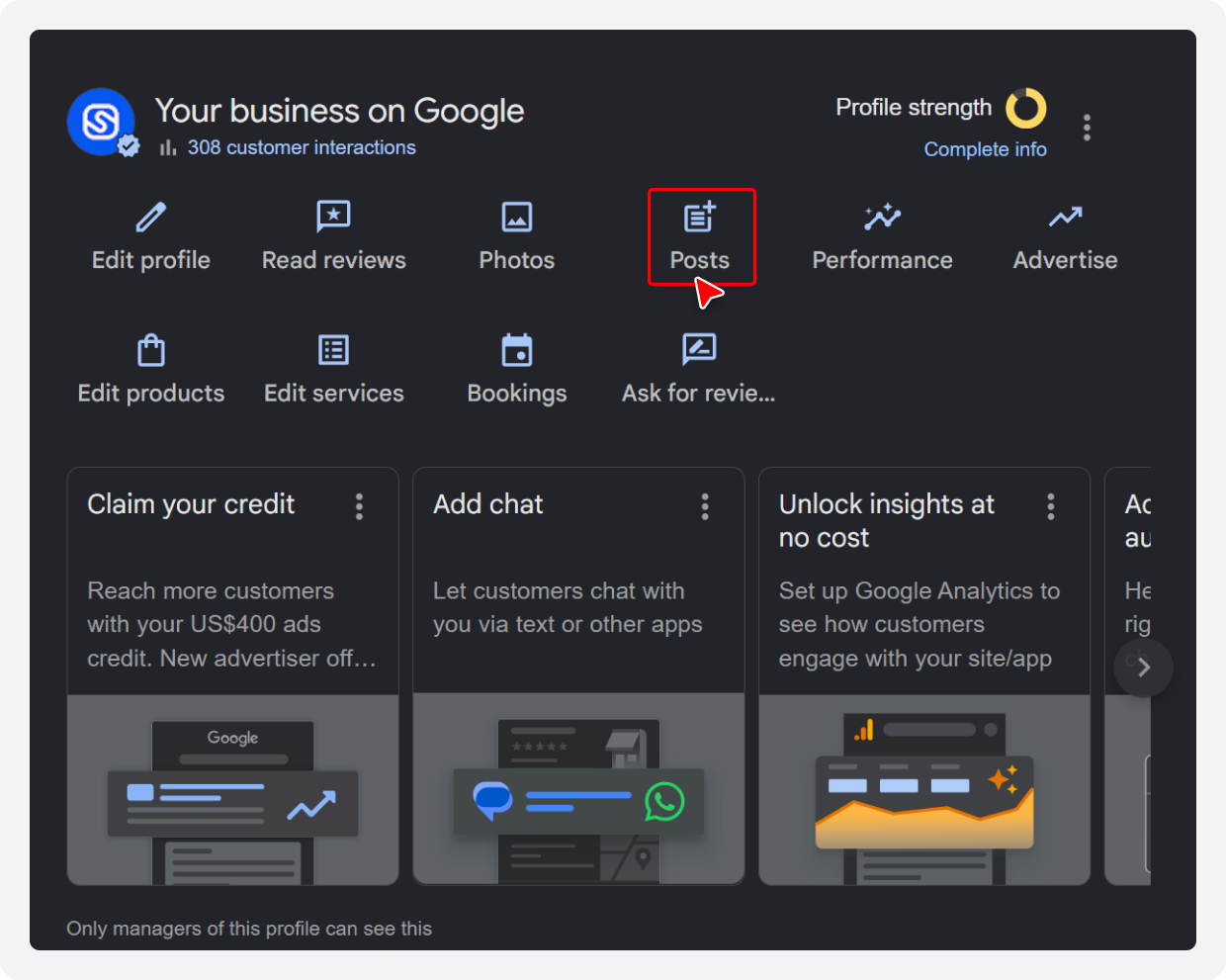
Step 2: Navigate to “Posts”
Click the “Posts” button in your GBP dashboard to open the post composer.
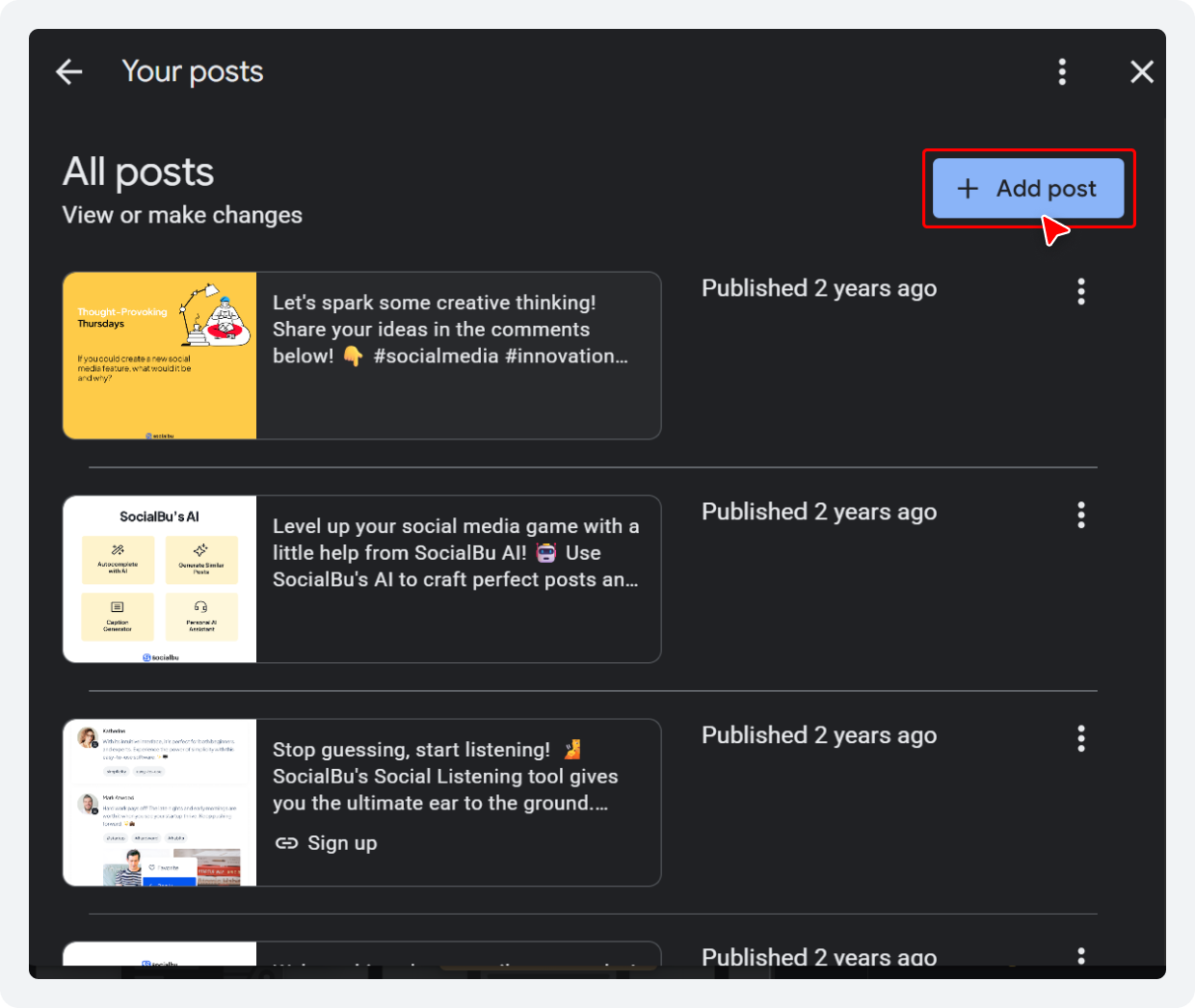
Step 3: Select “Add Post”
Select the “Add Post” option in the top-right corner of the post composer.
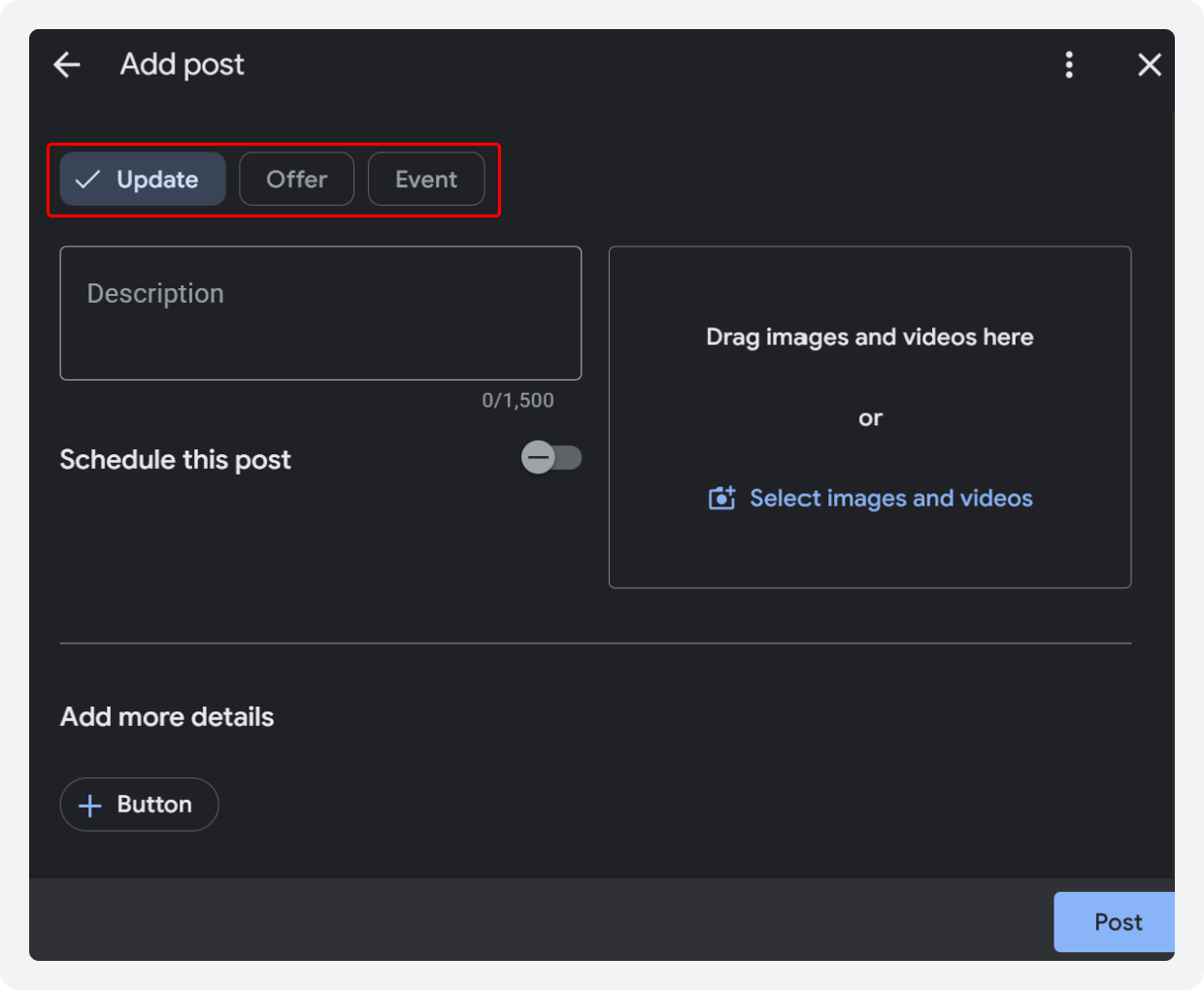
Step 4: Create Your Post Content
Choose the post type at the top, e.g., Update, Offer, or Event. Write your post copy, and upload your images or video.
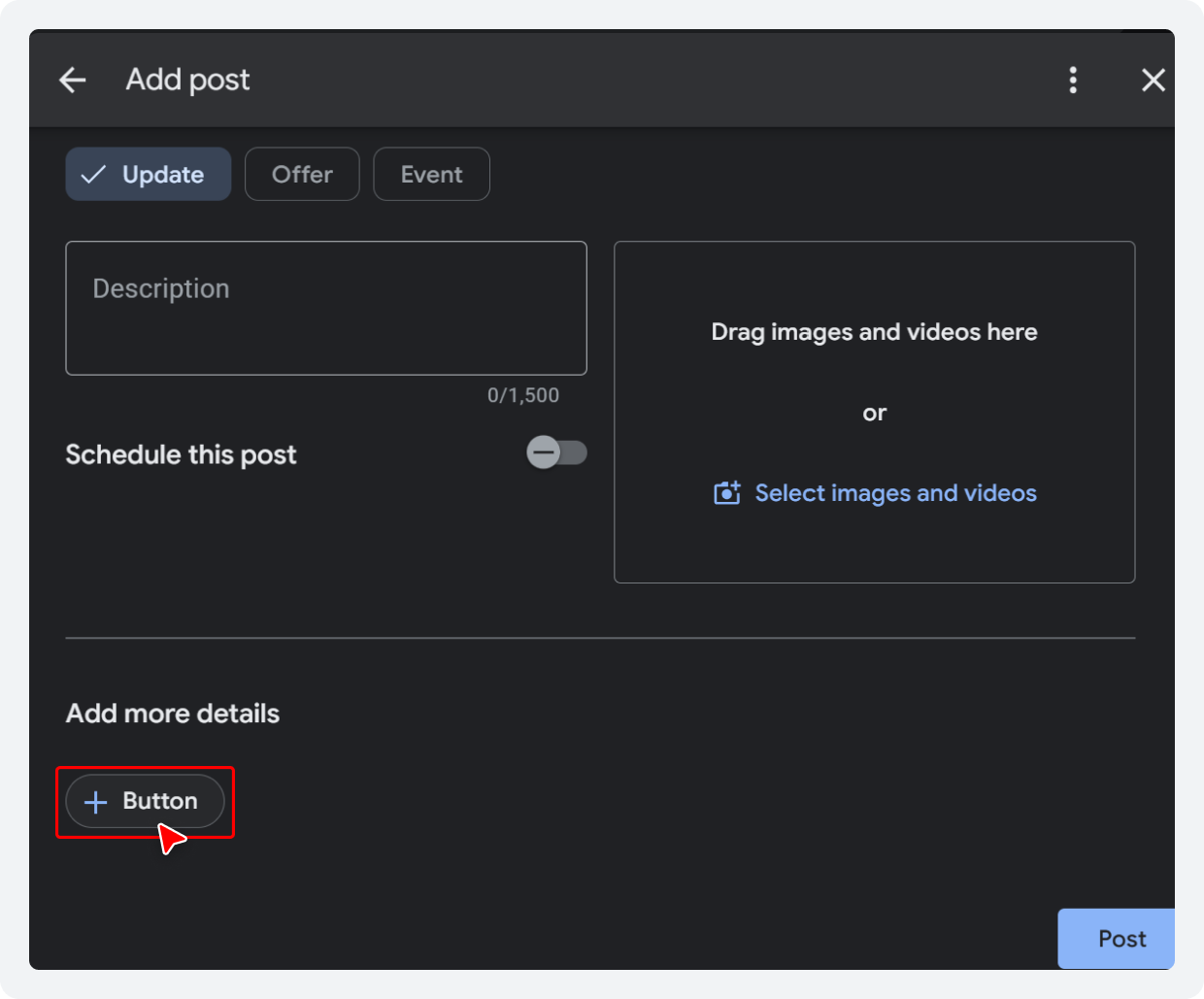
Step 5: Add a Button
Once you have composed your post, select the “+Button” option at the bottom. From the drop-down menu, select the option you prefer.
Step 6: Find the Schedule Option
Click the toggle next to “Schedule this post” if you wish to schedule your post for a future date and time.
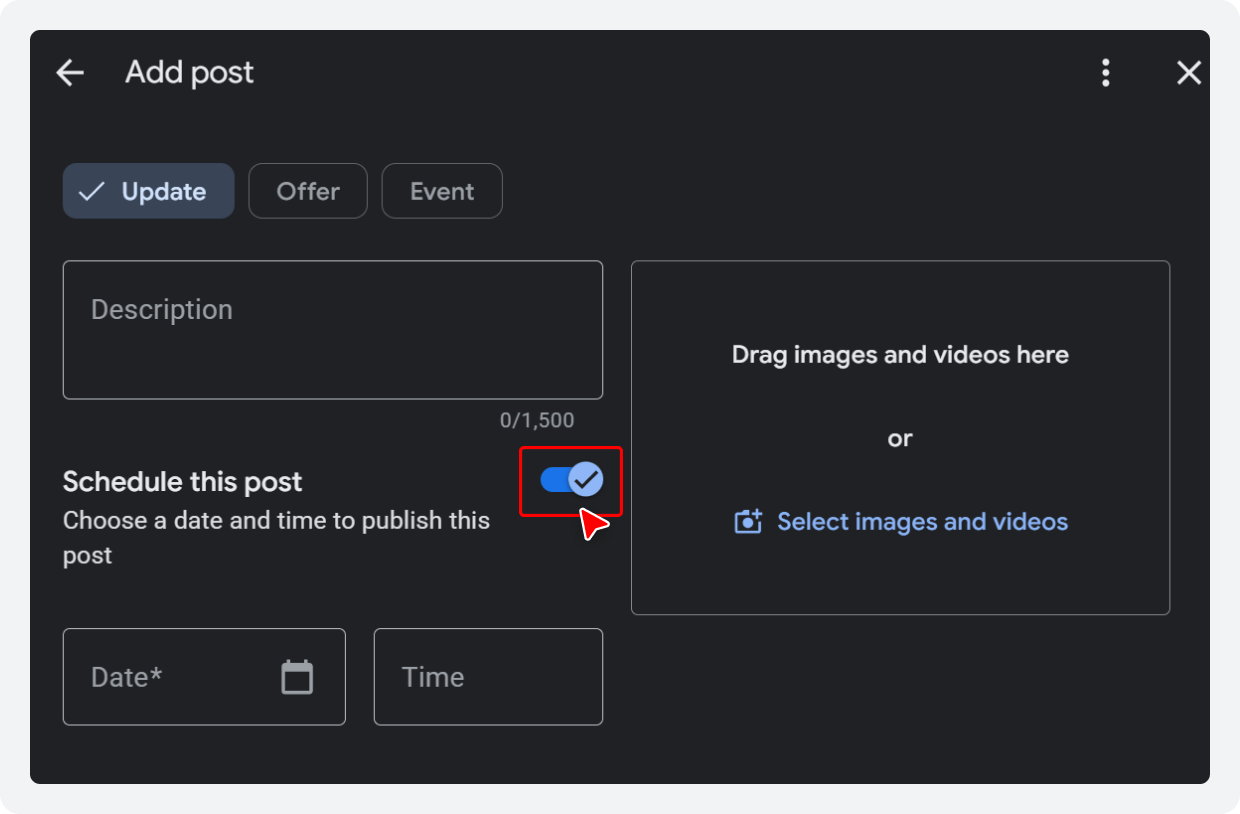
Choose the exact date and time you want the post to go live. You can specify time down to the minute.
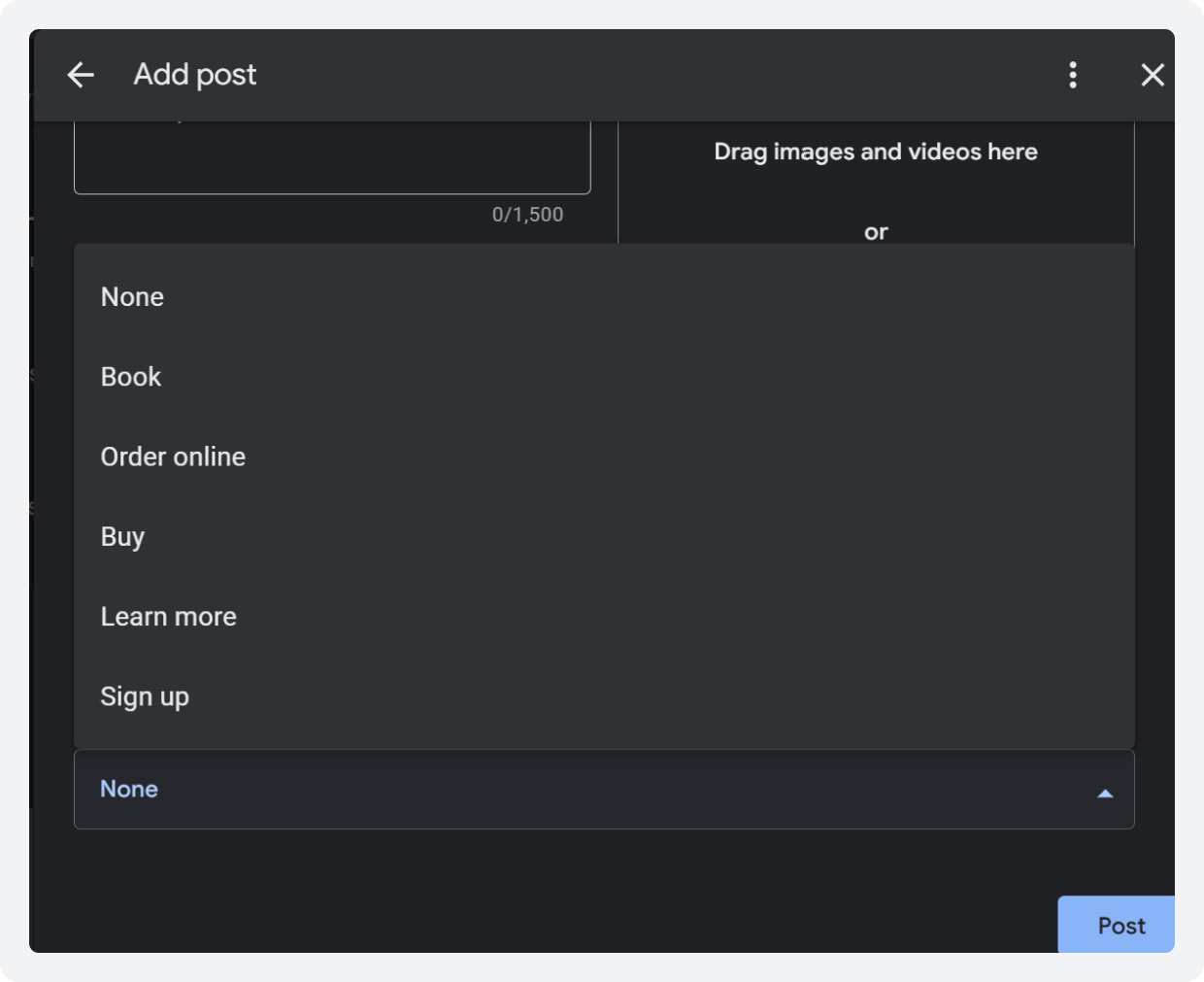
Step 7: Confirm Scheduling
Once the time and date are selected, click “Post” to queue the post. It will publish automatically at the time you selected, with no further action needed from you.
Limitations of Native Scheduling
While the free method works for basic use, it has significant shortcomings for businesses that need to scale their GMB post scheduling workflow.
Here’s a comparison of what native scheduling offers versus what a dedicated Google Business Profile scheduling tool like SocialBu provides.
Feature | Native GBP Scheduling | SocialBu |
Basic post scheduling | Yes | Yes |
Bulk scheduling | No | Yes |
Content calendar view | No | Yes |
Multi-location management | No | Yes |
Automation workflows | No | Yes |
Post-performance analytics | Limited | Advanced |
Team collaboration | No | Yes |
Multi-platform scheduling | No | Yes |
Also Read: If you’re weighing your options beyond the native dashboard, see our full roundup of the 9 best tools to schedule Google My Business posts.Method 2: How to Schedule Posts on Google Business Profile Using SocialBu (Recommended)
Why Use SocialBu as Your GBP Post Scheduler?
Here are all the reasons why you should be using SocialBu to schedule your Google Business Profile posts:
- Unified Content Calendar: Visualize all your scheduled Google Business Profile posts alongside your other social channels in one centralized calendar. See the full month at a glance and drag and drop to reschedule.
- Bulk Scheduling: Upload and schedule Google Business Profile posts in bulk at once; ideal for campaign planning, seasonal content, and agencies managing multiple clients. This is the feature that makes SocialBu a true social media scheduling tool for local businesses.
- Multi-Location Support: Manage GBP posts for all your locations from a single dashboard. Push the same post to all locations simultaneously, or customize posts for each location.
- Automation Workflows: Set up recurring posts and evergreen content recycling so your profile never gets quiet. Automate Google Business Profile posts so they keep running even when your team is on holiday.
Step-by-Step: How to Schedule Google Business Profile Posts in SocialBu
Here is a step-by-step guide to scheduling Google Business Profile posts in SocialBu.
Step 1: Connect your Google Business Profile to SocialBu
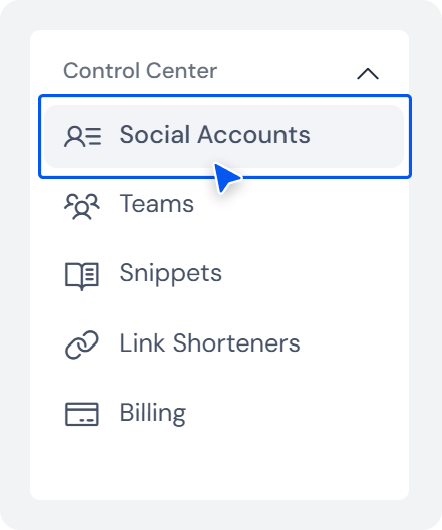
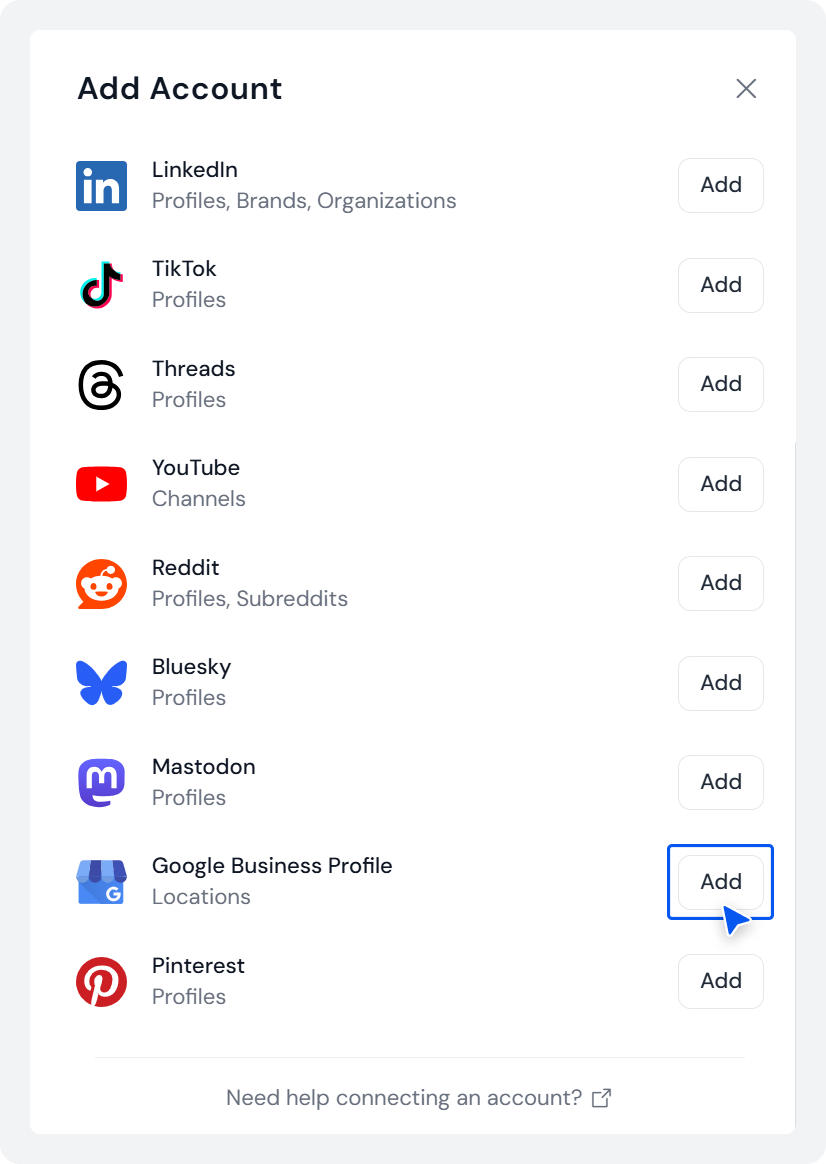
Log in to SocialBu and select “Social Accounts” under Control Center on the dashboard.
Choose “Add account” at the top.
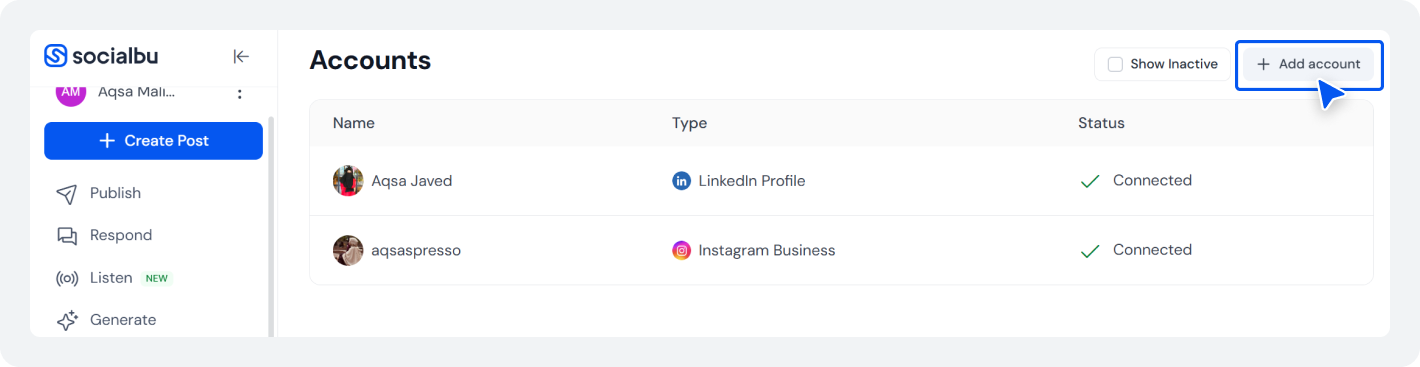
Select “Add” next to Google Business Profile, and select your GBP account to link it to SocialBu.
Step 2: Open the SocialBu Composer
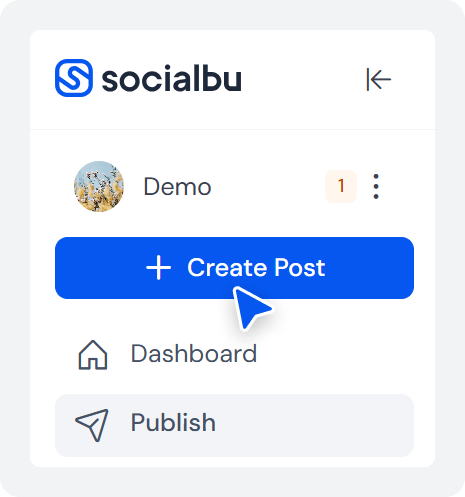
Click “Create Post” from the main dashboard.
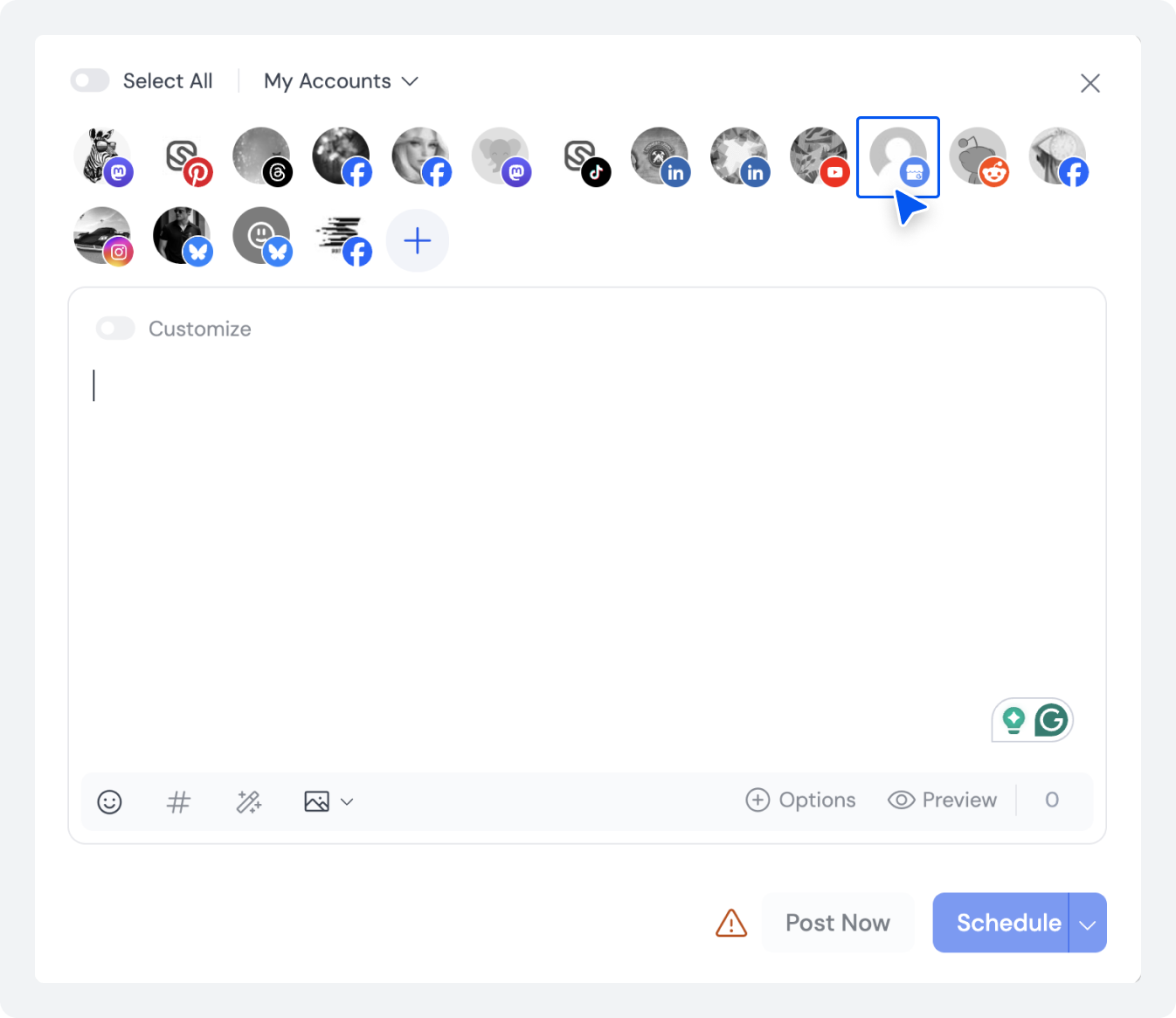
In the account selector, choose your connected GBP account from the accounts list.
Step 3: Create Your Optimized GBP Post
Write your post copy with local keywords naturally included. Add high-quality images or videos; real photos consistently outperform stock imagery.
Select your post type: Update, Offer, Event, or Product. Add a strong GBP post-CTA such as “Call Now,” “Book Appointment,” “Learn More,” or “Get Offer.”
Step 4: Optimize for Local SEO
Before scheduling, review your post for location-based keywords, clear conversion intent, a specific call to action, and visual quality. This step is critical to maximizing Google Business Profile engagement and local search visibility.
This is where the Google Business Profile API integration in SocialBu allows for seamless, optimized publishing.
Step 5: Schedule or Add to Queue
Click “Schedule” and set your preferred date and time, or add the post to an existing content queue. SocialBu’s calendar view lets you see all upcoming posts and adjust the schedule visually, making it the most intuitive way to schedule GBP posts in advance.
Sample Monthly GBP Content Calendar
Here’s a sample Google Business Profile content calendar you can implement immediately using SocialBu to maintain consistent posting:
Week | Post Type | Goal | CTA to Include |
Week 1 | Offer/Promotion | Lead generation & conversions | Get Offer/Learn More |
Week 2 | Business Update | Engagement & brand awareness | Learn More/Call Now |
Week 3 | Event/Workshop | Awareness & RSVPs | Book/Sign Up |
Week 4 | Testimonial/Review | Trust building & social proof | Call Now/Book |
How to Bulk Schedule Google Business Profile Posts
For businesses with large content calendars, the ability to bulk schedule Google Business Profile posts is transformative. Instead of creating posts one at a time, SocialBu allows you to:
- Upload a CSV file with multiple post drafts at once
- Assign dates, times, and post types in bulk
- Schedule an entire month’s or quarter’s content in a single session
- Manage seasonal campaigns and promotional bursts effectively
This feature is especially valuable for marketing agencies managing GBP accounts for multiple clients, or franchise businesses that need to push the same promotion to dozens of locations simultaneously.
The ability to batch create GBP posts from a spreadsheet is one of the biggest time-savers in local SEO management.
Can You Do Multi-Location GBP Post Scheduling Using SocialBu?
Multi-location GBP post scheduling is one of SocialBu’s most powerful capabilities. If you’re managing a franchise, retail chain, or any business with more than one physical location, SocialBu lets you:
- Manage all locations from a single centralized dashboard
- Push identical posts to all locations simultaneously
- Customize posts per location
- Monitor performance across all locations in one unified view
- Schedule posts that comply with each location’s operating hours and time zones
How to Automate Google Business Profile Posts?
Beyond scheduling, SocialBu lets you automate Google Business Profile posts using smart workflow features that go well beyond what any native GBP tool offers:
- Evergreen Content Recycling: Set your best-performing posts to automatically re-publish on a schedule. This is ideal for content that remains relevant year-round, such as your core services, opening hours reminders, or frequently asked questions.
- Recurring Posts: Create a post template and have it published weekly or monthly automatically. Perfect for regular promotions or weekly specials that don’t change much in structure.
- Campaign Automation: Set up a full promotional campaign with start and end dates, and let SocialBu handle all the publishing. With this level of automation, your Google Business Profile can maintain a consistent posting rhythm 24/7; even when your team is on holiday, during busy seasons, or during staff transitions.
Related Reading: The Perfect Social Media Posting Schedule for 2026. Build a posting rhythm across every platform, not just GBP.Best Practices for Scheduling Google Business Profile Posts
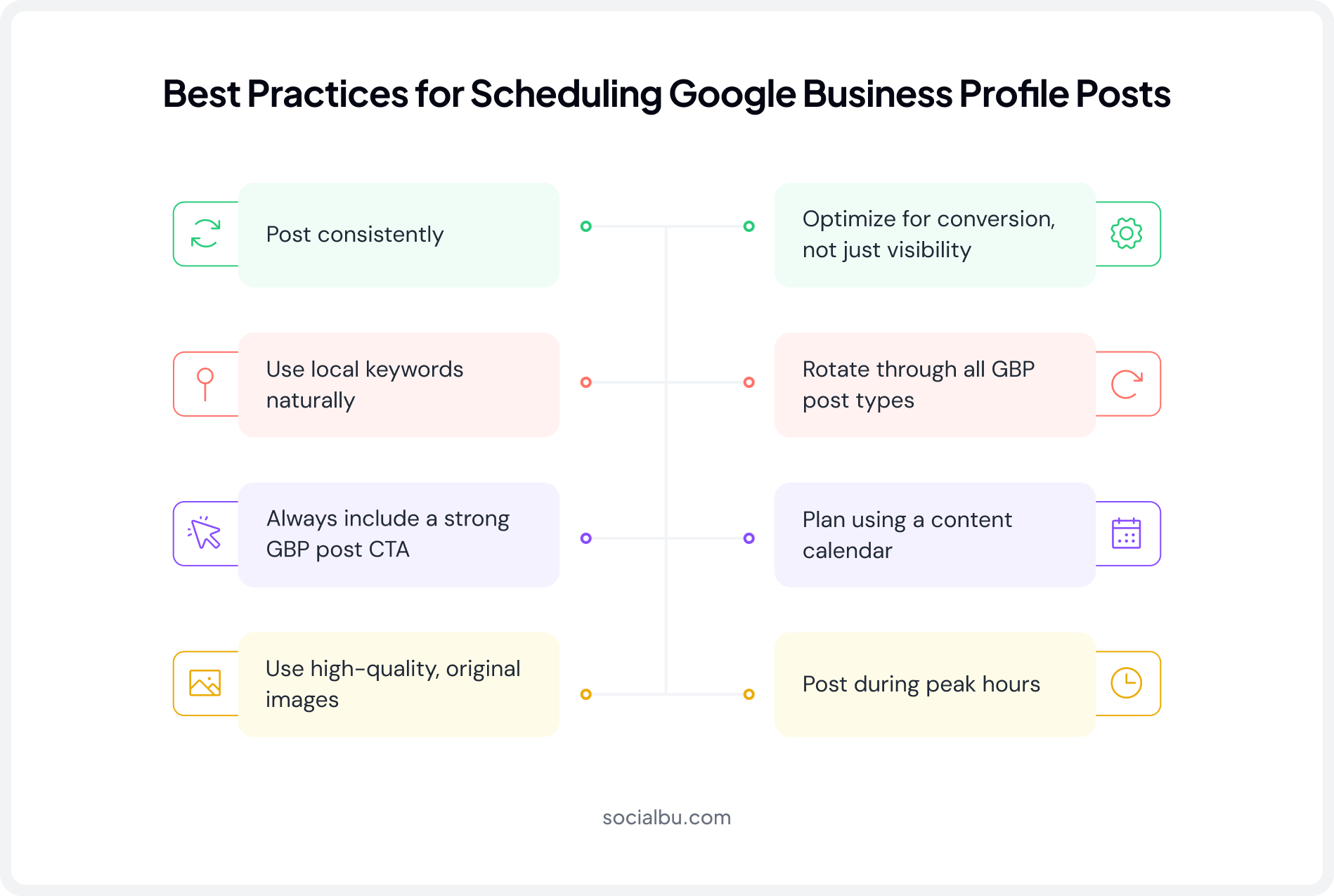
Knowing how to schedule Google Business Profile posts is only half the equation. The other half is making sure every post you publish drives real results. Here are the proven GBP best practices that separate high-performing profiles from average ones in 2026.
1. Post Consistently
The single most impactful thing you can do is post consistently on Google Business Profile. Aim for at least two to four posts per week. This cadence keeps your profile fresh and signals regular activity to Google’s local ranking algorithm.
Inconsistently, even a two-week gap can cause your profile to lose ground in local pack rankings that took months to build.
2. Use Local Keywords Naturally
Every post is an opportunity to improve your local SEO posting. Include location-based search terms naturally within your post copy; phrases like “[Service] in [City]” help Google understand your relevance and nearby customers.
Never keyword-stuff; write for humans first and let the keywords flow naturally. Google is sophisticated enough to identify and penalize forced keyword insertion.
3. Always Include a Strong GBP Post CTA
Every post should tell the reader what to do next. A strong GBP post CTA uses direct action language: Call Now, Book Appointment, Learn More, Get Offer, Visit Us Today. Posts that include a clear call to action generate 89% more clicks than posts without one. Your CTA should match the intent of the post.
4. Use High-Quality, Original Images
Original photos of your team, products, location, and real customers outperform stock photography by a significant margin. Google users respond to authenticity. Blurry images, irrelevant stock photos, and low-resolution visuals reduce engagement and trust in equal measure.
If you’re using SocialBu to schedule Google Business Profile posts, you can upload and store high-quality image assets directly in the platform for reuse across posts. Make sure every image meets Google’s specs with our complete guide to social media image sizes.
5. Optimize for Conversion, Not Just Visibility
Every Google Business Profile post scheduling decision should be driven by a clear conversion goal, not just a desire to “stay active.” Before scheduling any post, ask: “What do I want the reader to do? If you can’t answer that clearly, rewrite the post. Visibility without intent is wasted effort.
6. Rotate Through All GBP Post Types
A healthy content calendar mixes Offers, Updates, Events, and testimonials. Rotating through all four GBP post types keeps your profile dynamic and ensures you’re hitting different audience intents: awareness, consideration, and conversion, throughout the month.
7. Plan Using a Content Calendar
Ad hoc posting leads to gaps, inconsistencies, and missed opportunities. Plan your Google Business Profile content calendar at least two weeks ahead using a social media scheduling tool like SocialBu.
This prevents content gaps and ensures that every seasonal or promotional moment is captured in advance, not left to the last minute.
8. Post During Peak Hours
The best time to schedule GBP posts is during peak local business hours when users are actively searching in your area. For most businesses, Tuesday through Thursday between 9 AM and 11 AM local time tends to perform best.
However, your own analytics in SocialBu will show you exactly when your audience is most active and will always let data inform your scheduling decisions.
Common Mistakes to Avoid When Scheduling GBP Posts
Even businesses that have a scheduler in place and follow the basics often trip up in ways that have nothing to do with frequency, CTAs, or keywords. Here are the pitfalls that don’t get talked about enough.
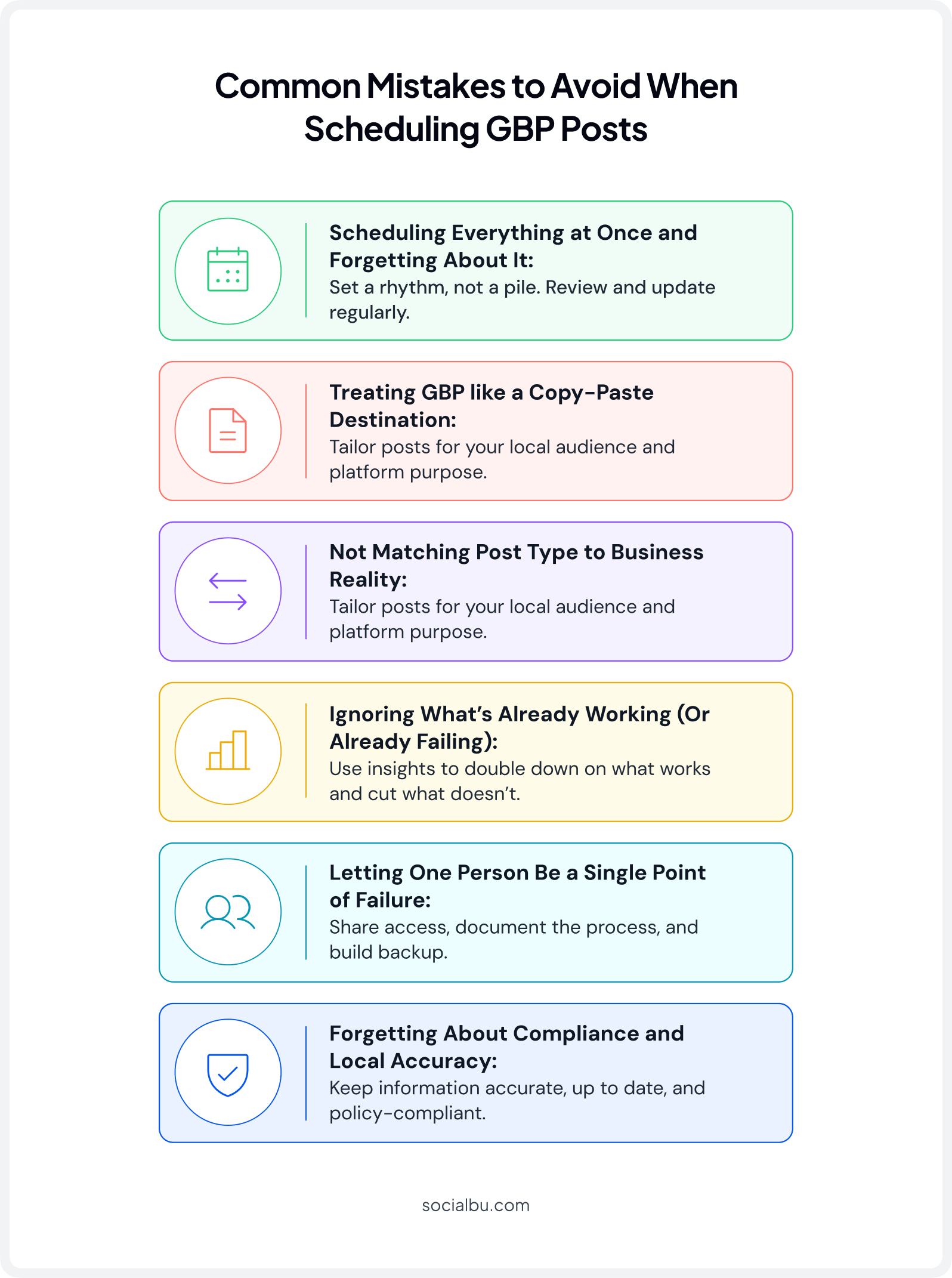
1. Scheduling Everything at Once and Forgetting About It
Queuing months of content and never checking back means posts can go out that are outdated or contradicted by something that just happened, like promoting a canceled event. Schedule in batches, but still check in weekly.
2. Treating GBP like a Copy-Paste Destination for Other Platforms
GBP shows up in search and Maps to people deciding whether to call or visit right now, not to an existing social audience. Content written for Instagram or Facebook often looks casual or out of place there. Write for searchers with high intent, not followers.
3. Not Matching Post Type to Business Reality
Using an “Update” for a real-time updated deal, or an “Event” post for something that isn’t an event, confuses both Google and the customer reading it. Match the post type to what’s actually happening.
4. Ignoring What’s Already Working (Or Already Failing)
Scheduling blind, i.e., without checking which past post drove clicks or calls, means repeating what doesn’t work. A scheduler only automates good decisions; without a feedback loop, it just automates mediocrity faster.
5. Letting One Person Be a Single Point of Failure
When GBP scheduling depends on one person’s login and memory, the whole pipeline stalls the moment they’re out sick or busy; sometimes for weeks before anyone notices. Shared visibility prevents this.
6. Forgetting About Compliance and Local Accuracy
Pushing the same post to every location without checking it still applies everywhere; incorrect phone numbers, mismatched time zones, and offers that don’t apply at every branch can spread misinformation faster than posting nothing at all.
Bad reviews often follow bad information, so it’s worth pairing your posting workflow with a social media review management strategy.
Ready to Automate Your GBP?
Stop posting manually and start dominating local search with SocialBu.
Conclusion
The ability to consistently schedule posts on Google Business Profile is not optional for any business serious about local search visibility. Google rewards active, consistently updated profiles with higher rankings in the local pack and on Google Maps and actively deprioritizes inactive ones.
The businesses winning in 2026 treat their Google Business Profile as a live marketing channel, not a static directory listing.
Whether you use the free native method to get started or invest in SocialBu to automate Google Business Profile posts at scale, the most important thing is to start scheduling consistently and maintain that rhythm without fail.
Start scheduling today, and you’ll see the impact on your local ranking within weeks.
FAQs
Q: Can you schedule posts on a Google Business Profile?
Yes. You can schedule posts on Google Business Profile using two main methods. One is native scheduling inside the GBP dashboard (free, with limited features) and the other is using a dedicated Google Business Profile scheduling tool like SocialBu.
Q: How to optimize Google Business Profile 2026?
Start with your primary category; choosing the narrowest, most accurate option can move your Maps visibility more than almost any other edit. From these, post consistently, fill out every attribute Google offers, and keep reviews coming in steadily rather than all at once.
Q: How do I add Q&A to my Google Business Profile in 2026?
You can’t anymore. Google retired the manual Q&A feature in late 2025, and customer questions are now answered automatically by AI using your profile, reviews, and website content.
Q: How often should you post on Google Business Profile?
The recommended frequency is two to four times per week. This frequency is sufficient to signal consistent activity to Google’s algorithm and keep your profile appearing fresh to potential customers.
Q: Do Google Business Profile posts help with SEO?
Yes, significantly. Google Business Profile posts contribute to your local search visibility by signaling profile activity, freshness, and relevance to Google’s local ranking algorithm. Regular local SEO posting helps improve your position in the local pack ranking and on Google Maps.
Q: Does scheduling GBP posts in advance affect their performance?
No, scheduling GBP posts in advance doesn’t negatively affect their performance. Google Business Profile post scheduling simply determines when a post goes live; the algorithm treats scheduled posts identically to posts published manually in real time.