Instagram doesn’t show you accounts randomly. Every list your followers, your following, Explore, story viewer order, and even your DMs. All is sorted by the same underlying logic: who you interact with most, most recently, and most directly.
If you understand that one principle, you understand all of Instagram’s ordering. The rest of this guide explains exactly how it plays out across each feature, and what you can do to use it to your advantage.
TL;DR
Here is what each Instagram list actually signals:
- Following: The accounts you engage with most
- Followers: The accounts that engage with you most
- Explore: New audiences Instagram thinks will connect with your content
- Stories: Your most active and interested viewers right now
- DMs: Your closest and most frequent conversations

Quick Reference: What Each Instagram List Tells?
Each Instagram list is not just a feature. It’s a signal. It tells you how Instagram analyzes your relationships and content performance.
List | What it Measures | Best Use |
Following (Default) | Your highest-engagement connections | See your closest connections |
Following (Latest) | Most recently followed accounts | Talk to new followers before you forget them |
Following (Earliest) | Oldest follows | Clean up inactive follows |
Followers | Who engages with you most | Find your main audience |
Explore | People who may like your content | Improve reach and performance |
Story Viewers | Who is most interested in your content | Find an active and warm audience |
DMs (Main) | Active conversation depth | Reply faster to key messages |
DMs (Requests) | Interest from non-connections | Check for new opportunities or collabs |
Why Instagram’s Ordering List Matters?
Most people ignore these lists, but they are actually a live map of your account’s relationships and performance.
- The order of your followers list tells you who Instagram considers your strongest connections. If you are trying to increase your Instagram followers, understanding these relationship signals can help.
- The following list shows where your engagement has been concentrated.
- The story viewer order shows who the algorithm is actively surfacing your content to.
- DM order tracks your warmest conversations.
- Explore determines whether new audiences ever find you.
These lists are a live readout of how Instagram maps your account’s relationship network.
Here’s how each one works, and exactly what to do with it.
How Instagram Sorts the Following List?
Instagram ranks your following list by mutual interaction. The accounts you engage with most through likes, comments, shares, story replies, and DMS. They appear at the top. It’s not alphabetical. It’s not by choice. It’s relational.
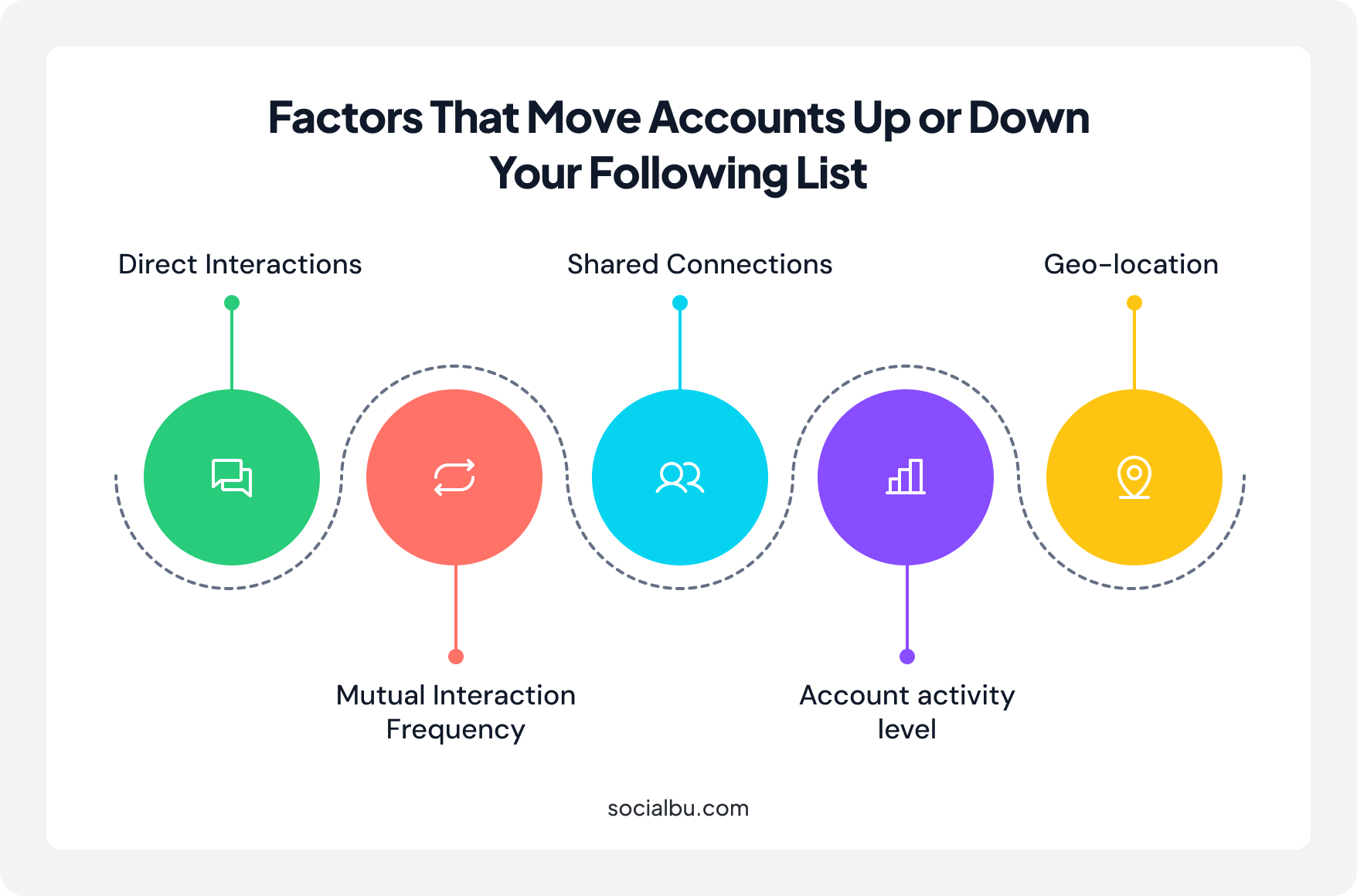
The factors that move accounts up or down your following list:
- Mutual Interaction Frequency: Liking, commenting, sharing, and DMing all contribute. Two-way engagement carries more weight than one-sided liking.
- Direct Interactions: DMs and story replies are the strongest signals. A single DM thread counts more than dozens of post likes.
- Shared Connections: If you and an account both follow many of the same people, Instagram treats you as closer.
- Geo-location: Accounts based in your city or country receive a larger boost.
- Account activity level: Active accounts that post and engage consistently rank higher than accounts that have gone idle. This is one reason creators who prioritize growing their Instagram followers focus on consistent engagement.
How to Check and Sort Your Following List? (Step-by-Step)
Instagram lets you control how you view your following list, making it useful for audits and cleanup.
On Mobile (iOS or Android)
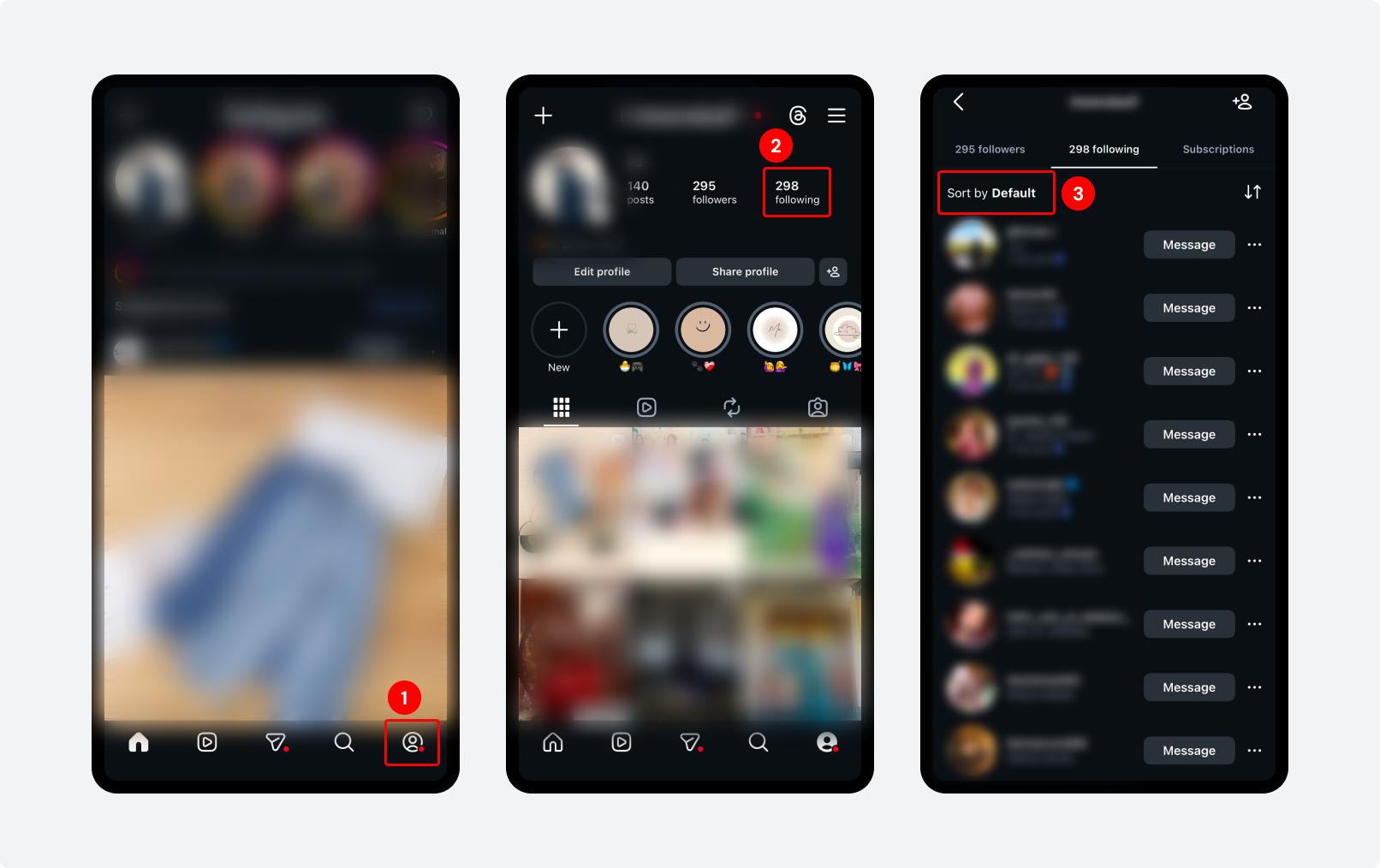
Step 1: Open Instagram and tap your profile in the bottom right.
Step 2: Tap the ‘Following’ count at the top of your profile.
Step 3: Your list opens in ‘Sort by Default’ mode, which is the algorithmically ranked order.
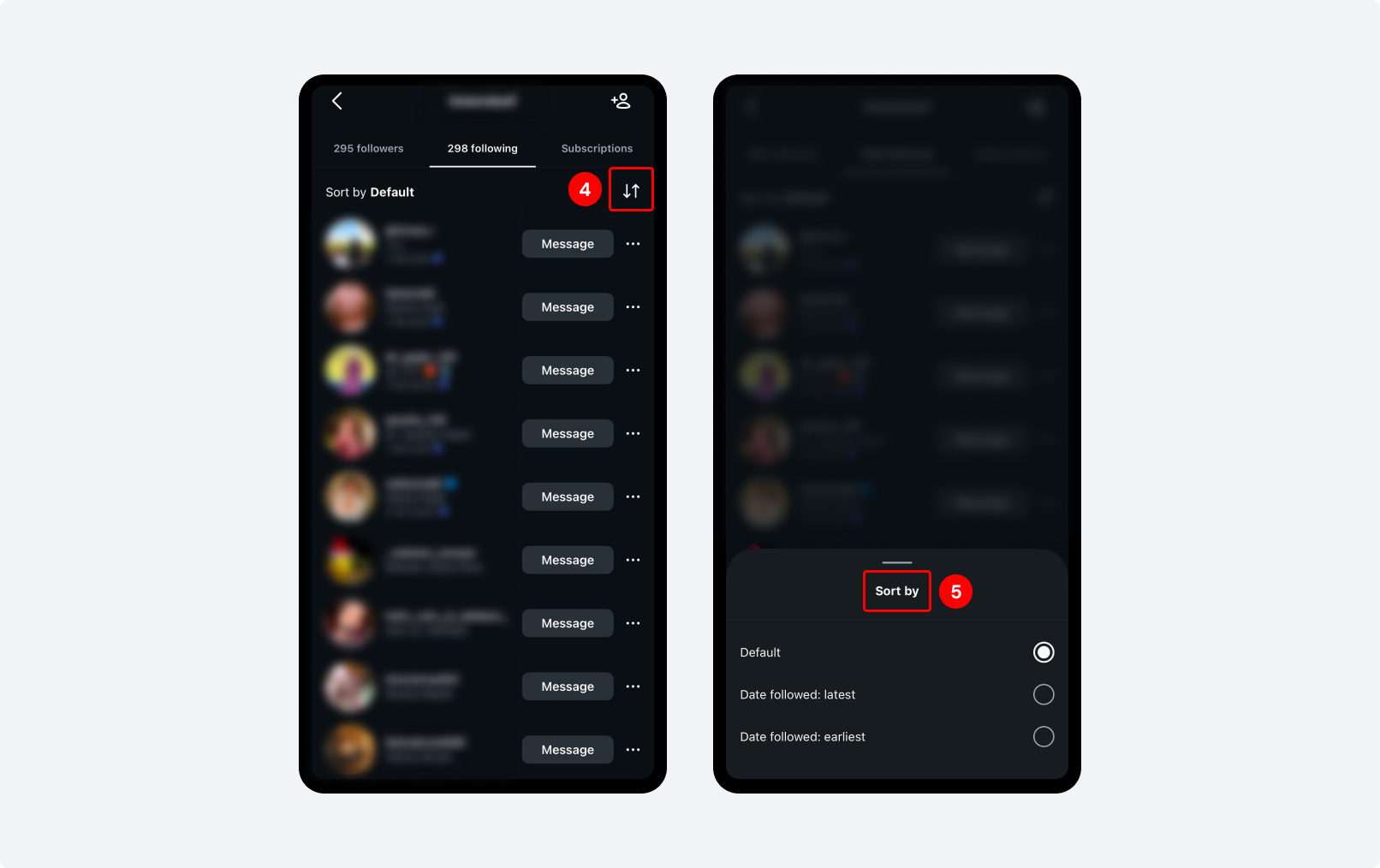
Step 4: To change the sort, tap the two arrows icon next to ‘Sort by Default’ in the top right.
Step 5: Three options appear:
- Default: ranked by interaction and relevance (algorithm order)
- Latest: accounts you followed most recently, newest first
- Earliest: accounts you followed longest ago, first
Reviewing older accounts can also help you manage your Instagram following limit more strategically.
On Desktop:
- Go to instagram.com and open your profile.
- Click ‘Following’ in your profile header.
- The same sort of options appear. Click the arrows icon to switch between Default, Latest, and Earliest.
How Instagram Sorts Your Followers List?
You can’t sort your followers list. Instagram doesn’t give you that option. What you see is what the algorithm does. It decides based on what it thinks you’re most closely connected to.
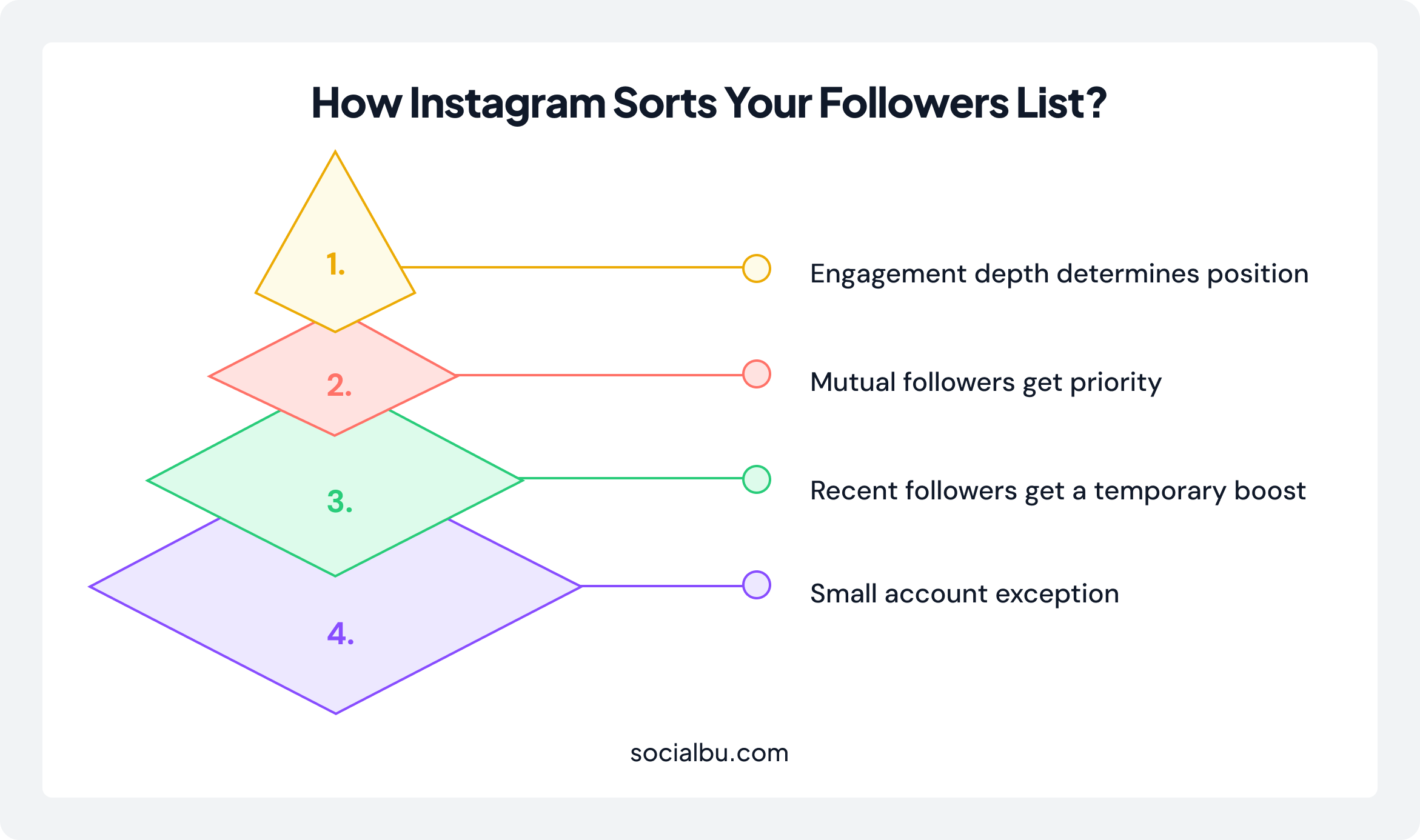
- Engagement depth determines position. Followers who consistently like your posts, watch your reels, save your content, and reply to your stories appear near the top.
- Mutual followers get priority. When you view your own followers list, accounts that follow you back rank higher than accounts that you don’t follow.
- Recent followers get a temporary boost. New followers appear at the top of your list for a short time.
- Small account exception. If an account has 200 or fewer followers in total. Instagram sorts its followers list alphabetically by full profile name, not by engagement. This applies to newer or very small accounts, not to typical business or creator profiles.
How to Check Your Followers List? (Step-by-Step)
Even though you can’t sort it, you can still analyze your followers list to understand your audience.
On Mobile:
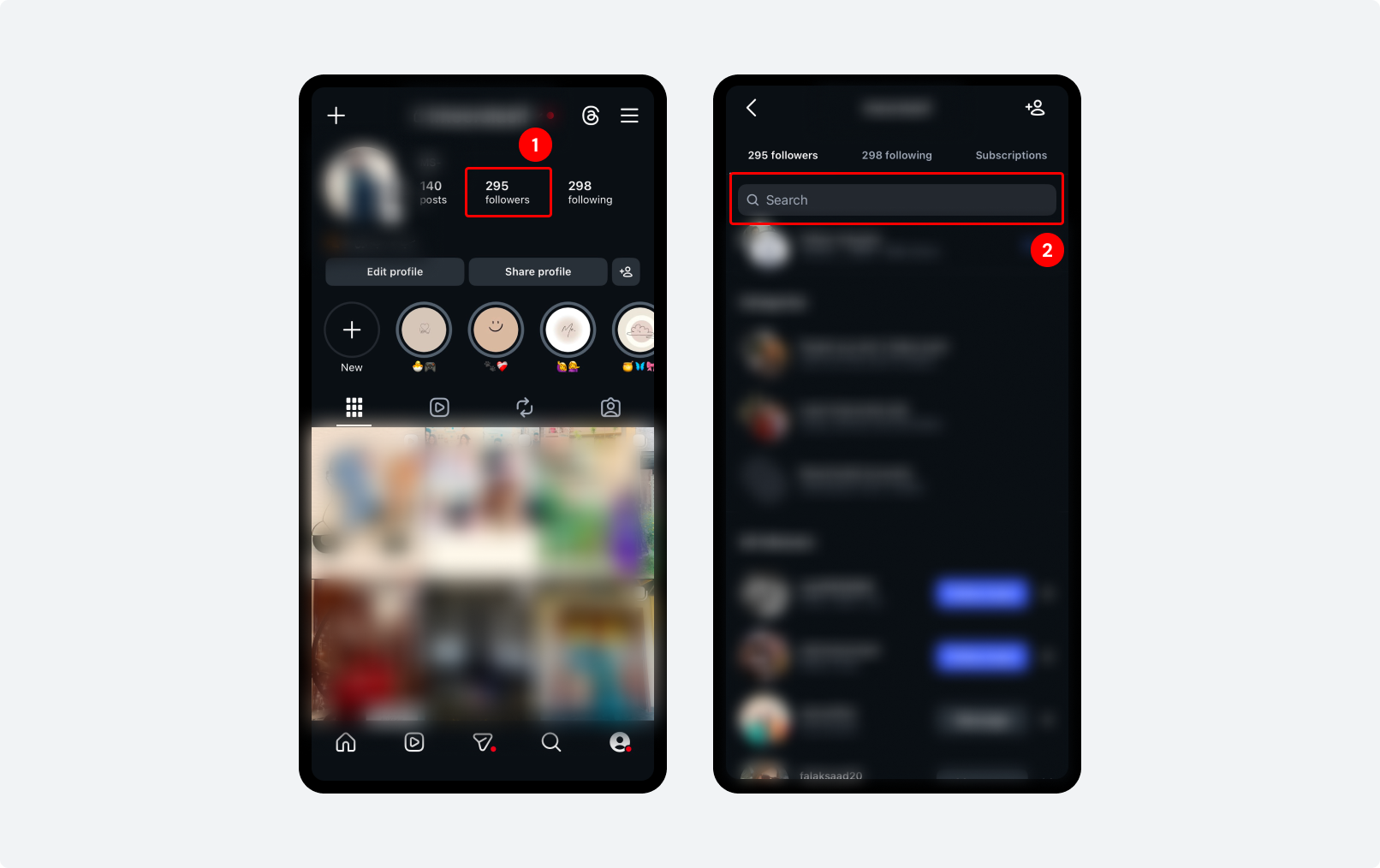
Step 1: Open Instagram and go to your profile. Tap the ‘Followers’ count at the top of your profile.
Step 2: To search within your followers list, tap the search bar at the top and type a name or username.
To find mutual followers when viewing someone else’s profile:
- Go to any account’s profile.
- Tap their ‘Followers’ count.
- The top section of their followers list will show people you follow or who follow you. These are labeled as mutual connections.
On Desktop:
- Go to instagram.com and open your profile.
- Click ‘Followers’ in your profile header.
- Scroll through the list, and the same algorithm-ranked order applies. Use the search bar at the top to look up specific accounts.
How Instagram Decides What Appears on Explore?
The Explore algorithm ranks content using four signals:
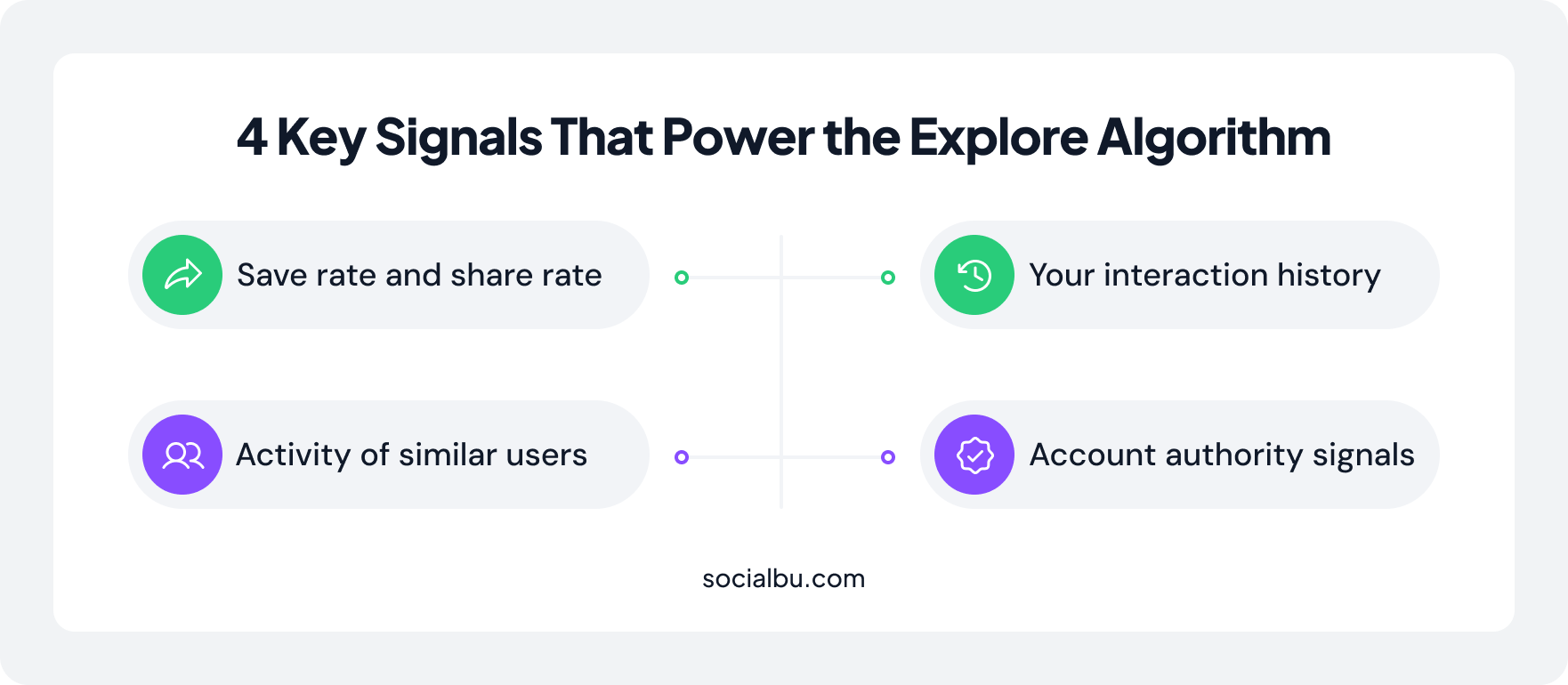
- Save rate and share rate: These outweigh likes. When someone shares your Reel to a friend via DM, it counts 3-5x more than a like. It’s the single strongest signal that tells Instagram your content is worth showing to new people.
- Your interaction history: Every account you’ve ever engaged with, every topic you’ve searched, every post category you’ve lingered on shapes your Explore feed.
- Activity of similar users: Instagram clusters users into interest groups. If people with similar engagement patterns to yours are heavily saving content from an account you’ve never seen, that account will start appearing in your Explore.
- Account authority signals: Verified accounts, accounts with strong engagement-to-follower ratios, and accounts that consistently produce high-save content appear on Explore more frequently.
Quick Tip: 10-15-60 Rule for Instagram Engagement
- Reply to comments within 10-15 minutes
- Engage with followers in your niche within 60 minutes of posting
- Spend at least 10 minutes interacting before posting
- This signals strong early activity and helps boost reach.
How to Access and Read Your Explore Feed? (Step-by-Step)
Most users scroll Explore passively, but it actually reflects your behavior and interests.
On Mobile:
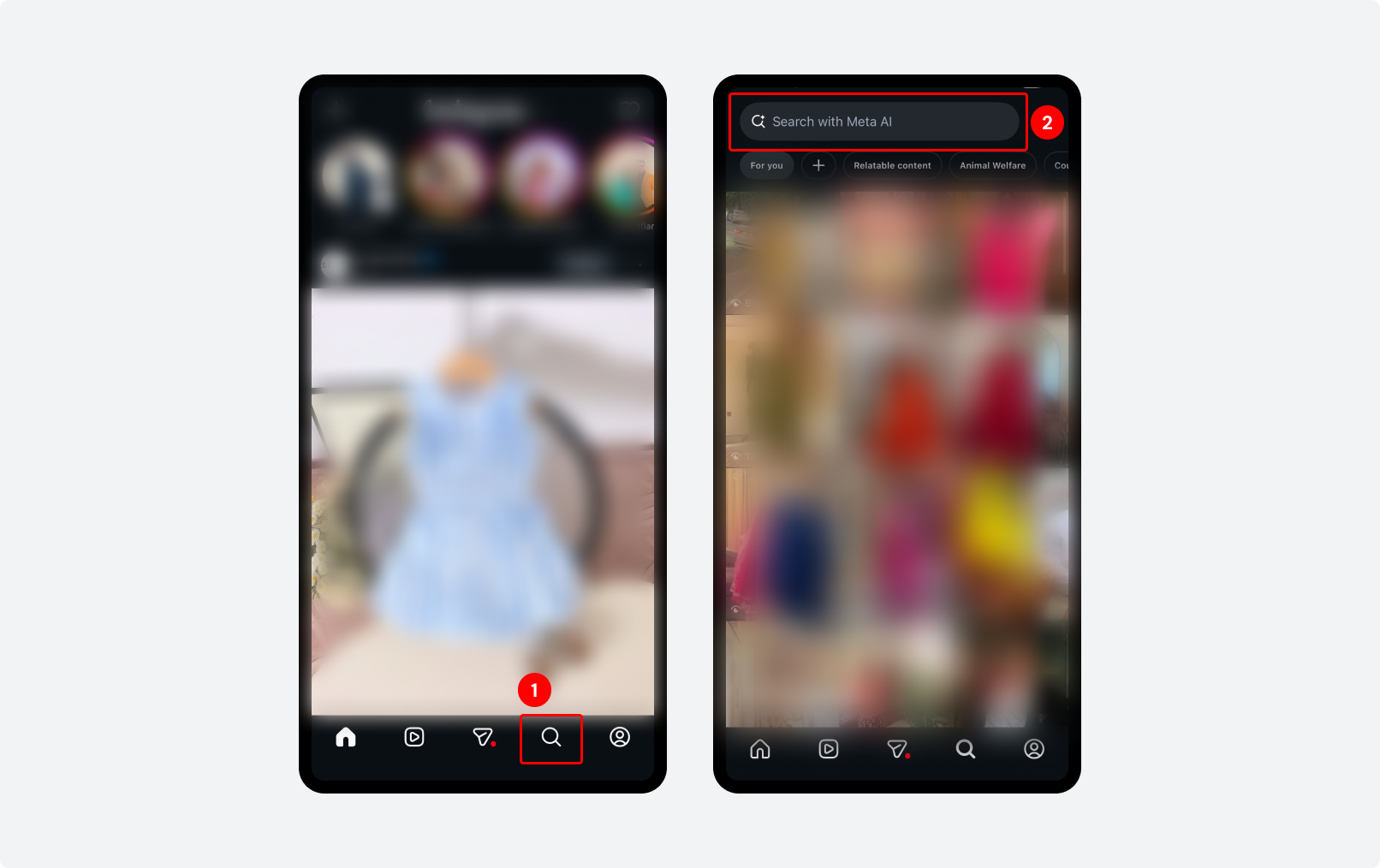
Step 1: Tap the magnifying glass icon at the bottom of the screen. Your Explore grid loads. This is Instagram’s prediction of content you’ll find relevant. Tap any post to open it and scroll through the Explore feed vertically.
Step 2: To search within Explore. Tap the search bar at the top and enter a keyword, hashtag, or account name. To filter by content type after searching, use the category tabs that appear (Accounts, Audio, Tags, Places, Reels, etc).
How to Get Your Content onto Other People’s Explore Pages?
Getting onto Explore is not random. It’s driven by specific engagement signals.
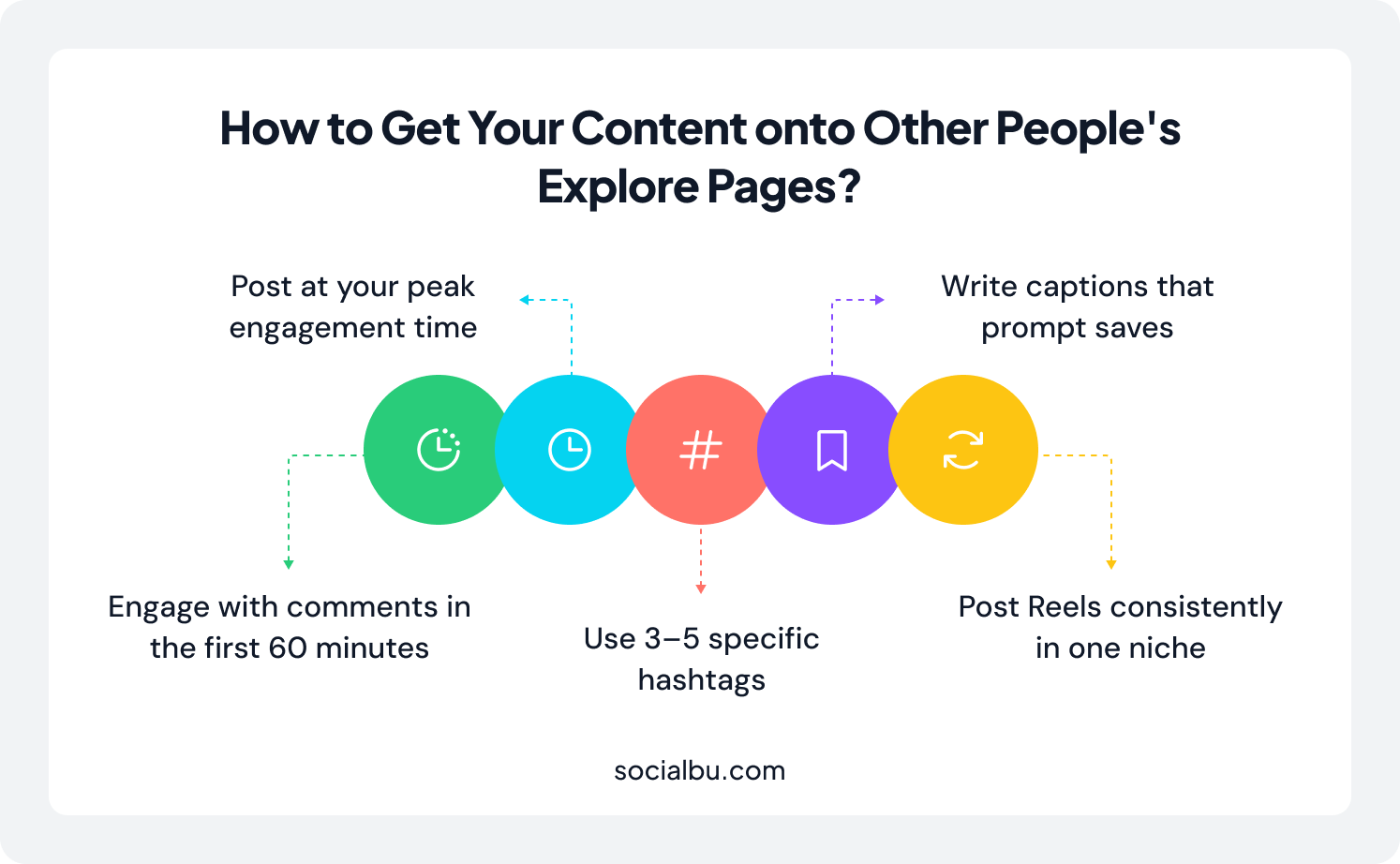
- Post at your peak engagement time. Use Instagram Insights (Profile → Professional Dashboard → Total Followers → Most Active Times) to find when your existing audience is most active. Publish during that window.
- Write captions that prompt saves. Before publishing, ask: “Would someone save this to refer back to later?” Opinion posts and aesthetic content alone usually don’t.
- Use 3-5 relevant hashtags. Instagram removed the ability to follow hashtags in December 2024, so hashtags no longer drive discovery the way they used to. Focus on using 3-5 niche-specific hashtags alongside natural keyword usage in your captions, which now carries more weight for Explore visibility.
- Engage with comments in the first 60 minutes. Early comment activity signals to the social media algorithm that your post is generating genuine interaction. Reply to every comment you receive in the first hour after posting.
- Post Reels consistently in one niche. Reels are currently the format Instagram pushes most aggressively in Explore. Strong Explore reach is one of the biggest drivers behind accounts that successfully monetize Instagram followers over time.
Maintaining consistency across posts is easier when you plan and schedule content in advance. Tools like SocialBu help creators schedule Reels, organize posting calendars, and analyze which content formats perform best over time.
Engagement Checklist After Posting
- Reply to all comments in the first hour
- Like and reply to early viewers
- Share the post to stories immediately
- Stay active on the app for 20-30 minutes
How Does Instagram Rank Story Viewers Order?
On Instagram, your Story viewers are sorted by the number of views your Story has. Before 50 views, the list is displayed in reverse-chronological order. The most recent viewer appears at the top.
After 50 views, the algorithm shifts. From that point, viewers are ranked by who you interact with most, not by who watched most recently.
What Factors Decide the Order of Your Story Viewers on Instagram?
- Accounts you’ve DMed recently
- Accounts whose stories you regularly watch and reply to
- Accounts that frequently view and reply to your stories
- Accounts Instagram has identified as close connections based on your overall interaction history
How to Check Your Story Viewers List? (Step-by-Step)
Your story viewer list is one of the easiest ways to identify your most engaged audience.
For active (live) stories:
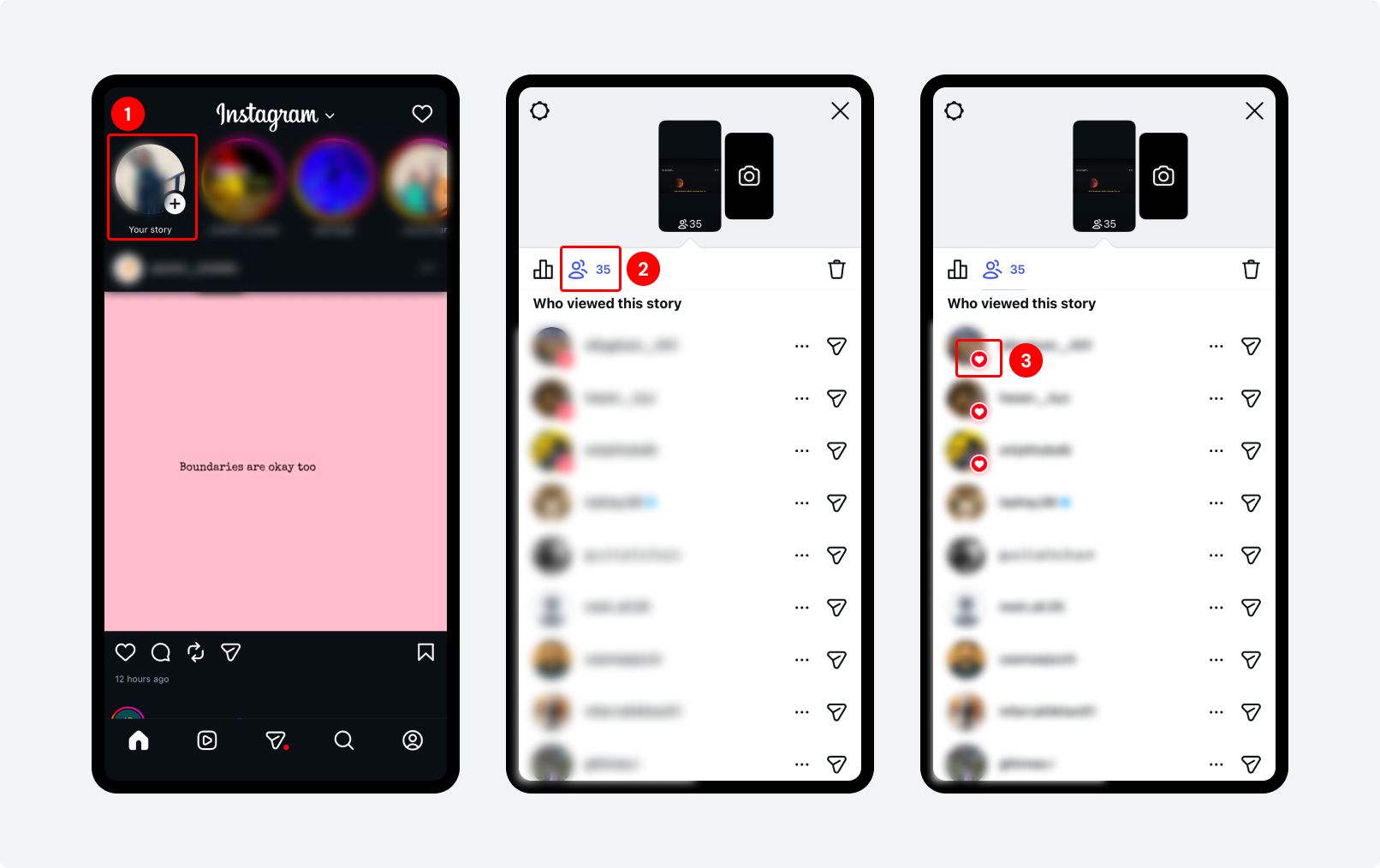
Step 1: Open Instagram and tap your profile photo at the top left to open your active story.
Step 2: Swipe up on the story to open the viewer’s panel. The number at the top shows your total view count.
Step 3: To see how someone specifically reacted, look for emoji reactions next to their name in the viewers list.
On Desktop:
Story viewer data is only fully accessible on mobile. On desktop (instagram.com), you can view your story, but the viewer list details are limited. Use the mobile app for viewer analysis.
How Instagram Sorts DM (Direct Message)?
On Instagram, your DMs are sorted by who you interact with most and which messages matter most to you.
Instagram also weights conversations by depth. A DM thread with deep, ongoing back-and-forth exchanges will stay near the top. The more message history you share with an account, the stronger Instagram reads that connection.
For accounts you haven’t interacted with yet, Instagram orders message requests (the secondary inbox for non-followers).
How to Check and Manage Your DM Order? (Step-by-Step)
Managing your inbox helps you stay on top of important conversations and opportunities.
Accessing your main inbox:
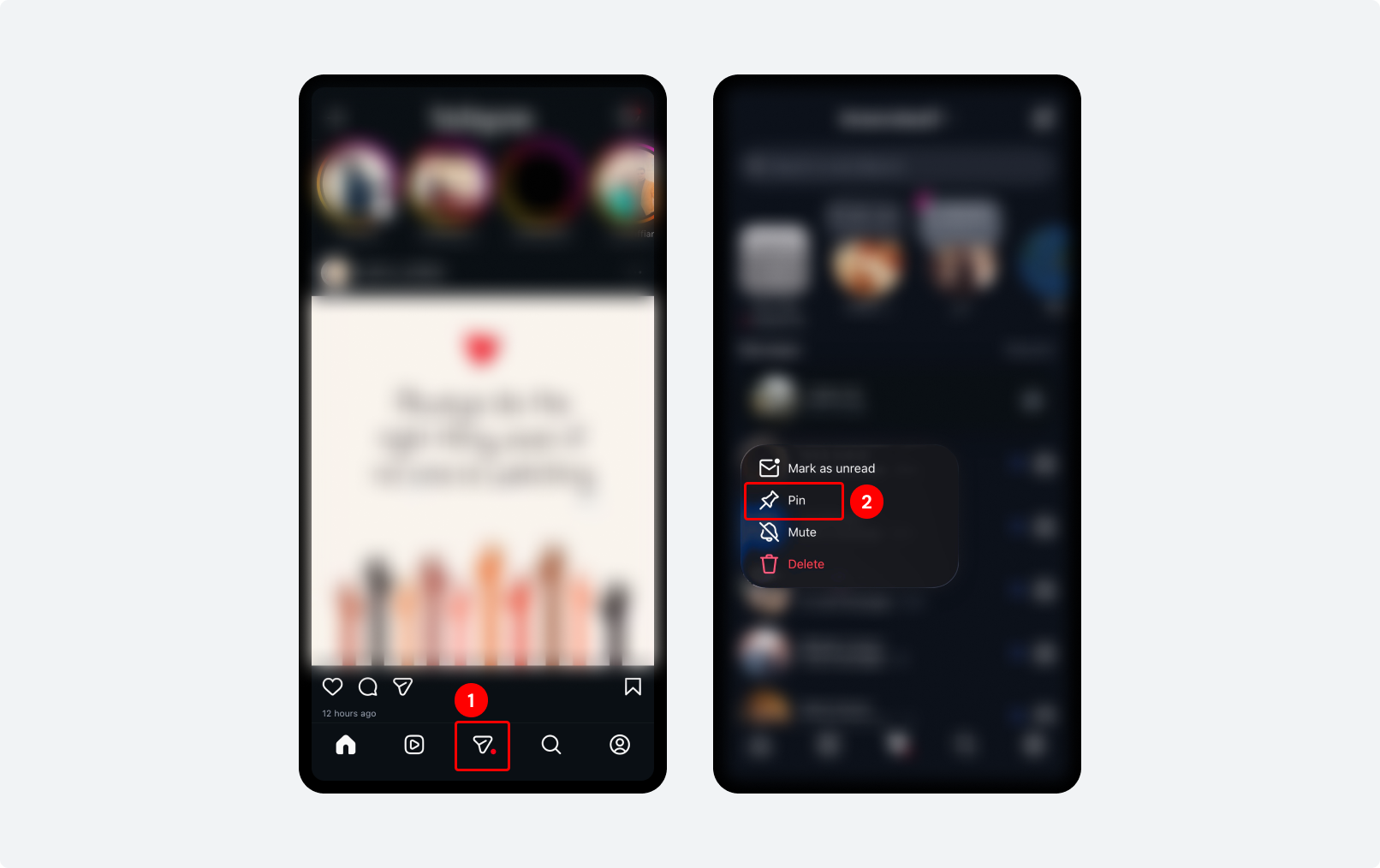
Step 1: Open Instagram and tap the ‘Paper plane’ icon. Your inbox opens. Conversations are ordered by most recent activity at the top.
Step 2: Pinned conversations (if you’ve pinned any) appear in a separate row at the very top. To pin a conversation (keep it at the top regardless of recency). Click the conversation, then tap the pin icon on both iOS and Android.
You can pin up to 3 conversations.
Wrap Up!
The Instagram following list order shows you people based on how often and how recently you interact with them. Your followers, following, Explore, Stories, and DMs all reflect one thing: your strongest and most active connections.
To improve engagement, focus on your top followers. Interact with them consistently, likes, replies, and messages. This can increase their interaction with your content. It helps train the algorithm to show your posts to more of the right people.
The same principles become much easier to apply when you consistently track performance and schedule content. That’s where tools like SocialBu help to plan and track performance.
That’s how you make the algorithm work for you.
Ready to Make Instagram Growth Consistent?
Join creators and businesses using SocialBu to schedule content, stay consistent, and see what’s actually working across their posts.
FAQs
Q: What does Instagram’s Sort by Default Mean on the Following List?
A. Sort by default’ on Instagram’s following list refers to the default order in which the people you’re following are displayed. When you view your following list, Instagram may sort it a certain way without any specific criteria you’ve chosen.
Q: Are Instagram Followers Always Shown in Order?
A. The short answer is no. Instagram’s algorithm dynamically updates the order based on various factors, providing a personalized experience. Unlike the following list, the platform doesn’t offer a manual option to order your followers’ list.
Q: Is Instagram’s Following still in Chronological Order?
A. No, Instagram uses factors like user preferences, engagement, and interaction levels to sort the following list order. However, it offers sorting options to arrange your list in chronological order.
Q: Can I Order My Instagram Following List?
A. Yes, you can order your Instagram following list. Besides the ‘sort by default’ option, Instagram provides users with two more options to sort their following list manually.
Q: Why do Instagram’s Following and Followers List Orders Change Sometimes?
A. Instagram continuously improves its algorithm to enhance the user experience. This can lead to occasional changes in the order of the followers/following list.
Q: Can I See Another Instagram User’s Following List in Order?
A. No, you can’t see another IG user’s following list in order. The Instagram algorithm respects users’ privacy and prevents others from seeing the order of the following list. You can only see a user’s total number of followers and followings, as well as a partial list of mutual followers and followings (accounts that both you and the other user follow).