Post Planner’s pricing initially seems affordable, but costs can increase as you add social accounts and users. Post Planner does include automation-oriented scheduling features (like recycling, bulk upload, and a calendar view) and includes analytics as a plan feature. Still, it does not publicly position itself as an automation-first platform with workflow automations (e.g., RSS-driven automations) or strong approvals.
In this guide, we’ll break down what each Post Planner tier offers, whether the pricing is justified, and how it compares to automation-first, affordable competitor tools such as SocialBu. By the end, you’ll know if Post Planner is worth it, or if another all-in-one tool will save you money while scaling with your needs.
TL;DR
- Post Planner is initially affordable, but its costs rise rapidly as user or account numbers increase or advanced features are used.
- It works well for solo users.
- It has limitations for teams because it lacks advanced automation, analytics, and collaboration tools.
- SocialBu offers more scalability, automation, and value for a slightly higher cost, making it best suited for agencies, SMBs, and social media managers.

Post Planner Pricing Analysis: What You Have to Pay for the Tool?
Post Planner is a social media scheduling and content curation tool. It is the ideal solution for individuals, small businesses, and agencies seeking to streamline publishing across multiple platforms.
The tool’s value primarily depends on the pricing tier you choose. Each plan unlocks different posting limits, account and user connections, AI credits, and advanced scheduling and content curation features. That’s why the Post Planner subscription cost depends heavily on your intended use.
Key Features That Drive Post Planner Pricing
Several factors shape the Post Planner subscription cost:
- Number of social accounts you can connect
- Number of users/team members allowed
- Daily or monthly post scheduling limits
- Size of the media library for storing visuals
- Access to content discovery and curation tools (basic vs plus)
- Availability of Post drafts, Snippets, AI credits, and post analytics
These factors define the Post Planner pricing structure and directly influence which tier works best for different users.
Post Planner Pricing Structure (2026): Quick Overview
Here is the 2026 Post Planner pricing breakdown – monthly vs. annual- plus what features each tier actually offers:
Plan | Yearly Price (per month) | Monthly Price | Key Features |
Free | $0 | $0 | 1 profile, 1 user, 3 posts/day, 15 scheduled |
Stater | $7 | $12 | 3 profiles, 1 user, 150 posts, 100 MB storage |
Growth | $37 | $49 | 12 profiles, 2 users, 1,000 posts, premium curation |
Business | $57 | $79 | 25 profiles, 5 users, 5,000 posts, curation |
Agency | $107 | $149 | 50 profiles, 10 users, 10,000 posts, premium scheduling |
Enterprise | $207 | $299 | 100 profiles, 15 users, 20,000 posts, full curation |
Takeaway: Although pricing appears low at the entry level, costs escalate quickly. Moreover, the tool lacks advanced features, such as automation and team collaboration.
 Explore our list of Post Planner alternatives to find the tool that suits your workflow best.
Post Planner Feature Analysis: What You Get In Each Plan?
Now that you’ve seen the Post Planner pricing structure, let’s do the feature analysis and break down what each plan actually offers and where it falls short. This helps you quickly determine which tier fits your needs and when it’s time to explore a more efficient social media management tool.
1. Free / Trial Plan – Best for Testing the Dashboard
Cost: Free
Includes:
- 1 profile
- 1 user
- 3 posts/day (90 per month)
- 15 scheduled posts
2. Starter Plan – Best for Solopreneurs
Cost: $12/month
Includes:
- 3 profiles
- 1 user
- 150 scheduled posts
- Basic post queue
3. Growth Plan – Best for Freelancers
Cost: $49/month
Includes:
- 12 profiles
- 2 users
- 1,000 scheduled posts
- Bulk post upload
- Limited analytics
4. Business Plan – Best for Small Teams
Cost: $79/month
Includes:
- 25 profiles
- 5 users
- 5,000 scheduled posts
- Priority support
- Content discovery (post ideas library)
5. Agency Plan – Best for Mid-Sized Agencies
Cost: $149/month
Includes:
- 50 profiles
- 10 users
- 10,000 scheduled posts
- Branded reporting
6. Enterprise Plan – Best for Large Teams
Cost: $299/month
Includes:
- 100 profiles
- 15 users
- 20,000 scheduled posts
- White-label reporting
- Dedicated account manager
The plans scale nicely for profiles, users, and post caps, but at higher prices. However, the feature set barely evolves compared to competitors, which means you’ll likely need another tool once your team grows.
Try SocialBu For Free
Join over 20,000 businesses who trust SocialBu to elevate their social media presence every month.
Post Planner Value Analysis: Is the Tool Worth Subscribing to?
Post Planner subscription cost delivers decent value at the entry level, especially for solopreneurs who want simple scheduling and light content curation. It’s affordable, quick to set up, and offers basics like:
- Low-cost entry point
- Content curation engine & post buckets
- AI credits for captions, hashtags, and ideas
- Media library for storing assets
- Content queues & recycling for evergreen posts
However, as your needs grow, the cracks begin to show. The tool falls short in areas that matter most to teams, agencies, and serious marketers:
- Limited scalability → profile and user caps push upgrades too soon
- No drag-and-drop calendar → no visual campaign planning
- Weak automation → lacks advanced workflows (e.g., RSS feeds, auto-replies)
- Limited analytics → no advanced reporting or downloads
- No social inbox or listening → can’t manage conversations in-platform
- Poor collaboration tools → no approval workflows or role-based access
Reviews
Here is what users say about Post Planner on G2:
There are many things I could put here, but I feel the customer support has been better than almost any experience elsewhere. If I am ever confused about a function, the CS answers quickly and correctly. No crazy over-the-top fake empathy or any of that annoying stuff.
Limits to account connections. This is more of a ME problem, though. It scales up with the plans, and that is good. I just need to be able to afford a better plan. That being said, it isn’t expensive really. Again, it is a ME problem. Overall the software is excellent, but the cost is a bit high. Also, we need a feature that could move the scheduled post into drafts when we have to edit it instead of recreating it from scratch.
But once you grow, you’re paying more for fewer features. For nearly the exact cost, competitors like SocialBu provide advanced automation, deeper analytics, and collaboration tools, all in one place.
Post Planner vs Competitors’ Cost Analysis: Choose the Right Tool for You
Post Planner appears to be affordable for solopreneurs with one or two accounts. But the moment you scale, whether it’s more profiles, team members, or deeper features, the price rises fast while the platform still feels limited. That’s the hidden cost, and it’s where you look for more feature-rich yet affordable tools.
1. SocialBu: Best Automation-first and Affordable Solution
SocialBu is an all-in-one social media scheduling tool that packs advanced features into every plan. For just $10 more than Post Planner’s Growth tier, you unlock unlimited scheduling, advanced analytics, a unified inbox, and collaboration tools in SocialBu’s Super plan. All of which Post Planner doesn’t support or lock behind higher plans.
Post Planner vs SocialBu: Quick Comparison
Here’s a side-by-side look at SocialBu and Post Planner, and SocialBu’s mid-tier and most popular plans to give you an idea of what SocialBu offers you at just a bit of extra cost:
Features | Post Planner Growth Plan | SocialBu Super Plan |
Monthly Price | $49/mo (monthly billing) | $ 59/mo (Billed monthly) |
Social Profiles | 12 | 30 |
Users/Teams | 2 users | 6 teams |
Monthly Post Scheduling | 1,000 | Unlimited |
Social Inbox | No | Yes |
Analytics & Reports | Basic | Advanced |
Collaboration Tools | No | Yes |
AI-Powered Automation | No | Yes |
AI Content Generation | Limited | Yes: Advanced |
Why SocialBu Wins as a Post Planner Alternative
Here’s why SocialBu is a smarter, more scalable alternative to Post Planner for creators, marketers, and teams:
1. Unified Inbox That Saves You Hours
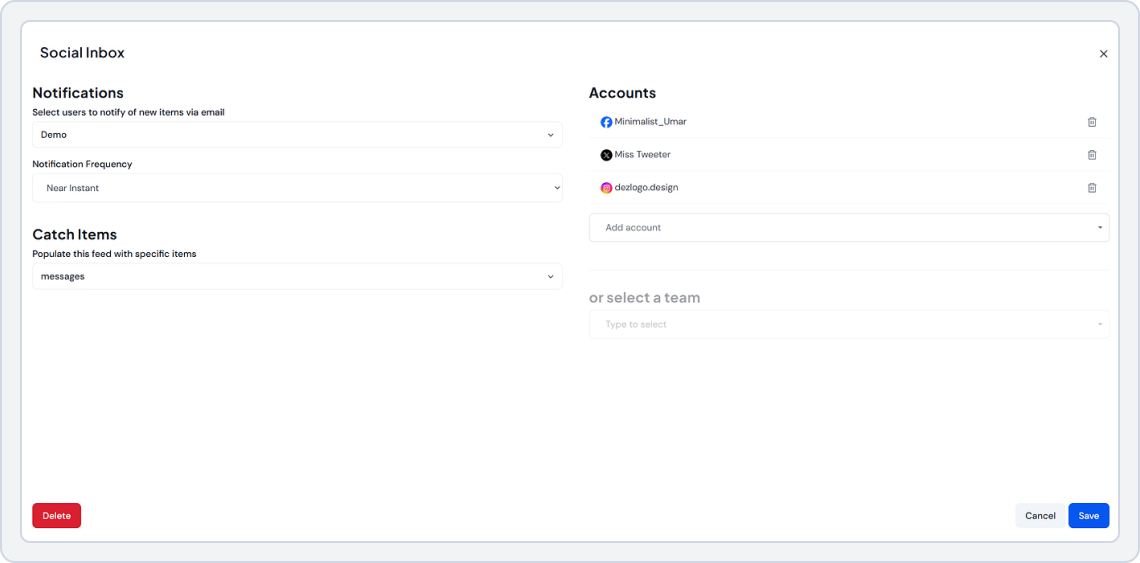
Instead of jumping between platforms, SocialBu brings all your comments, mentions, and direct messages into a single, clean dashboard through a unified inbox. You can reply faster, track conversations, and never miss a customer interaction. Post Planner focuses mainly on publishing, while SocialBu lets you manage engagement and publishing in one place, keeping your workflow uninterrupted.
2. Automation & AI That Keep Your Content Consistent
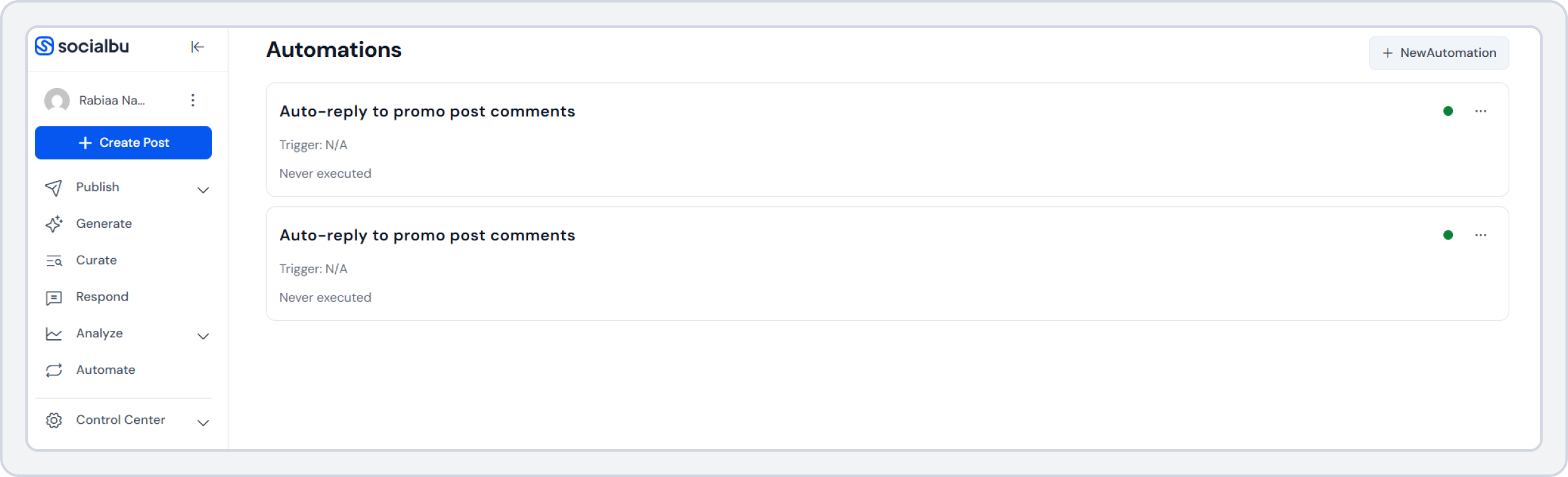
SocialBu doesn’t just offer simple scheduling. You can auto-publish posts from RSS feeds, set up recurring content, create auto-replies, and use AI to generate content, captions, or ideas when you’re short on time. This means fewer manual steps and more consistency across platforms. Post Planner relies heavily on manual queuing, while SocialBu helps you automate the repetitive work so you can focus on your content strategy.
3. Visual Drag-and-Drop Calendar for Real Campaign Planning
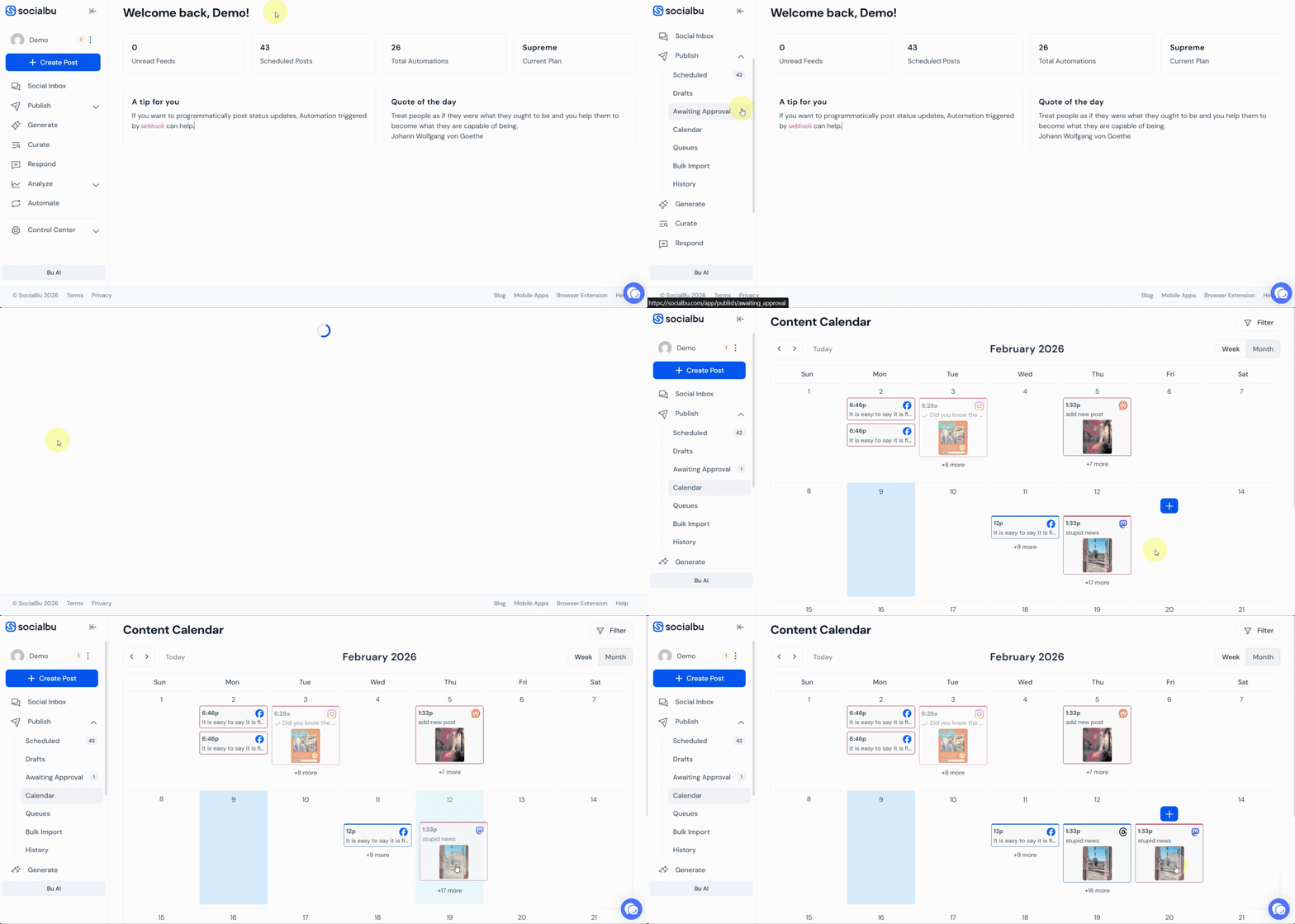
SocialBu’s calendar helps you manage multiple campaigns. You can visually map out weeks or months’ content, drag posts to new dates, balance content types, and collaborate with your team in real time. If plans change, rescheduling takes seconds. Post Planner’s queue-based system limits visibility, while SocialBu’s calendar shows your full content strategy at a glance.
4. Team Collaboration for Growing Brands
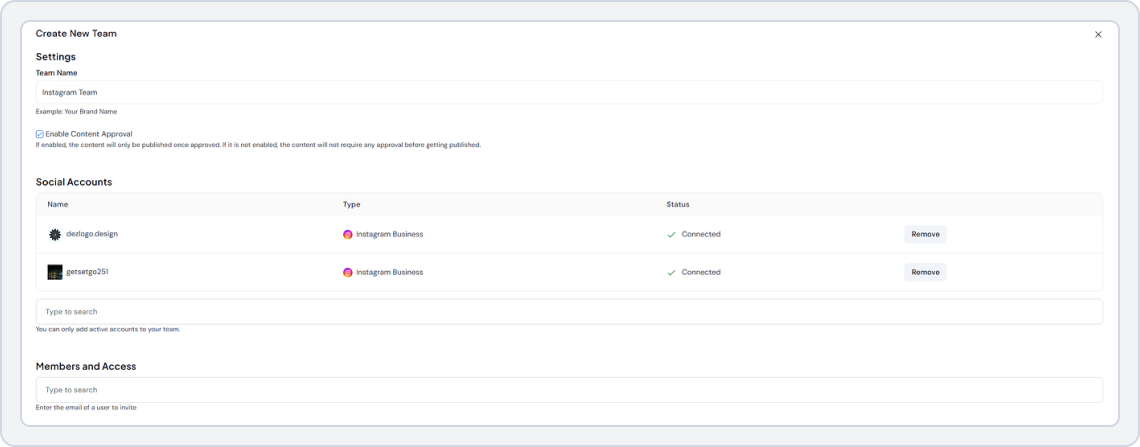
With SocialBu’s team collaboration feature, you can assign roles, control permissions, request approvals, and share post previews before anything goes live. This prevents mistakes and keeps everyone aligned. Post Planner lacks structured approval workflows, making it harder for agencies and teams to collaborate smoothly. SocialBu turns scheduling into a controlled, team-friendly process.
Reviews
Here’s what users say about SocialBu on G2:
SocialBu is really intuitive and easy to use. I use it for several clients and post daily. It’s also super affordable compared to other social scheduling platforms I’ve used. Customer support is also really responsive. I highly recommend it!
It’s a lot less expensive that other social media schedulers I’ve used so it’s saving my agency a lot of money. I especially like that it offers scheduling for LinkedIn.
Stop paying for plan upgrades that cap your growth.
Plan, automate, analyze, and grow your social media presence. All in one place with SocialBu.
2. Buffer: Best for Simple Scheduling
Buffer is another widely recognized social media scheduling tool for planning and scheduling content. It’s known for its clean interface, simple publishing workflows, and ease of use, perfect for solo creators and small teams.
While Buffer excels in simplicity, its automation, reporting, and analytics features are limited unless you upgrade or integrate third-party tools.
Key Buffer Features
- Easy post scheduling and publishing across major platforms
- Calendar view for visual planning
- Basic engagement analytics
- Integrations with Canva and Unsplash
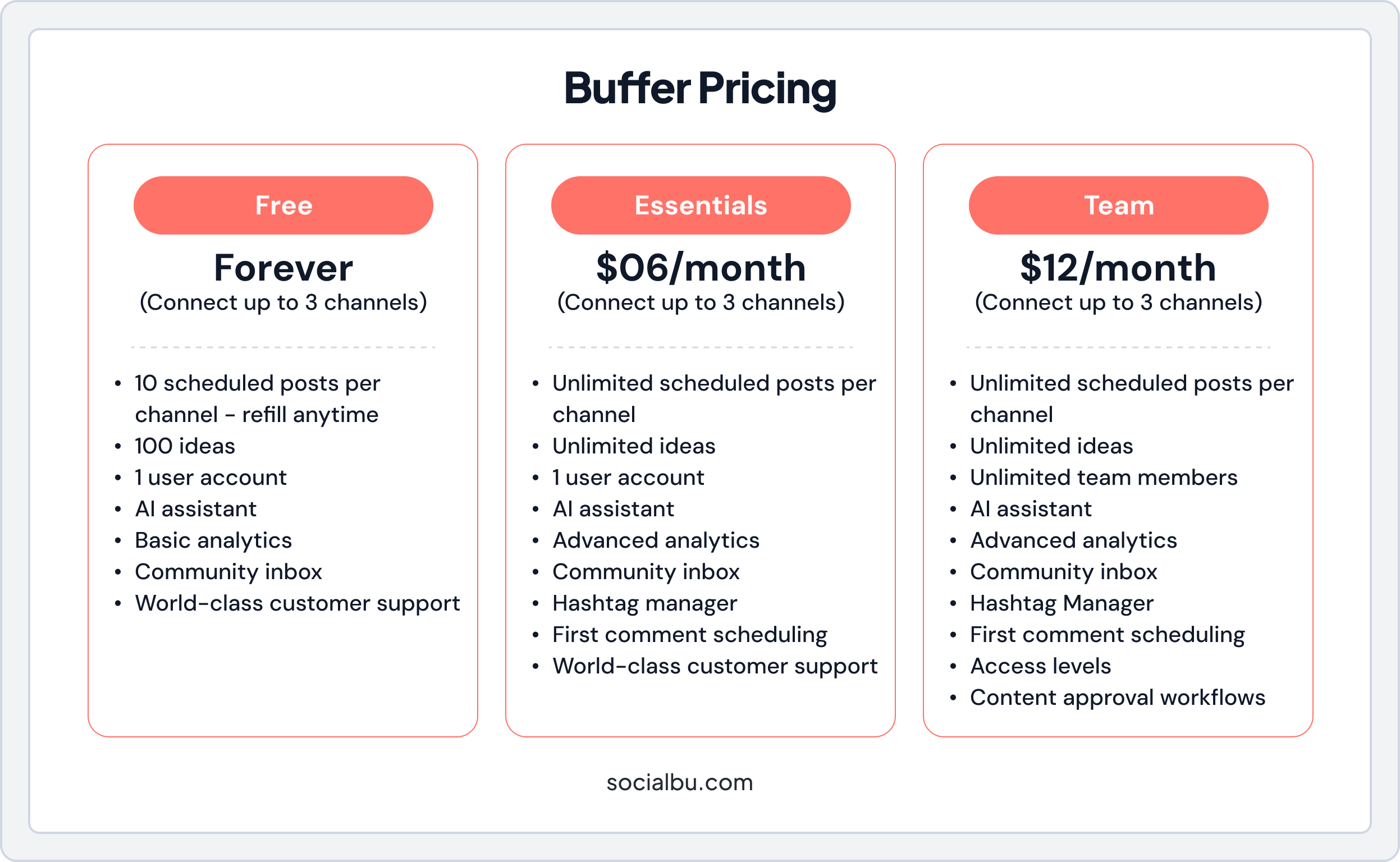
Buffer Pricing
Have a look at Buffer’s monthly pricing plans.
Reviews
Here is what people say about Buffer on G2:
Buffer’s standout feature is its incredibly intuitive and streamlined scheduling platform, allowing users to effortlessly plan and automate their social media content across multiple networks with remarkable ease and reliability. While excellent for scheduling, Buffer’s analytics and reporting capabilities are somewhat basic compared to more comprehensive and in-depth social media management platforms.
Also Read: Explore top Buffer alternatives for growing teams.3. Sendible: Best for Scalable Social Media Management
Sendible is a powerful platform tailored for agencies and marketing teams. It stands out with its white-label reporting, client management, and approval workflows, making it perfect for handling multiple brands.
However, Sendible’s pricing can escalate quickly as you scale users or profiles. Some key features are also available with higher-tier plans.
Key Sendible Features
- Centralized dashboard for multiple brands
- Approval workflows for smooth collaboration
- Integrations with Canva, Google Drive, Slack
- Content recommendations and publishing calendar
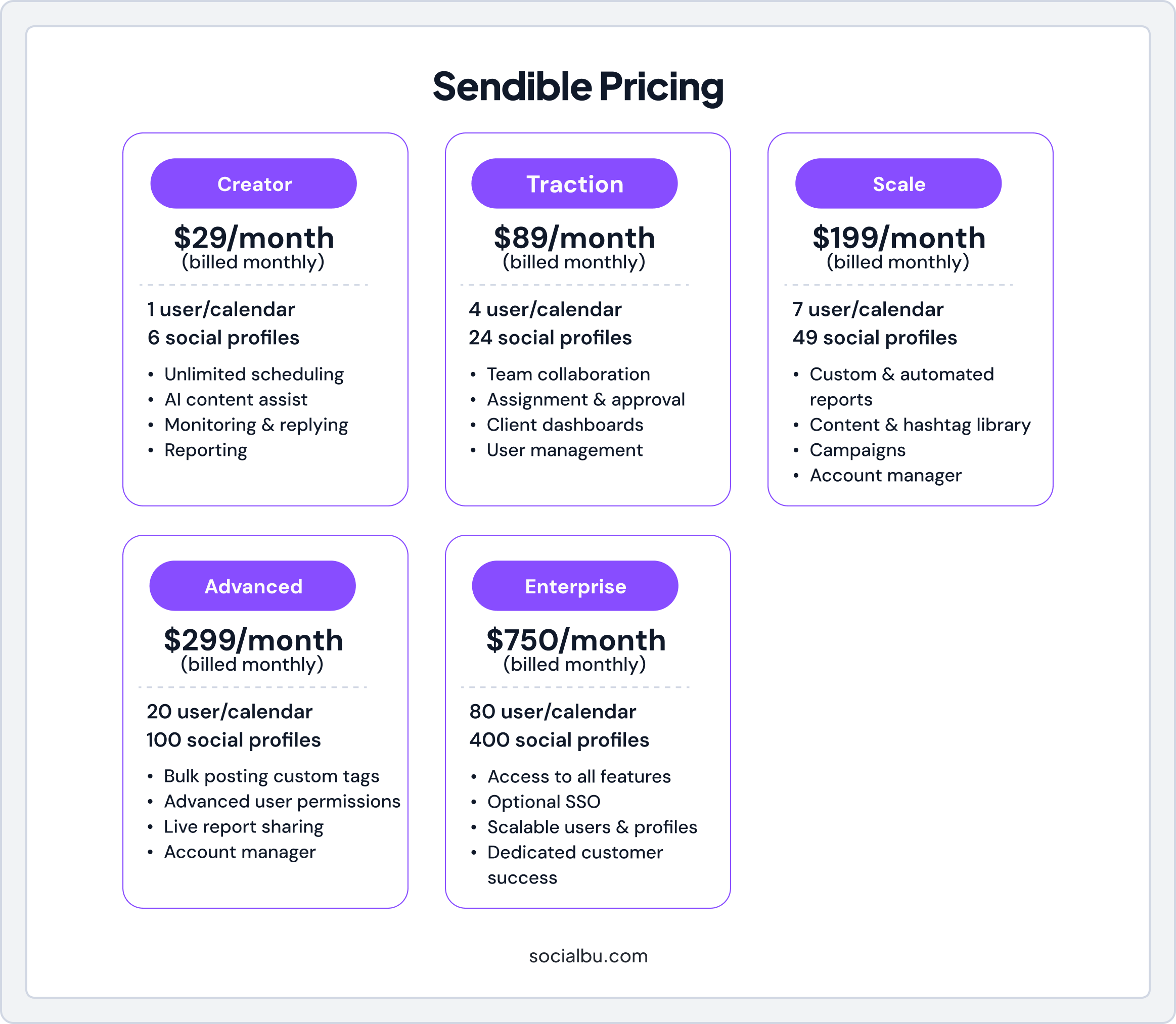
Sendible Pricing
Have a look at Sendible’s monthly pricing plans.
Reviews
Here is what people say about Sendible on G2:
Sendible makes all my social media efforts possible. I use it for a local film festival and other event organizers are always amazed at how much and consistently I post. I tell them that Sendible makes it happen. I wish I could add just 1 more social media account. I don’t need all the tools in the next highest tier.
Discover our curated list of top Sendible alternatives, offering more value.Wrap Up!
If you’re a solo creator, Post Planner can handle the basics. However, once you start managing multiple profiles, need deeper analytics, or require team collaboration, costs increase while features remain limited.
Before upgrading, ask yourself:
- Do I need more than 5–10 profiles?
- Do I want advanced analytics and automation?
- Am I managing a growing team?
If the answer to any of these is yes, SocialBu is the smarter investment. For just about $10 more, you unlock unlimited scheduling, a unified inbox, automation, and collaboration tools, everything you need to scale without constant upsells.
Don’t wait until you hit Post Planner’s limits. Sign-up for SocialBu now.
Frequently Asked Questions
How much does Post Planner cost monthly?
The Growth plan is $49/month with monthly billing, and the Business plan is $79/month.
What’s included in Post Planner’s premium plan?
The Business plan includes features such as 25 social profiles, 5,000 scheduled posts, 5 user seats, 5 GB of media library storage, content curation, and basic analytics.
Is Post Planner pricing competitive?
Yes, for solopreneurs and small-scale users, Post Planner offers a relatively affordable entry point. But the pricing becomes less competitive as teams and posting needs grow.
How many posts can you schedule with each plan?
Scheduled post limits vary by tier: for example, the Growth plan allows approximately 1,000 posts in the queue, while the Business plan supports up to 5,000 posts planned.
What are the account limits on Post Planner plans?
Account Limits depend on the plan:
- Starter plans offer 3 social accounts
- Growth offers 12 accounts
- The Business plan provides 25 profiles
- Agency plan offers 50 accounts
- The Enterprise tier supports up to 100 accounts.
Are there any Post Planner discounts available?
Yes, annual billing usually offers a discount compared to monthly billing, resulting in a lower effective monthly cost.
What’s the difference between Post Planner subscription tiers?
Higher tiers unlock additional profiles and users, premium post-scheduling volume, increased media storage, and AI/curation credits, as well as enhanced recycling/rerouting tools and analytics. Lower tiers are more restrictive in volume, social profiles, and users.
Is Post Planner worth the cost for content curation?
Yes, if your primary need is to discover and recycle curated content, Post Planner delivers substantial value. However, if you require more advanced automation, unified inboxes, or team workflows, the cost-benefit analysis becomes less compelling.
How much does Post Planner cost for teams?
Team-friendly plans include the Business plan at $79/mo (monthly billing) and the Enterprise plan at $299/mo (monthly billing).
Can you get a free trial of Post Planner?
Yes. Post Planner offers a free plan and a 7-day free trial on paid tiers, allowing users to test features before committing.