Random posting is the fastest way to waste LinkedIn. A good LinkedIn post scheduling strategy gives you consistency, better visibility, and a repeatable way to turn attention into pipeline.
LinkedIn is still a B2B powerhouse because the audience quality is strong. On LinkedIn, four out of five members drive business decisions, and the audience has 2x buying power vs the average web audience.
Instead of random tips, we will build your LinkedIn post scheduling strategy for 2026 step by step, so everything connects and makes sense.
What Changed in LinkedIn Algorithm 2026 Strategy?
The LinkedIn algorithm rewards posts that keep people reading and responding. That means your schedule helps, but it does not replace relevance, clarity, and real conversation.
If you want a practical anchor, use this logic: “Scheduling creates consistency, and consistency creates more chances to earn engagement signals.”
LinkedIn Organic Reach Strategy 2026 (What Scheduling Can and Cannot Do)
A schedule can fix an inconsistency. It cannot fix weak content.
Your LinkedIn organic strategy for B2B needs posts that people actually want to stop for.
2025 benchmarks show the top formats by engagement rate by impressions:
- Multi-image (6.60%)
- Native documents (6.10%)
- Video (5.60%)
That is why your LinkedIn post scheduling strategy 2026 should plan around formats that hold attention.
How To Create A LinkedIn Post Scheduling Strategy For B2B Brands
A good B2B social media scheduling strategy is not “pick a time and post.” It is a system.
Here is the system we will build for your LinkedIn post scheduling strategy 2026:
- Goals and KPIs
- Where you post (Page vs profiles vs employees)
- Cadence (Posting frequency)
- Content mix and pillars
- Content calendar and batching
- Timing and optimization
- Tools (native vs third-party)
- Engagement plan
- Analytics loop
- Lead generation and campaigns
- Automation boundaries
Step 1: Set Goals And KPIs Before You Touch A Calendar
If you skip this, your LinkedIn post scheduling strategy 2026 can turn into “we posted a lot” with no business outcome.
LinkedIn Analytics For B2B Brands (KPIs That Matter)
Track social media metrics that match the B2B buying cycle:
- Impressions (Are you reaching the right people?)
- Engagement rate (Is your content landing?)
- Click-through rate (Are people moving deeper?)
- Replies and DMs (Is it starting conversations?)
- Lead quality and conversion rate (Is it affecting the pipeline?)
This measurement layer is part of your LinkedIn marketing strategy 2026, not a separate thing.
How To Use LinkedIn Analytics To Optimize Posting Schedule?
Once a week, you should also look at your top 3 posts and ask:
- Which topic got the best comments?
- Which format got the highest engagement rate?
- Which time slot consistently performed?
Then adjust one thing for next week. That is enough to build momentum without overthinking.
Step 2: Choose Where You Post (And Give Each Channel A Job)
This is your LinkedIn company page vs personal profile strategy. It is also where many B2B calendars go wrong.
LinkedIn Company Page Posting Strategy
Use the Page for:
- Proof (case studies, outcomes, screenshots)
- Product clarity (use cases, objections, integrations)
- Culture and hiring
- Campaign coordination
If you want to schedule posts on a LinkedIn company page, LinkedIn’s Page scheduling rules matter.
As a Page admin, you can schedule a post or newsletter article between one hour and three months in advance.
You also cannot schedule events, multiple photos, reshares, polls, jobs, or service posts.
This affects your LinkedIn content calendar B2B because some formats must be published manually.
LinkedIn Personal Profile Posting Strategy
Use profiles for:
- Thought leadership
- Personal stories with lessons
- Point of view on your category
- Community building through comment threads
LinkedIn’s scheduling help mentions that scheduling is not supported for Events, Jobs, and Services. It also says the scheduled time must be within 10 minutes to 3 months, and the scheduled time is standardized in UTC.
That is the main part of the LinkedIn native scheduling tool for profiles.
Employee Advocacy Posting Strategy for LinkedIn
Keep employee advocacy simple, or it collapses.
- Share a weekly “talking points” doc.
- Ask employees to write it in their own voice.
- Give a suggested 30-minute engagement window after a key company post.
This approach also supports your LinkedIn engagement strategy 2026 by increasing early interactions and improving post visibility.
Step 3: Decide Cadence And Posting Frequency You Can Sustain
You cannot run a LinkedIn post scheduling strategy in 2026 on motivation alone. You need a realistic cadence.
How Often Should B2B Brands Post On LinkedIn?
Pick a tier based on resources:
- Lean: 2 Page posts per week, 3 profile posts per week
- Growth: 3 to 5 Page posts per week, 3 to 5 profile posts per week across 2 to 3 people
- Scale: Daily only if batching and approvals are stable
This section covers your LinkedIn posting frequency for B2B and your baseline LinkedIn posting schedule for b2b.
Best LinkedIn Posting Schedule For B2B Companies 2026
Here is a practical weekly posting schedule you can use as a starting point for your LinkedIn posting schedule for B2B.
- Monday: Profile POV or lesson (thought leadership)
- Tuesday: Document post framework (save-worthy)
- Wednesday: Page proof post (case study, results)
- Thursday: Video post (short takeaway or teardown)
- Friday: Page culture post or weekly roundup
This is a practical LinkedIn thought leadership posting schedule you can repeat.
 Also Read: The Perfect Social Media Posting Schedule to follow to post on your socials and get maximum audience’s engagement.
Step 4: Build Your Content Mix For 2026 (So You Do Not Sound Like A Brochure)
This section explains how to structure your LinkedIn content strategy for B2B brands so it supports authority, engagement, and lead generation.
Content Mix Strategy For LinkedIn B2B 2026
A simple combination that works for most B2B brands:
- 40% education and thought leadership
- 30% proof and credibility
- 20% product and use cases
- 10% culture and community
That mix supports brand positioning and keeps middle-of-funnel content moving.
LinkedIn Thought Leadership Strategy
Thought leadership is not long posts with big words.
It has clear opinions, real examples, and frameworks people can use.
LinkedIn Document Posts Strategy
Documents are a strong choice for B2B because they hold attention and encourage saves.
Native documents typically earn about 5.85% engagement by impressions, which makes them a strong pillar in your LinkedIn document posts strategy.
LinkedIn Video Posting Strategy B2B
Keep the videos simple:
- 30 to 60 seconds
- One idea per video
- One clear takeaway
In 2025, LinkedIn video posts typically earned around 5.60% engagement by impressions, so you should include video in your LinkedIn video posting strategy for B2B.
LinkedIn Newsletter Strategy 2026
Newsletters can compound authority if you can publish consistently. For Pages, LinkedIn explicitly allows scheduling newsletter articles.
Plan your LinkedIn Calendar for 2026
Batch create content, schedule posts for Pages and profiles, and test document/video formats with built-in analytics — all from one calendar.
Step 5: Create The Calendar, Then Batch Content
A calendar is the backbone of your LinkedIn post scheduling strategy 2026. It removes the daily “what do we post?” panic.
LinkedIn Content Calendar B2B
Your calendar should show:
- Date and time
- Channel (Page vs profile)
- Format
- Topic pillar
- Owner
- Status (draft, review, approved, scheduled)
- Link or UTM (if needed)
LinkedIn Content Calendar Template For B2B
If you want it even simpler, use just five columns:
- Date
- Channel
- Format
- Hook
- Owner
LinkedIn Content Batching Strategy
A LinkedIn content batching strategy helps you stay organized and publish consistently without feeling overwhelmed.
How To Batch LinkedIn Content For A Month
Use a weekly batch session:
- 30 minutes: Collect ideas from sales calls, objections, FAQs
- 60 minutes: Draft 6 to 10 posts
- 45 minutes: Build 1 document post and 1 short video
- 15 minutes: Load everything into scheduling
This is the most sustainable version of the LinkedIn content batching strategy.
LinkedIn Content Approval Workflow
If you are a team, define roles:
- Writer drafts
- SME reviews for accuracy
- Marketing approves voice and claims
- Scheduler publishes
This is where a tool can help, but the process matters more than the tool.
Step 6: Post Timing (Benchmarks First, Then Your Data)
Timing is not magic, but it is not irrelevant either. This section is your LinkedIn post timing optimization layer.
Best Time To Post On LinkedIn 2026
According to SocialBu’s data-driven timing guide, these are the best windows to reach your B2B audience across the week:
- Monday: 8:00 a.m. to 10:00 a.m.
- Tuesday: 9:00 a.m. to 12:00 p.m.
- Wednesday: 10:00 a.m. to 12:00 p.m.
- Thursday: 9:00 a.m. to 11:00 a.m.
- Friday: 9:00 a.m. to 12:00 p.m.
- Saturday: 10 a.m. to 1 p.m.
- Sunday: 9 a.m. to 12 p.m.

Best Time To Post On LinkedIn For B2B Audience
Use SocialBu’s windows as a baseline, then adjust for your audience’s workday and time zones.
LinkedIn Post Timing Optimization (A 4 Week Test)
Keep it simple:
- Pick one format (documents work well)
- Test two time slots for four weeks
- Compare impressions, engagement rate, and click-through rate
- Keep the winner next month
That is how you improve a LinkedIn post scheduling strategy 2026 without guessing.
Read more: Best Time to Post on Social Media.Step 7: How To Schedule LinkedIn Posts (Native First, Then Tools)
This section answers how to schedule LinkedIn posts in a simple and practical way.
LinkedIn Native Scheduling Tool (Profiles)
LinkedIn’s Help Center mentions that profile post scheduling supports standard posts, but not Events, Jobs, or Services. It also confirms the window is 10 minutes to 3 months, and time is standardized in UTC.
Schedule Posts On LinkedIn Company Page (Native)
LinkedIn’s Help Center mentions that Pages can schedule posts and newsletter articles one hour to three months in advance, and lists the Page post types that cannot be scheduled.
How Far In Advance Should You Schedule LinkedIn Posts?
LinkedIn allows up to three months for both profiles and Pages (with different minimums).
For most B2B teams, scheduling 1 to 2 weeks ahead keeps you consistent while staying flexible.
Step 8: Native Scheduler Vs Third Party Tools
This section explains the differences between LinkedIn’s native scheduler vs third-party tools and why B2B teams often choose one over the other.
LinkedIn Third-Party Scheduling Tools (When They Make Sense)
Use third-party tools when you need:
- A shared calendar
- Approvals
- Multi-account workflows
- Consistent publishing across clients
That matters for a LinkedIn scheduling strategy for agencies managing B2B clients.
How To Schedule LinkedIn Posts With SocialBu?
A social media scheduler tool like SocialBu helps you with LinkedIn scheduling and management from one place.
SocialBu also provides a social media calendar for planning and scheduling posts.
A clean SocialBu-style workflow looks like this:
1. Plan posts in the post creator.
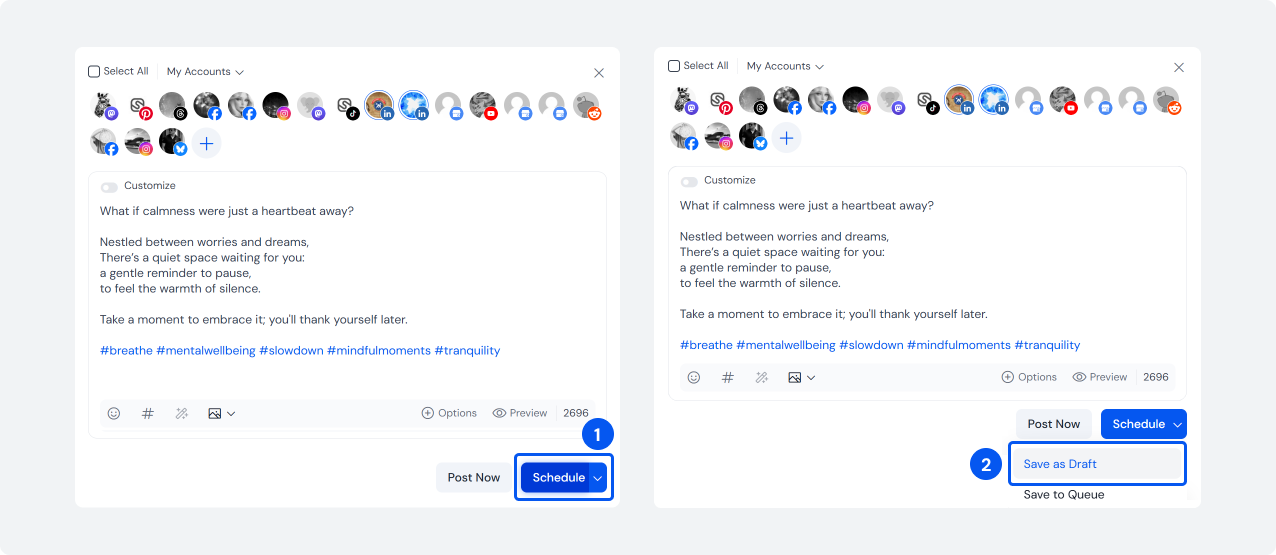
2. Draft and review content
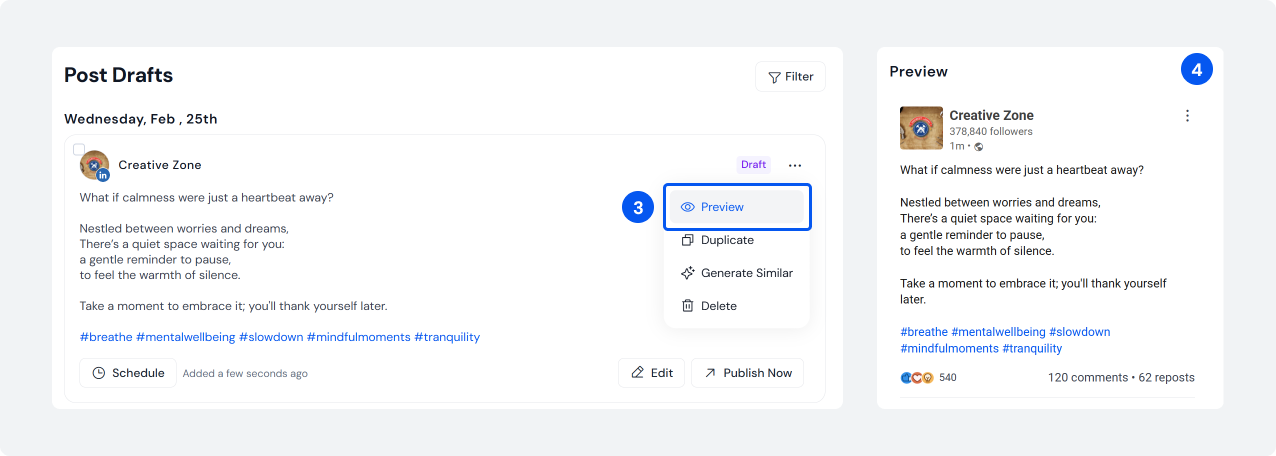
3. Schedule posts to the right Page or profile
4. Assign someone to handle comments after publishing.
Note: If you have a change of mind and would like to change or create similar posts for other platforms, you can simply choose an option like “Generate Similar”.
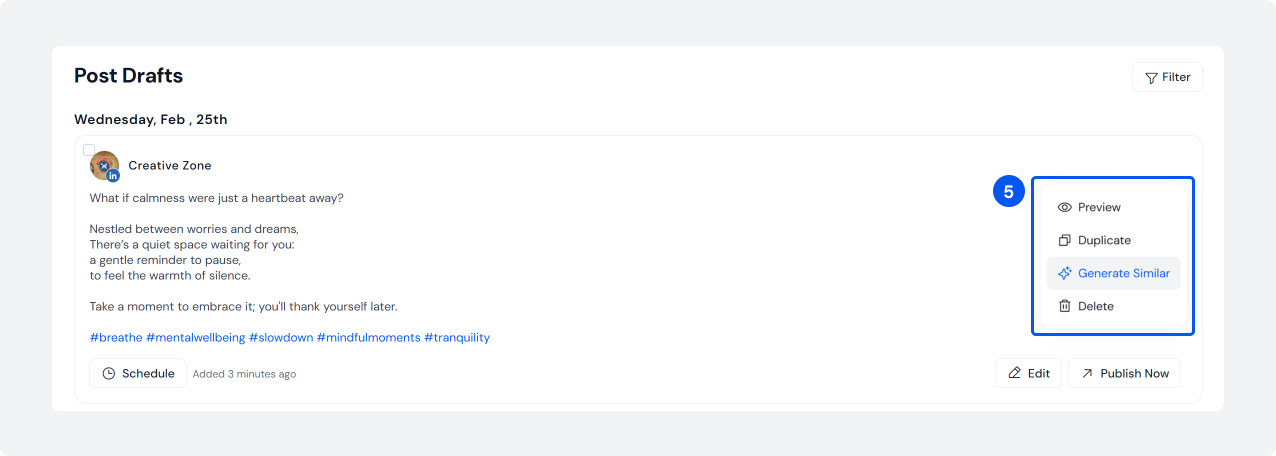
This example shows how a typical LinkedIn scheduling workflow is executed step by step.
Step 9: Engagement That Makes Scheduling Work
If you schedule and disappear, your reach usually drops. That is why engagement is built into the system.
LinkedIn Engagement Strategy 2026
Here is a simple LinkedIn engagement strategy 2026 routine you can follow consistently.
- 15 to 30 minutes online when the post goes live
- Reply fast, ask follow-up questions
- Spend 10 minutes a day leaving thoughtful comments on relevant posts
LinkedIn Engagement Tips For B2B Brands
Simple rules to follow:
- End with one clear question when you want comments
- Reply with specifics, not emojis
- Avoid copy-paste replies
How To Schedule LinkedIn Posts Without Losing Engagement
Schedule the post, and also schedule the reply timeline. Treat that time like a meeting.
Also Read: 21 LinkedIn Statistics to know the key insights you need to grow on this B2B platform.Step 10: Lead Generation And Campaign Scheduling
Your LinkedIn B2B lead generation strategy should rely on organic content that builds trust before asking for action.
LinkedIn Lead Generation Through Organic Content
Organic lead gen works when you run a ladder:
- Teach the problem
- Show proof
- Offer a next step
How To Generate Leads Through LinkedIn Posting
Make offers feel earned:
- 80% value posts
- 20% offer posts (template, webinar, demo, newsletter)
This approach supports a strong LinkedIn organic reach strategy for 2026 and a healthier pipeline.
LinkedIn Campaign Scheduling
For launches, do not post once. Build a series:
- Week 1: problem education
- Week 2: proof and case study
- Week 3: offer and objections
If you are using a company Page, remember that LinkedIn mentions that you cannot promote a scheduled Page post through Campaign Manager’s “browse existing content” until it is published.
Step 11: LinkedIn Automation Strategy (What Is Safe)
Automation is fine when it supports workflow. It becomes risky when it tries to fake human behavior.
LinkedIn’s User Agreement (effective Nov 3, 2025) explicitly prohibits using software, scripts, robots, or similar methods to scrape or copy data, and also prohibits bots or unauthorized automated methods to create, comment on, like, share, or re-share posts, or otherwise drive inauthentic engagement.
This is your safest definition of LinkedIn automation strategy:
- Automate planning and publishing workflows
- Do not automate engagement actions
LinkedIn Post Scheduling Best Practices 2026
Here are the best practices that keep the whole system clean:
- One goal per month, one theme per week
- Split Page vs Profile Roles
- Batch weekly, schedule 1 to 2 weeks ahead
- Use documents and video consistently (based on format benchmarks)
- Protect the first hour with replies
- Review analytics weekly, adjust monthly
LinkedIn Posting Mistakes B2B Brands Should Avoid
- Posting only product updates
- Scheduling everything months ahead with no flexibility
- Ignoring format performance, especially for documents and multi-image
- Skipping comment replies
- Not tracking click-through rate and lead quality
Automate your Content Scheduling and Get Results
Save the first hour for replies, batch weekly, and use analytics to iterate — run your LinkedIn strategy 1–2 weeks ahead with SocialBu.
Conclusion
A strong LinkedIn post scheduling strategy 2026 is about building a repeatable system: set goals, split Page vs profile roles, choose a realistic cadence, plan a calendar, batch content weekly, schedule 1 to 2 weeks ahead, show up for comments, then refine using LinkedIn analytics. If you do that for 30 days, your posting stops feeling random and starts compounding into trust, conversations, and the B2B pipeline.
If you want to simplify execution, use a tool that makes planning and scheduling easier across LinkedIn pages and accounts, and keeps everything visible in one calendar.
Try SocialBu to plan and schedule your LinkedIn posts from one place, using a simple calendar workflow.
You can follow SocialBu’s step-by-step LinkedIn scheduling guide to set it up quickly.
LinkedIn Post Scheduling Strategy 2026 Checklist
Use this checklist every week:
- Review your KPIs and what “good” looks like for this month’s LinkedIn post scheduling strategy 2026
- Confirm your LinkedIn company page vs personal profile strategy for the week’s posts
- Lock your LinkedIn posting frequency for B2B for the next 7 days
- Update your LinkedIn content calendar B2B and assign owners
- Batch content using your LinkedIn content batching strategy
- Schedule posts using the LinkedIn native scheduling tool or your chosen platform
- Block time for replies as part of your LinkedIn engagement strategy 2026
- Run a 10-minute review to improve your LinkedIn post scheduling strategy for 2026 next week
FAQs
Q. Does scheduling LinkedIn posts reduce reach in 2026?
A. Scheduling itself does not automatically reduce reach. The bigger issue is scheduling and disappearing. If you want consistent results, schedule posts and also schedule time to reply.
Q. What is the best time to post on LinkedIn for B2B brands?
A. Use benchmark windows as a starting point (SocialBu highlights strong midweek morning and noon peaks), then test two time slots for four weeks and keep what wins.
Q. How often should B2B companies post on LinkedIn?
A. Start with a cadence you can sustain, then scale with batching. Many B2B teams do well with 2 to 5 Page posts per week, plus 3 to 5 profile posts per week across 1 to 3 key people.
Q. Should B2B brands use LinkedIn’s native scheduler or third-party tools?
A. Use native scheduling if your workflow is simple. Use third-party tools when you need approvals, multi-account management, and a shared calendar (especially for agencies).
Q. How far in advance should LinkedIn posts be scheduled?
A. LinkedIn allows scheduling up to three months ahead for profiles and Pages (with different minimum lead times). Most B2B teams schedule 1 to 2 weeks ahead for flexibility.
Q. What type of content performs best on LinkedIn in 2026?
A. Use benchmarks as your baseline. Socialinsider’s 2025 data shows multi-image, native documents, and video as top performers by engagement rate by impressions, then test for your niche.
Q. Is LinkedIn automation safe for B2B brands?
A. Workflow automation, like scheduling, can be fine. Automation that scrapes data or fakes engagement can violate LinkedIn’s User Agreement.