Later has no free plan. And if you’re working with a team, the cost adds up faster than you would think.
Plans start at $25/month, but the Starter tier allows only one person. The moment you need a teammate, you’re looking at a higher plan. Even then, extra users cost more on top.
In this post, we break down exactly what you get at each price point, where things get restrictive, and how to pick the plan that matches your work.
TL;DR
- Later’s value doesn’t scale. Extra costs for users, social sets, AI credits, and advanced features quickly add up.
- Later subscription plans start at $25/month. Starter works for solo creators, Growth ($50/month) quickly gets expensive with add-ons, and Scale ($110/month) still limits team size and automation.
- SocialBu beats Later on value. This platform offers automation, cross-platform scheduling, team collaboration, and built-in AI tools. It gives you more features for less, with no hidden fees.

What’s Behind Later’s Sticker Price?
Later currently offers three tiers: Starter, Growth, and Scale. On paper, these Later subscription plans look simple. However, in practice, each plan has restrictions designed to encourage upgrades and paid add-ons.
Here’s the reality:
No free plan anymore. Only a 14-day trial, after which you must pay.
- Starter Plan: Just 1 social set and 1 user. Useless once your team or clients grow.
- Growth Plan: Costs increase with additional users, social sets, and expanded publishing capabilities.
- Scale Plan: Still caps you at 4 users, 6 sets, and 100 AI credits.
Hidden Costs That Add Up
Would you like to add social sets, users, or AI credits as your team grows? With Later, every step forward means another bill.
- Add-ons: Social sets ($15 each) and users ($5 each).
- AI credits: Capped, and you’ll pay extra if you rely heavily on AI-generated captions.
- Upgrades: Growth and Advanced tiers are almost mandatory once you manage multiple brands.
- Policy gaps: No white-labeling, clunky approval workflows, limited automation, and a weak refund policy.
- Platform support: Later still lags on rising platforms compared to competitors.
In short, the Later subscription cost doesn’t stay at $25/month (Billed monthly); it scales up quickly as your needs grow.
Here’s what users are saying about Later on Trustpilot.
Horrible content quality because it gets scaled down
Service is completely for nothing. I bought a good package so I can upload videos with 1,GB but the funny thing is that when you upload a Video with over 100 mb it gets scaled down to a horrible quality because of their API. The support doesn’t help you, waiting for an answer for weeks now.Can’t schedule Twitter/X anymore + Later not refund/credit after taking away Twitter/X
Later is removing Twitter/X scheduling and analytics in Aug ’25 despite us paying for a full year that included those features. We’ve contacted them multiple times about reimbursement but received no response. Based on this experience, we don’t recommend using Later.
That’s concerning for creators, social media managers, or small businesses that manage multiple clients and don’t want to overspend on essential features.
Don’t Overpay for Hidden Add-ons With Later
You get all the essential features with SocialBu: automation, team collaboration, analytics, and AI tools, without any additional add-ons.
Later Pricing: What You’re Really Paying For?
Later’s entry-level plan may feel affordable, but its pricing structure is designed to prompt you to upgrade quickly. Once you outgrow post limits or team caps. Later subscription costs double or triple, which can be more expensive for small teams and social media managers.
It sounds like you’re doubling or tripling your monthly cost.
Below is a detailed cost breakdown for the Starter, Growth, and Scale plans, highlighting the actual costs and features you get in each plan:
Features | Starter Plan | Growth Plan | Scale Plan |
Price (Annual Billing) | $18.75 /month | $37.50 /month | $82.50 /month |
Price (Monthly Billing) | $25 /month | $50 /month | $110 /month |
Social Sets & Users | 1 Set, 1 User | 2 Sets, 2 Users | 6 Sets, 4 Users |
Posts per Profile | 30 | 180 | Unlimited |
AI Credits/month | 5 credits | 50 credits | 100 credits |
Visual Planner & Auto-Publish | Yes | Yes | Yes |
Social Inbox | No | Yes | Yes |
Team Collaboration | No | Yes | Yes |
Custom Analytics | No | No | Yes |
Competitive Benchmarking | No | No | Yes |
Each plan initially feels affordable until you scale, at which point add-ons significantly increase your cost.
What You’re Paying For in Each Later Plan and What You Get
Let’s review the Later paid plans in detail to see if they’re worth sticking with or if they break the moment you grow.
1. Later Starter Plan: For Solo Creators & Individuals (Until You Grow)
Cost: $25/month (billed monthly)
What You Get
- 1 user, 1 social set (6 profiles from the same brand)
- Basic visual planner for scheduling posts (Instagram, Facebook, Pinterest, etc.)
- Limited analytics (up to 3 months) and scheduling functionality
- 10 AI credits per month
The Catch: Fine for 1 solo creator. The moment you land a second client or want to add another team member, the Starter plan becomes unworkable.
Better option: SocialBu’s free plan already allows you to manage up to 2 accounts and 40 posts per month.
2. Later Growth Plan: For Growing Teams, but with Expensive Limits
Cost: $50/month (billed monthly)
What You Get
- Schedule up to 180 posts per profile
- 2 users, 2 social sets
- Instagram visual planner
- 1-year analytics and basic reporting
- Social inbox and roles/permissions
- 50 AI credits per month
The Catch: Although it looks fine for small teams, hidden add-ons ($15 per brand, $5 per user) and automation can quickly escalate costs.
Or you’re suddenly staring at the much more expensive Scale plan.
3. Later Scale Plan: For Teams, Not Quite for Agencies
Cost: $110/month (billed monthly)
What You Get
- 4 users, 6 social sets
- Analytics + performance comparisons
- Advanced collaboration (roles, approvals)
- Social listening + social inbox
- 100 AI credits per month
The Catch: Although branded as an “agency” plan, it has a 4-user/6-set cap, which many agencies quickly outgrow.
Key Takeaway: Later’s plans aren’t built to scale affordably. Each tier only works until you grow, at which point it forces you into expensive add-ons or upgrades.
What are the Best Later Alternatives in 2026?
Later’s sticker price might look beginner-friendly, but once you scale, the hidden add-ons stack up like a Later tax: extra team seats, extra AI credits, extra accounts.
Instead of paying more for every new feature, agencies, freelancers, and growing creators look for Later alternatives that scale without hidden costs.
- SocialBu: Top pick for automation, bulk scheduling, AI tools, and managing multiple brands without expensive add-ons
- Buffer: Best for simple scheduling and budget-conscious solo creators
1. SocialBu – Best Later Alternative for All-in-One Social Media Management
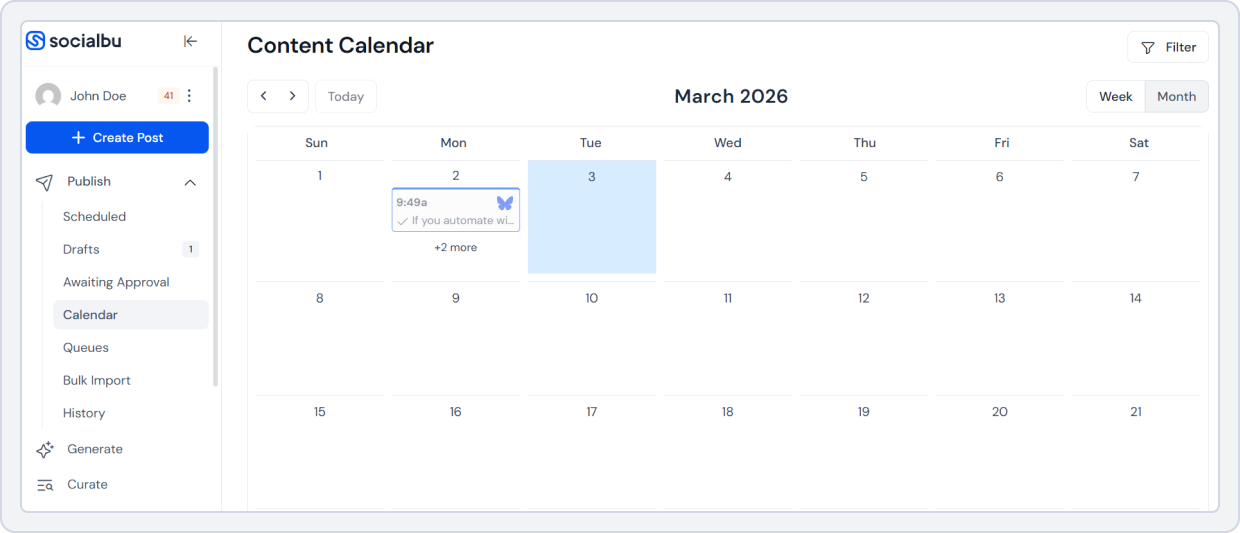
SocialBu is a smart, budget-friendly Later alternative built on automation and advanced scheduling.
Unlike Later, which is heavily Instagram-focused, SocialBu is an all-in-one scheduler for cross-platform growth across Instagram, TikTok, LinkedIn, Facebook, Twitter (X), Reddit, and more.
SocialBu lets you grow without limits and scale, without paying hidden fees for every extra feature or user account.
Key Features of SocialBu
Here’s how SocialBu gives you more for less:
- Automation Built-In: Schedule your content once, post everywhere, automate from RSS feeds, and free yourself from manual posting.
- AI That Actually Saves Time: Generate content, captions, and full platform-specific posts in your brand’s tone without paying extra per credit.
- Bulk Scheduling + Smart Workflows: Plan campaigns in batches and streamline repetitive tasks.
- Engagement Automation: Set automatic Rules for comments, messages, and reviews (a feature that Later doesn’t touch).
- Analytics That Scale: Get advanced reports and analytics for multiple brands without enterprise-level pricing.
- Collaboration Without Extra Fees: Collobrate with your team for cleaner workflows, no add-on costs for “extra seats.”
Bottom line: SocialBu eliminates the Later tax and offers all-in-one automation at an affordable price, designed for scalability.
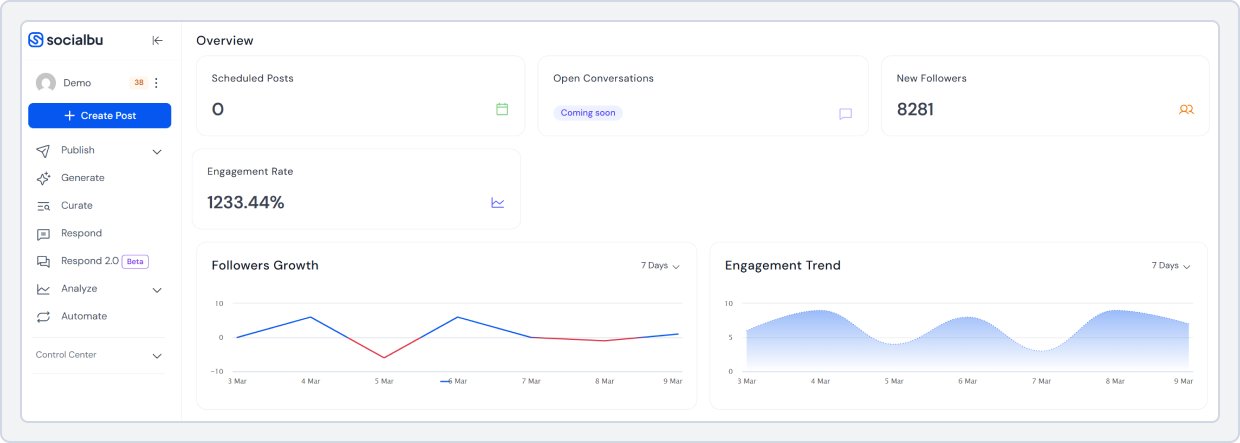
SocialBu vs. Later: Feature Comparison
Here’s how SocialBu stacks up against Later in 2026:
Features | Later | SocialBu |
Platforms Supported | Primarily Instagram + limited others | Full support: Instagram, TikTok, LinkedIn, Facebook, Twitter (X), more |
Pricing | Starter: $25/mo (1 set, 1 user) | Standard: $ 19/mo (12 social accounts, 2 teams) |
Scheduling | Basic post scheduling | Post scheduling with drag-and-drop calendar + bulk uploads |
Automation | Limited (manual-heavy workflows) | Smart workflows + automated replies |
AI Tools | Basic AI captions | AI captions + content generation tools |
Analytics | Basic analytics, unless upgraded | Strong analytics across all tiers |
Comment/DM Automation | Not available | Advanced comment & reply automation |
Team & Client Workflows | Available in high-tier plans only | Supported in every plan |
This comparison table clearly highlights the extra add-ons you pay for and the high-tier pricing plans that offer limited features.
SocialBu’s Standard plan delivers 40% more value at 40% lower cost.
You also get more users, more accounts, up to 800 posts publishing, bulk import, custom queues, and automation tools that Later doesn’t offer, even in higher tiers.
Here is what people are saying about SocialBu on G2:
What do you like best about SocialBu?
SocialBu has completely transformed how I manage my social media presence. Earlier, I had to schedule alot of things manually using each Social Media Interface but SocialBu gives me a single interface to manage all my Social media platforms. The interface is clean and user-friendly, making scheduling posts, replying to messages, and tracking performance a breeze – even across multiple platforms like Facebook, Twitter, LinkedIn, and Instagram.
Review collected by and hosted on G2.com.What do you dislike about SocialBu?
As far as the features I had used, found no problem.
Have a closer look at SocialBu’s pricing plans:
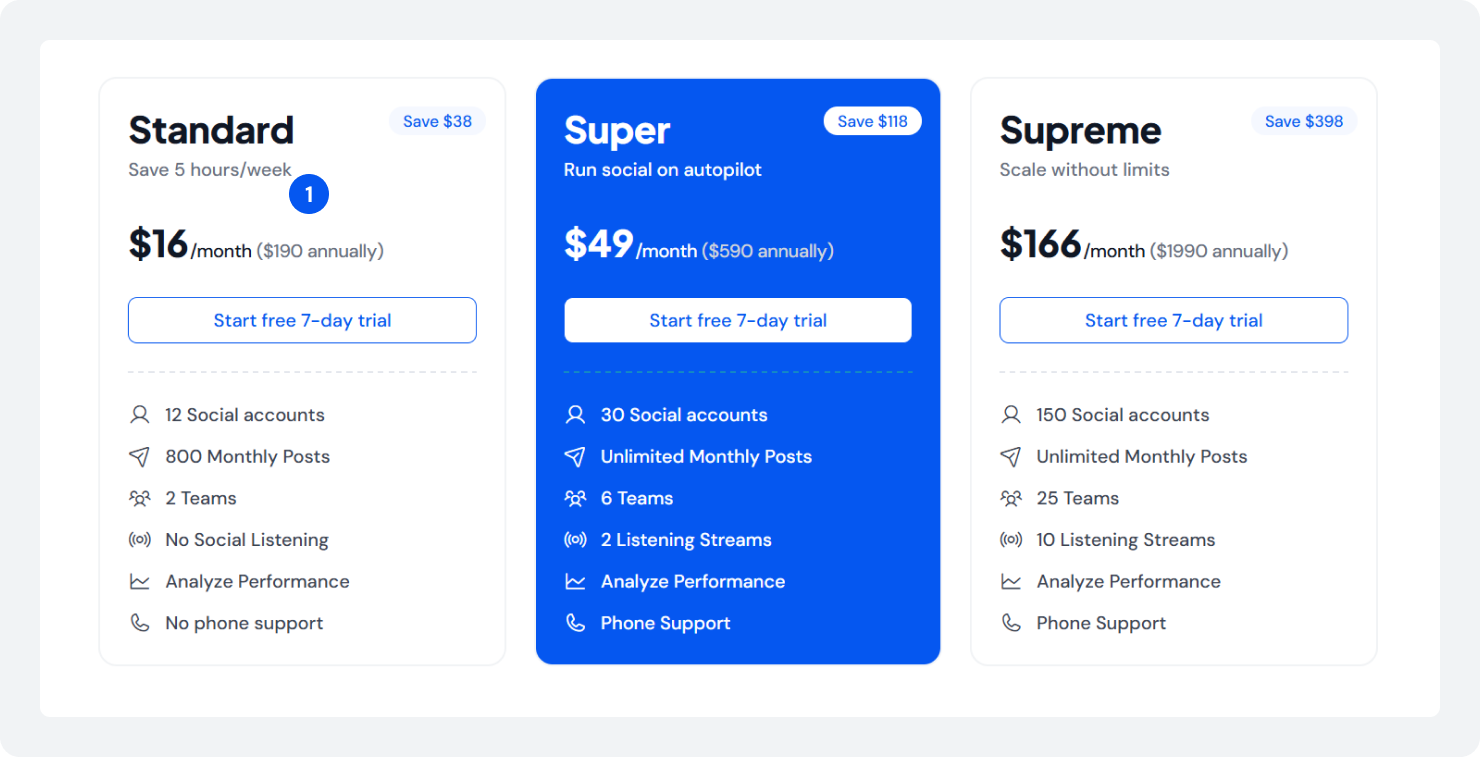
Compare all paid plans and the features included in each.
So, when you have a better option, why not try it? You can manage multiple brands, more team members, and enjoy automation.
 Read this Guide: The best Later alternatives. If you’re tired of paying extra for users, accounts, and features that should already be included.
 2. Buffer: A Simpler Alternative to Later
If you’re purely budget-conscious and want basic scheduling, Buffer is another Later alternative to consider. It’s one of the oldest social scheduling tools, built for creators and small businesses who want an easy-to-use interface with reliable publishing and Instagram story scheduling.
Pricing Plans:
- Free Plan: 3 channels, 10 scheduled posts.
- Essentials: $5/month per channel (ideal for solo creators).
- Team: $10/month per channel.
Key Takeaway: Buffer offers more flexibility than Later, featuring per-channel pricing and a still-available free plan. However, it lacks advanced automation, AI workflows, and analytics.
So, if you prioritize automation, Bulk scheduling, Post recycling, analytics, and AI tool support, SocialBu is the best platform to consider.
Also Read: Buffer vs Later for a feature-by-feature comparison. Which Plan (or Tool) is Right for You?
- For Solo Creators: Later’s Starter plan is restrictive. SocialBu’s free or lower-tier plan gives more features and automation. Buffer’s free plan is suitable if you only need basic scheduling.
- For Small Businesses: Later’s Growth plan becomes expensive with add-ons. SocialBu offers better value, including automation, analytics, and team collaboration. Buffer’s per-channel pricing fits if you manage a few accounts.
- For Agencies: SocialBu scales affordably with bulk scheduling, workflows, and smart comment replies. Buffer’s Team plan supports multi-channel management, but the cost increases as you grow.
Wrap Up!
Later is a popular choice for visually planning Instagram and TikTok posts. However, its pricing in 2026 feels restrictive, especially as your needs grow and you require automation, analytics, or multi-platform support.
Whether you’re a solo creator, social media manager, small business, or agency. Later’s pricing plans, the actual ones, the hidden ones, and the extras can exceed your budget.
That’s why it’s essential to evaluate the pricing plans of any tool you plan to use for your social media management needs and be aware of the potential price increases.
Here’s how you can select the best tool for your needs:
- Define your budget before subscribing.
- List the features you need in a social media tool.
- Match features with your actual workflow (automation, approvals, analytics)
- Consider scalability and any extra charges or add-ons that may arise if your team or clients grow.
- Test free trials before committing long-term.
If your priority is a budget-friendly, automation-rich, and cross-platform solution, SocialBu is the best alternative for you. With it, you don’t have to pay for additional add-ons, and the platform scales with your needs without draining your budget.
FAQs
How much does Later cost for Instagram scheduling?
Later’s Instagram scheduler pricing starts at $25/month (Starter plan), billed monthly with 1 user and 1 social set. Higher-tier plans, such as Growth and Scale, cost more but offer increased post limits, user capacity, and additional features.
What’s included in Later’s free plan?
Later used to offer a free plan with 1 user and 1 social set. However, Later has retired its free plan and now offers a 14-day free trial on its paid plans. You must pay for the paid tiers after the trial ends.
Is the Later Starter plan worth the cost?
The Later Starter plan ($25/month) is ideal for individuals with basic Instagram planning needs and those who also use other platforms. However, it feels limited for creators who need automation, more users or social sets, AI credits, and team collaboration.
How does Later pricing compare to Planoly?
Later is more expensive than Planoly, especially for small creators. The Later’s Starter plan costs $25/month, whereas the Planoly Starter plan costs $16/month.
What are the post limits on Later’s free plan?
Later currently does not offer a free plan. It offers a 14-day free trial for all paid plans.
However, here’s the Later’s paid plans post limits:
- Starter: 60 posts per profile
- Growth: 180 posts per profile
This limit can quickly feel restrictive for growing creators or businesses.
How much does Later cost for multiple accounts?
Managing multiple accounts with Later requires upgrading to the Growth plan ($50/month) or Scale plan ($110/month). Above this, you also have to pay extra add-ons if you want to add more users or need additional social sets or AI credits.
Are there any Later pricing discounts?
Yes, Later offers a discount when billed annually. This reduces the monthly cost compared to monthly billing.
What’s the difference between Later plans?
The main differences are in post limits, user count, social sets, and advanced features such as analytics, team collaboration, and a social inbox. Higher-tier plans unlock more post limits, social listening, AI credits, and analytics.
Is Later more affordable than Hootsuite?
Later is generally cheaper than Hootsuite, especially for solo creators or small teams. However, Hootsuite offers broader enterprise-level integrations and analytics.
How much does Later cost for businesses?
For businesses, Later’s Growth plan starts at $50 per month/, and the Scale plan starts at $110/month. These options support 2 and 4 users, respectively, as well as higher post limits and team workflows.