
Your TikTok For You page is supposed to know you, but what if it doesn’t? If your FYP is suddenly flooded with irrelevant videos, stuck in one niche, or showing content you never interact with, your TikTok algorithm may be off track. The solution? You don’t need to delete your account or start over.
In this guide, we’ll show you how to reset the TikTok algorithm in 2026, refresh your For You feed, and retrain TikTok to serve content you actually care about.
Can You Reset TikTok Algorithm?
Yes! While TikTok doesn’t offer a single “reset” button, there are several tools and actions you can take to reset TikTok recommendations, refresh TikTok For You feed, and fix a TikTok For You page showing wrong content.
TikTok offers an in-app option called Refresh your For You feed, which removes personalized recommendations based on your previous interactions and lets you start fresh with new recommendations.
From clearing cache to managing topics, these steps help your recommendation system understand your interests and adjust your feed accordingly.
How the TikTok Algorithm Works in 2026
Before learning how to reset the TikTok algorithm, it helps to know how the TikTok algorithm works and decides what appears on your FYP. The recommendation system is designed for content discovery and relies on your watch history/viewing behavior, engagement, and search activity. Recent TikTok statistics show just how important the For You page is for content discovery.
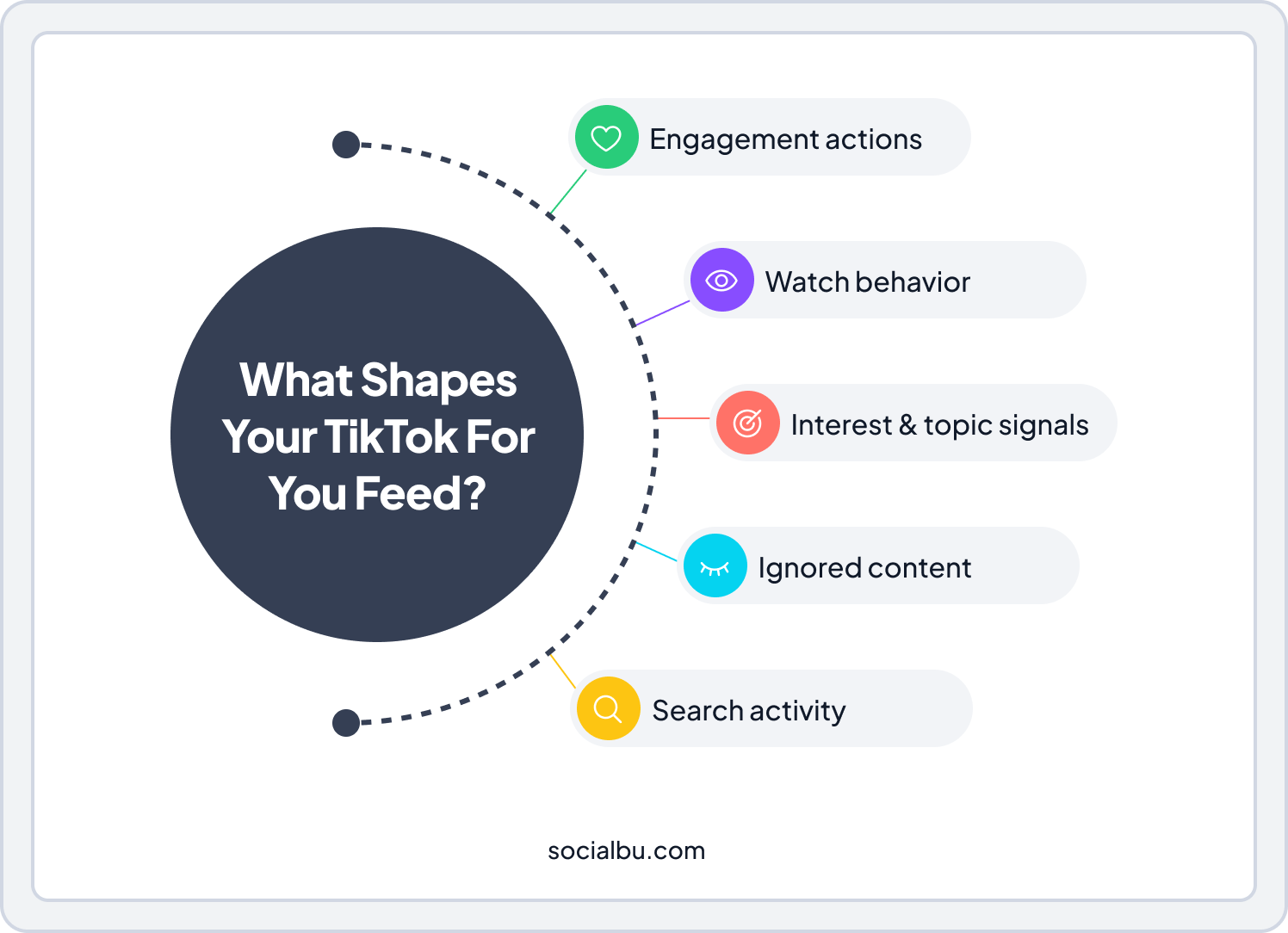
Key Signals TikTok Uses:
- User interactions (e.g., likes, shares, follows, comments)
- Video information (e.g., captions, sounds, hashtags)
- Device and account settings (e.g., language, country, device type)
TikTok also notes that finishing a longer video can be a strong indicator of interest.
- Engagement signals (likes, comments, shares, follows)
- Watch history/viewing behavior: How long you watch, rewatches, skips
- Topic categorization: TikTok classifies the videos you engage with
- Content you ignore: Fast scrolling or skipping shows what you don’t like
- Search activity: Your searches influence future recommendations
Even small actions, like watching a video for a few extra seconds, can affect what TikTok thinks you’re interested in. Over time, this can cause your TikTok algorithm to show the wrong content. With billions of daily video views driven by personalization, recent TikTok statistics show just how important the For You page is for content discovery.
What Happens When You Refresh Your For You Feed?
When you use Refresh your For You feed, TikTok reduces the impact of your old activity and starts recommending more diverse content. TikTok states that refreshing removes personalized recommendations based on your previous interactions and lets you start fresh with new recommendations.
Here’s what happens:
- Old watch history matters less
- Topic categorization gets loosened
- TikTok shows new and exploratory videos
Important to Know:
- Your account, followers, and posts stay the same
- You can’t undo refreshing your For You feed once it’s done
- The feed may feel random for 1–3 days
This is completely normal and part of the reset process.
What NOT to Do When Resetting TikTok Algorithm?
Resetting your TikTok algorithm works best when you guide it carefully. Some actions, however, can confuse the system and make your feed worse instead of better. Before you start, here are the things you should avoid doing to make sure your FYP reset actually works.
- Rage-watch content you hate
- Comment on videos you don’t like
- Follow the random trends for social media
- Skip videos instantly
- Reset repeatedly without engagement
Avoid blindly jumping on current TikTok trends during a reset, as random trend engagement can confuse the algorithm.
Now, let’s take a closer look at how the TikTok algorithm works in 2026 and how it builds your personalized For You feed.
How to Reset TikTok Algorithm in 2026
TikTok’s For You page is powered by an algorithm that learns from what you watch, like, and skip. Over time, this can cause your feed to show content you’re no longer interested in. In this guide, we’ll show you how to refresh your TikTok For You feed in 2026 and retrain the algorithm to show content you actually enjoy.
Step 1: Clear TikTok Cache to Reset Feed
One of the first steps to reset the TikTok FYP on iPhone or Android is to clear the cache. It removes temporary data affecting your feed without deleting your account.
How to Clear TikTok Cache 2026
1. Open TikTok → Profile
2. Tap ☰ → Settings and Privacy
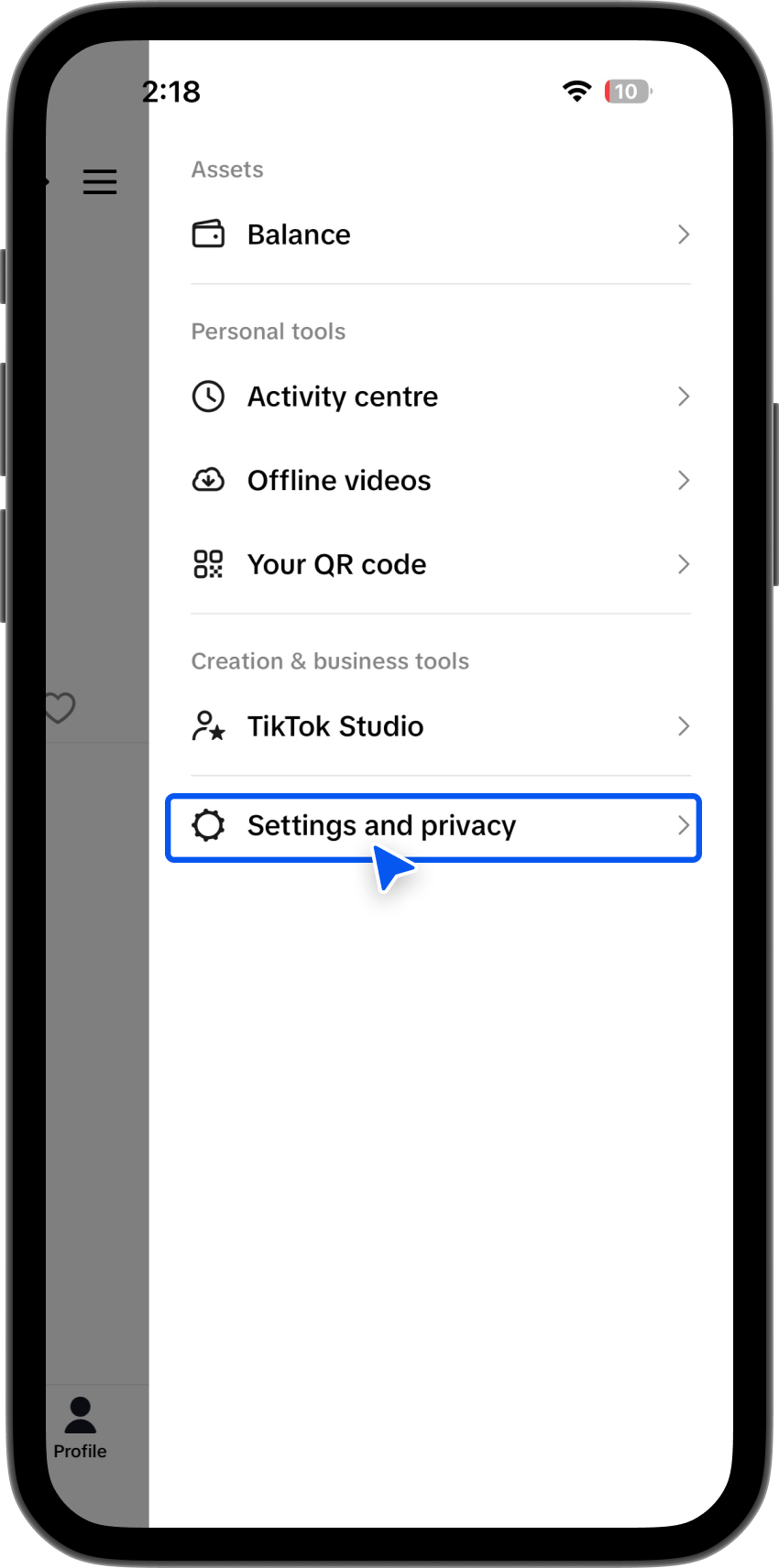
3. Select Free up space
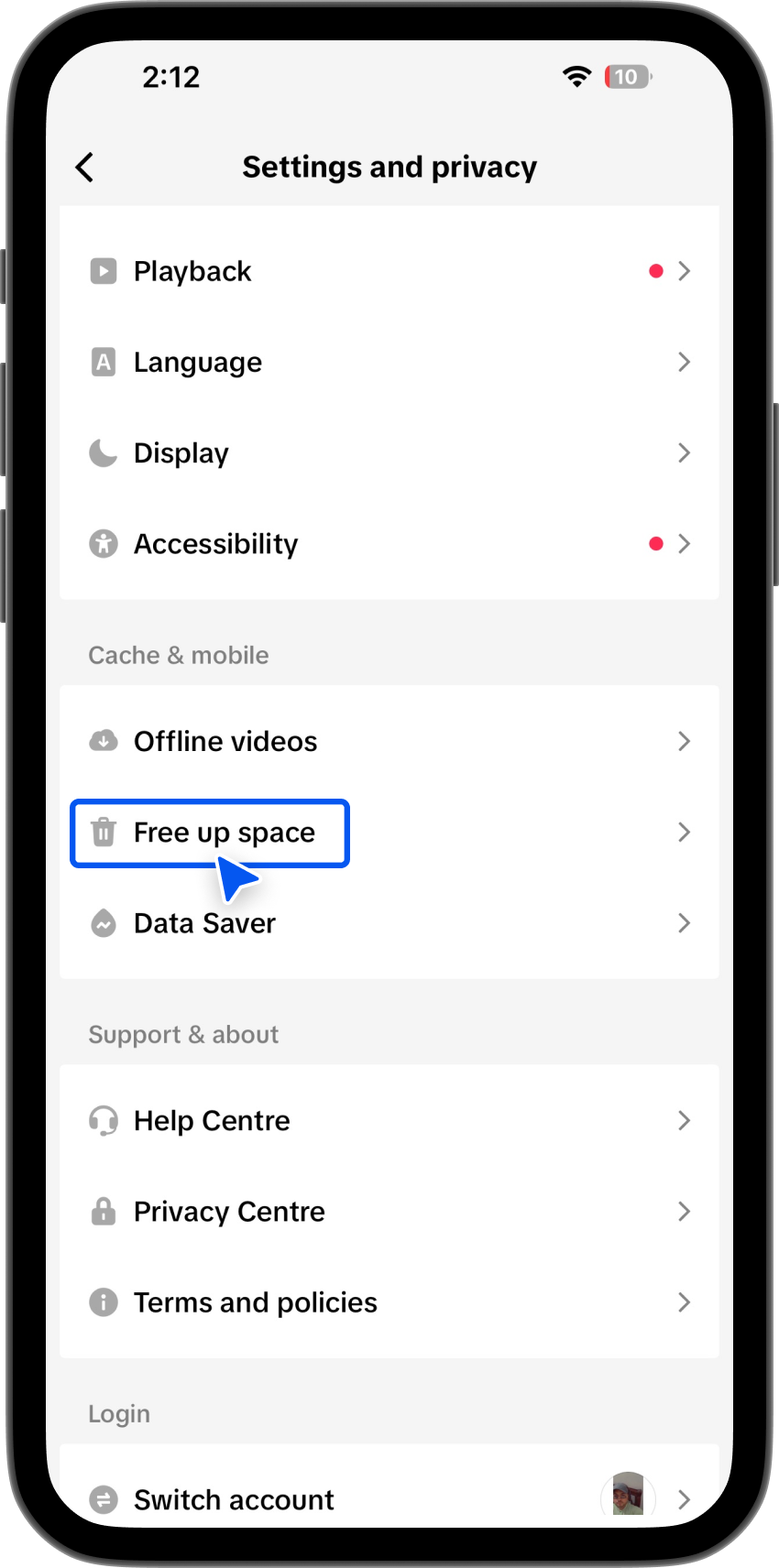
4. Tap Clear cache
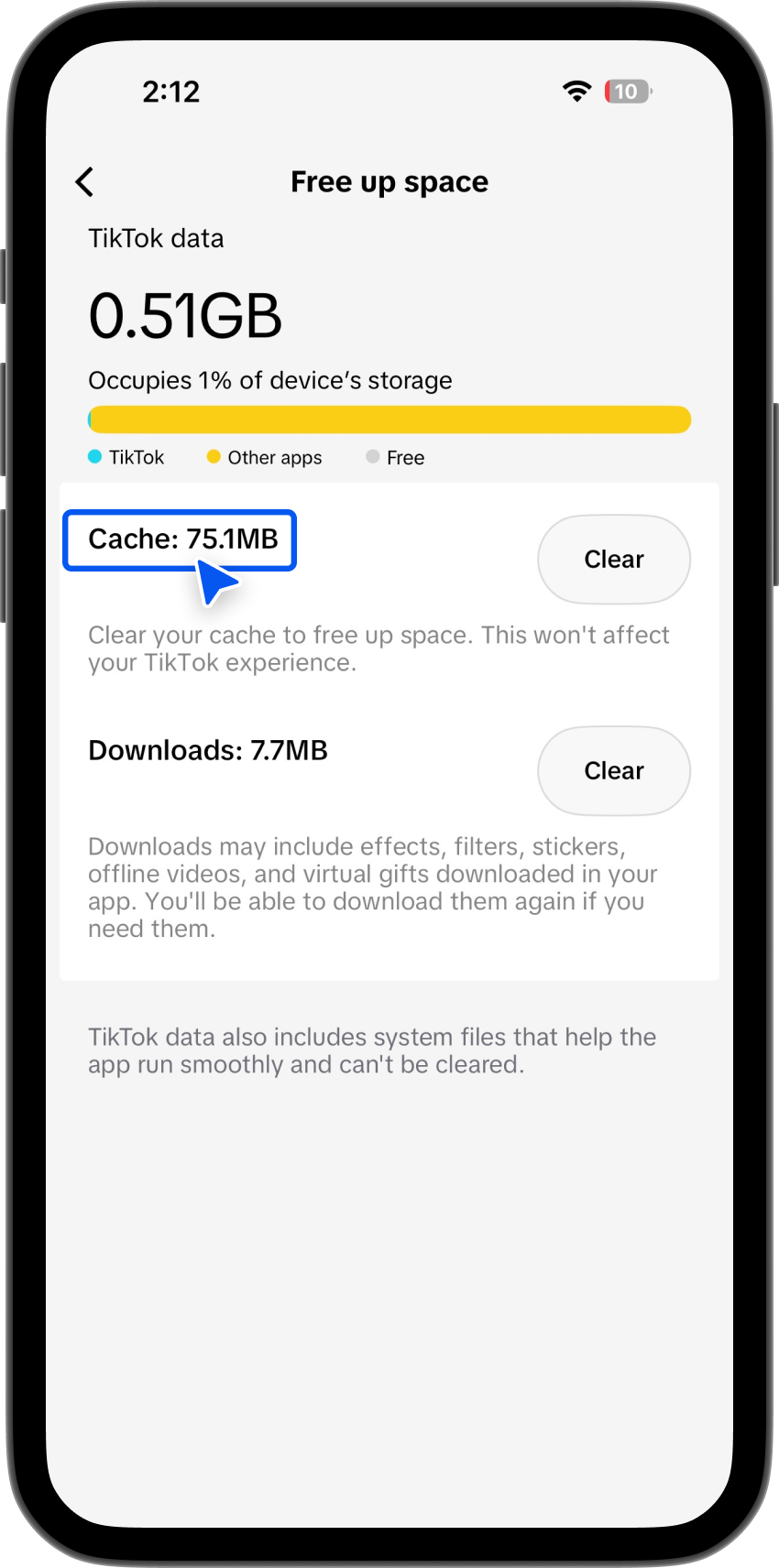
This helps TikTok clear the cache to reset the feed, giving the algorithm a fresh start. For many users, this alone improves the feed.
Step 2: Use the “Not Interested” Option
If your TikTok For You page is messed up, the Not interested feature is your best friend. It tells TikTok what you don’t want to see, which directly affects topic categorization and your personalized feed.
Long-press a video means touch and hold your finger on the video thumbnail or the video itself for a second or two (don’t just tap it quickly). When you do this, a menu will pop up with several options. From that menu, tap “Not interested.”
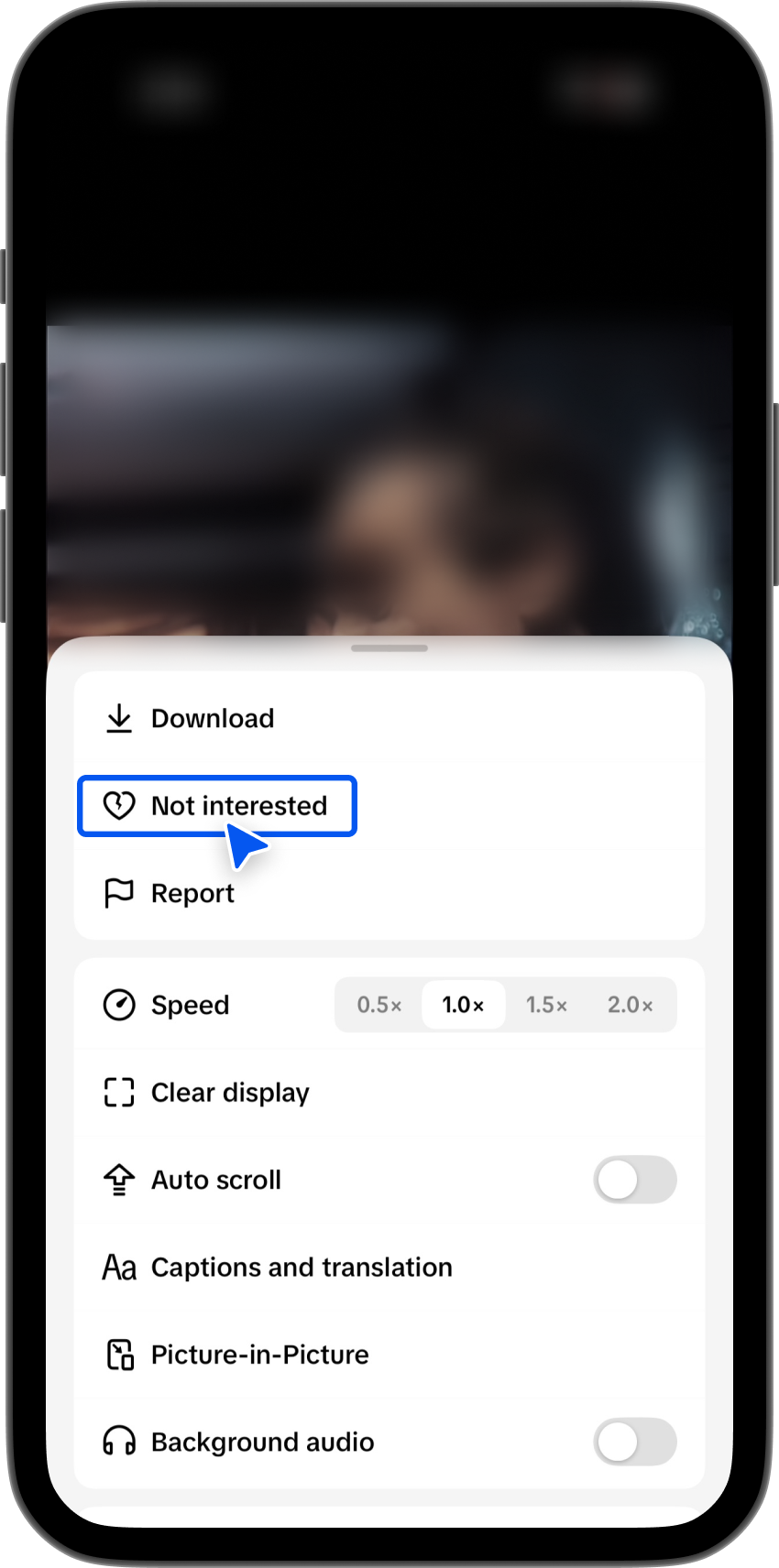
Selecting “Not interested” tells the app that you don’t want to see content like that, and it will try to show you fewer similar videos in the future.
Using this consistently helps you reset TikTok recommendations, fix a TikTok algorithm stuck in a single niche, and adjust your For You feed more quickly.
Step 3: Refresh Your For You Feed with Content Preferences
TikTok introduced Content Preferences to make it easier to refresh your For You feed.
TikTok’s Content preferences include tools such as Refresh your For You feed (feature availability can vary by version/region). With this, you can directly influence what TikTok recommends to you.
Tap “Content Preferences”. After opening Settings and Privacy, scroll until you see Content Preferences.
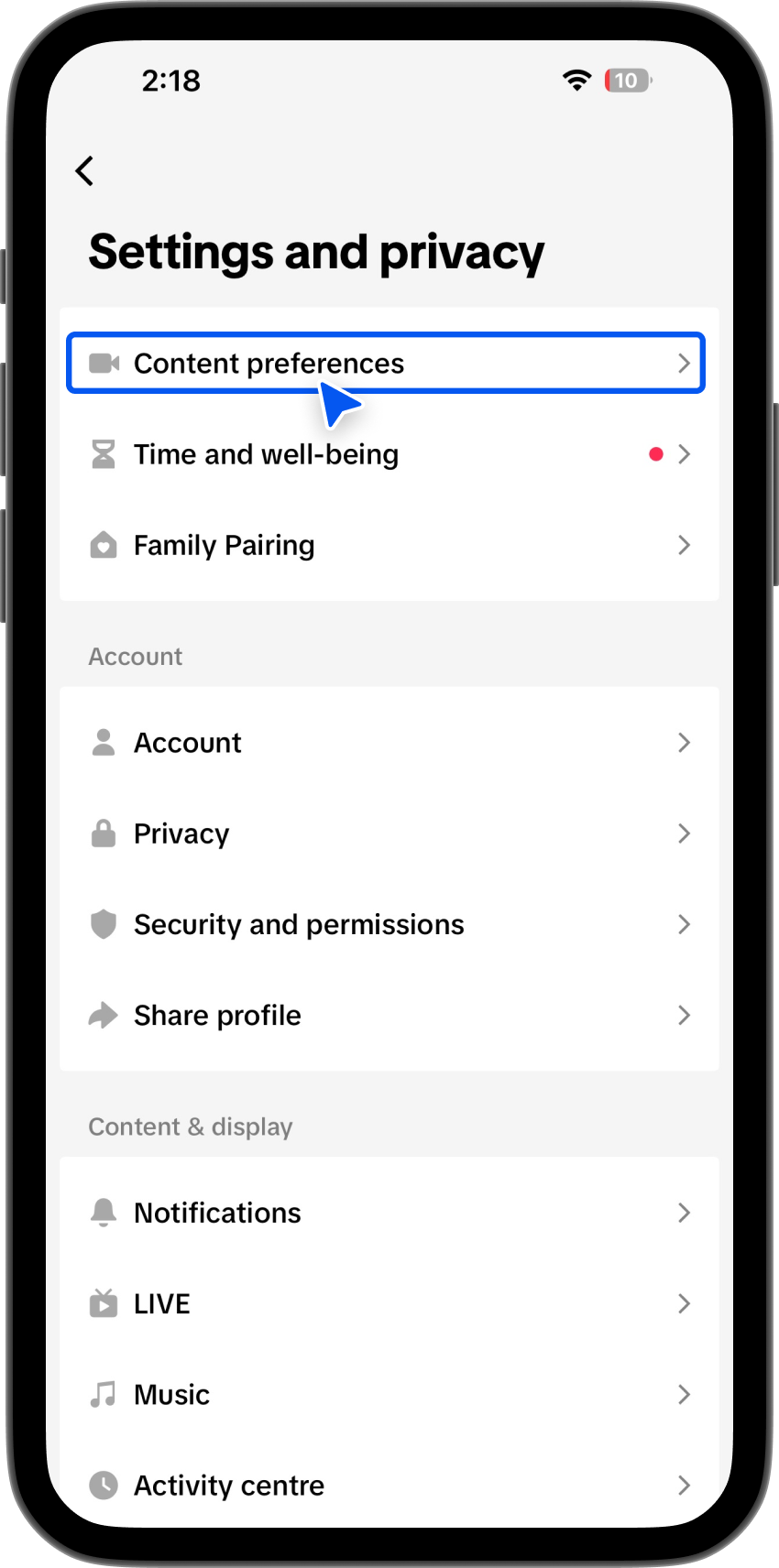
This section controls the types of videos and topics that appear in your For You feed. When you tap it, you’ll see options to manage your interests, reset or refresh recommendations, and adjust what kind of content the app prioritizes or avoids.
This is where the app learns what you like (and don’t like), so changes made here directly affect how your For You feed refreshes.
Adjust:
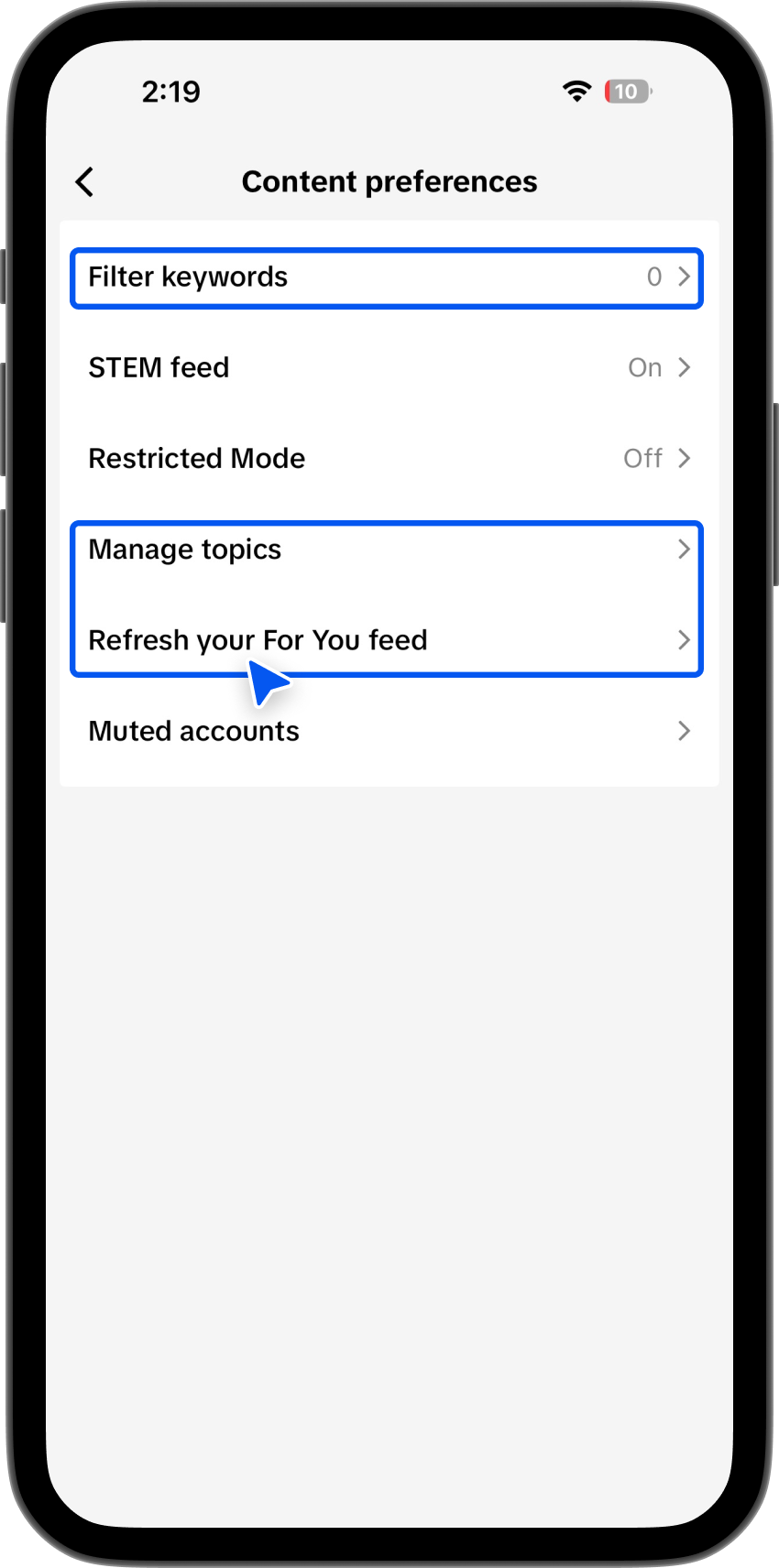
- Manage topics
- Filter keywords
- Adjust your For You
Pick categories you want more or less of, like fitness, travel, fashion, tech, or comedy. This is essential for how to change TikTok For You page interests.
Step 4: Manage Topics on TikTok For You Feed
Inside Content Preferences, you’ll find Manage topics.
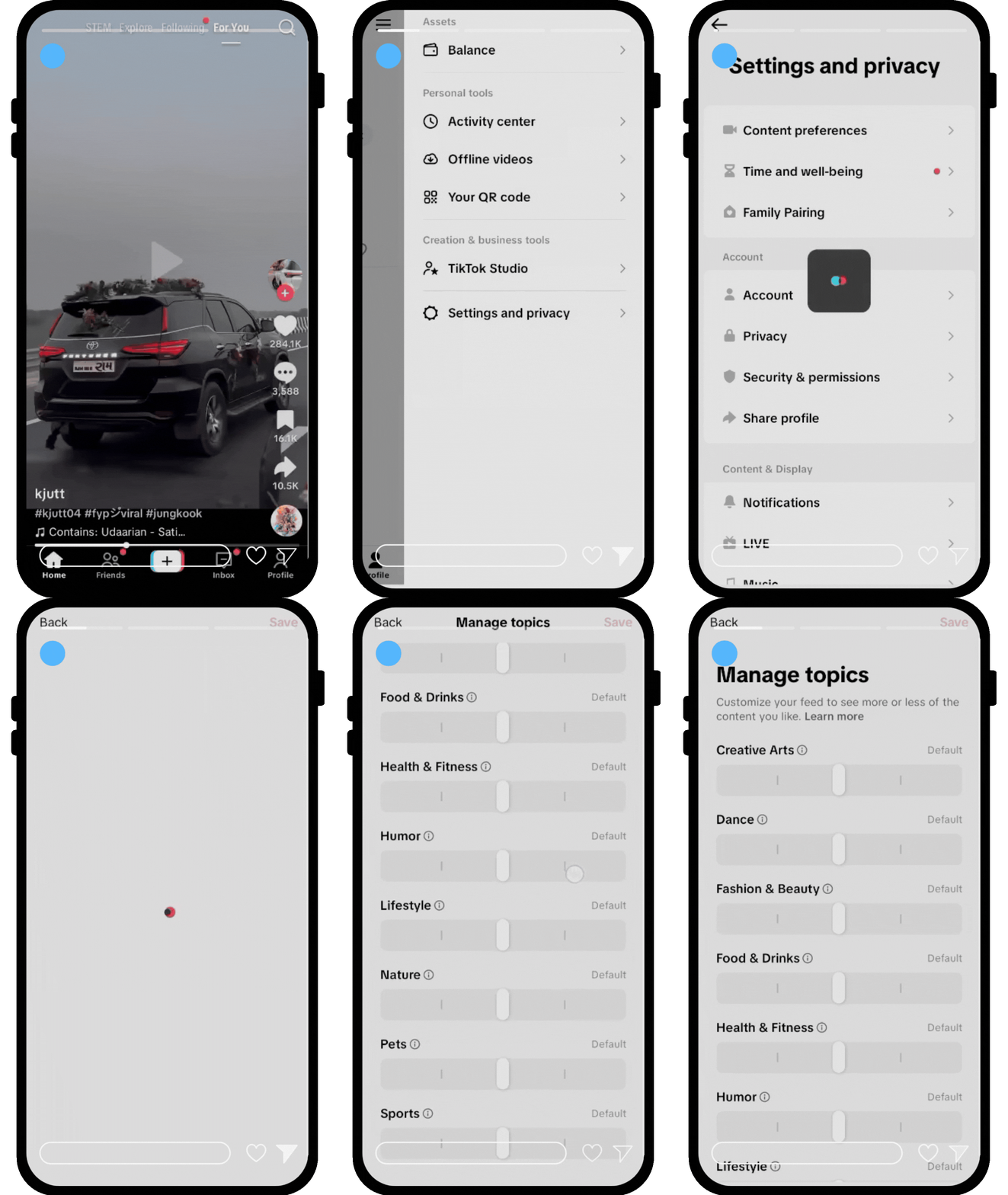
Here’s how to manage topics on TikTok. You can choose whether you want to see more or less content from categories like:
- Fitness
- Travel
- Fashion
- Tech
- Comedy
This directly helps with:
- How to change TikTok For You page interests
- TikTok manages topics For You feed
- TikTok content preferences refresh For You feed
Step 5: Filter Keywords on TikTok For You Feed
Add words or hashtags you want to block. After tapping Filter keywords, you’ll see a screen where you can type in specific words, phrases, or hashtags. These are the terms you don’t want to see in your feed. For example, if a certain trend or topic keeps appearing that you find annoying or irrelevant, type it in here.
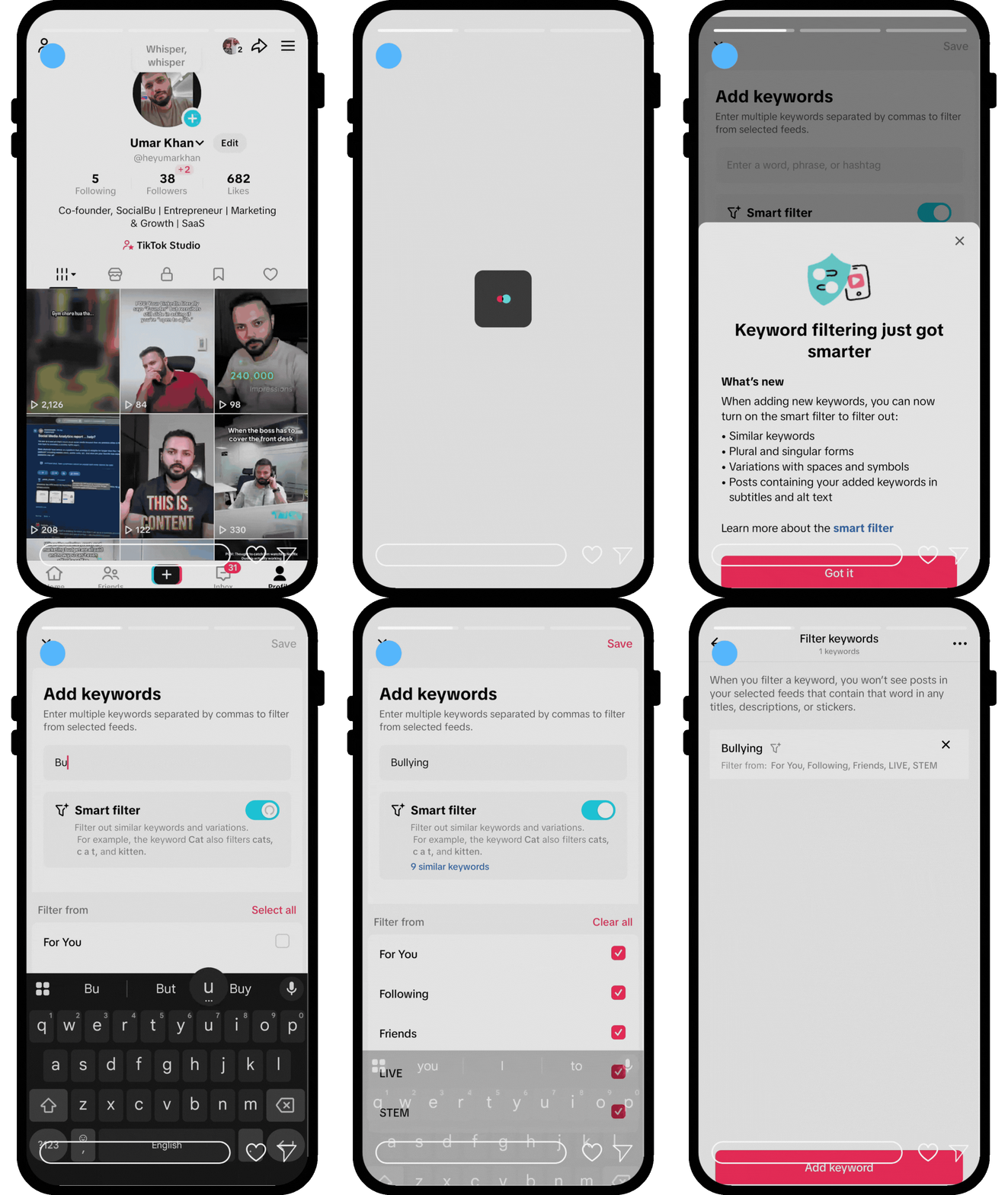
Once added, the app will try to hide videos containing those keywords or hashtags from your For You feed. You can add multiple words or hashtags, and you can remove them later if you change your mind.
This is a useful way to fine-tune your feed without fully resetting your content preferences.
TikTok will reduce or hide videos that contain those keywords, helping you clean up your For You feed.
Step 6: Use “Why This Post?” to Train the Algorithm
Tap “Why this post / Why this video” on any FYP video to see why TikTok recommended it.
This feature helps you adjust your For You feed by:
- Showing why a video appeared
- Allowing you to reduce similar content
- Improving TikTok’s topic categorization
Step 7: Engage With the Content You Want
Your TikTok feed adjusts fastest when you actively signal what you like. The algorithm considers engagement signals (likes, comments, shares, follows) as high-priority data. Using familiar engagement signals like comments with the most used emojis on TikTok can also boost interaction.
Tips to Retrain Your FYP:
- Follow new creators in your preferred niche
- Search trending hashtags actively
- Watch videos fully (longer watch time signals interest)
- Like, comment, and share content you enjoy
This method is critical for resetting the TikTok algorithm after changing niche and TikTok content preferences, to refresh the For You feed. Watching videos to the end is a strong interest signal, especially when creators follow the ideal TikTok video length for higher completion rates.
Step 8: Reset TikTok Search Suggestions
Old searches can continue to influence your FYP. Resetting them is part of how to refresh the TikTok For You feed 2026.
How to Reset TikTok Search?
- Tap the Search bar
- Click Clear All
- Go to Settings and Privacy → Clear search history
This helps refresh TikTok For You feed 2026 and removes outdated interest signals.
Reset TikTok FYP on iPhone vs Android
The steps are almost the same:
- iPhone: Settings → Free up space → Clear cache
- Android: Same steps, though cache size may differ
All content preferences features work on both platforms.
Reset TikTok Algorithm for Business Account
Business accounts depend heavily on consistency and clear audience signals, which means resetting the TikTok algorithm can take a bit longer. After a reset, it’s important to stay focused on one niche and avoid posting unrelated content. A clean FYP and clear niche signals can also improve performance when running TikTok ads.
Many businesses use social media scheduler tools such as SocialBu, an affordable social media scheduler, to plan and schedule TikTok posts in advance, track engagement, and maintain a consistent content strategy, helping the algorithm better understand who your content is meant for.
Steps to Reset TikTok Algorithm for Business Accounts
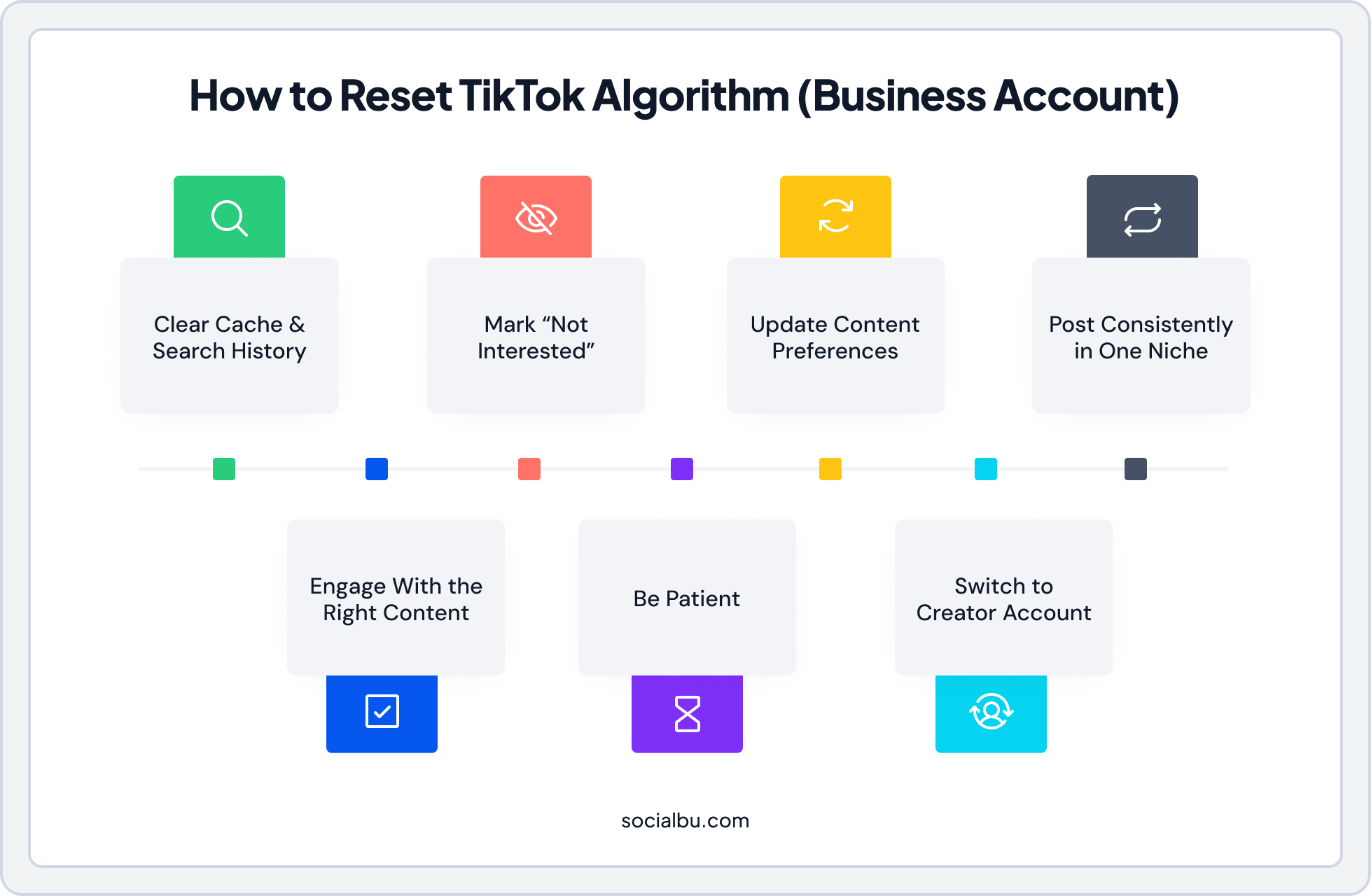
If you’re unsure what to post after a reset, exploring proven TikTok content ideas can help you stay relevant and consistent. Here are the steps to reset the TikTok algorithm for business accounts:
1. Clear Cache and Search History
- Open TikTok → Profile → ☰ → Settings and Privacy → Free up space → Clear cache
- Reset search history: Tap the search bar → Clear all
Why: Removes old data that may be influencing your FYP.
2. Use “Not Interested” on Irrelevant Videos
- Long-press a video → Not Interested
- Optional: Hide videos from the creator or hide videos with a specific sound
Why: Signals to the algorithm which content you don’t want to appear.
3. Adjust Content Preferences
- Open Settings and Privacy → Content Preferences
- Manage topics: Choose categories you want more or less of (e.g., fitness, tech, travel)
- Filter keywords: Block words or hashtags you don’t want to see
Why: Directly tells TikTok the type of content your business account wants to prioritize.
4. Plan Consistent Posting in One Niche
- After a reset, avoid posting randomly or off-topic.
- Tools like SocialBu, a free social media scheduler, can help schedule posts, track engagement, and maintain niche consistency more efficiently than manual posting.
Why: Helps the algorithm understand your account’s focus and improves recommendation speed.
5. Engage with Desired Content
- Follow relevant creators, watch videos fully, like, comment, and share content in your niche.
Why: Reinforces the algorithm to recommend similar content for your business account.
6. Give It Time
Algorithm updates don’t happen instantly. Typical adjustment times for business accounts:
- Clear cache: Immediate–24 hours
- Not interested: 2–5 days
- Content preferences & topic adjustments: 1–3 days
- Heavy engagement in new niche: 3–7 days
7. Optional: Temporarily Switch to Creator Account
If your business account feed is heavily stuck in one niche, switching temporarily to a creator account can sometimes speed up algorithm retraining. Being able to schedule TikTok posts helps businesses stay consistent without posting manually every day.
Key Tips for Business Accounts:
- Avoid posting random or irrelevant content during reset
- Stay consistent with your niche for at least 48–72 hours
- Use social media scheduler tools like SocialBu (a free social media scheduler with paid upgrades) to plan content and keep signals clear
 Also Read: Best Time to Post on TikTok to get your posts live when your audience is most active.
TikTok For You Feed Reset Not Working? Try This
Sometimes, even after following all the steps, your TikTok For You feed doesn’t change. The algorithm may still show content you don’t like or keep recommending videos from old interests. This usually happens because of habits or settings that keep sending the wrong signals. In this section, we’ll explain the most common reasons why a TikTok reset might fail and how to fix them.
- Watching old niche content again
- Following irrelevant creators
- Searching unrelated topics
- Not engaging after refreshing the feed
Fix Checklist
-Unfollow creators you’re no longer interested in
-Use Not interested often
-Stick to one niche for 48–72 hours
-Avoid random scrolling
After resetting your algorithm, updating your profile with a TikTok bio generator can help reinforce your niche to both users and the algorithm.
How Long Does TikTok Take to Update Recommendations?
After refreshing your For You feed or changing your interests, TikTok takes some time to adjust your recommendations. The update speed depends on your engagement and viewing behavior.
Action | Time |
Clear cache | Immediate–24 hours |
Not Interested | 2-5 days |
Refresh your For You feed | 24–72 hours |
Manage topics / Filter keywords | 1–3 days |
Heavy engagement | 3–7 days |
Bonus: Reset TikTok FYP Without Deleting Account
Many people think the only way to fix a messy TikTok For You page is to start over with a new account, but that’s not true. You can refresh your feed and retrain the algorithm without deleting your account. By clearing old data, adjusting your preferences, and engaging with the content you actually want, you can reset your TikTok FYP while keeping all your followers, posts, and account history intact.
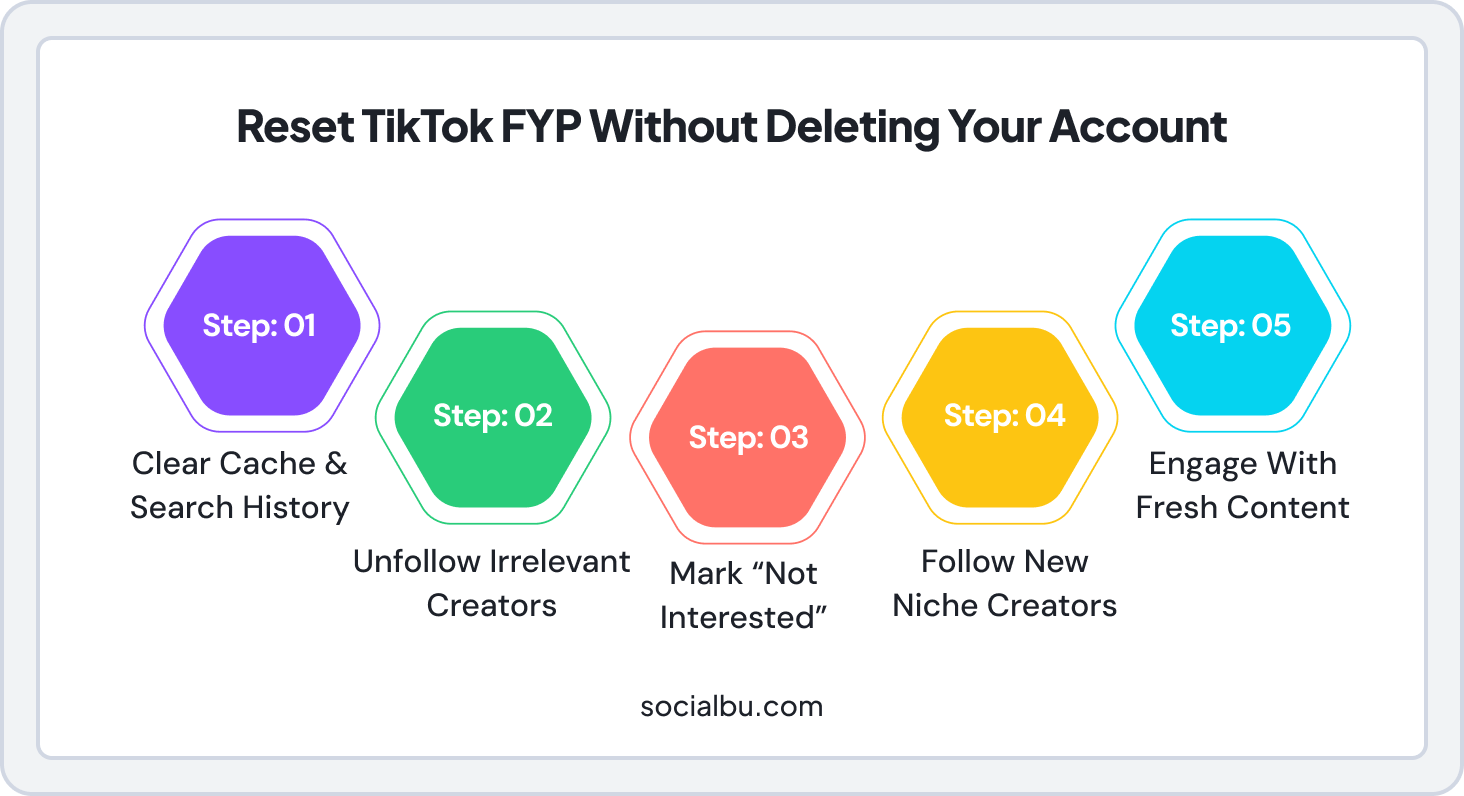
Just follow these steps:
Step 1: Clear Cache and Search History
Remove all stored data affecting your current FYP. Go to Settings and Privacy to clear your cache and search history. This helps reset the previously stored preferences affecting your video recommendations.
Cache clearing removes temporary files and app storage and may help performance or glitches, but it’s not the same as refreshing recommendations.
Step 2: Unfollow Unwanted Creators
If your TikTok feed is filled with creators that you don’t like, unfollow them. With this, TikTok can no longer consider you as interested in this type of content. Go to your following list and review all those accounts. Unfollow the ones through this process based on which ones you no longer resonate with.
Step 3: Mark Unwanted Content as ‘Not Interested’
To improve your recommendations, tell TikTok what you don’t want to see. Tap and hold any video that isn’t related and hit ‘Not Interested.’ The more you do this, the sooner TikTok will learn not to show similar content.
Step 4: Follow New Influencers in Your Preferred Niche
Categories such as fitness, fashion, tech, or even comedy should have their respective creators followed. Following more accounts on TikTok will tell the app that you want more of that content on your FYP.
Step 5: Engage With Fresh Content
You are retraining TikTok’s algorithm by liking, commenting, and sharing videos in your new niche. The more you engage with videos relevant to your interests, the more TikTok will adjust and fine-tune your FYP to reflect your changing interests.
Following these steps will allow the user to restart their TikTok experience without creating a new account. It helps bring a new, pleasurable FYP and reset TikTok, if you would like.
Take Your TikTok Game to the Next Level
Plan, schedule, and track TikTok posts with SocialBu!
Wrap Up!
Take control of your TikTok feed by clearing cache, using Not Interested, managing Content Preferences, filtering keywords, and engaging with the content you actually like. For business accounts, tools like SocialBu, an affordable social media scheduler and one of the best social media scheduler tools, help schedule posts, track engagement, and maintain a consistent niche, speeding up algorithm retraining.
With a few simple steps and consistent interaction, your For You page will start showing the videos you truly want to see, no account deletion required.
FAQs
Q: Can you reset TikTok algorithm?
Yes. While there’s no single reset button, using Refresh your For You feed, Content Preferences, Not interested, and engagement effectively resets the algorithm.
Q: How do I refresh my TikTok For You feed?
Go to Settings and Privacy → Content Preferences → Refresh your For You feed.
Q: Does clearing the TikTok cache reset the algorithm?
No, but it removes temporary data and helps refresh the feed when combined with other steps.
Q: How long does it take TikTok to update recommendations?
Anywhere from 24 hours to 7 days, depending on how consistently you retrain it.
Q: Why is my TikTok For You page messed up?
It could be due to accidental interactions, algorithm updates, or cached preferences. Reset using the steps above.
Q: What happens when you refresh your For You feed?
TikTok updates recommendations to reflect your selected topics, filtered keywords, and engagement history.









