Buffer pricing looks pretty simple until you try to grow. You add another platform, connect a second brand, or invite a collaborator, and you will find yourself recalculating costs, limits, and what “counts” toward your plan.
The problem is not that Buffer is unclear about its model. It’s that most people don’t budget the way Buffer bills. Buffer prices by social channel, and the per-channel cost changes as your channel count increases, which makes “How much will this cost me next month?” harder than it should be.
This guide solves that budgeting gap.
You’ll learn how to map your real setup (channels and workflow needs) to the right plan, identify the limitations that matter in practice, and compare Buffer pricing against a flat-tier alternative so you can decide based on total cost.
By the end, you’ll clearly know which Buffer plan fits your needs and budget, and if Buffer is the right choice for your social media strategy in 2026.
TL;DR
- Buffer charges per social channel, not per user
- Costs increase as you add accounts (even though per-channel price drops at scale)
- Free plan: 3 channels, very limited
- Essentials: Best for solo users and small businesses
- Team: Adds collaboration but gets expensive fast

Overview of Buffer Pricing Plans (2026)
Buffer charges based on the number of social accounts you manage, not just the number of users. This Buffer pricing structure is helpful if you want to grow your social media accounts without paying for features you don’t need.
What Buffer Counts as a “Channel”
In Buffer, each connected social account is a channel.
For example: A Facebook Page, a Facebook Group, an X/Twitter profile, a LinkedIn Page, and a LinkedIn Profile would count as 5 channels.
Two details that affect budgeting:
- Buffer’s paid plans are charged per channel, including the channels you already connected on the Free plan.
- Start Page counts as a channel if you connect it.
Here are the Buffer subscription plans in 2026:
Plan | Price (Monthly) | Price (Annual) | Channels Included | Users |
Free | $0 | $0 | Up to 3 | 1 |
Essentials | $6 | $5 | Unlimited | 1 |
Team | $12 per channel | $10 | Unlimited | Unlimited |
Buffer’s Per-Channel Pricing Tiers (Essentials and Team)
Buffer uses tiered pricing where the average cost per channel decreases as you add more channels.
Buffer Essentials Plan’s Cost per Channel
Number of Channels | Monthly Cost (per channel) | Annual Cost (per channel) |
1–10 | $6 | $60 |
11-25 | $4 | $40 |
26-50 | $3 | $30 |
51+ | $1 | $20 |
Buffer Team Plan’s Cost per Channel
Number of Channels | Monthly Cost (per channel) | Annual Cost (per channel) |
1–10 | $12 | $120 |
11–25 | $4 | $40 |
26–50 | $3 | $30 |
51+ | $2 | $20 |
Real-World Cost Examples (So You Can Budget Fast)
These examples use Buffer’s published per-channel tiers:
Example A: 3 channels (Solo Creator)
- Essentials (Monthly): 3 × $6 = $18/month.
- Team (Monthly): 3 × $12 = $36/month.
Example B: 12 channels (Small Business Across Networks)
- Essentials (Monthly): (10 × $6) + (2 × $4) = $68/month.
- Team (Monthly): (10 × $12) + (2 × $4) = $128/month.
Example C: 30 channels (Multi-brand Team)
- Team (Yearly): (10 × $120) + (15 × $40) + (5 × $30) = $1,950/year.
Buffer Plans Overview
Now, let’s look at what you actually get in each plan.
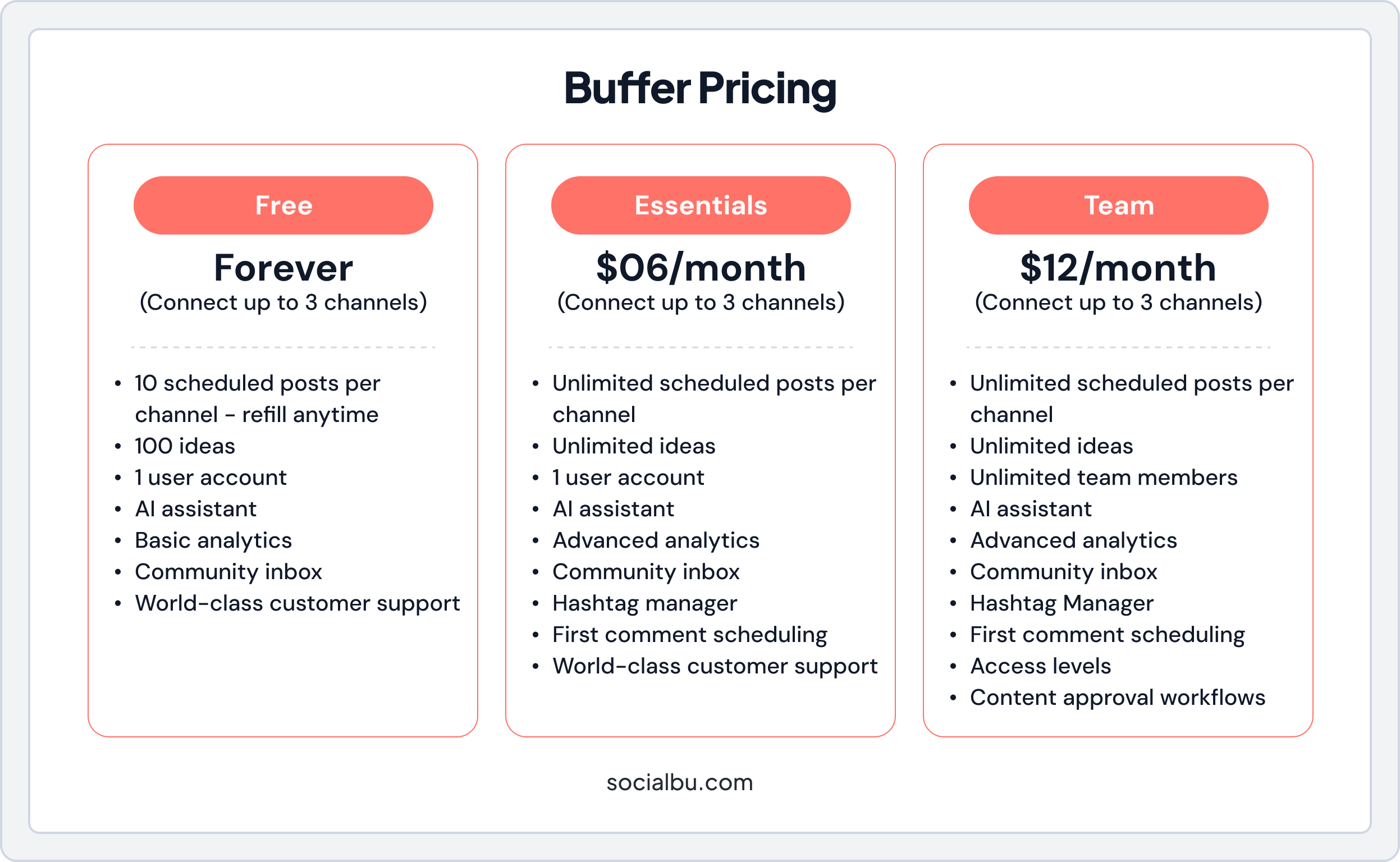
This section will help you understand the real value of Buffer’s features and where each plan might fall short.
1. Free Plan
Buffer-free plan limits are noticeable for serious users. You cannot schedule first comments, use hashtag managers, or access advanced analytics, such as audience demographics or best-time-to-post suggestions.
It also includes a community inbox and supports replying to comments on supported networks, but it does not include advanced analytics (like audience demographics and best-time-to-post suggestions). Threads are supported on eligible networks (for example, X/Twitter threads).
Features:
- Manage up to 3 social accounts
- Schedule 10 posts per account (Buffer free plan limits)
- 100 ideas
- 1 user account
- AI Assistant to help create content
- Basic analytics to track engagement
- Community inbox for messages
Limitations:
- Very limited posts, good for testing, but not enough for active posting
- No team collaboration tools
- Analytics are basic
The Free plan is good to try Buffer, but if you post a lot, it may feel too small.
Free Plan Limits People Commonly Miss
Buffer’s Free plan has the visible limits (3 channels, 10 scheduled posts per channel), but two less-obvious limitations matter for long-term use:
- Lifetime cap on Free: You can connect up to 3 channels at a time, but there’s also a lifetime limit of 8 unique channel connections on the Free plan (even if you disconnect and reconnect later).
- Analytics history: Basic analytics for Free shows a 30-day history, while paid plans have unlimited history in the comparison table.
2. Essentials Plan
At $6 per channel per month (or $5 annually), this plan unlocks unlimited scheduling (up to 5,000 posts under fair use), unlimited ideas, and advanced analytics features. The available history depends on the social network and how far back Buffer can backfill data, as well as an engagement inbox for managing comments.
“Best Time to Post” Feature in Buffer
Buffer’s “Best Time to Post” feature is part of the Analyze → Answers report and is only available on paid plans.
However, it’s important to understand its limitations clearly:
- Limited network support: This feature is currently available only for Instagram Professional Accounts. It is not available for Facebook, X (Twitter), LinkedIn, Pinterest, TikTok, or several other supported networks.
- Data requirements: The feature requires a minimum amount of posting and follower data before insights are shown, meaning new or low-activity accounts may not see results.
- Trial restrictions: Buffer explicitly states that the “Best Time to Post” chart is not available to trial users.
Because of these limitations, Buffer’s “Best Time to Post” should not be viewed as a universal scheduling recommendation across all platforms. Instead, it’s a network-specific insight that works only when eligibility and data requirements are met.
Features:
- Unlimited scheduled posts per channel
- Unlimited ideas
- 1 user account
- AI Assistant
- Advanced analytics
- Community inbox
- Hashtag manager
- First comment scheduling
- World-class customer support
Limitations:
- Only supports one user and offers limited team collaboration
- Costs increase rapidly as more social channels are added
- No branded reports and limited tags (250 max)
This plan works well for solo users who want more than the Free plan.
3. Team Plan
Priced at $12 per month per channel ($10 annually), Buffer team pricing adds unlimited users, approval workflows, custom access permissions, and content collaboration.
Features:
- Unlimited scheduled posts per channel
- Unlimited ideas
- Unlimited user accounts
- AI Assistant
- Advanced analytics
- Community inbox
- Hashtag manager
- First comment scheduling
- Access levels
- Content approval workflows
- World-class customer support
Limitations:
- Cost scales quickly; a 5-channel setup becomes $60/month ($720/year)
- Still no unified engagement inbox, requiring multiple apps
- You pay extra for features that many competitors include in lower-tier plans
Is Buffer Worth the Cost in 2026?
When looking at Buffer cost analysis, the answer depends on how many social accounts you manage, the size of your team, and the features you actually use. Let’s discuss whether Buffer’s pricing is worth it.
For many users, Buffer continues to offer good value. Its Buffer value proposition is built around simplicity, ease of use, and flexible Buffer subscription plans. If your main goal is scheduling posts, planning content, and checking basic performance, Buffer can be a very cost-effective social media scheduler.
Buffer works especially well for:
- Solo creators and freelancers
- Small businesses with a limited number of channels
- Teams that want easy scheduling without complex tools
In these cases, Buffer’s cost-effectiveness is high because you’re not paying for features you don’t need. This makes Buffer one of the more affordable social media tools available in 2026.
1. Buffer Cost Analysis
Looking at Buffer cost analysis, the value you get depends on your goals:
- If your priority is posting regularly, planning content ahead, and tracking basic analytics, Buffer offers strong features at a competitive price.
- If you want team collaboration tools, the Team plan adds workflows and permissions that many growing businesses need.
- If you manage many clients or accounts, the Agency and Enterprise plans provide reporting and client tools, but this is where the cost adds up.
Because Buffer charges per channel, costs can grow quickly as you manage more accounts. This is something to carefully consider in your Buffer budget.
2. What You Get vs. What You Don’t
Part of assessing Buffer pricing comparison is understanding what’s included and what isn’t included:
Included:
- Easy post scheduling
- AI content suggestions
- Analytics and reporting
- Team workflows (on higher plans)
- Community inbox
Not Included (or limited):
- Deep social listening tools
- Full social CRM
- Advanced audience insights
- Built-in ad management
So, if your strategy needs advanced listening or CRM, Buffer might feel limited, and a competitor with deeper analytics might be worth the extra spend.
How Buffer Compares to Other Tools
This Buffer pricing comparison shows how Buffer stacks up in terms of cost, features, and overall value compared to other social media scheduler tools.
Tool | Free Plan Available | Free Plan Details | Starting Price (monthly) |
Buffer | Yes | Free tier with up to 3 social channels and scheduling | $6 /month per channel |
SocialBu | Yes | Free tier with basic post scheduling, limited accounts, and posts | $19 /month |
Hootsuite | No free plan | 30-day free trial | $149 per user/month |
Later | No free plan | 14‑day trial, then paid only | $25/month |
Sprout Social | No free plan | 30-day free trial | $199 per seat/month |
Below is a simple breakdown comparing Buffer with tools like SocialBu, Hootsuite, Later, and Sprout Social.
Buffer vs SocialBu
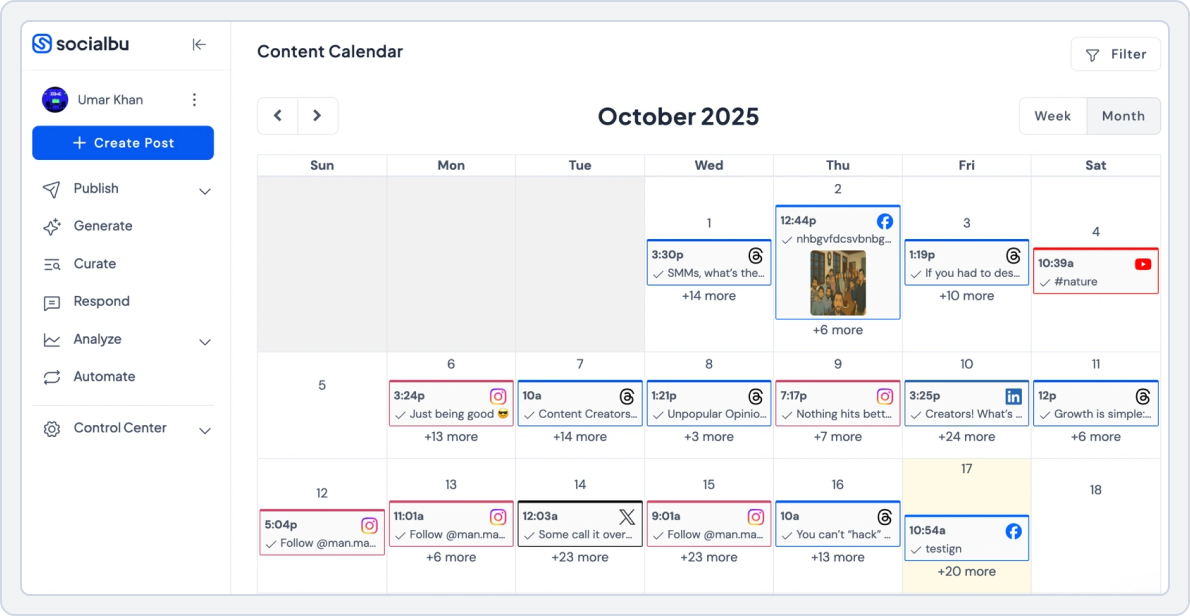
When comparing Buffer with SocialBu, both tools help you schedule posts and manage social media, but they take very different approaches, especially in pricing, automation, and value. Understanding these differences can help you decide which one offers better Buffer cost-effectiveness or value for your money.
 Looking for the best Buffer alternatives in one place with side‑by‑side comparisons? Check out this detailed guide to help you choose the right social media tool for your needs.
Buffer’s Pricing Structure
Buffer charges per channel, meaning you pay for each social account you connect.
For example, on paid plans:
- Essentials is about $6 per channel per month
- Team plans are about $12 per channel per month
- Agency and Enterprise plans are much higher based on the number of channels you add.
This per-channel model means the cost grows quickly as you add more social accounts, even if your team is small. That’s why many people carefully review Buffer’s cost analysis before scaling up.
SocialBu’s Pricing Structure
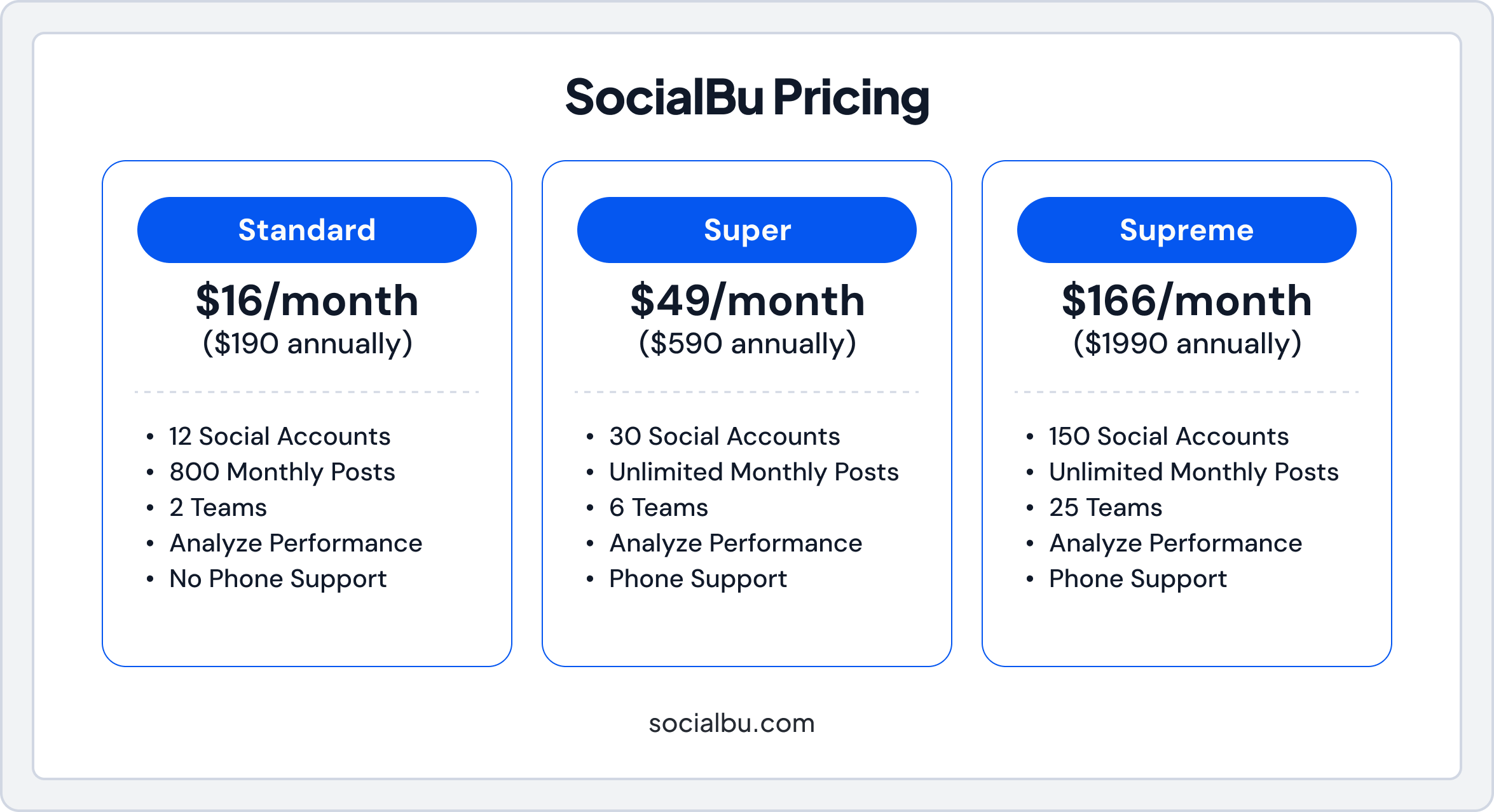
SocialBu uses a flat pricing model that doesn’t charge per channel, so you pay a single price for a set number of accounts (and more accounts at higher tiers):
- Standard Plan $19/month: Up to 12 social accounts
- Super Plan $59/month: Up to 30 social accounts
- Supreme Plan $199/month: Up to 150 social accounts
Plus a 7-day free trial to test features before paying.
This makes SocialBu easier to budget because you know your price upfront, without multiplying costs per account.
Which Is Better?
If you care most about price and automation, SocialBu is better because:
- You get many social accounts under one fixed price
- It offers more automation features at lower-tier costs
- You don’t pay per channel
- Includes team collaboration tools without paying extra per user
- Unlimited posts on most plans, unlike Buffer’s channel-based limits
- Advanced analytics and reporting are built in from the start
- Free trial available to test all features before committing
Quick Pricing Example
Scenario: Managing 10 Channels
- Buffer (Team): $12 × 10 channels = $120/month
- SocialBu (Standard): $19/month for up to 12 accounts
Here, SocialBu would be much cheaper and include automation features that Buffer doesn’t offer at that price level.
When weighing Buffer’s cost-effectiveness, consider whether you value simplicity and collaboration (Buffer) or automation and flat-rate pricing (SocialBu).
Why Pay per Channel When You Don’t Have To?
Start using SocialBu and discover a better, more cost-effective alternative to Buffer.
Buffer vs Hootsuite

When comparing Buffer vs Hootsuite cost, the biggest difference is pricing flexibility.
- Buffer pricing is more affordable and works well for small teams and solo users
- Buffer offers a free plan, while Hootsuite does not
- Hootsuite’s starting plans are much more expensive
- Hootsuite includes advanced social listening and analytics tools
Which is Better?
If you want simple scheduling at a lower cost, Buffer is the better option. If you need advanced analytics and social listening, Hootsuite may offer more value, but at a higher price.
For a detailed comparison of how Buffer stacks up specifically against Hootsuite’s pricing and plans, check out this breakdown of Buffer vs Hootsuite. Buffer vs Later

Later is mainly focused on visual platforms like Instagram and TikTok, while Buffer supports a wider range of social networks.
- Buffer works well across Facebook, Instagram, LinkedIn, X (Twitter), and more
- Later is stronger for visual planning and content calendars
- Buffer offers better analytics across platforms
- Later may be easier for creators focused only on visuals
Which is Better?
If you manage multiple platforms, Buffer offers better cost-effectiveness. If your strategy is mostly visual content, Later may be a better fit.
Want to see exactly how Buffer stacks up against Later in features, pricing, and ease of use? Check out Buffer vs Later comparison. Buffer vs Sprout Social
Sprout Social is designed for larger teams and enterprises.
- Sprout Social has very strong analytics and CRM tools
- Buffer pricing is much lower and easier to understand
- Sprout Social is more expensive but feature-rich
- Buffer is simpler and faster to use
Which is Better?
For small teams, Buffer is one of the most affordable social media tools. For large companies needing deep insights, Sprout Social may justify its higher cost.
Still unsure how Buffer pricing compares with Sprout Social’s plans and value? Read the full comparison of Buffer vs Sproutsocial. Hidden Costs to Watch For in Buffer
While Buffer’s pricing is right there, there are hidden factors that can increase costs if you’re not careful.
- Extra channels
- Team member access
- Higher-tier features
Considering these hidden costs is important when evaluating Buffer’s cost-effectiveness, especially for small businesses and agencies managing multiple accounts.
Billing Rules That Change Your Total Cost
These billing rules are what cause “unexpected” invoices when teams grow:
- Adding channels mid-cycle: Buffer charges a prorated amount immediately for the remainder of your billing period.
- Removing channels: To reduce your bill, you must remove the channel slot. The reduction is scheduled for your next billing date on monthly or annual plans.
- Currency: Buffer bills all subscriptions in USD, and your bank handles conversion if you’re outside the U.S.
- Taxes/VAT: Buffer’s published prices are tax-exclusive; applicable taxes/VAT appear as a line item depending on jurisdiction.
Buffer’s Payment Methods and Refund Policy
Buffer accepts major credit/debit cards and also lists options like Apple Pay (and other region-dependent methods).
Buffer explicitly states in its pricing FAQ that it does not accept PayPal, checks, or bank transfers. So readers should rely on the accepted methods list in their account/country.
Refund policy:
- Monthly Plans: Refunds available within 7 days of starting a subscription.
- Annual Plans: Refunds available within 30 days of the start of a subscription.
When Buffer Is the Better Choice?
Buffer is the better option if you’re looking for an affordable social media scheduler:
- You want easy scheduling and planning
- You manage fewer than 15 channels
- You need simple analytics and team workflows
- You want predictable pricing and clear Buffer budget considerations
In this Buffer pricing comparison, Buffer stands out as a balanced tool. It may not have every advanced feature, but it delivers strong value for its price.
Who Should Not Use Buffer?
Buffer is a strong choice for simple social media scheduling and publishing. But it isn’t the right fit for every team. You may want to look elsewhere if you have any of the following requirements:
1. Large Enterprises That Require Social Listening
Buffer does not offer advanced social listening, brand monitoring, or sentiment analysis features. Organizations that need to track mentions, keywords, or conversations at scale will require a stronger social listening platform.
2. Teams That Need a Unified Inbox Across All Networks
Buffer does not provide a true, centralized social inbox for managing comments, replies, and messages across every supported platform. If real-time engagement management is an essential requirement, this may be a limitation.
3. Users Who Rely Too Much on Automation and Workflows
Buffer prioritizes simplicity over automation. It lacks advanced workflow automation, conditional posting rules, and complex approval pipelines that power users and large teams often require.
4. Organizations That Manage a Very High Number of Social Channels
Because Buffer charges per channel, costs can increase quickly for agencies or businesses managing dozens of accounts. Flat-rate or account-based pricing models may be more cost-effective at scale.
Tips to Maximize Value from Buffer Plans
Even if you choose Buffer, there are ways to make the most out of your subscription. For example:
- Limit channels to only the most active accounts to manage your Buffer budget considerations.
- Use AI-powered content suggestions to reduce content creation time (Buffer plans features).
- Take advantage of scheduling and engagement analytics to track performance efficiently (Buffer cost effectiveness).
- Start with the free plan to understand Buffer’s free plan limits, it works as a basic social media scheduler, then upgrade strategically based on your needs.
These tips help you get maximum ROI from Buffer while keeping costs predictable and scaling your social media strategy efficiently.
Final Verdict
Buffer pricing is based on channels, so the most accurate way to decide is to price your actual channel count rather than just a single “starting price.”
As you add more channels, Buffer’s tiered pricing can reduce the per-channel rate, so your real total depends on how many channels you’ll keep connected.
Buffer remains a solid and reliable social media management tool in 2026. But, before you subscribe, do a quick reality check:
- Trial: Confirm what happens when the 14-day trial ends and what plan you land on afterward.
- Free limits: Confirm what happens when your connected channels exceed the Free plan’s cap.
- “Unlimited scheduling”: On paid plans, “unlimited” still has a fair-use limit. Buffer mentions a 5,000-post cap for scheduled posts per channel on Essentials and Team.
If this pricing still feels unpredictable, especially when you manage many accounts, you can compare it with a flat-tier option next.
SocialBu offers plan tiers with a set number of social accounts at a single price, and it offers a 7-day free trial, which can be easier to budget for than per-channel scaling for some teams.
Run your numbers in the Buffer pricing calculator, then compare the total to the SocialBu plan tiers and start the SocialBu 7-day free trial to confirm the fit before committing long-term.
Try SocialBu For Free
SocialBu to elevate their social media presence every month.
FAQs
Q: How much does Buffer cost for individuals?
For individuals, Buffer costs $6 per month per channel on the Essentials plan (or $5/month if billed annually). The Free plan is $0.
Q: What’s included in Buffer’s free plan?
The free plan includes:
- Up to 3 social accounts
- 10 scheduled posts per account
- 100 ideas
- 1 user
- AI Assistant
- Basic analytics and community inbox
Q: How does Buffer pricing compare to Hootsuite?
Buffer is much more affordable than Hootsuite. Buffer has a free plan and lower starting prices, while Hootsuite starts much higher and doesn’t offer a free tier.
Q: Is Buffer Pro worth the upgrade cost?
Yes, if you need unlimited scheduling, better analytics, an engagement inbox, and hashtag tools. It’s great for solo marketers but may get expensive if you add many channels.
Q: What are the limits on Buffer’s free plan?
Limits include:
- Only 3 social accounts
- 10 posts per account
- Basic analytics only
- No team tools or advanced features
Q: How much does Buffer cost for teams?
Teams pay $12 per month per channel on the Team plan (or $10/month if billed annually), with unlimited users and collaboration tools.
Q: Are there any Buffer pricing discounts available?
Yes, you pay less per channel when you choose annual billing (e.g., $5 instead of $6 on Essentials).
Q: What’s the difference between Buffer plans?
- Free: Basic scheduling and analytics
- Essentials: Unlimited posts, advanced analytics, and engagement inbox
- Team: Adds unlimited users, access levels, and workflows
Q: Is Buffer more affordable than other social media tools?
Yes, Buffer is more affordable than tools like Hootsuite and Sprout Social, especially for simple scheduling. But some flat-rate tools (like SocialBu) may be cheaper for many accounts.
Q: How much does Buffer Analyze cost?
Based on the plans, advanced analytics is included in paid plans (Essentials and up). There’s no separate cost for Buffer Analyze; it’s part of paid subscriptions.