Ever feel like Facebook is reading your mind or just showing you stuff you no longer care about? The key might be to reset the Facebook algorithm. This powerful system influences your feed by tracking what you like, comment on, and share to curate a highly personalized experience.
By analyzing what you like, share, comment on, and watch, Facebook curates a personalized experience designed to keep you engaged. However, this algorithm isn’t always perfect, and sometimes it shows you content that doesn’t match your current preferences.
For example, you might get more Reels, videos, or content from pages you no longer follow, making your feed repetitive or cluttered. This is where understanding how to reset the Facebook algorithm becomes essential.
You can make adjustments to reset the Facebook Reels algorithm on Android and reset the Facebook feed on your iPhone.
Let’s start!
TL;DR
- You can’t fully erase Facebook’s algorithm data, but you can retrain it by changing your behavior.
- Clear your Activity Log, search history, and watch history to reduce old signals.
- Use “Not Interested” and “Hide” on unwanted posts consistently for a few days.
- Add close friends and favorite pages to your Favorites list for priority content.
- The reset usually takes 1–2 weeks of consistent engagement with new content.

Can You Really Reset the Facebook Algorithm?
The truth is, Facebook’s system doesn’t let you start from zero when it comes to the data it knows about you. However, you can overwrite old signals with new, better ones through your behavior. Think of it as retraining the algorithm rather than wiping it clean.
The Facebook algorithm learns from every interaction you make. When you consistently engage with different types of content and stop interacting with what you don’t want to see, the algorithm gradually adjusts. This process takes time, usually a few days to a couple of weeks, but it works.
So yes, you can fix your feed and make it show more relevant content. It just requires some patience and consistent action on your part.
But before we get into the reset steps, let’s first understand what the Facebook algorithm actually is and how it works.
 Also read:
 What is the Facebook Algorithm?
The Facebook algorithm decides what appears in your feed. It looks at what you like, comment on, and share to understand what you want to see more of.
The goal is to show you content that Facebook thinks you’ll find interesting, whether that’s posts from friends, pages you follow, or videos. The algorithm also influences what Facebook Reels and ads you see. It constantly adjusts based on your activity and interactions on the platform.
Finding the best time to post on Facebook can also be crucial. The algorithm prioritizes content that receives early engagement, so posts made when your audience is most active can gain more visibility.
Want to Beat the Facebook Algorithm?
How Does the Facebook Algorithm Work?
The Facebook algorithm works by sorting through all available content and showing you the posts most likely to catch your attention. It looks at several factors, such as:
1. Engagement
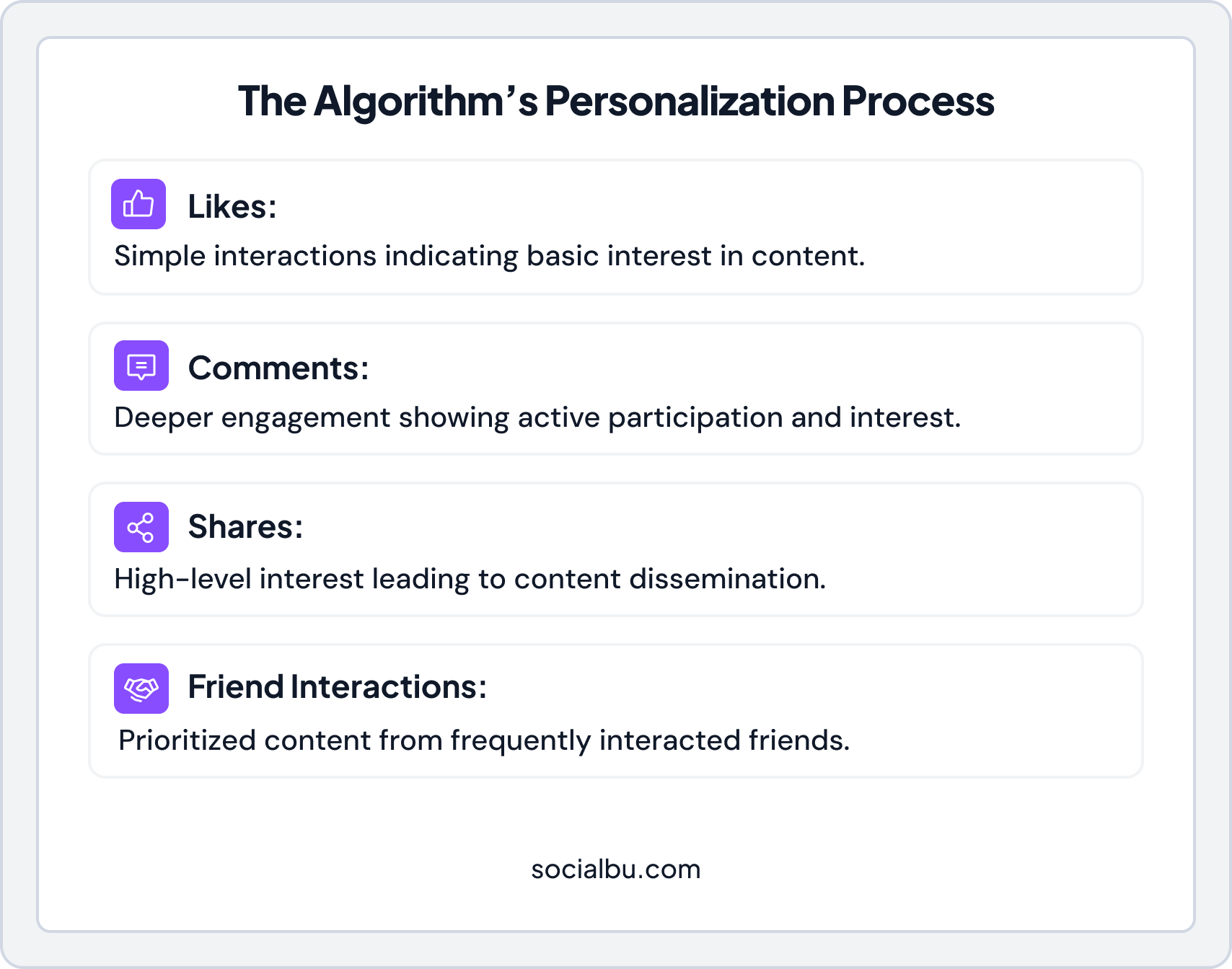
If you like, comment on, or share a post frequently, the algorithm considers that a sign that you’re interested in more content like it. The more you interact with a specific type of content, the more similar posts will appear in your feed. Facebook also weighs different types of engagement differently.
For example, comments and shares carry more weight than simple likes because they indicate a deeper level of interest. If you regularly engage with a friend’s posts, Facebook will prioritize their future content in your feed.
2. Recency
Newer content gets more attention, so Facebook prioritizes fresh updates over older ones. This means posting at the right time can significantly boost your visibility and help you grow your audience. The best time to post on Facebook depends on when your target audience is most active.
Not to mention, if an older post suddenly gets a lot of engagement, Facebook may push it back into feeds. The algorithm balances freshness with relevance, so a highly engaging post from yesterday might still appear above a less interesting post from today.
3. Content Type
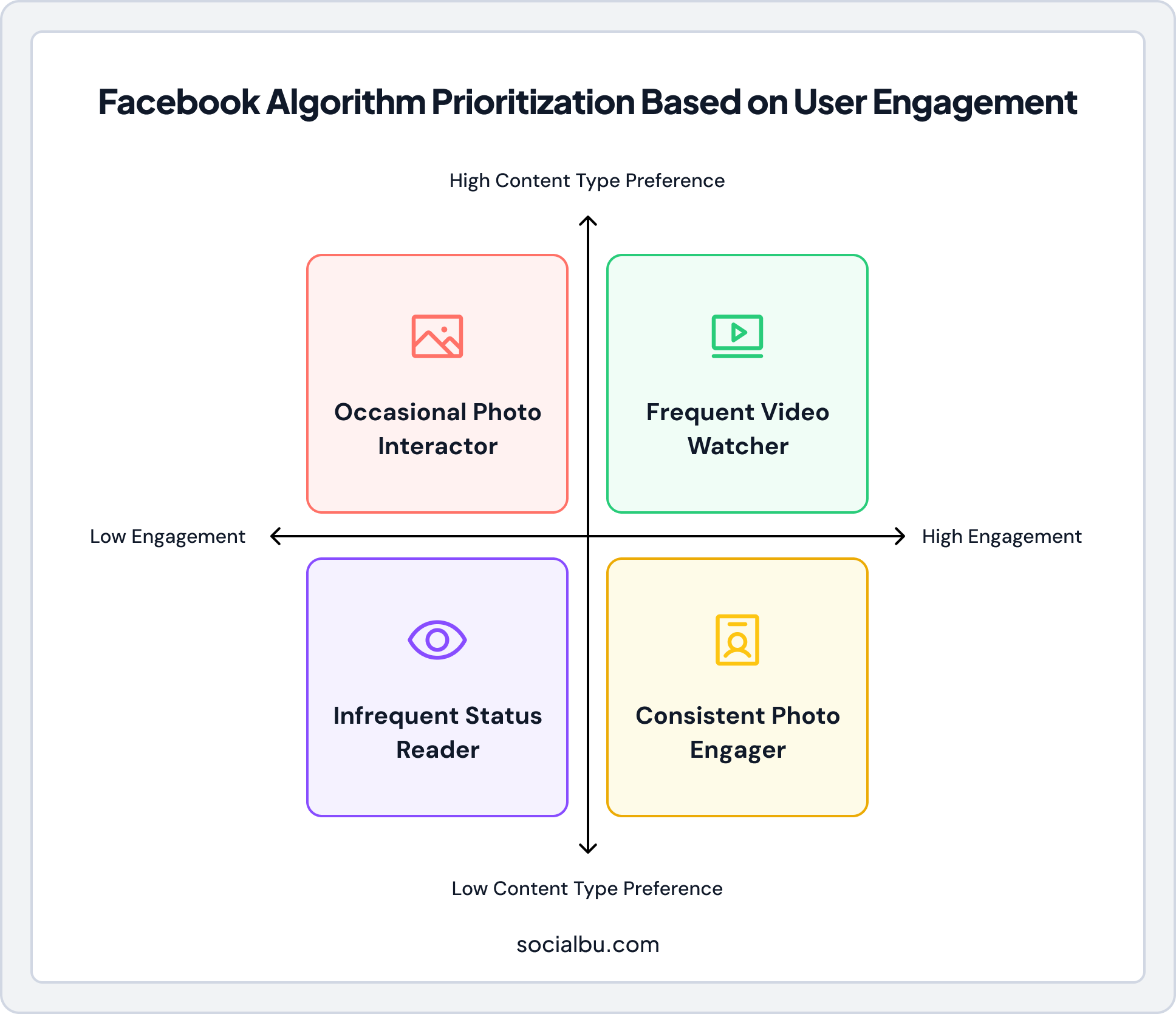
The algorithm will prioritize videos, photos, or status updates depending on what you engage with the most. Similarly, if you frequently interact with photo posts, you’ll see more images in your feed. Facebook also considers how you consume different content types.
For instance, if you watch videos all the way through, the algorithm assumes you prefer video content.
4. Friends and Pages
It shows posts from your close friends and family, and the pages you follow more often, rather than from less connected accounts. Facebook determines closeness based on your interactions.
If you frequently message someone, comment on their posts, or get tagged together in photos, Facebook considers them a close connection.
5. User Preferences
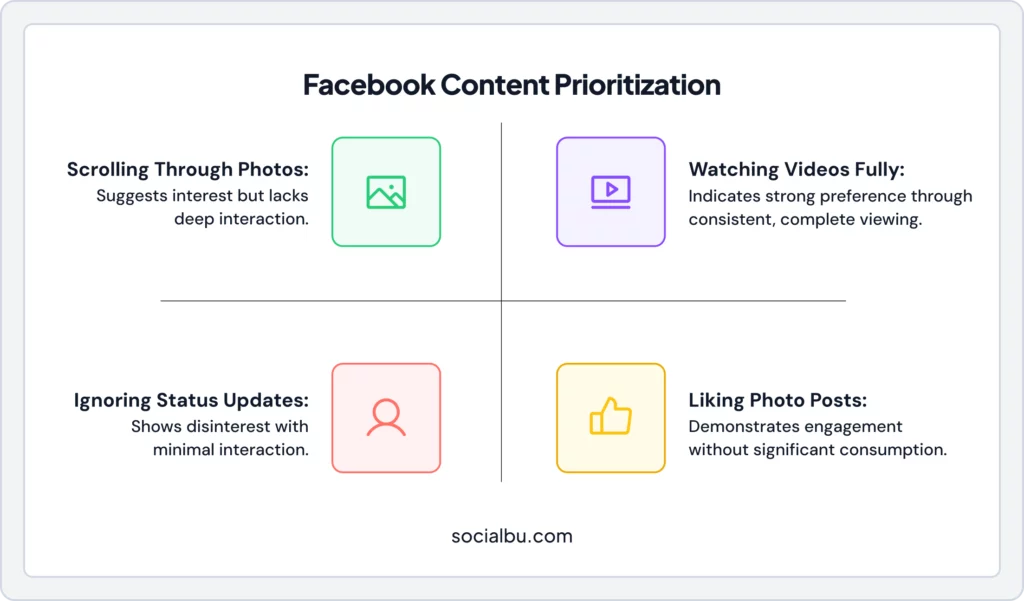
Facebook also tracks your time on specific activities, such as watching Facebook Reels or videos, and adjusts its content based on these patterns. The algorithm monitors how long you spend viewing each post, even if you don’t actively engage with it.
If you pause to read a long caption or watch a video halfway through, Facebook takes note.
Facebook Algorithm Changes for 2026
As Facebook evolves, so does its algorithm. These include more emphasis on video content, more personalized Reels, and more options for users to reset their Facebook algorithm.
Here’s what the Facebook algorithm in 2026 will focus on:
1. Engagement Quality
Facebook will prioritize high-quality engagement over likes, such as meaningful comments and shares. This means that if your post sparks a real conversation or encourages users to engage deeply, it will be favored by the algorithm.
2. Short Form Video
Facebook prioritizes short-form content, like Reels and Stories, because users tend to engage more with quick, entertaining videos. This shift means creators should focus on producing bite-sized video content to catch attention and boost engagement.
3. Facebook Ads
Paid ads will continue to be an important part of Facebook’s algorithm. Based on past behavior, the algorithm will likely focus on showing ads to the people most likely to interact with them, making ads more effective for businesses and more relevant for users.
4. Facebook Stories
Facebook will continue prioritizing stories as a quick and engaging way for users to share content. In 2026, stories that disappear after 24 hours will be a key focus, meaning more opportunities for creators to engage their audience with fresh, frequent content.
5. Facebook Reels
Like short-form videos, Facebook will boost Reels (short, vertical videos) in its algorithm, encouraging more creators to use this format. Reels tend to get higher engagement rates, so focusing on creating fun, shareable Reels can increase your visibility.
6. AI Assistants Now Influence Personalization
From December 2025 onward, Meta uses information about how you interact with Meta AI (its chatbot) to personalize content and ads across Facebook and Instagram. This means the questions you ask and the topics you explore with Meta AI can influence the posts and Reels you see in 2026, not just your likes and follows.
Quick Facebook Algorithm Reset Checklist
Before diving into detailed guides, here’s a quick checklist you can follow to reset your Facebook algorithm in 2026:
Quick Facebook Algorithm Reset Checklist
Here’s a quick Facebook algorithm reset checklist:
✓ Open Settings & Privacy → Feed Preferences
✓ Add friends and pages you care about to Favorites
✓ Unfollow or snooze noisy friends, pages, and groups
✓ Tap “Hide” or “Not interested” on irrelevant posts for a few days
✓ Clear your search history and Watch History
✓ Spend about a week interacting only with content you actually want to see
Following this checklist consistently will help retrain the algorithm to show you better content.
How to Reset Facebook Algorithm?
If your Facebook feed shows too many unwanted posts or irrelevant content, you can reset the algorithm to get a fresh, more personalized experience. The Facebook algorithm shows you posts based on your past behavior, including likes, comments, shares, and the people or pages you follow.
By resetting the algorithm, you can adjust what you see and receive content that is more relevant to your interests.
How to Reset Facebook Algorithm on Android?
Follow these steps to reset the Facebook algorithm on Android:
Step 1:
Open the Facebook app.
Step 2:
Tap the menu in the top-right corner.
Step 3:
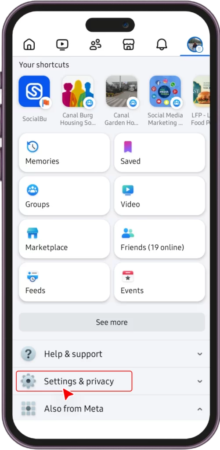
Scroll down and tap Settings & Privacy, then Settings.
Step 4:
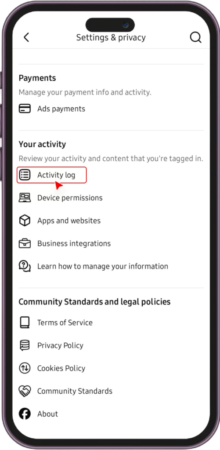
Under Your Information, tap Activity Log.
Step 5:
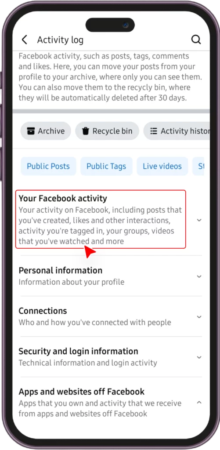
Tap your Facebook activity and clear things like likes and comments you’ve made.
Step 6:
Adjust your preferences under Feed Preferences to follow or unfollow pages and people.
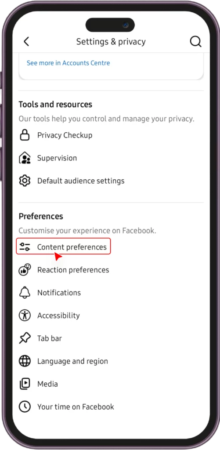
Tadaaaa, it’s done.
How to Reset Facebook Algorithm on IPhone?
If you want to reset your Facebook algorithm on an iPhone, here’s a step-by-step guide for you:
- Open the Facebook app on your iPhone.
- Tap the three lines (menu) in the bottom-right corner.
- Scroll down and tap Settings & Privacy, then Settings.
- Go to Activity Log and view past interactions like likes or comments.
- You can also adjust your Feed Preferences to control what you see more or less of.
That’s it.
How to Reset Facebook Video Algorithm?
To reset the video recommendations:
- Go to Settings in the app.
- Tap on Feed Preferences and adjust your video settings.
- Clear Watch History in the Activity Log to reset suggestions based on your past videos.
- When you see videos you don’t want, tap the three dots and select “Hide” or “Not interested.”
- Start engaging with videos you actually want to watch to retrain the algorithm.
How to Reset Facebook Reels Algorithm?
Step 1:
Open Facebook and tap on the Reels section.
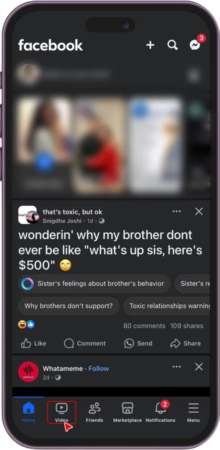
Step 2:
Tap the three dots on a reel you don’t like and choose ‘Not Interested’ to help reset what kind of Reels you see.
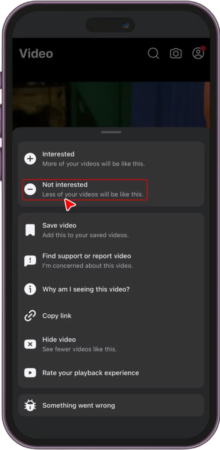
Step 3:
Clearing your Watch History in the Activity Log also helps reset recommendations for Reels. If you are worried about losing your favorite Reels, you can download Facebook Reels.
Step 4:
Unfollow creators whose Reels you no longer enjoy to reduce similar content.
How to Reset Facebook Marketplace Recommendations?
If your Facebook Marketplace keeps showing items you’re not interested in, like baby furniture when you don’t have kids or cars when you’re not looking to buy, you can reset those recommendations, too.
Here’s how to fix it:
- Step 1: Open Facebook and go to Marketplace.
- Step 2: When you see a listing you don’t want, tap the three dots on the listing and select “Hide” or “Not interested in this item.”
- Step 3: Go to your Activity Log and clear your Marketplace search history. This removes old searches that influence what Facebook shows you.
- Step 4: Start searching for and clicking on items you actually want to buy. The algorithm will learn from your new browsing behavior.
- Step 5: If you’ve messaged sellers about certain products before, those conversations also influence recommendations. You can delete old Marketplace messages to reduce their impact.
Pro tip: Consistently browse categories you’re interested in for about a week. Facebook Marketplace will start showing more relevant listings based on your updated activity.
Tips and Tricks to Reset Facebook Algorithm
If you want your Facebook algorithm reset and to see more relevant content, here are some easy tips and tricks you can try:
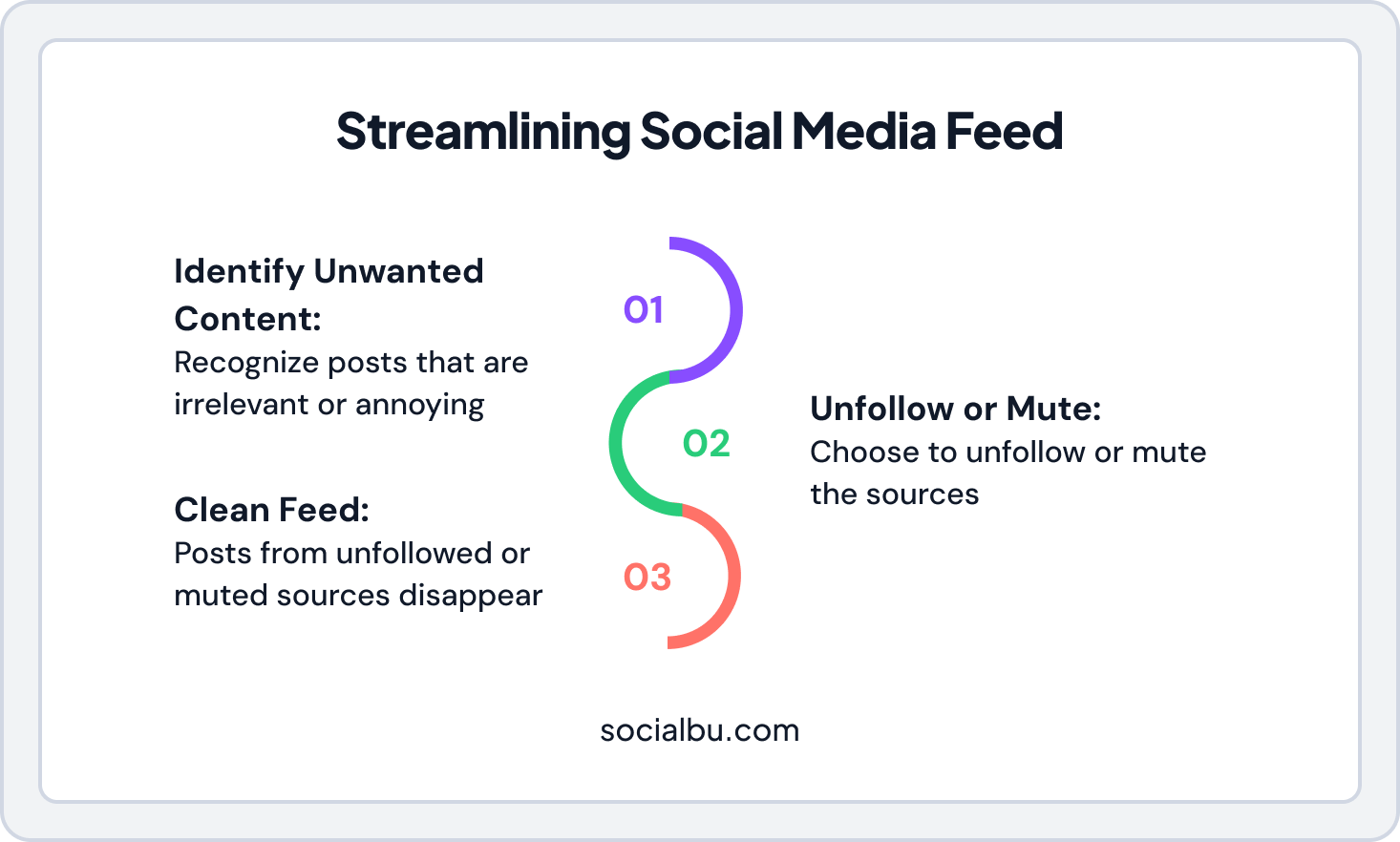
1. Unfollow or Mute Accounts
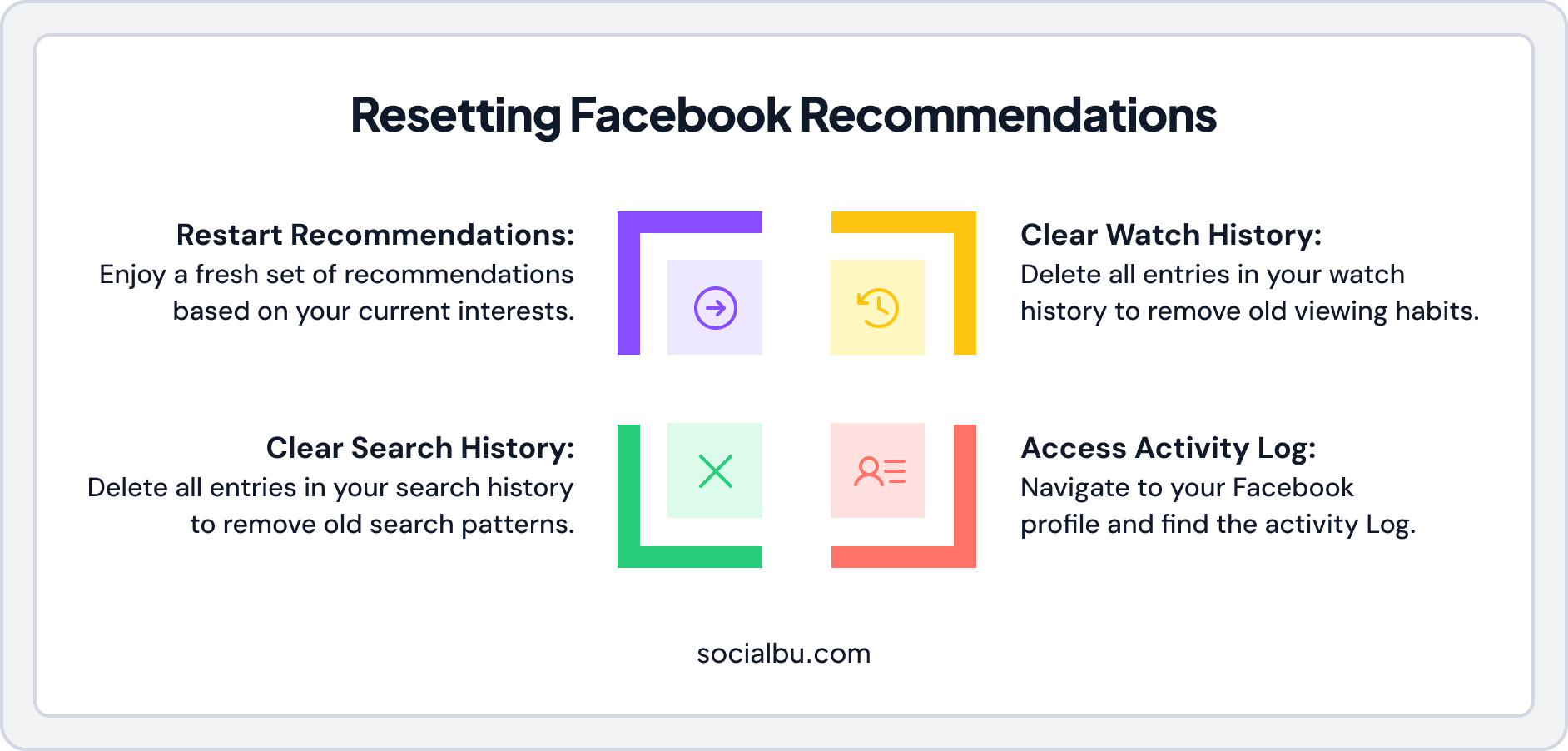
If certain people, pages, or groups post too much content you don’t care about, you can unfollow or mute them. This will stop their posts from appearing in your feed without unfriending them.
This allows you to clean up your feed without unfriending or leaving any group. When you unfollow or mute someone, their updates stop appearing on your timeline, giving more space to posts you actually enjoy.
2. Clear Your Activity Log
Facebook tracks what you like, comment on, and share to decide what to show you. You can go to your Activity Log and delete or clear some past actions, which helps Facebook reset what it thinks you’re interested in.
By reviewing and clearing out older interactions, especially those that no longer match your interests, you help Facebook relearn what you want to see now.
3. Use “Not Interested.”
If you see a post you don’t like, tap the three dots on the top right of the post and select ‘Not Interested.’ This tells Facebook not to show you similar posts in the future.
The more you use this option, the faster the algorithm adjusts. It’s a small action, but it helps filter out noise and unwanted recommendations.
4 . Manage Feed Preferences
Furthermore, you can choose what content you want to see more or less of by adjusting your Feed Preferences. You can prioritize posts from close friends, family, or favorite pages so their updates appear at the top. You can also reduce how much you see from accounts you don’t want regular updates from.
5. Clear Your Watch and Search History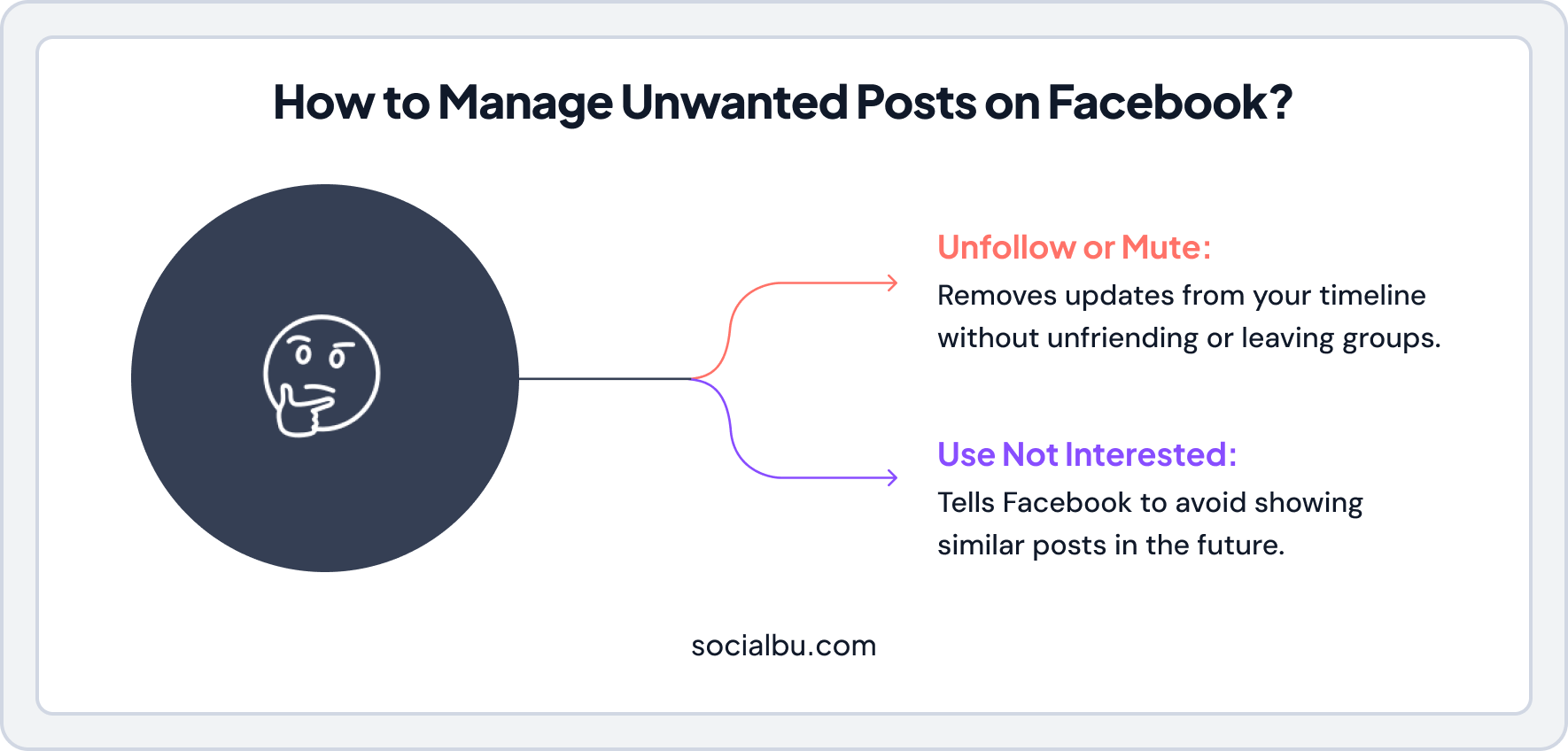
Because Facebook relies heavily on your Watch and Search History for suggestions, removing that data from your Activity Log helps you restart your recommendations.
Clearing your Watch History and Search History helps remove old viewing habits that no longer reflect your interests.
6. Engage with New Content
Start liking, commenting, and interacting with content that interests you now. Facebook will notice these new activities and start showing you more related posts.
Like posts, leave comments, follow new pages, watch videos, and join communities that match your current hobbies or goals.
By following these simple tips, you can reset the Facebook algorithm to show you better content that matches your interests. The changes may take some time to take full effect, but you’ll notice a more personalized and relevant feed.
What to Do When Your Facebook Feed Still Feels Wrong?
Sometimes, even after trying the reset steps, your feed might still show content that frustrates you. Here are quick fixes for the most common problems:
If There Is Too Much Politics or Controversy
Political content can take over your feed quickly, especially during election seasons. Here’s how to reduce it:
- Tap the three dots on political posts and select “Hide post” or “Not interested.”
- Go to Settings → Feed Preferences → Reduce and choose to see less content from pages that frequently post political content.
- Unfollow friends or pages that share controversial content without unfriending them.
- Avoid engaging with political posts, even to argue. Comments and reactions signal interest in the algorithm.
If the Same Annoying Page Keeps Appearing
When one page dominates your feed despite your disinterest:
- Tap the three dots on their post and select “Hide all from [Page Name].”
- If you follow the page, unfollow it immediately.
- If it’s a suggested page, select “Not interested in this page” every time it appears.
- Check if a friend frequently shares content from that page. You may need to snooze that friend for 30 days.
If There Are Too Many Suggested Posts
Facebook’s suggested posts can flood your feed with content from accounts you don’t follow. To reduce them:
- On every suggested post you dislike, tap the three dots and select “Hide post” or “Not interested.”
- Do this consistently for 3-5 days. The algorithm will reduce suggestions.
- Engage more with posts from friends and pages you follow. This tells Facebook to prioritize familiar content.
- Go to Feed Preferences and add more accounts to your Favorites list. This pushes suggested content further down.
How to Keep Your Facebook Feed Clean After Resetting?
Resetting your Facebook algorithm is just the first step. To maintain a clean, relevant feed, you need to practice ongoing maintenance:
Use SocialBu to Stay Consistent
If you’re a creator or business trying to work with the Facebook algorithm, consistency is everything. SocialBu helps you schedule posts ahead of time, so you never miss the best posting windows. You can also track which content performs best and adjust your strategy accordingly.
Instead of manually posting every day, let SocialBu handle the scheduling while you focus on creating quality content that the algorithm will love.
Regularly Trim Your Followers
Every month, review the pages and groups you follow. Unfollow people that no longer interest you or post content you consistently scroll past. This keeps your Facebook feed filled with creators you genuinely want to follow.
Update Your Favorites List
Lastly, add new friends or pages you want to see more of to your Favorites and remove those you’ve lost interest in. This keeps your priority content fresh.
Reset Your Feed. Post Smarter.
Conclusion
In short, resetting the Facebook algorithm is a simple but effective way to get your feed back on track and ensure you see the content that truly matters to you. Whether you’re looking to reset the Facebook Reels algorithm on Android, adjust the video recommendations, or refresh your feed on iPhone, it’s all in your control.
Take 5 minutes today to clear your Activity Log or unfollow old pages, your future self (and your feed) will thank you.
If you ever feel like your feed is off-track, resetting the Facebook algorithm can give you a cleaner, more relevant feed. Don’t be afraid to make these adjustments; you’ll soon see a feed that is more in tune with your preferences.
If you’re managing pages or creating content, tools like SocialBu can help you stay consistent, post at the right time on social media, and work with the algorithm instead of against it. It is even better that you can get a 7-day free trial for any SocialBu plan. Try now!
FAQs
Can you really reset the Facebook algorithm?
Yes, but you can’t completely erase all data. You can overwrite old signals by changing your behavior, engaging with new content, and using features like “Not Interested” to retrain the algorithm.
Can I fully wipe Facebook’s algorithm data?
No, Facebook doesn’t offer a complete reset button. However, you can clear your Activity Log, search history, and Watch History to significantly reduce the influence of old data.
Does deleting or reinstalling the Facebook app reset the algorithm?
No, reinstalling the app doesn’t reset the algorithm. Your preferences and data are stored on Facebook’s servers, not on your device.
Does deactivating my account reset my feed?
Temporarily deactivating your account doesn’t reset the algorithm. When you reactivate, your previous data and preferences remain intact.
How do I reset my Facebook algorithm in 2026?
Clear your Activity Log, adjust Feed Preferences, unfollow irrelevant pages, use “Not Interested” on unwanted posts, and engage with content you actually want to see.
How do I reset my Facebook feed without making a new account?
Use the Feed Preferences to add favorites, unfollow noisy accounts, clear your activity history, and consistently engage with preferred content for about a week.
How can I reset Facebook to see more friends’ posts?
Go to your Feed Preferences and prioritize posts from friends. Add close friends to your Favorites list and interact with their posts more frequently.
How do I stop seeing so many suggested posts on Facebook?
Tap the three dots on suggested posts and select “Hide post” or “Not interested.” Do this consistently to reduce the number of suggested posts in your feed.
How long does it take for the Facebook algorithm to reset?
It typically takes a few days to two weeks for noticeable changes, depending on how consistently you engage with new content and hide unwanted posts.
Why is my feed still weird after changing my settings?
The algorithm needs time to learn your new preferences. Continue hiding unwanted content and engaging with preferred posts. Be patient and consistent.
How do I reset the Facebook algorithm for my ads?
Go to Settings > Ad Preferences and adjust your ad topics and interests. You can also hide specific ads and advertisers you don’t want to see.
How do I get better reach with the 2026 Facebook algorithm?
Focus on creating engaging video content, use trending hashtags, post when your audience is active, and encourage meaningful comments and shares on your posts.
Can I reset my algorithm?
Yes, you can reset the Facebook algorithm by clearing your Activity Log, adjusting your Feed Preferences, and engaging with new types of content.
How can I increase my Facebook algorithm reach?
To improve your Facebook algorithm reach, engage more with content you like by liking, commenting, and sharing. Posting regularly and interacting with your audience also helps.
How do I reset all data on Facebook?
To reset all data, go to Settings, find Activity Log, and clear your activity history, including likes, comments, and searches.
How to get more views on Facebook?
Post high-quality, engaging content regularly, use hashtags, and interact with your audience. Posting at peak times when your audience is active also helps increase views.