You cannot search for Instagram users by phone number. Instagram does not have a phone number search bar. The only way phone numbers work is through contact syncing, where Instagram suggests accounts if the number is saved in your contacts and linked to a user’s account.
If either condition is missing, the search will not work.
Keep reading to find more on this.
Key Takeaways
- Instagram does not support phone number search
- Phone number works only via contact syncing
- Matching depends on mutual permissions
- No synced contacts = no results
- Username search is the primary discovery method
Does Instagram Allow Phone Number Search?
Not directly. Instagram’s search bar only works with usernames, full names, or hashtags. There’s no field where you can type a phone number and get a profile back.
How Does Instagram Find People From Your Contacts?
Instagram does have contact syncing. When you allow Instagram to access your phone’s contacts, it scans your saved numbers and matches them against its database. If someone has linked that number to their Instagram account and hasn’t turned off contact discovery, their profile gets suggested to you.
That’s it. That’s the only official method.
How to Search Someone’s Instagram by Phone Number? (Step-by-Step)
Before you start, make sure two things are true:
- The person’s phone number is saved in your phone’s contacts app (with the correct country code).
- You’re logged into your Instagram account on your phone.
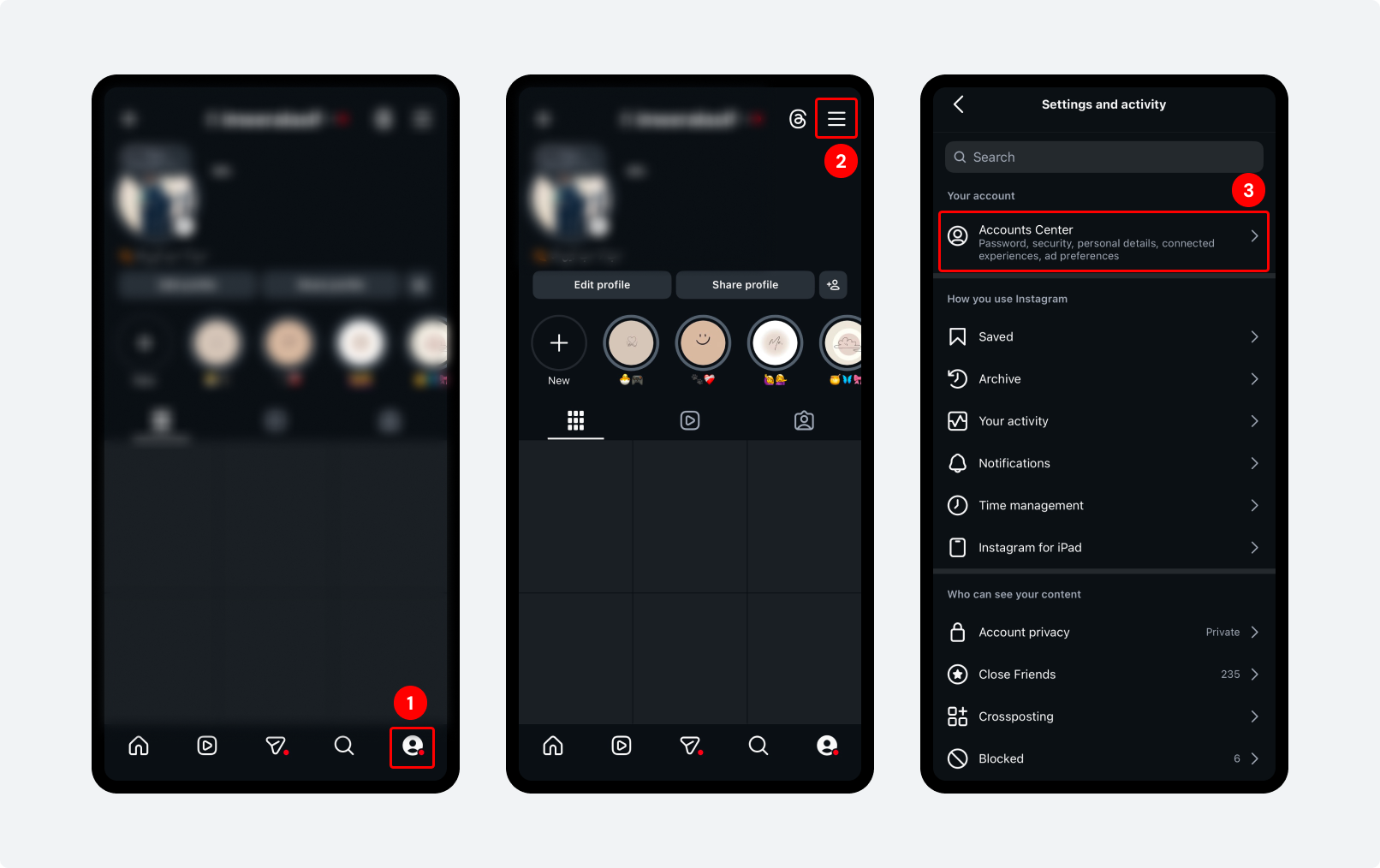
Step 1: Go to your Instagram profile by tapping your profile picture in the bottom-right corner.
Step 2: In the top-right corner, tap the ‘three horizontal lines’ menu icon.
Step 3: From the menu, click on ‘Accounts Center’
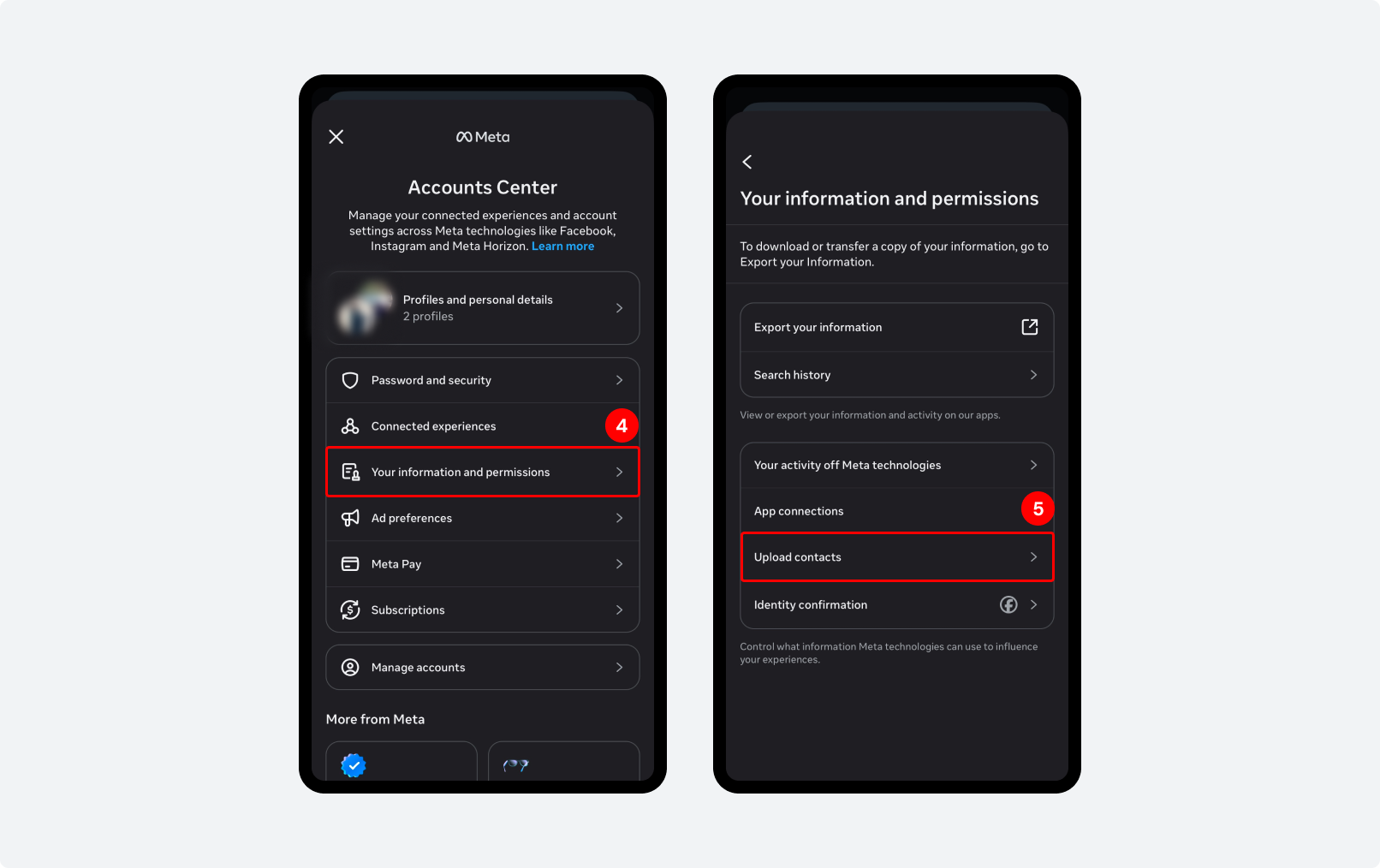
Step 4: Then click on ‘Your Information and permissions’
Step 5: Click ‘Upload contacts’ to add a new number. This will have Instagram scan your saved numbers and match them against its database.
Instagram will now show suggested accounts.
Note: If a user does not have an Instagram account linked to the provided phone number, they will not appear in the search results.
Why It Might Not Work? And What to Do Instead?
This method doesn’t always succeed. Here are the most common reasons it fails:
1. Their number isn’t linked to Instagram
Many people sign up with an email address and never add their phone number. In that case, Instagram has no way to match the number you have to their account.
2. Their account is private and not synced
Even if someone has a private account, it can still show up in this search. But only if they’ve enabled contact syncing. If they’ve turned that off in their privacy settings, they won’t appear.
3. You don’t have the right number saved
If the person uses a different Instagram number than the one you have saved, the search won’t find them.
What to Do When It Fails?
If the phone number method doesn’t work, here are the best alternatives:
- Ask them directly. The simplest option. Text or WhatsApp them and ask for their Instagram handle.
- Search by full name. Type their name into the Instagram search bar. It won’t be a perfect match, but it narrows things down.
- Check mutual friends. If you share contacts on Instagram, look at who they follow. The person might show up there.
- Use Facebook. If their Facebook is linked to Instagram, you may be able to find their account through the Facebook ‘Find Friends’ feature.
How to Stop Others from Finding You This Way?
The flip side of this feature is that someone could use the same method to find you by your phone number, without you knowing. Here’s how to turn it off.
How to remove your phone number from Instagram’s contact matching?
To remove your phone number from your profile:
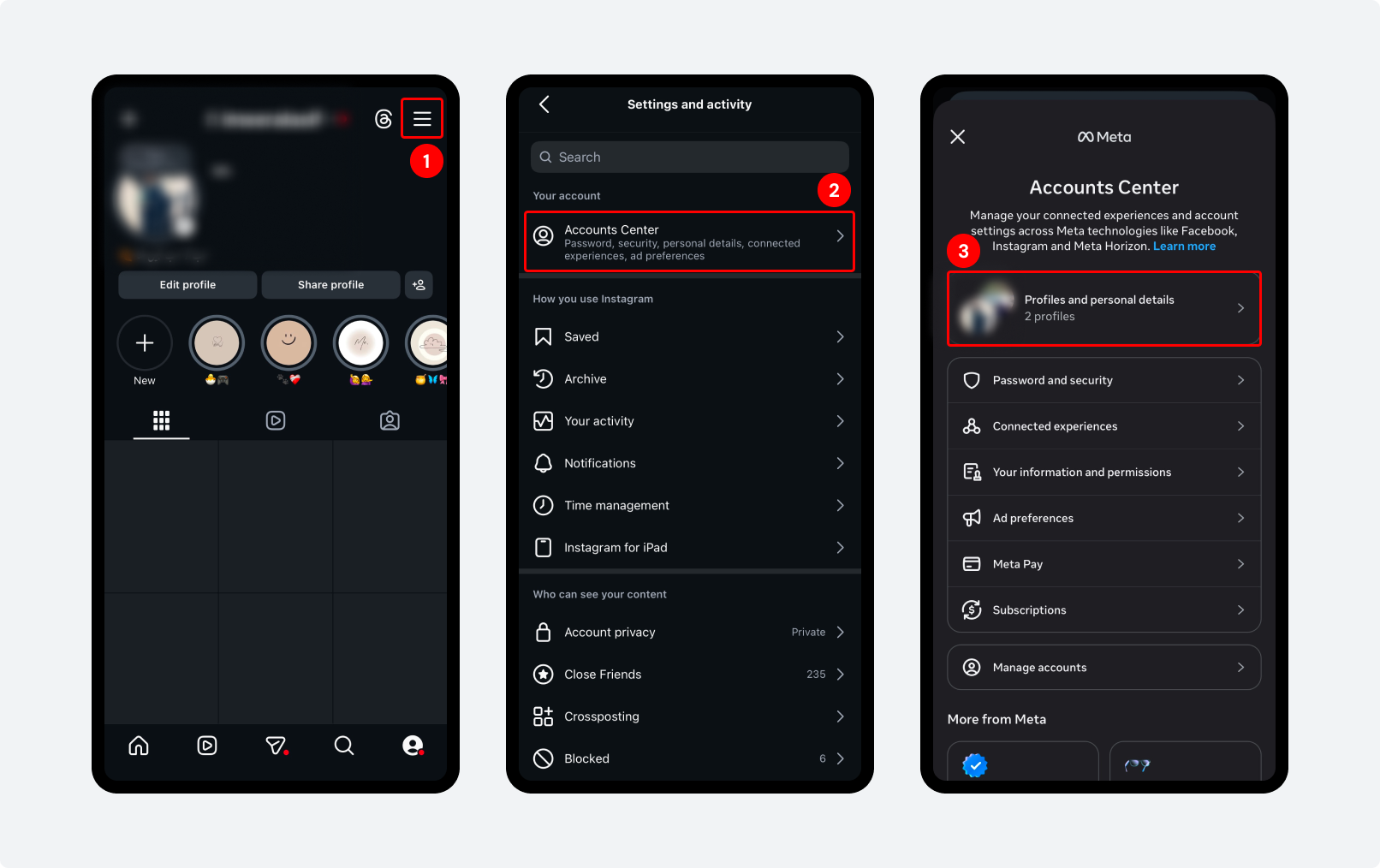
Step 1: Open Instagram and go to your Profile. Tap the Menu icon in the top-right corner.
Step 2: Select ‘Accounts Center’
Step 3: Tap ‘Profile and Personal Details’
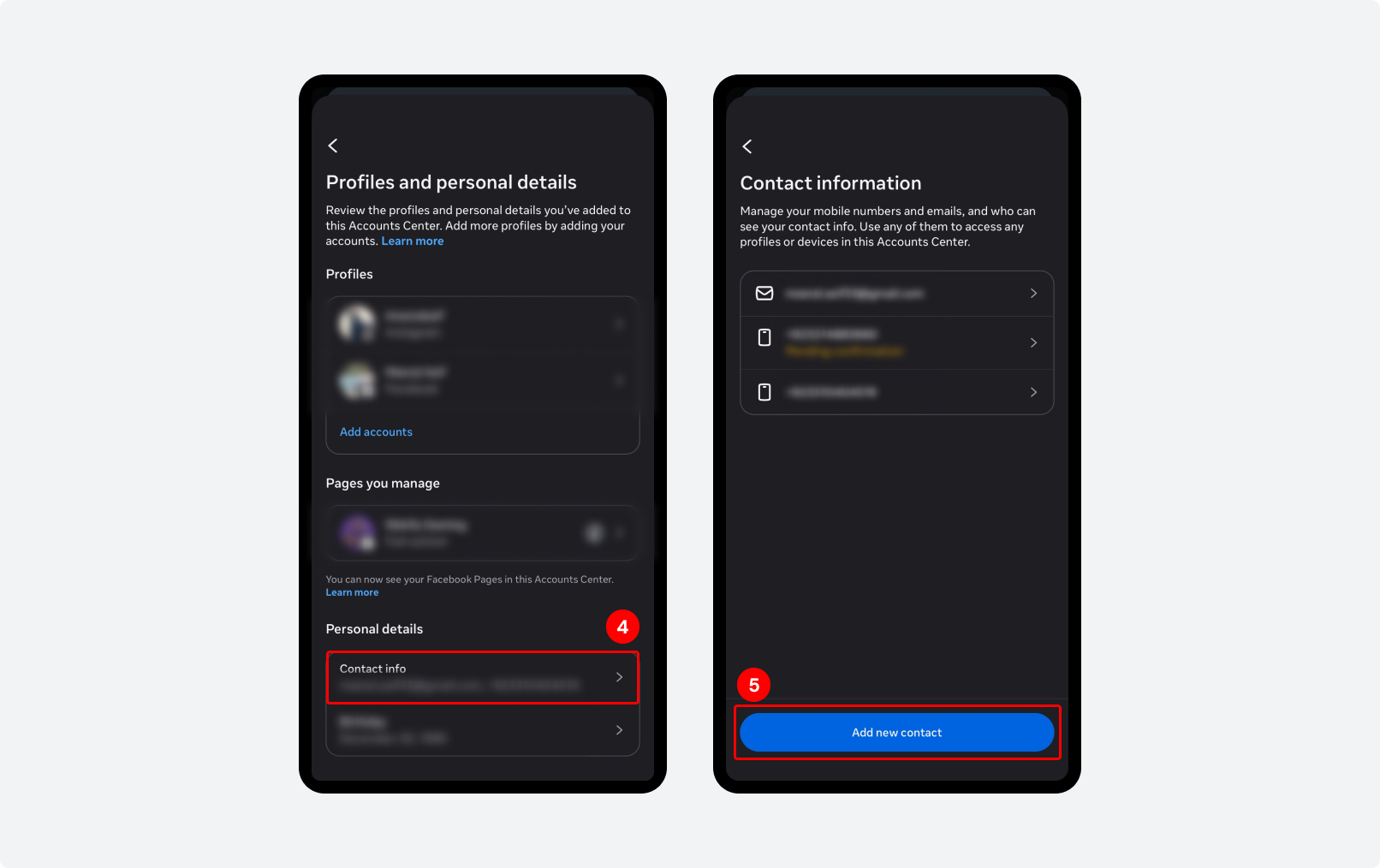
Step 4: Open Contact Info
Step 5: Select your Phone Number. Tap Remove Number and confirm the changes. Or if you want, you can ‘Add new contact’.
To delete the contacts Instagram has already stored:
Open Instagram on a desktop browser → Settings → Account Center → Your Information and Permissions → Manage Contacts → Delete All.
And it’s done.
Common Problems and Quick Fixes
1. No contacts appear in the list: Check that your phone’s contacts app has permission to share data with Instagram.
- On iPhone: Settings – Instagram – Contacts – On.
- On Android: Settings – Apps – Instagram – Permissions – Contacts – Allow.
2. ‘Invite Friends by SMS’ is greyed out: This usually means Instagram doesn’t have permission to access your contacts. Check your phone’s app permissions.
3. The person appears, but I can’t view their profile: Their account is likely private. You can still send a follow request from the invite screen. Once they accept, you’ll see their posts.
4. I followed the steps, but the person didn’t show up: Their number probably isn’t linked to Instagram. Try asking them directly for their username. It’s the most reliable option.
5. The app asks me to sync contacts first: You’ll need to allow contact access once for this feature to work. You can turn it off again in settings after you’ve done the search.
When Is It Okay to Search for Someone by Their Phone Number?
Using someone’s phone number to find their Instagram is acceptable when you have a genuine reason and a real connection. Reconnecting with an old colleague, finding a friend who changed their username, or confirming a business contact.
It becomes a problem when it’s used to find someone who hasn’t shared their Instagram with you, or who may not want to be found. If someone’s profile doesn’t appear in this search, respect that. It likely means they’ve chosen not to be discoverable this way.
Found Your Contact? Here’s How to Stay Connected
Once you do find and connect with the right people on Instagram, managing those relationships becomes the next challenge. SocialBu helps you schedule posts, track engagement, and manage multiple accounts without switching accounts.
Grow your Instagram. Safely and consistently!
2.5M+ posts scheduled with SocialBu. Automate your posting and stay consistent on Instagram.
Final Insight
Phone number-based discovery on Instagram is not intended to be a search tool. It is a controlled suggestion system. That’s why results feel inconsistent: it is designed around privacy boundaries, not open lookup behavior.
If your goal is a reliable connection, Instagram still depends on the simplest system: username + direct sharing.
FAQs
Q: Can I search Instagram by phone number directly?
A. No. Instagram’s search bar only accepts usernames, full names, and hashtags. Phone number search is not a feature. The only way phone numbers work is through contact syncing.
Q: Will the person know I searched for them by phone number?
A. Not from the search itself, but contact syncing cuts both ways. If you upload someone’s number, Instagram may suggest your profile to them under ‘People You May Know.’
Q: Why does contact syncing show no results?
A. Three most likely reasons: the person hasn’t linked their phone number to Instagram. They’ve turned off contact discovery in their settings, or the number you have saved doesn’t match the one they used for Instagram.
Q: Can someone find me on Instagram if they have my number?
A. Yes. If your number is linked to your account and contact syncing is enabled, someone who has your number saved could see your profile in their suggestions.
Q: Does Instagram store my contacts after I sync them?
A. Yes. Instagram stores synced contact data on its servers, including phone numbers for people who don’t even have Instagram accounts.
Q: What if I don’t have the person’s username or phone number?
A. Try searching their full name in the Instagram search bar, look through mutual followers, or search Google for their name + ‘Instagram.’ If their account is public, Google often indexes it.
Q: Can I find someone’s Instagram using just a phone number without an account?
A. No. You need to be logged into an Instagram account for contact syncing to work. The feature isn’t available to users who aren’t signed in.
Q: Are third-party phone number lookup tools for Instagram safe?
A. Generally, no. Instagram strictly prohibits data scraping, and using unauthorized third-party tools could result in the permanent suspension of your account.